Solo: Your Gig Business App
- 1.16K
- 4.2
- Installs
- 500.00K
- Price
- Free

Screenshots

Analysis by Reviewed
When a week is split between client work, app-based gigs, and the admin that follows, I want one clear place to see what needs attention. Solo: Your Gig Business App is built for that kind of juggling, bringing gig-work management into a single mobile app. I find the idea most compelling for people who already earn across several channels and are tired of reconstructing their workday from separate tools.
Starting with a scattered workweek
Before choosing a business app, I’d first look at where the friction actually comes from. If bookings arrive through different services, deadlines live in messages, and money is checked in separate accounts, the burden is not just remembering each task. It is repeatedly moving between sources to work out what is urgent and what can wait. That is the problem Solo is aimed at making easier to manage.
A realistic example is a day that begins with a delivery shift, includes a client revision due in the afternoon, and ends with a quick check of recent earnings. The useful question is not whether one app can run the whole business; it is whether it can reduce the number of places I need to consult before deciding what to do next. I would judge Solo by that practical test rather than by how many screens or options it offers.
Who benefits from bringing gigs together?
Solo is a business app from WorkSolo, and its appeal is less about replacing every tool a freelancer uses than reducing the mental overhead of keeping gig work organized. It is free to download, rated for Everyone, and has reached over 500,000 installs. Its average rating is 4.2 from around 6,600 ratings, which suggests a substantial audience, though any app’s fit still depends on how you work.
I would look at it first if you switch between several kinds of paid work and want a more joined-up view of your commitments and finances. Someone who has one employer, one calendar, and a simple payment routine may get more value from the basic tools already on their phone. Likewise, if you need a full accounting system with a particular workflow, I would compare those specialist options before treating a gig-management app as a substitute.
Getting Started with Solo
Setting up Solo: Your Gig Business App was a breeze. The app is available on both Android and iOS, ensuring a seamless start irrespective of your device preference. Upon launching, the app welcomes you with a user-friendly interface that feels intuitive even for someone who's not a tech wizard. I was able to link all my gig accounts, from Uber to Fiverr, within minutes. Everything you need is right there, just a tap away!
Moving from a workday to a useful overview
A practical way to use an all-in-one organizer is to begin with the work you already have, rather than trying to rebuild your entire business on day one. I’d connect the gig sources I check most often, then use the combined view to decide what needs a response first. For example, a delivery shift in the morning followed by a freelance deadline in the afternoon creates two different kinds of pressure; seeing those obligations alongside the related financial activity can make it easier to plan the transition between them.
More From Our News Desk

Weather by Xiaomi Review: Clear at a Glance, Less Clear Up Close

X Under Pressure: Can It Recover When Posting Goes Wrong?

Clash of Clans Is Won Between the Battles

Android Auto Makes the Case for Quieter Car Software

MobiOffice: Transforming Mobile Productivity with Seamless Integration

EA SPORTS FC™ Mobile Soccer: Redefining Mobile Sports Gaming
There is a useful habit here: check the overview at the start and end of a workday. In the morning, I’d use it to spot schedule conflicts or a task that needs attention. Later, I’d review the day’s activity while it is still fresh, so an expense or payment is less likely to disappear into a pile of receipts and messages. That routine matters more than trying to perfect every setting before the app becomes part of daily work.
Features That Stand Out
One of the standout features of Solo is its comprehensive financial tracking system. As a freelancer, keeping track of invoices, expenses, and payments can be overwhelming. Solo simplifies this by consolidating all your financial data into one place. I particularly loved the automated invoicing feature – it’s like having a personal accountant in your pocket. It’s a relief to see all my earnings and expenses neatly categorized and easily accessible.
Consolidation is most helpful when it gives you a better next step, not merely another screen of numbers. I’d use the financial view as a regular check-in before setting aside money for bills or deciding whether a slow week needs more bookings. I would still compare important totals with original account records before making formal tax or bookkeeping decisions. A convenient overview can reduce routine admin, but it should not automatically become the only record you rely on.
Solo is free to start, with in-app purchases ranging from $0.99 to $200 per item, so I’d check the purchase details before assuming every part of the workflow is included at no cost. The app is on version 5.2.2, and it first arrived on December 1, 2021. For me, the sensible approach is to try the basic routine first and decide whether any paid option solves a real problem in my work rather than paying simply because it is available.
Making the daily workflow more useful
One non-obvious benefit of keeping work and money activity close together is that it can help me spot gaps in my own routine. If I finish a job but postpone noting the related expense, a short end-of-day review gives me a natural moment to catch it. I would not try to turn every small task into a formal bookkeeping session; instead, I’d reserve a brief check-in for the items that are easiest to forget when I am moving between gigs.
For someone who works irregular hours, the app is also best used as a decision aid rather than a rigid schedule. A calendar can show what I have committed to, but I still need to leave realistic room for travel, revisions, or a shift that runs longer than planned. My practical tip is to avoid filling every open slot just because the calendar looks empty. A combined view helps me see commitments; it cannot make an overbooked day manageable.
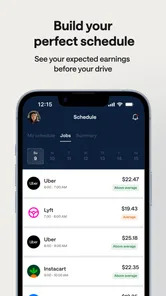
Another feature worth mentioning is the integrated calendar. I often lose track of my deadlines, but with Solo’s calendar sync, I can schedule my tasks, set reminders, and even plan my workdays efficiently. The push notifications are a lifesaver, ensuring I never miss a gig or a deadline.
Where the handoffs need care
When work moves between a gig platform, a calendar, and a client conversation, the weak point is often the handoff: an update made in one place may still need attention elsewhere. I’d treat the calendar as a planning aid and make a quick check against the original booking or client message when timing matters. Before relying on a reminder for a high-stakes deadline, confirm that the event is visible where you expect it and that notifications suit your routine.
This is also where Solo differs from the usual patchwork of a notes app, separate calendar, and spreadsheets. A spreadsheet gives you more control over custom columns and formulas, while separate apps can be better if each is already part of a dependable workflow. Solo’s advantage is having gig-related organization and money tracking closer together; the trade-off is that an all-in-one view may not offer the depth or flexibility of a dedicated tool in every area.
Keeping the handoff dependable
I would also be deliberate about how I introduce the app into an established work routine. Rather than immediately abandoning a familiar calendar or record-keeping method, I’d run the two approaches side by side long enough to notice what transfers cleanly and what still needs a manual check. That is especially sensible for a freelancer who has repeat clients: a missed change to a meeting time is more costly than spending a moment confirming it in the original conversation.
There is a trade-off between convenience and control. Combining information can make a busy week easier to scan, but a single overview may not explain every detail behind a payment or a client request. When something looks unusual, I would follow it back to its source instead of trying to resolve it from a summary alone. This gives Solo a useful role in the workflow without asking it to replace the platforms where the work originates.
The User Experience
Using Solo feels like having a personal assistant dedicated to managing my gig life. The app is incredibly responsive and rarely do I encounter any glitches. The developers have clearly put a lot of thought into making it both functional and aesthetically pleasing. Plus, the customer support is top-notch. I had a minor issue with syncing once, and the team was quick to resolve it, making me feel valued as a user.
For a newcomer, the main question is whether the app can fit around the services and habits already in place. I’d connect the accounts that matter most, check that their information appears as expected, and keep existing records during the transition. If a connection stops syncing, I would not assume the latest activity has transferred; checking the source account before acting is a sensible safeguard. That small bit of verification keeps a helpful overview from becoming a single point of failure.
The app’s current version is 5.2.2, and it runs on Android 8.0 or later. Those details are worth checking against an older device before building a daily routine around it. I would also think about how much of my work is actually spread across gig services: the more fragmented the week, the more useful consolidation is likely to feel. If nearly everything happens in one system, the setup may add another place to check without saving much effort.
What to check before relying on it
People often wonder whether an organizer like this can replace an accountant, a project manager, or a dedicated invoicing system. I would not treat it as a substitute for specialist advice or a tool designed around detailed accounting controls. Its practical role is closer to keeping gig activity easier to oversee. If your work has complex tax needs, strict client reporting requirements, or carefully customized invoice processes, keep the specialist workflow that already handles those jobs well.
Another reasonable question is whether it suits someone just starting out. I think it can, provided there is enough variety in the work to make a shared view worthwhile. A new freelancer with only one small client may find a phone calendar and a simple record of payments easier to maintain. Once bookings, deadlines, and income begin arriving through different channels, the value of bringing those threads together becomes easier to judge.
When a different approach is better
I would skip Solo if I mainly need advanced bookkeeping, strict project management, or a customized business dashboard and already have reliable specialist software for those jobs. It may also be a poor fit if I prefer to enter every transaction manually and control exactly how each category is structured. For a person with several small income streams, though, a shared overview can be more practical than maintaining multiple spreadsheets and repeatedly copying the same details between them.
Where the workflow can break
The main point of friction is dependence on information moving between services. A connected account or calendar is only helpful when its details are current, and I would not assume that a missing update is harmless. If I am preparing for a paid shift or a client deadline, I’d verify the latest details at their source, particularly after a booking changes. This is a small extra step, but it is better than discovering a stale view at the moment I need it.
There is also the effort of deciding what belongs in the combined workflow. Connecting everything may sound attractive, yet the most useful setup is often the smallest one that answers real questions: what am I committed to, what needs follow-up, and how is work affecting my finances? Starting with the accounts and activities I check most often keeps the overview readable. If it becomes cluttered or duplicates work, I would remove the least useful part rather than forcing myself to maintain an elaborate system.
Final Thoughts
In a world where freelance work is becoming the norm, having an app like Solo is essential. It offers everything a gig worker needs – from financial management to task scheduling. It’s more than just an app; it’s a tool that empowers you to take control of your freelance career. Whether you’re a seasoned freelancer or just starting out, Solo is definitely worth considering. It has transformed the way I manage my gigs, and I bet it can do the same for you.
My recommendation is to judge it by one ordinary week: whether the combined view helps you catch a commitment, keep an eye on earnings, or spend less time switching between work sources. I’d keep a specialist tool where I need deeper control, and use Solo where bringing gig activity together makes the day easier to manage. If that balance matches your work, it is worth trying.
So, if you’re ready to streamline your gig business, give Solo a try. It might just be the companion you’ve been looking for in your freelance journey.
Solo: Your Gig Business App Frequently Asked Questions
Who is Solo: Your Gig Business App intended for?
Solo: Your Gig Business App is aimed at people who earn money through gig work and want a mobile tool for handling business tasks. Its business focus may suit freelancers and other independent workers who prefer to keep work-related information together. The app is free to download, and it is rated for Everyone, so its store age rating does not limit it to adult users.
What is Solo: Your Gig Business App and what does it do?
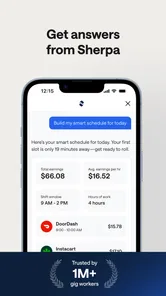
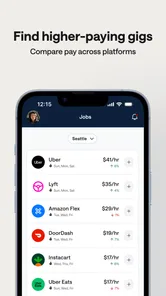
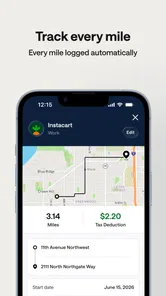
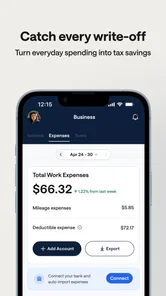
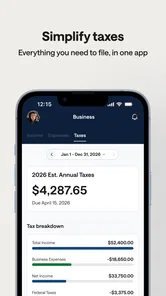
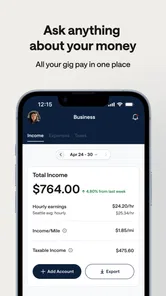
Solo: Your Gig Business App is designed to help gig workers manage their business efficiently. It offers features like income tracking, tax estimation, mileage logging, and a comprehensive dashboard. This app aims to simplify the administrative tasks for freelancers, allowing them to focus more on their gigs and less on paperwork.
Is Solo: Your Gig Business App available for both Android and iOS?
Yes, Solo: Your Gig Business App is available for download on both Android and iOS platforms. Users can easily find and install the app from the Google Play Store or Apple App Store, ensuring accessibility for a wide range of mobile users. This cross-platform availability allows gig workers to manage their business on any device. The Android version requires Android 8.0 or later.
How secure is my personal and financial information on Solo?
Solo prioritizes user security by implementing robust encryption and data protection measures. The app ensures that your personal and financial information is kept confidential and safe from unauthorized access. Regular updates and adherence to privacy standards further enhance the security, making it a reliable choice for managing your gig business data.
Does Solo: Your Gig Business App offer customer support?
Yes, Solo: Your Gig Business App offers comprehensive customer support to assist users with any issues or inquiries. Users can access support through email, chat, or phone, ensuring that help is readily available. The app also provides detailed FAQs and tutorials to help users navigate and make the most of its features.
Pros
- User-friendly interface boosts productivity.
- Comprehensive gig management features.
- Seamless payment processing integration.
- Customizable to suit various gig types.
- Regular updates with new features.
Cons
- Limited offline functionality.
- Requires stable internet connection.
- Premium features behind paywall.
- Occasional bugs in scheduling.
- Steep learning curve for new users.











