

SoFi Stadium
- 7.00
- 4.1
- Installs
- 10.00K
- Price
- Free

Screenshots

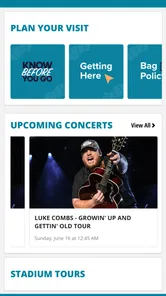
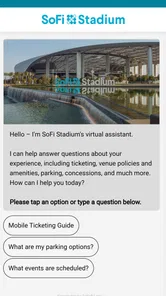
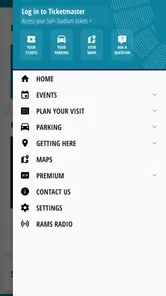
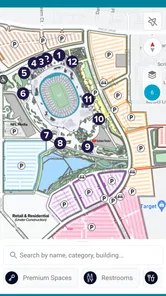
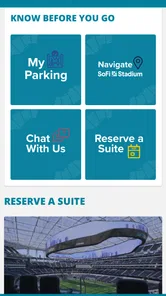
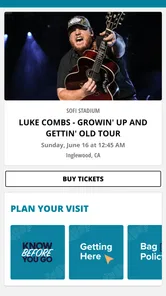
Analysis by Reviewed
SoFi Stadium is the kind of events app I would install when I am planning a visit to the stadium rather than treating it as an app I need every day. Developed by SoFi Stadium and Hollywood Park, it is aimed at putting the venue experience on a phone, with the most value appearing before arrival and during the busy moments around an event. My overall impression is that it works best as a digital companion for people attending concerts, sports, or other stadium occasions, especially when they want venue information close at hand instead of searching through several unrelated apps.
The app is free and rated for Everyone, which makes it easy to recommend as a low-risk download before heading out. It has an average rating of 4.1 from around 35 ratings, and its audience is still relatively modest at over 10 thousand installs. That combination tells me to view it as a focused venue tool, not as a huge, universally tested platform. It is available for devices running Android 10 or later, and version 26.1.4893 is the current release I considered while using it.
How the app fits into a real stadium visit
I find the most useful way to think about this app is as a single place for the digital side of a SoFi Stadium visit. The usual alternative is to jump between a browser, an email confirmation, a map app, a ticketing service, and social media posts from the event organizer. That approach can work, but it becomes awkward when I am walking, carrying a bag, trying to keep up with friends, and dealing with a crowded entrance. A dedicated stadium app has a clearer purpose: reduce the amount of searching needed around one venue.
That focus is also its main limitation. This is not a general event discovery service covering every venue in a city, and it should not replace a broader calendar app if I am comparing concerts or planning an entire weekend. Its usefulness depends on having a reason to visit SoFi Stadium. For a regular attendee, that narrow focus can feel convenient. For someone who visits only once and already has every detail saved elsewhere, the extra installation may feel unnecessary.
Before leaving home, I would open the app while connected to a reliable network and use it as part of a short preparation routine. I would check the event information, review anything relevant to the venue visit, and then keep the important details easy to reach on my phone. I would not wait until I was already in a parking area or in a line to explore the app for the first time. That small habit matters because stadium connectivity can be unpredictable precisely when thousands of people arrive at once.
The best time to use the app is before the crowd creates pressure. At home, I can read carefully, compare the information with my ticket or event message, and decide what I need to remember. At the stadium, I want quick confirmation rather than a long browsing session. This is a practical distinction that a short store description would not communicate, but it makes a noticeable difference to the experience.
Where a network connection becomes important
Connectivity shapes the app more than it might seem at first. Any venue application becomes more useful when it can present current event information, but that usefulness depends on the phone being able to reach the service. I would therefore treat a stable connection as part of the preparation, not as something guaranteed once I arrive. Checking the app in advance gives me a chance to understand what it offers before the network becomes busy.
More From Our News Desk

 Gmail
GmailGmail in a Busy Inbox: Who Benefits Most?
From first account to crowded workday, Gmail earns its place through dependable search and flexible sorting—but its best fit depends on how much inbox maintenance you can tolerate.

 Prime Video
Switching to Prime Video: What Changes in Your Viewing Routine
Prime Video can make a compelling second home for streaming, but switching means learning a different catalog, rental layer, and route from browsing to playback.

 Universal TV Remote Control
Universal TV Remote Control Works Best as a Reliable Backup
A phone remote earns its place through quick setup and reliable habits. Here is how to get more from Universal TV Remote Control—and where its limits show.

 Weather - By Xiaomi
Weather by Xiaomi Review: Clear at a Glance, Less Clear Up Close
Xiaomi’s weather app makes everyday forecasts quick to scan, but its calm surface can leave useful details and recovery paths harder to find than they should be.

 X
XX Under Pressure: Can It Recover When Posting Goes Wrong?
A resilience-focused review of X, examining setup, mistaken posts, interruptions, weak connections, and the gaps that matter when recovery needs to be dependable.

 Clash of Clans
Clash of Clans Is Won Between the Battles
Its raids are quick; its community is a long-term project of coordination, teaching, rivalry, and shared responsibility—with all the friction that entails.
Latest News



There are several moments when that matters. The first is before departure, when I am deciding what to bring and how early to leave. The second is during the approach to the venue, when I may be moving between parking, rideshare drop-off areas, and pedestrian routes. The third is after the event, when many people may be trying to use their phones at the same time. In each case, a connection problem can turn a simple lookup into an irritating delay.
I would avoid assuming that every screen will behave the same way without a connection. Instead, I would open the information I expect to need while online and make a mental note of the essentials. This is not a claim that the app offers offline access; it is simply a sensible workflow for any connected venue tool. If I need a detail at a critical moment, I prefer to have already seen it rather than depend on a fresh request in a crowded environment.
The app also makes more sense when I use it alongside, rather than instead of, the other tools already on my phone. A ticket may live in a separate service, directions may be handled by a maps app, and conversations with friends may happen in messaging. The stadium app can reduce venue-related searching, but it cannot remove the need to coordinate across those services. I see that as a realistic trade-off rather than a flaw unique to this product.
Using it while moving through the venue
Mobile context changes how I judge the experience. At home, I can tolerate dense information and take time to read. In a car, on a sidewalk, or in a queue, I need larger decisions: where to go next, what information applies to my event, and whether I should stop moving before looking at the screen. I found the app more suitable for short, purposeful checks than for extended browsing while walking.
My preferred routine would be to stop in a safe place, open the relevant section, read what I need, and put the phone away before continuing. That sounds obvious, but it is especially useful at a large stadium where entrances and pedestrian flows can be busy. The app can support the visit, but it should not encourage me to stare at my screen while navigating a crowd.
It is also useful for groups, although not in a magical way. If I am attending with friends or family, one person can check venue information and share the practical conclusion verbally. That avoids everyone searching separately and reduces the chance that the group splits up while comparing screens. I would still keep my own event confirmation accessible, because a venue guide and an individual ticket are not necessarily the same thing.
For parents, the Everyone age rating makes the app straightforward to consider for a family outing. The more important question is not age but attention. A child may enjoy having a stadium-related app available, yet an adult should handle the decisions involving timing, meeting points, and movement through the venue. I would use it as a planning aid, not as the sole communication method for a group.
A realistic concert-day workflow
Imagine I am attending a concert with two friends. The day before, I open the app at home, look through the event-related information, and note anything that could affect our arrival. I then check the ticket details separately and message the group with one simple plan: when to leave, where to meet, and who is responsible for keeping the tickets ready.
On the way, I use the app only when we are stopped. If the connection is good, I can confirm the venue information again. If the connection is slow, I already know the basic plan and do not need to keep refreshing. Once we are inside, I would use it for targeted checks rather than continuous navigation. After the concert, I would avoid relying on it as the only way to reunite with friends, because crowded exits and overloaded networks can make any phone-based plan less dependable.
This workflow shows the app’s real strength: it can centralize venue context, but it works best when I prepare before the event. It is less convincing as an emergency tool that I install at the last minute. The difference between those two uses is important for first-time visitors deciding whether the download is worthwhile.
What happens when connectivity fails
A connected app should be judged not only by its ideal behavior but also by how gracefully I can continue when the connection becomes unreliable. At a stadium, failure may come from weak reception, crowded networks, low battery, or simply moving through an area where the signal changes. I would not blame the app for every one of those conditions, but I would factor them into my preparation.
My first recovery step would be to stop repeatedly refreshing. Repeated attempts rarely improve a congested connection and can waste battery. I would move to a less crowded spot if practical, close unrelated apps, and try again when I actually need the information. If the detail is important, I would rely on the notes I made before leaving and on the event communications already stored elsewhere on my phone.
A second useful habit is separating essential information from convenient information. The essentials are the things that determine whether I can enter, meet my group, or get home. Convenient information can wait. I would make sure the essentials are available through their original source before arriving, while using the stadium app for additional context and timely checks. This gives the app a defined role without making it responsible for the entire outing.
Battery planning matters too. A phone used for tickets, messages, directions, photos, and venue information can lose charge quickly. I would start with a good charge and carry a power bank if the event is long. That advice is not a special feature of this app, but the app becomes much more useful when the device itself remains available. A dead phone defeats every digital venue tool at once.
If I were visiting with someone who has limited mobile data or an older phone, I would make the plan more conservative. The minimum operating system is Android 10, so compatibility should be checked before the event rather than at the entrance. I would also avoid making the least-connected member of the group responsible for every lookup. Sharing key decisions in advance is more reliable than assuming everyone can access the same screen at the same time.
Managing data without making the app inconvenient
I do not see a reason to keep the app open continuously. That would be inefficient and would not improve the visit. I would use it in short sessions: one before leaving, another while approaching the venue if needed, and occasional checks during the event. This approach limits unnecessary network activity while preserving the app’s practical value.
Using Wi-Fi before departure is another sensible step when available. I can review the app at home, update other event-related information, and reduce the amount of mobile browsing required later. I would still avoid assuming that everything I viewed will remain available in every situation, so I would remember the key details rather than depending entirely on cached screens.
There is also a privacy and attention trade-off with any app used around a major event. I would grant only the access that feels necessary for the way I intend to use it, and I would review the phone’s settings if I no longer attend events there. I am not suggesting a particular permission policy for this app; I am describing my own cautious habit of keeping a venue application installed only while it serves a clear purpose.
For people who attend SoFi Stadium often, the data-conscious approach is easy to maintain because the app can become part of a repeatable routine. For a one-time visitor, the benefit may be smaller. If all the required information is already in an email and the person has a dependable plan, downloading another app may add little. In that case, a browser and the original event provider may be the simpler choice.
How it compares with ordinary alternatives
The closest alternative is usually a browser search. A browser is more flexible and can show information from many sources, but it also produces more noise. I may need to identify which page applies to my event, distinguish official information from old posts, and switch between tabs. The dedicated stadium app has a narrower job, which can make relevant information easier to find when I am already focused on the venue.
A general maps app is better for the journey itself. It is designed around roads, walking routes, and location search, while a stadium app is more closely tied to the event environment. I would not replace maps with this app, and I would not expect maps to provide the same venue-specific context. Using both is more sensible than forcing one tool to do the other’s job.
Ticketing and event-organizer apps may remain essential because they handle the individual event relationship. The SoFi Stadium app should be viewed as complementary unless it clearly covers the exact task I need at that moment. That distinction prevents disappointment: a venue companion can improve orientation and preparation without becoming a universal replacement for tickets, messages, or directions.
The app’s focused identity is therefore both its advantage and its boundary. If my question is about visiting SoFi Stadium, it is more relevant than a generic event app. If my question is which event to attend next across several venues, a broader service is better. I would recommend this one to people with a concrete stadium visit, not to someone merely browsing entertainment options.
Who should install it and who can skip it
I would install it if I had an upcoming event at SoFi Stadium, especially if I was visiting for the first time, coordinating a small group, or trying to reduce the number of browser tabs involved in preparation. It is also a reasonable choice for repeat visitors who want a familiar venue-specific reference point before each event.
I would probably skip it if I never attend events at this venue, if my phone cannot run Android 10 or later, or if I already have a simple and reliable workflow that covers every detail I need. People who dislike installing single-venue apps may reasonably prefer the browser and the original event provider. The free price removes a financial barrier, but it does not remove the cost of storage, attention, or another app to maintain.
The current rating of 4.1 suggests a generally positive reception, while the relatively small number of ratings means I would treat that score as useful guidance rather than a complete verdict from a massive user base. My own view is similarly measured: the app has a clear purpose and can make preparation less scattered, but its value depends heavily on the event, the user’s habits, and the quality of the connection at the time.
My connectivity verdict
SoFi Stadium is most effective when I use it before the crowd, not when I expect it to rescue every situation inside the crowd. Its role as a free events app is clear, and the connection between the venue and the phone can make planning feel more organized. I appreciate the focused approach because it avoids the clutter of a general event platform, but I also accept that it does not replace tickets, maps, messaging, or sensible preparation.
My final recommendation is straightforward: install it ahead of a SoFi Stadium visit, explore it while connected, identify the information that matters to your own event, and keep a backup plan for the moments when reception or battery becomes a problem. That workflow gives the app room to help without asking it to do more than a venue companion should. For the right visitor, that is enough to make the download worthwhile; for everyone else, the usual phone tools may be perfectly adequate.
SoFi Stadium Frequently Asked Questions
Who publishes the SoFi Stadium app, and what is its focus?
The app is published by SoFi Stadium and Hollywood Park and focuses on events at the venue, including concerts and other live experiences. Its event-oriented design makes it useful for visitors who want stadium details in one place while preparing for a visit. If you are considering a download, think of it primarily as a companion for SoFi Stadium events rather than a general ticketing or entertainment app.
What is the SoFi Stadium app used for?
The SoFi Stadium app is designed to make attending events at the stadium easier and more convenient. It can help you explore upcoming concerts, sports games, and other events, review venue information, find seating details, check directions, and access important visitor updates. Depending on the event, it may also provide digital tickets, mobile ordering, parking guidance, and information about stadium policies.
Can I buy or access event tickets through the SoFi Stadium app?
The app may connect you with official ticketing services for events hosted at SoFi Stadium, allowing you to view event details and manage eligible tickets from your mobile device. Availability can vary depending on the event, organizer, and ticket provider. Before attending, users should confirm that their tickets are stored in the correct account, available offline if possible, and ready to be scanned at the entrance.
Does the SoFi Stadium app provide parking and transportation information?
Yes, the app can be useful for planning your journey to SoFi Stadium by providing venue directions, parking information, and transportation guidance. Parking availability, prices, entry points, and traffic conditions may change according to the event. It is best to check the latest instructions before leaving, arrive early, and follow any event-specific recommendations regarding parking reservations or rideshare drop-off areas.
Can I use the app to order food or drinks inside SoFi Stadium?
For selected events and locations, the SoFi Stadium app may offer information about restaurants, concessions, stadium dining, and mobile ordering options. Features can differ based on the event, seating area, and current venue operations. If mobile ordering is available, you may be able to browse menus, place an order, and collect it from a designated location, although not every concession stand necessarily supports this service.
Pros
- Modern
- visually impressive stadium with excellent facilities.
- Wide range of food
- drinks
- and retail options available on-site.
- Convenient access to major Los Angeles attractions and transport routes.
- Hosts major sports
- concerts
- and special events throughout the year.
- Large video board helps fans follow the action from most seats.
Cons
- Parking can be expensive and difficult to navigate on event days.
- Heavy traffic around the stadium may cause significant arrival delays.
- Food and beverage prices are generally higher than average.
- Some upper-level seats feel distant from the field or stage.
- Crowds and long lines can make leaving the venue time-consuming.











