

Snowella
- 99.00
- 4.3
- Installs
- 50.00K
- Price
- Free

Screenshots
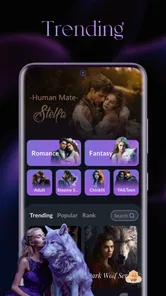
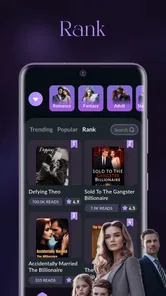
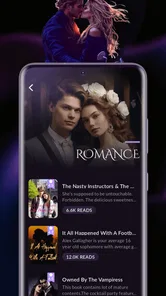
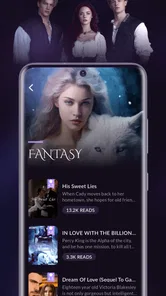
Analysis by Reviewed
Snowella is a personalization app with an unusual promise: it treats reading as a way to gain knowledge rather than as a simple wallpaper or theme tool. I approached it as something to use during small gaps in the day—while waiting for a bus, taking a short break, or looking for a calmer alternative to endlessly scrolling social feeds. That framing makes it interesting, but it also means the quality of the experience depends heavily on how comfortably it fits into your mobile routine.
The app is developed by Liu Lian and is available free of charge, with optional purchases ranging from $0.99 to $99.99 per item. It carries a Mature 17+ content rating, so I would not treat it as a general-purpose learning app for children or younger teenagers. Its current version is 1.0.5, and it runs on Android 7.0 or later. Those details make it accessible to people using older phones, although the age classification is something to consider before recommending it to a family member.
What makes Snowella worth examining is not a long list of obvious tools, but the way its central idea changes the role of a personalization app. Instead of opening it only when I want to alter the look of my phone, I found myself judging it by a different question: does it make brief, interrupted moments feel useful? That answer depends on your connection, your tolerance for interruptions, and whether you want a guided stream of knowledge or a more controlled reading library.
How Snowella feels when the network is part of the experience
The first thing I would keep in mind is that an app built around delivering reading content can feel very different when the phone has a strong connection compared with when the network is unreliable. In a connected setting, the experience feels more natural because the app can serve its main purpose without making you think about the technical side. You open it, encounter something to read, and decide whether the material deserves a few minutes of attention.
That simplicity is useful in short sessions. I can imagine opening Snowella while standing in a checkout line, reading one piece, and closing it before the moment becomes a commitment. This is where the app’s personalization category becomes more interesting than a conventional reading app. A dedicated reader usually asks me to choose a book, article, or saved feed first. Snowella is better suited to the opposite mood: I have a little time, but no specific subject selected.
The trade-off is that this kind of convenience can make the experience feel less predictable. A personal library gives me control over what appears next. A knowledge-oriented personalization app is more dependent on the material it presents and the way it presents it. If I want to study a particular topic in a planned order, I would rather use a structured course or a reading app with clear collections. If I want an occasional prompt that may lead me to an unexpected idea, Snowella makes more sense.
The strongest use case is not deep study; it is turning otherwise empty phone moments into low-pressure reading time. That distinction matters. I would not install it expecting a full academic system, a replacement for a news reader, or a complete note-taking workflow. I would install it as a lightweight doorway into learning, especially when I want something more constructive than another round of short videos.
More From Our News Desk

 Gmail
GmailGmail in a Busy Inbox: Who Benefits Most?
From first account to crowded workday, Gmail earns its place through dependable search and flexible sorting—but its best fit depends on how much inbox maintenance you can tolerate.

 Prime Video
Switching to Prime Video: What Changes in Your Viewing Routine
Prime Video can make a compelling second home for streaming, but switching means learning a different catalog, rental layer, and route from browsing to playback.

 Universal TV Remote Control
Universal TV Remote Control Works Best as a Reliable Backup
A phone remote earns its place through quick setup and reliable habits. Here is how to get more from Universal TV Remote Control—and where its limits show.

 Weather - By Xiaomi
Weather by Xiaomi Review: Clear at a Glance, Less Clear Up Close
Xiaomi’s weather app makes everyday forecasts quick to scan, but its calm surface can leave useful details and recovery paths harder to find than they should be.

 X
XX Under Pressure: Can It Recover When Posting Goes Wrong?
A resilience-focused review of X, examining setup, mistaken posts, interruptions, weak connections, and the gaps that matter when recovery needs to be dependable.

 Clash of Clans
Clash of Clans Is Won Between the Battles
Its raids are quick; its community is a long-term project of coordination, teaching, rivalry, and shared responsibility—with all the friction that entails.
Latest News



Short sessions work better than forced concentration
In my experience, the app’s concept is most convincing when I avoid treating every opening as a serious study session. A few minutes of attention can be enough to encounter a useful idea, but it may not be enough to master a complicated subject. That is not necessarily a weakness; it simply defines the right expectation.
A practical routine would be to use Snowella at one repeatable point in the day, such as after lunch or during a commute, and stop after one focused reading. This prevents the app from becoming another endless feed. It also gives the content a chance to remain memorable instead of blending into a long sequence of things consumed and forgotten.
For someone who already has a large collection of saved articles, the appeal is less obvious. Existing reading tools usually provide stronger organization, search, bookmarking, and progress tracking. Snowella’s value is more immediate and spontaneous. It helps when the problem is not a lack of material, but the difficulty of deciding what to read next.
What happens in weak-signal places
Connectivity becomes more noticeable in places such as underground stations, crowded venues, elevators, or rural roads. If the app needs to retrieve fresh reading material, a poor connection can interrupt the moment when I expect the experience to begin. That creates a particular kind of friction: I have already decided to spend a few minutes learning, but the app may not be ready when I am.
I would therefore avoid making Snowella my only source of reading for a journey. A conventional reader with material already stored on the device is a safer companion when I know the signal will be inconsistent. Snowella is better used as a connected discovery tool, while a separate saved collection handles predictable travel or areas with unreliable service.
This is also why I would test the app in the places where I actually intend to use it. A smooth home Wi-Fi experience can give a misleading impression if most of my planned sessions happen during a commute. The app’s usefulness is not determined only by what appears on screen; it is determined by whether that content appears at the right moment.
Mobile habits, interruptions, and practical daily use
Snowella fits people who use their phones in fragments. I can see it working for a person who has several small pauses each day but rarely enough uninterrupted time to open a long book. It may also suit someone trying to replace a little passive scrolling with something that feels more mentally rewarding without demanding a rigid schedule.
One realistic scenario would be a busy office worker who arrives early, has ten minutes before a meeting, and does not want to begin a large article. Snowella can fill that gap with a compact reading experience. The person can take away one idea and return to work without needing to remember a complicated place in a course or a multi-step study plan.
Another scenario is a student who wants occasional background knowledge outside a main subject. Here I would use it as a supplement, not as a revision tool. It might broaden curiosity, but it should not replace class notes, assigned texts, or a source that clearly explains where its information comes from. The distinction between casual learning and dependable research is important, particularly when a short piece feels convincing simply because it is easy to read.
People who are sensitive to interruptions should approach the app more carefully. A reading flow can be broken by a connection delay, an unexpected prompt, or the need to move through an unfamiliar screen. Even a good idea loses impact when the user is constantly pulled away from it. I prefer to open apps like this when I can give them a small, protected window rather than while doing something that already requires concentration.
A useful workflow for distracted readers
My preferred approach would be deliberately simple. I would open Snowella with one goal: read one item attentively, identify the main point in my own words, and then close the app. If the subject is genuinely useful, I would follow up later in a more controlled source. This two-step workflow prevents a brief discovery app from carrying more responsibility than it can reasonably handle.
A less obvious benefit of this method is that it separates discovery from verification. Snowella can serve as the spark that introduces an unfamiliar topic, while a book, course, or trusted reference can provide depth afterward. That is a better use of a personalization app than assuming every short reading is enough to form a complete opinion.
I would also avoid opening it automatically whenever I feel bored. That can turn any knowledge-focused app into another reflexive feed. Choosing a specific time or situation gives the reading a purpose and makes it easier to notice whether the app is genuinely helping or merely filling screen time.
Where the mobile format helps and where it gets in the way
Reading on a phone is convenient because the device is already with me, but the small screen can encourage hurried consumption. Short passages are easier to approach than long ones, yet the same convenience can make me skim. Snowella is therefore most effective when I slow down enough to think about what I have read instead of treating each item as something to clear from a queue.
The mobile setting also creates distractions that have nothing to do with the app itself. Notifications, calls, battery concerns, and switching between applications can break concentration. For that reason, I would use it in a quiet moment with unnecessary notifications reduced. This is a practical adjustment, but it makes more difference than installing another reading tool and hoping motivation will appear automatically.
Failure, recovery, and the cost of a broken reading moment
Every app that depends on timely content delivery has to deal with imperfect conditions. A failed load is not merely a technical inconvenience here; it interrupts the central promise of making a short moment useful. If I open Snowella and spend the first part of that moment waiting, I may simply return to another app instead.
When a connection problem occurs, my first response would be to retry once rather than repeatedly tapping the same control. If the issue continues, I would close the app and come back later, especially if other connected services are also struggling. Repeated retries waste battery and attention without improving the reading experience.
That recovery habit is important for people using older devices or moving through areas with unstable service. The app supports Android 7.0 and later, which makes it available to a broad range of phones, but compatibility alone does not guarantee that every older device will feel equally responsive. A phone with limited memory, an aging battery, or a busy background workload may make interruptions feel more noticeable.
I would also keep expectations realistic around continuity. A dedicated reading platform often gives me a clear sense of where I stopped, what I saved, and what I planned to read next. Snowella’s appeal is more immediate, so I would not rely on it as my sole system for preserving a long research trail. If a particular item matters, I would record the idea separately while it is fresh.
Handling purchases without losing control
The app is free to start, but it includes optional purchases from $0.99 to $99.99 per item. That is a wide range, so I would pay close attention before confirming anything, particularly if the app is being used on a shared device. Free access can make experimentation easy, but optional purchases mean I should decide in advance whether I am comfortable spending money on additional content or functions.
This is one reason I would not hand the phone to a younger user without supervision. The Mature 17+ rating already suggests that the app is not aimed at children, and the presence of in-app purchases adds a separate reason to keep account controls in mind. For an adult user, the sensible approach is to try the free experience first and only consider spending if the app has become part of a regular reading habit.
The price structure also changes the comparison with ordinary free reading sources. A browser, public library app, or free news reader may provide more predictable access without asking me to evaluate optional purchases. Snowella can still be worthwhile if its presentation and discovery style suit me, but I would judge paid elements by whether they improve my actual routine rather than by curiosity alone.
Using it carefully when data matters
Because the experience is designed around reading and may involve retrieving content, I would use Snowella more freely on Wi-Fi when possible. This is especially sensible for people with limited mobile data plans or for anyone who often opens apps automatically without noticing how much connectivity they consume. I do not need to turn the habit into a technical project; simply choosing home or workplace Wi-Fi for longer sessions is a practical safeguard.
Short mobile sessions are easier to manage than extended browsing. If I know I am away from Wi-Fi, I would open the app for a specific purpose and leave once I have finished reading. That keeps both attention and data use more predictable. It also reduces the temptation to continue scrolling merely because new material is available.
I would avoid assuming that a screen that looks simple is automatically light on data. Images, refreshed content, and repeated loading can all affect a mobile experience, and a user should make choices based on their own plan and habits. Snowella is easier to recommend to someone with comfortable connectivity than to someone who regularly has to ration every megabyte.
Privacy-conscious users may also want to think about the general difference between a connected discovery experience and a locally managed reading collection. A traditional reader built around files already on the phone gives me more direct control over what is stored and when it is accessed. Snowella is more convenient when I want fresh discovery, but that convenience comes with a greater dependence on the connected app experience.
Who should choose it, and who should skip it
I would recommend Snowella to adults who enjoy learning in small doses, like discovering subjects without planning every session, and have a reasonably dependable connection. It is also a good candidate for someone trying to make their phone feel a little less empty during short waits. The average rating of 4.3 from around 420 ratings and more than 50K installs suggest that it has found an audience, although those figures should be treated as context rather than proof that it will suit every reading style.
I would skip it if I need a serious study platform, a carefully organized personal archive, or dependable access in signal-poor locations. I would also choose a different option if I want complete control over topics, sources, and reading order. A library app, ebook reader, RSS tool, or course platform may be better for those needs because each is built around a clearer form of ownership or structure.
Users under the Mature 17+ age classification are another clear case for caution. Even if the learning angle sounds harmless, the stated age category means I would not present it as a children’s educational recommendation. Parents looking for a safe reading tool for younger users should start with an app designed and rated for that audience instead.
My connectivity verdict after living with the concept
Snowella is most convincing when I treat it as a connected prompt for curiosity. It can make a spare few minutes feel more intentional, and its personalization focus gives it a different role from a conventional reader. I like the idea of opening an app without already knowing what I want to study, then using one interesting reading as a starting point for deeper exploration elsewhere.
Its limitations are tied to that same design. The experience is less dependable when the network is weak, less suitable for carefully planned study, and potentially less comfortable for people who need a strict offline library. Optional purchases also mean that the free starting point should not be confused with an entirely cost-free long-term experience.
For me, the best way to use it is modestly: connect through Wi-Fi when practical, read one item with attention, save the useful idea in a separate place if it matters, and verify important subjects through stronger sources. That workflow respects what Snowella does well without asking it to become a textbook, archive, or research database.
As a free personalization app from Liu Lian, Snowella is worth trying if your goal is to make casual phone time more thoughtful. The current version, 1.0.5, keeps it accessible to older Android devices, while the mature age classification and optional purchases call for adult judgment. If you want guided curiosity in short, connected sessions, I can recommend giving it a fair test; if you need reliable offline reading or structured learning, a dedicated alternative will serve you better.
Snowella Frequently Asked Questions
What is Snowella, and what can I do with the app?
Snowella is a winter-themed mobile application designed to provide an engaging seasonal experience through snowy visuals, festive content, and interactive features. Depending on the version available for your device, you may be able to explore themed scenes, enjoy relaxing animations, customize elements, or use the app for entertainment and holiday inspiration. Its simple presentation makes it accessible to both casual users and families.
Who developed Snowella, and what is the app’s main focus?
Snowella is a personalization app developed by Liu Lian. Its short description is simply “Snowella,” while its store summary is “Gain knowledge through reading.” Those descriptions offer a broad sense of the app’s identity, so it is worth checking the screenshots and details on the platform you use to see how its presentation and features fit your interests before downloading.
Is Snowella free to download and use?
Snowella is free to download, though in-app purchases are available, with prices ranging from $0.99 to $99.99 per item. Some features can potentially include advertisements, optional purchases, subscriptions, or premium content. The free version may provide the core experience, while additional visual effects, customization options, or other extras could require payment. Always review the pricing information shown on your Android or iOS device.
Does Snowella require an internet connection?
The internet requirements can vary depending on which Snowella features you use. Basic content may work offline after installation, while advertisements, updates, online media, analytics, or optional features may require an active connection. If you plan to use the app while traveling or with limited data, it is a good idea to open it once while connected to Wi-Fi and test which parts remain available without internet access.
Is Snowella safe for children and what permissions does it request?
Snowella appears intended as a light entertainment or seasonal app, but parents should still review its store rating, privacy policy, advertising practices, and available in-app purchases before allowing children to use it. Its content rating is Mature 17+, so it is not presented as an app for young children. Installation permissions may differ between Android and iOS and can change with updates. Avoid granting access that seems unrelated to the app’s purpose, and use parental controls where appropriate.
Pros
- Simple controls make Snowella easy to pick up and play.
- Short levels suit quick gaming sessions on mobile devices.
- The winter-themed visuals create a pleasant
- cozy atmosphere.
- Progression gives players a reason to return and improve.
- Runs well on many devices without requiring high-end hardware.
Cons
- Some levels may feel repetitive after extended play.
- The game can become challenging without clearly explaining mechanics.
- Ads may interrupt gameplay
- depending on the version installed.
- Limited content may reduce its long-term replay value.
- Some features or rewards may require in-app purchases.











