

SnackFic - Stories & Novels
- 574.00
- 4.1
- Installs
- 50.00K
- Price
- Free

Screenshots

Analysis by Reviewed
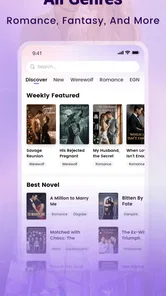
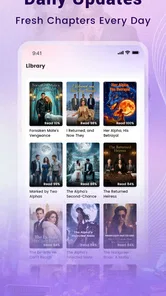
I approached SnackFic - Stories & Novels as a quick-reading app rather than a replacement for a full digital library. Its focus is clear: romance and fantasy fiction that I can open when I have a few spare minutes, follow in small sessions, and return to whenever I want a little escapism. That narrow purpose is also its main strength. I did not expect academic reference material, long-form literary criticism, or a broad selection of nonfiction, and the experience makes more sense once I treat it as a serial-fiction reader.
The app sits in the Books & Reference category and is developed by Snack AI Inc. It is free to install, with optional in-app purchases ranging from $0.49 to $99.99 per item. That combination matters because the initial download does not tell the whole story: casual reading is easy to try, but anyone who reads heavily should pay attention to how the app presents optional spending during longer sessions. My overall impression is positive for readers who enjoy romantic tension, fantasy settings, and bite-sized chapters, but more cautious for people who want a completely open reading experience with no purchase prompts or interruptions.
Where reading can become frustrating
The first point where I can imagine users getting stuck is not the fiction itself but the rhythm of the app. A snackable story format encourages quick decisions: choose a title, read a section, stop, and come back later. That sounds simple, yet it can become awkward if you are unsure which story deserves your time or whether a chapter break is a natural stopping point. With short-form fiction, the opening can feel more important than the overall plot because the app asks you to make a fast commitment.
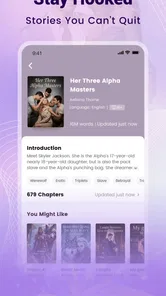
I found it useful to judge a story by its setup rather than by its title alone. Romance and fantasy labels can cover very different moods, from gentle relationship drama to high-stakes magical conflict. If I begin a story expecting a slow romance and discover that the fantasy element dominates, the problem is not necessarily the writing; it is a mismatch between my mood and the story’s direction. Taking a moment to read the available description before starting saves time and reduces the temptation to abandon several stories in a row.
Another likely friction point is reading continuity. Serial fiction depends on remembering names, relationships, and unresolved conflicts. When I read only a few sections at a time, it is easy to forget why a character made a particular choice. This is especially noticeable when I return after a busy day. I recommend pausing at a clear scene break and making a quick mental note of the current conflict. That small habit is more useful than rushing through another section just to maintain momentum.
The best way to use SnackFic is to treat it as a focused reading break, not as an endless feed. I get more from it when I choose one or two stories and give them a fair chance instead of constantly switching whenever a new title catches my eye. The app’s appeal comes from keeping a story close at hand, but that convenience can also encourage shallow browsing.
Readers may also wonder whether the free starting point means every story can be enjoyed without spending anything. The app is free, but optional purchases are part of the experience, so I would not assume that every reading path is equally open. Before getting deeply invested in a title, I would watch for any point where continued reading depends on an in-app purchase. That is not a reason to avoid the app, but it is an important part of deciding whether its reading model suits you.
More From Our News Desk

 Gmail
GmailGmail in a Busy Inbox: Who Benefits Most?
From first account to crowded workday, Gmail earns its place through dependable search and flexible sorting—but its best fit depends on how much inbox maintenance you can tolerate.

 Prime Video
Switching to Prime Video: What Changes in Your Viewing Routine
Prime Video can make a compelling second home for streaming, but switching means learning a different catalog, rental layer, and route from browsing to playback.

 Universal TV Remote Control
Universal TV Remote Control Works Best as a Reliable Backup
A phone remote earns its place through quick setup and reliable habits. Here is how to get more from Universal TV Remote Control—and where its limits show.

 Weather - By Xiaomi
Weather by Xiaomi Review: Clear at a Glance, Less Clear Up Close
Xiaomi’s weather app makes everyday forecasts quick to scan, but its calm surface can leave useful details and recovery paths harder to find than they should be.

 X
XX Under Pressure: Can It Recover When Posting Goes Wrong?
A resilience-focused review of X, examining setup, mistaken posts, interruptions, weak connections, and the gaps that matter when recovery needs to be dependable.

 Clash of Clans
Clash of Clans Is Won Between the Battles
Its raids are quick; its community is a long-term project of coordination, teaching, rivalry, and shared responsibility—with all the friction that entails.
Latest News



What to check before blaming the app
If a story does not appear to load correctly, I would begin with ordinary checks rather than immediately assuming the app has lost progress. A weak connection, a temporary interruption, or an incomplete refresh can make a reading screen look less reliable than it really is. Closing and reopening the app, checking the connection, and trying again after a short pause are sensible first steps. These are basic actions, but they often separate a temporary loading problem from a persistent account or application issue.
I would also check whether the app is running on a compatible device. The listed minimum operating-system requirement is Android 7.1, so older or heavily modified devices may behave differently from newer phones. Compatibility is not only about whether an app installs; it can also affect responsiveness, screen rendering, and how smoothly a reader returns to a previous session. If the app opens but feels unusually sluggish, checking the device software and available storage is a more useful first move than repeatedly tapping the same story.
Because the current version is 1.3.6, keeping the installation current is another practical step. Updates can matter when a problem affects only one screen or appears after a system change. I would first note exactly what is happening: does the app fail to open, does one story fail to load, or does reading resume at an unexpected place? Describing the symptom precisely makes troubleshooting easier and prevents a general complaint such as “the app is broken” from hiding the real issue.
Notifications and account prompts can also make setup feel more complicated than expected. I prefer to decide early whether I want reading reminders or a quieter experience. If the app offers choices during the first run, I would read them instead of tapping through automatically. That is particularly important in a fiction app, where a reminder can be helpful for following a serial story but annoying if I only intend to read occasionally.
One practical tip is to test the app during the kind of session in which I actually plan to use it. A quick launch at home may seem fine, while reading during a commute or in a place with inconsistent connectivity can expose a different kind of friction. I would open a story, read for several minutes, leave the app, and return to it. That simple test tells me more about whether the app fits my routine than a few seconds spent browsing the front screen.
A calmer workflow when reading is interrupted
When a reading session breaks, I try to recover in a fixed order. First, I reopen the same story rather than searching for it again. Next, I identify the last scene I clearly remember instead of assuming the most recent screen is accurate. If the app returns me to an earlier point, rereading a small passage is usually less frustrating than jumping forward and missing context. This approach is especially helpful with romance plots, where a short exchange can change the meaning of a later scene.
If the interruption happens while I am deciding whether to continue a story, I do not immediately spend anything to regain momentum. I first confirm whether the obstacle is a loading problem, a chapter boundary, or a purchase prompt. Those situations can feel similar when I am reading quickly, but they call for different responses. A loading issue deserves a retry; a chapter boundary may simply be the app’s structure; a purchase prompt requires a deliberate decision about value.
For readers who move between several stories, I recommend keeping a simple personal order: one main story for regular reading and one backup for a different mood. This is a surprisingly effective way to avoid losing track of characters. I might use the romance title during a quiet evening and the fantasy title when I want faster plot movement, but I would avoid maintaining a long queue unless I am willing to remember several separate casts and conflicts.
Another useful habit is to stop before a major reveal rather than after one. Serial fiction often relies on anticipation, and ending at a natural suspense point makes it easier to return later. It also prevents the common problem of reading too far, becoming tired, and then forgetting the details that made the scene enjoyable. SnackFic works best when I control the pace instead of letting the next section decide how long I stay.
If the app appears to forget where I was, I would record whether that happens after force-closing, switching networks, or moving between devices. A repeatable pattern is valuable; a one-time jump may simply be a temporary interruption. I would avoid reinstalling immediately if I care about my current place, because removing an app can complicate recovery. First, I would try a normal restart and check whether the same story behaves consistently afterward.
When another part of the phone is responsible
Not every poor reading experience originates in the application. A phone with very little free storage can make many apps behave unpredictably, and a battery-saving mode may restrict background activity in ways that affect how quickly content becomes available after returning to the app. If SnackFic works normally after a fresh launch but struggles after sitting in the background, the device’s resource management may be contributing to the problem.
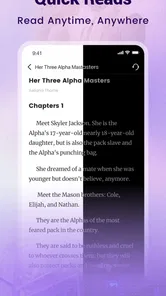
Screen settings can affect comfort as well. Romance and fantasy reading often involves longer sessions than a quick news check, so brightness, text scaling, and the phone’s display temperature matter. If the words feel tiring to read, I would adjust the device before deciding that the app’s presentation is unsuitable. A comfortable setup makes it easier to judge the writing and navigation fairly.
Network switching is another overlooked cause of confusion. Moving from mobile data to Wi-Fi, entering a weak signal area, or using a connection that filters certain traffic can interrupt content retrieval. If only one network causes trouble, I would compare the behavior on another connection before changing the installation. That test can quickly show whether the issue follows the app or the environment.
Purchases deserve a separate pause. Since the app includes optional items at several price points, I would check the purchase screen carefully and avoid confirming anything while distracted. A reader who shares a device with family members should be especially deliberate about account settings and confirmation steps. The important distinction is that enjoying the free installation does not require treating every prompt as part of the reading flow.
The Teen content rating also helps set expectations. I would not choose this app as a universal children’s reading shelf, and I would consider the age suitability of individual stories rather than relying only on the broad category. For a teenager or adult who already enjoys romance and fantasy, the rating is a useful boundary. For younger readers, parents should make the choice themselves and pay attention to the themes presented in the stories they select.
Who will get the most from this reading format?
I think the app is a good match for someone who reads in fragments: during a lunch break, while waiting for an appointment, or before sleep. Imagine having ten minutes before leaving home. Instead of committing to a full novel, I can open a continuing romance, read a manageable portion, and stop without needing a bookmark or a large amount of preparation. That scenario captures the app’s practical value better than the promise of reading “anytime.”
It is also appealing to readers who like emotional momentum. Romance stories often provide immediate personal stakes, while fantasy adds a sense of discovery and larger consequences. If I enjoy wondering what happens next more than studying elaborate prose, the serial format can be satisfying. The smaller reading units make it easy to build a daily habit without carrying a physical book or opening a long document.
On the other hand, I would skip it if my priority is owning a stable collection of books in a conventional library format. A dedicated ebook reader may be better for someone who wants long novels, flexible typography, offline organization, and a reading experience built around complete books rather than ongoing episodes. A general library app may also be preferable for readers who want nonfiction, reference works, or a broader range of genres.
I would also hesitate to recommend it to someone who dislikes cliffhangers or wants to finish a complete story in one sitting. Serial reading can make a plot feel artificially stretched when I am in the mood for a beginning, middle, and ending immediately. Likewise, readers who are highly sensitive to purchase prompts should examine the free experience carefully before investing time in a long story.
Its audience is reflected in its early reach: the app has passed 50 thousand installs and holds a 4.1 average from around 9.1 thousand ratings, with 574 written reviews. Those figures suggest meaningful interest without proving that every reader will like the format. I read them as a sign that the concept has found an audience, while still leaving plenty of room for personal preference to matter more than popularity.
How it compares with familiar alternatives
Compared with a standard ebook app, SnackFic feels more immediate and less formal. A conventional reader is usually built around books I select, download, and finish at my own pace. This app is better suited to discovering a continuing story and returning for another small portion. The trade-off is control: the snackable approach is convenient, but it may offer less satisfaction to someone who wants a carefully managed personal library.
Compared with free online fiction platforms, its advantage is focus. I can approach it specifically for romance and fantasy rather than sorting through a much wider mixture of genres. The disadvantage is that a narrower catalog may feel limiting when my mood changes. If I want mystery one day, essays the next, and history after that, a broader reading service will probably serve me better.
Compared with social media, the app gives my spare minutes a clearer narrative purpose. I am less likely to lose an hour to unrelated posts when I open it intending to read a story. Still, it shares one risk with other quick-content services: the ease of moving from one item to another can weaken attention. I get the best results when I choose a story in advance and resist browsing endlessly.
Compared with printed books, the convenience is obvious, especially for short sessions. I do not need to carry anything extra, and a phone is usually already with me. The compromise is that the reading experience depends on the device, its battery, its screen, and the app’s own flow. For a quiet weekend read, I might still prefer paper or a dedicated reader; for an unexpected ten-minute wait, SnackFic is more practical.
My practical verdict after weighing the trade-offs
SnackFic - Stories & Novels earns my recommendation for readers who specifically want romance and fantasy in compact, easy-to-return-to sessions. Snack AI Inc. has positioned it as a focused fiction app rather than an all-purpose book service, and that focus makes the choice straightforward. I would install it for a teenager or adult who enjoys serialized emotional plots and wants something lighter than a full novel during the day.
I would set expectations before recommending it. The app is free to start, but optional purchases can shape the longer reading journey. The Teen rating means it should not be treated as a children’s shelf. Device compatibility, connection quality, storage, and background restrictions can all affect how smooth the experience feels, so a few basic setup checks are worthwhile before judging it.
My most practical advice is to test one story through several short sessions, not just one opening chapter. Check how easily you return to the same plot, whether the pacing suits your routine, and whether the purchase structure feels comfortable before committing more time. If those three points work for you, the app can turn scattered minutes into a pleasant reading habit. If they do not, a conventional ebook service or a broader library app will likely be a better fit.
In the end, I see this as a convenient specialist rather than a complete reading home. It does one thing with a clear audience: it puts romance and fantasy fiction within easy reach when I want a quick escape. That is enough to make it worthwhile, provided I approach it deliberately, keep an eye on interruptions and purchases, and choose it for its serial-reading style rather than expecting the flexibility of a traditional digital library.
SnackFic - Stories & Novels Frequently Asked Questions
What kinds of stories can I find on SnackFic?
SnackFic is aimed at readers who enjoy romance and fantasy stories, and its store summary invites users to enjoy those stories anytime. If you are looking for short fiction to browse in spare moments, the app may be worth exploring. The stories and themes can vary, so check the description and any content guidance for a title before you begin reading.
What is SnackFic - Stories & Novels?
SnackFic - Stories & Novels is a mobile reading app focused on short, serialized fiction designed for quick reading sessions. Its library generally includes romance, drama, mystery, fantasy, and other popular genres, with stories divided into convenient episodes. The app is aimed at readers who enjoy discovering new plots and following ongoing novels directly from an Android or iOS device.
Is SnackFic - Stories & Novels free to download and use?
SnackFic is free to download, but free access may not include every story or chapter. Depending on the title, readers may encounter advertisements, waiting periods, virtual coins, or in-app purchases used to unlock premium episodes. In-app purchases range from $0.49 to $99.99 per item, so check the purchase terms before spending, since access conditions can vary.
Do I need an account to read stories on SnackFic?
An account may not always be necessary for basic browsing, but signing in can be important for saving reading progress, creating a personal library, receiving recommendations, and continuing a story across devices. Registration methods may include email or supported third-party login services. Users should review the requested permissions and privacy information before creating an account, especially if they prefer to limit shared personal data.
Can I read SnackFic stories offline?
Offline reading availability depends on the app’s current features and on the individual story or chapter. Some content may need to be opened or downloaded while connected to the internet before it can be read without a connection. Premium restrictions, advertisements, and synchronization may still require online access. If offline reading is important to you, test the download option with a free chapter before purchasing additional content.
Pros
- Large selection of short stories and serialized novels
- Easy-to-use interface for browsing by genre
- New chapters can keep readers engaged regularly
- Convenient reading format for quick sessions
- Personalized recommendations help discover new fiction
Cons
- Some stories may require coins or in-app purchases
- Free reading options can be limited for popular titles
- Story quality may vary between different authors
- Frequent notifications may feel intrusive to some users
- An internet connection may be needed for some content











