Smartsheet: Projects & Teams
- 1.15K
- 4.7
- Installs
- 1.00M
- Price
- Free

Screenshots
Analysis by Reviewed
When I’m deciding whether to keep a project app on my phone, I look beyond task lists: I want to know whether it helps a team handle sensitive work thoughtfully, and whether its controls are clear enough to use without guesswork. Smartsheet: Projects & Teams is built around shared project work, so it can be useful when updates and responsibilities need to stay organized across a group. I’d still treat the phone app as one part of a wider workflow, rather than assuming that a convenient interface settles every question about how a team should manage information.
What to decide before bringing a team in
The first question I’d ask is not whether the app can hold a project, but whether the team agrees on what belongs in that project. A shared workspace is most useful when people know which information is appropriate to record, who is responsible for keeping it current, and where a decision should be documented. Without those habits, a polished system can still become a collection of stale updates and ambiguous notes.
That distinction matters for trust. The app’s collaborative purpose makes shared work easier to coordinate, but the team remains responsible for choosing a suitable place for each kind of information. I would avoid treating a project sheet as a catch-all for private details simply because it is convenient. Before adopting it for sensitive work, I’d check the sharing choices available in the app and follow the organization’s own rules for access and handling information.
A practical fit for recurring work
I’d consider this app for a team that handles requests in a repeatable sequence: someone submits a need, a colleague takes ownership, the work changes status, and another person checks the result. A structured project view can make those handoffs easier to follow than a long conversation in chat, especially when several requests are active at once. It is less compelling for a small group whose work is already clear in a short list and rarely needs shared tracking.
For example, imagine a small office preparing an event. One person handles the venue, another keeps track of materials, and a third needs to approve communications. A shared project can give each person a clearer view of what is assigned and what still needs attention. I would keep the information focused on coordination rather than adding personal or confidential details that are not needed to move the work forward.
How to keep a project readable
A useful, easily overlooked step is to agree on the meaning of fields before everyone starts filling them in. If one teammate uses “in progress” to mean work has started and another uses it to mean a task is nearly finished, the project can look orderly while giving a misleading picture. I’d set a small number of plain-language status choices and make sure the team understands them before relying on progress views or reports.
I’d also give each recurring task a clear owner rather than using a shared name or a vague team label. That does not mean one person must do every part; it means there is someone who can notice a stalled handoff and ask what happens next. This simple convention can be more valuable than adding elaborate tracking, particularly when people update the work in brief sessions from a phone.
More From Our News Desk

Clash of Clans Is Won Between the Battles

Android Auto Makes the Case for Quieter Car Software

MobiOffice: Transforming Mobile Productivity with Seamless Integration

EA SPORTS FC™ Mobile Soccer: Redefining Mobile Sports Gaming

How Microsoft OneDrive Became a Mobile Productivity Giant

How Google Translate Breaks Language Barriers Effortlessly
Fit for a team, not every task
This is a business app from Smartsheet Inc., and its focus makes the most sense for people coordinating projects or repeatable processes with others. The app is free to install, rated for Everyone, and has a 4.7 average from around 26,000 ratings, with over a million installs. Those figures suggest a well-used option, but I would choose it for its fit with a team’s working style, not as proof that it suits every organization.
On a busy day, I can imagine opening a shared project on the way to a meeting, checking what is moving, then noting a change while the details are fresh. That kind of quick check-in is where mobile project management earns its place: it can help prevent an update from waiting until someone is back at a desk. For complex planning, though, I’d still prefer a larger screen where a broad sheet or report is easier to inspect.
Using Smartsheet with care
From the moment I downloaded Smartsheet: Projects & Teams, I was impressed by its sleek and intuitive interface. Setting up my first project was a breeze. The app offers a variety of templates to kickstart your project management journey, whether it's for marketing campaigns, event planning, or product launches. You name it, they've got a template for it. And if you're like me, who loves a bit of customization, you'll appreciate the flexibility to tweak these templates to suit your specific needs.
Collaboration, decisions, and sensible checks
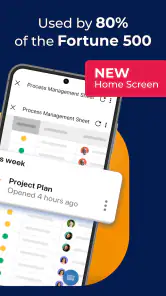
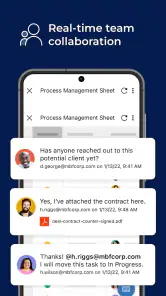
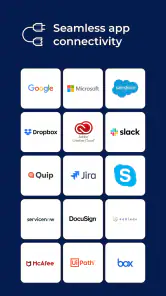
One of the standout features of Smartsheet is its robust collaboration tools. You can easily share sheets with your team, assign tasks, and even set reminders for deadlines. The real-time updates ensure that everyone's on the same page, reducing the chances of miscommunication. Plus, the app integrates seamlessly with other popular tools like Google Workspace and Microsoft Office, making it a perfect fit for any tech stack.
For a team handling customer requests, for example, a shared sheet can give people a place to track ownership and status instead of scattering updates across chat messages. A useful habit is to agree on what each column means before several people start editing; otherwise, the same status can be entered in different ways, making a tidy-looking sheet harder to trust. I’d also keep especially sensitive details out of broad team views unless everyone who can access that work genuinely needs them. That is a practical workflow choice, not a substitute for checking the organization’s own access and data-handling rules.
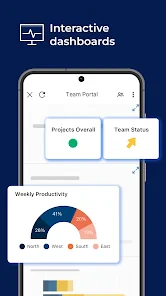
Another feature that caught my eye is the automation capability. I set up automated workflows to handle repetitive tasks, which not only saved me time but also ensured consistency across projects. And for those who love data (guilty as charged), the reporting and analytics tools provide insightful visuals that help track progress and identify bottlenecks.
Making reminders and automation earn their place
I would start with one repetitive step rather than automating a whole process at once. For instance, if a team regularly needs a nudge before a handoff, a reminder can help make that expectation visible. Before relying on an automated workflow, I’d check that the information it uses is entered consistently and that people understand what the resulting alert means. Automation can reduce routine chasing, but it cannot correct a poorly defined process; it can simply make the confusion happen more consistently.
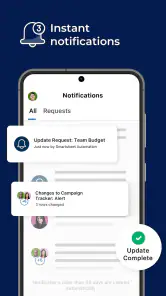
There is also a balance to strike with notifications. If every minor change produces a prompt, people may begin ignoring the messages that matter. I’d agree as a team which updates require attention and which can wait for a routine check-in. That keeps the phone useful as a way to respond to meaningful changes instead of turning it into a stream of interruptions.
Where mobile helps—and where it doesn’t
If you're still on the fence about trying out Smartsheet, let me give you a nudge. The app's versatility is its biggest selling point. Whether you're part of a small team or managing a large enterprise, Smartsheet scales effortlessly to meet your demands. Plus, with its mobile app, you can manage projects on the go, ensuring that you're always in the loop, no matter where you are.
Compared with a basic to-do list, this approach is better when work has dependencies, shared ownership, or a process that repeats. Compared with a chat app, it gives project information a more structured home. The trade-off is that a spreadsheet-like workspace can feel like too much ceremony for a short personal checklist, and a phone is not the easiest place to reshape a complicated plan. If your work is mostly individual reminders, I’d pick a lighter task manager; if it depends on visual boards or long-form discussion, a tool centered on those formats may feel more natural.
That comparison is about working style, not a claim that one format is universally better. A board-oriented tool may be easier when the team thinks in columns and visual movement; a document-centered option may suit projects where discussion and detailed writing dominate. Smartsheet makes more sense when the work benefits from structured information and shared tracking. If colleagues are unlikely to maintain a sheet, even a capable system can become less dependable than a simpler tool they will actually use.
For a first project, I’d keep the template simple, define a few clear status values, and decide who should see or edit the shared sheet before inviting colleagues. Then use reminders or automation only for steps that are genuinely repetitive; too many alerts can become background noise, while an automated process based on unclear fields can repeat confusion faster. When reviewing progress on mobile, I’d focus on the next decision or overdue item and leave detailed restructuring for a larger screen.
Trust comes from deliberate use
Smartsheet’s mobile convenience does not remove the need for sensible account and team practices. Before sharing project material, I would check the available sharing choices in the app and follow my organization’s rules for access. I would also be careful when entering information in a public or shared setting, since a quick status update can expose details to anyone who can view that project. The app’s collaboration is most useful when people know which workspace is appropriate for each kind of work.
When I’m working away from my desk, I’d treat a quick update as a chance to record a clear fact, not to make a complicated decision without context. If a change affects several people, I’d make sure the relevant owner can understand what changed and what action is needed. For an ambiguous issue, it is better to wait until I can review the project properly than to enter a hurried note that teammates may interpret in different ways.
Before inviting a wider group, I’d also review the project from the perspective of someone who only needs to contribute to one part. Keeping a sheet focused can make it easier to understand and can reduce unnecessary exposure of unrelated details. The useful question is not simply “Can this person see the project?” but “Does this person need this information to do their part?” The answer will depend on the team’s responsibilities and its established access practices.
Who should choose it—and who should pass
I’d recommend trying it if your work involves several people, recurring handoffs, or progress that needs to remain visible between meetings. It can be a good fit for coordinators who want a structured place to check ownership and status, and for teams that are prepared to agree on how their shared project is maintained. Its templates may also help a group get started without designing every part of a process from a blank page.
I would skip it for a private shopping list, scattered personal reminders, or a project that is mainly a conversation. It may also frustrate someone who expects to build and reorganize a complex plan entirely on a phone. In those cases, a simpler checklist, a visual board, or a discussion-first tool may better match the work. The best choice is the one that gives people enough structure without making routine updates feel like another task in themselves.
The app is currently version 25.9.0.1 and requires iOS 11 or later. That makes the operating-system requirement worth checking before installing, especially on an older device. For someone who wants a mobile companion to a team’s structured project process, it is a reasonable starting point; for someone seeking a private, no-setup personal list, the shared-work emphasis may be unnecessary.
In conclusion, Smartsheet: Projects & Teams is more than just a project management tool; it's a comprehensive platform that fosters collaboration, boosts productivity, and ultimately helps you achieve your goals. If you're looking to streamline your workflows and enhance team collaboration, I highly recommend giving Smartsheet a try. Who knows, it might just be the secret weapon your team needs to succeed!
Smartsheet: Projects & Teams Frequently Asked Questions
Can I use Smartsheet: Projects & Teams on a phone while away from my desk?
Yes. Smartsheet is intended to help people collaborate on the go with project and process management. Its mobile focus makes it useful when you need to keep work moving away from a desk, while the app’s value will depend on whether your team already organizes projects in Smartsheet and whether the tasks you need to handle suit a mobile workflow.
Is Smartsheet: Projects & Teams appropriate for personal task lists, or is it mainly for team work?
Smartsheet: Projects & Teams is a business app centered on projects, processes, and team collaboration. It can still be considered for organizing individual work, but its shared-workspace approach is most relevant when tasks connect to a wider team or business process. If you only want a simple personal checklist, its project-management orientation may be more than you need.
What should I check before installing Smartsheet: Projects & Teams on my phone?
Smartsheet: Projects & Teams is a business app for managing projects and collaborating with teams while on the go. Before downloading, check that your device runs a compatible operating system and consider whether your team’s work is suited to a shared project-management workspace. The app is free to download, is rated for Everyone, and has a 4.7 average from around 26 thousand ratings.
What is Smartsheet: Projects & Teams and how does it work?
Smartsheet: Projects & Teams is a versatile project management and collaboration app available for both Android and iOS. It allows teams to work together on projects by providing tools for task management, tracking progress, and sharing documents. Users can create sheets to manage tasks, set deadlines, and allocate resources, making it ideal for businesses and teams looking to streamline their workflow.
Is Smartsheet suitable for small businesses or only large enterprises?
Smartsheet is designed to be scalable and can be used by both small businesses and large enterprises. Its flexible features cater to various industries and team sizes, allowing customization to fit specific business needs. Whether you're managing a small team or coordinating across departments in a large company, Smartsheet provides the tools necessary to boost productivity and collaboration.
Pros
- User-friendly interface simplifies project management.
- Real-time collaboration boosts productivity.
- Customizable templates enhance workflow efficiency.
- Mobile app ensures accessibility on-the-go.
- Integrates with popular tools like Google Workspace.
Cons
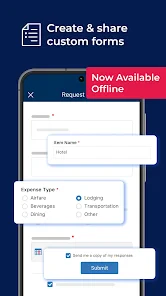
- Limited offline functionality.
- Steep learning curve for new users.
- Subscription cost may be high for small teams.
- Occasional sync issues with mobile app.
- Advanced features reserved for premium plans.

- Category
- Business
- Version
- 25.9.0.1











