

SMART tag™ Parent App
- 263.00
- 3.6
- Installs
- 100.00K
- Price
- Free

Screenshots
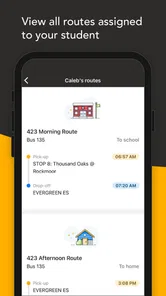
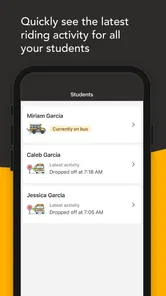
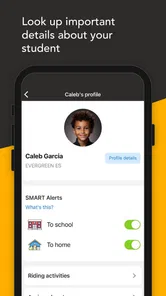
Analysis by Reviewed
Keeping track of a student’s school routine is often less about one dramatic problem and more about dozens of small updates: a changed notice, a missed reminder, a document to check, or a message that arrives when the day is already busy. SMART tag™ Parent App is built around that everyday gap. Developed by SMART tag, this free education app focuses on student management and notifications rather than trying to become a broad learning platform.
I found its appeal easy to understand during the first few days. A parent does not necessarily need another place for lessons, games, or complicated planning. Sometimes the useful thing is simply having school-related information gathered in a more direct way. The app is available to everyone in its age classification, runs on Android 7.0 and later, and its current version is 1.5.1. Those details make it accessible to many older phones, which matters when a family shares devices or relies on a phone that is no longer new.
My main question with an app like this is not whether it feels useful on the first day. Notification tools almost always feel helpful when they are new. The more important test is whether I would still open it several weeks later, whether the alerts remain meaningful, and whether keeping student information current becomes another chore. That is where this app has a practical purpose, but also where its limits become clearer.
What the first week feels like
I’d use the first week to learn which school updates actually call for a response, rather than treating every alert as urgent. That gives me a clearer sense of whether the app is reducing missed details or simply adding another notification stream, and it sets up the more important question of whether the routine remains worthwhile over time.
A focused start for families
The first-week appeal comes from its narrow purpose. Instead of presenting itself as a complete school ecosystem, SMART tag™ Parent App is aimed at the parent side of student management. That focus can be reassuring if you are trying to reduce the number of places where school information is handled. I would be more comfortable recommending it to a parent who wants a dedicated channel for notifications than to someone looking for homework help or a digital classroom.
The free price also makes the initial decision straightforward. There is no purchase to weigh up before testing whether the app fits a family’s routine. I would install it, connect it to the relevant school process, and then judge it by the quality and usefulness of the notifications that actually arrive. That last point is important: an app centered on alerts is only as valuable as the information it receives and the way a parent responds to it.
During the first week, I would use it as a companion to the existing school routine rather than immediately treating it as the only source of truth. Keep the school’s normal communication method available while learning where SMART tag™ Parent App fits. This avoids a common mistake with notification apps: assuming that installing one automatically replaces every email, paper notice, or school portal.
More From Our News Desk

 Instagram
Instagram’s Power Comes From Its Place in Your Phone
A close look at how Instagram turns Meta’s reach, recommendation systems and everyday camera habits into durable platform power—and what that costs users.

 Gmail
GmailGmail in a Busy Inbox: Who Benefits Most?
From first account to crowded workday, Gmail earns its place through dependable search and flexible sorting—but its best fit depends on how much inbox maintenance you can tolerate.

 Prime Video
Switching to Prime Video: What Changes in Your Viewing Routine
Prime Video can make a compelling second home for streaming, but switching means learning a different catalog, rental layer, and route from browsing to playback.

 Universal TV Remote Control
Universal TV Remote Control Works Best as a Reliable Backup
A phone remote earns its place through quick setup and reliable habits. Here is how to get more from Universal TV Remote Control—and where its limits show.

 Weather - By Xiaomi
Weather by Xiaomi Review: Clear at a Glance, Less Clear Up Close
Xiaomi’s weather app makes everyday forecasts quick to scan, but its calm surface can leave useful details and recovery paths harder to find than they should be.

 X
XX Under Pressure: Can It Recover When Posting Goes Wrong?
A resilience-focused review of X, examining setup, mistaken posts, interruptions, weak connections, and the gaps that matter when recovery needs to be dependable.
Latest News



Why the simple approach can work
A dedicated parent app can be easier to check than a general-purpose school system filled with menus that are irrelevant on a given day. If I only need to review student-related updates, a focused interface has a natural advantage over searching through a broad learning platform. This is especially useful for a parent who checks information in short moments, such as before leaving for work or while preparing a child for school.
There is also a useful psychological benefit to separating school administration from entertainment and social apps. A notification from a purpose-built education tool is easier to recognize as something that deserves attention. That does not guarantee that every alert will be urgent, but it can make the routine more deliberate.
The app’s audience size suggests that it has reached a substantial group of users, with over one hundred thousand installs. Its average rating is 3.6 from more than three hundred ratings, so I would describe the reception as mixed rather than universally enthusiastic. I would not treat that score as a final verdict, but I would take it as a reason to test the app in the real school context instead of assuming that its first impression will be enough.
A realistic morning scenario
Imagine a parent checking the phone before a child leaves home. The useful workflow is not complicated: look for a new school-related notification, read it carefully, and decide whether it changes the morning plan. Perhaps the message affects what the student needs that day, where attention should be directed, or whether a parent needs to follow up. The app earns its place when that check is quicker and clearer than hunting through several unrelated conversations.
My practical tip is to avoid checking every notification the moment it appears unless the family genuinely needs that behavior. A better habit is to create one or two deliberate review moments, then act on anything important. This reduces the chance that the app becomes background noise. Parents who already receive a heavy stream of alerts may find that discipline necessary from the start.
Does it still matter after the novelty fades?
Once the initial setup feels familiar, I’d judge the app by whether it changes a real household habit: fewer missed updates, less searching across channels, or a clearer handoff between caregivers. If those benefits do not appear, a familiar school portal or email routine may be easier to maintain; the next question is what would make this focused tool worth keeping.
The month-to-month value
After the first month, the value of SMART tag™ Parent App depends on repetition. Student management is rarely a one-time task. Information changes, children move through different parts of the school year, and parents need a reliable way to notice what applies to them. A notification app can remain useful when it turns scattered checking into a small, predictable habit.
I would judge its long-term usefulness with three questions. Do the notifications arrive in time to be acted on? Are they specific enough to understand without extra searching? Does opening the app save effort compared with the usual school communication channels? If the answer is yes to all three, the app can justify staying installed even when it no longer feels new.
If the messages are infrequent, repetitive, or disconnected from what a parent actually needs to do, the value drops quickly. That is not necessarily a failure of the app itself; student communication depends on the organization using it. Still, from a parent’s point of view, the distinction may not matter. An app that rarely helps with real decisions will feel unnecessary regardless of its design.
Where it fits beside familiar alternatives
The usual alternatives are school email, paper notices, messaging groups, phone calls, and larger school portals. Email is flexible and searchable, but important messages can disappear among work and personal correspondence. Messaging groups are fast, but they may be noisy and difficult to treat as an official record. Paper notices can be clear, yet they depend on a student remembering to bring them home. A broad school portal may offer more functions, but it can take longer to navigate.
SMART tag™ Parent App makes the most sense when it serves as a focused notification layer. I would choose it over a general portal for quick parent-facing updates, but I would not expect it to replace every other channel. If a family needs grades, assignments, live classroom interaction, file sharing, and detailed academic history in one place, a fuller school platform may be the better primary tool.
The trade-off is specialization. A focused app can reduce clutter, but it may also leave parents switching elsewhere for context or action. That is acceptable when its notifications point clearly to the next step. It becomes frustrating when a message tells me that something matters but still forces me to search through another system to understand what to do.
Useful habits that protect its value
One overlooked part of student-management apps is information freshness. Parents should make a habit of checking that the correct student context is being used whenever the app supports more than one student or school relationship. I would not assume that an old setup remains correct after a change in school arrangements. A quick review at the beginning of a new term or major routine change can prevent missed information.
I would also treat notifications as prompts, not as permanent records. When an alert requires action, I would complete that action immediately or add it to the family’s normal calendar or checklist. This prevents a notification from being mistaken for a task manager. The app can tell me to pay attention, but my long-term organization should not depend on leaving the alert unread.
A third useful approach is to decide which notifications deserve immediate attention and which can wait for a scheduled check. That distinction helps preserve trust in the system. If every message interrupts the day, parents may start dismissing them all. If the app becomes part of a calm review routine, its recurring value is easier to maintain.
The maintenance burden
The maintenance burden is probably modest in technical terms, but it can still be noticeable in family life. Any parent-facing notification tool requires attention to account setup, student details, device notification behavior, and changing school circumstances. Even when the app itself is simple, the surrounding routine can become complicated if several adults share responsibility.
I would recommend agreeing on one primary checking habit within the household. If two parents both assume the other person has seen an alert, the app may create false confidence rather than better coordination. A short family rule—such as deciding who handles school notifications on a given day—can be more valuable than repeatedly installing additional tools.
Older Android support is a practical advantage for families using devices that do not run the newest operating systems. At the same time, anyone using an older phone should keep expectations realistic about the overall experience. The app may be compatible, but the phone’s notification behavior, battery settings, or general performance can still affect how dependable the routine feels.
The developer is SMART tag, and the app was released on October 16, 2023. Because it is a relatively focused product rather than a general education suite, I would pay attention to how consistently it remains useful as school needs change. The current version, 1.5.1, is the version I would evaluate today, but long-term confidence comes from continued usefulness, not simply from seeing a recent version label.
Sources of fatigue
The biggest source of fatigue is notification overload. A parent may begin with good intentions, then receive enough low-priority prompts that the important ones lose their distinction. I would not recommend enabling every possible alert without first observing how often they appear and whether they lead to a concrete action.
Another source is duplication. If the same update arrives through SMART tag™ Parent App, email, a messaging group, and a paper notice, the family may spend more time confirming information than using it. The app is most helpful when it reduces uncertainty. It is less helpful when it adds another copy of every message without clarifying which channel should be trusted.
There is also a fatigue that comes from checking an app without a clear reason. Parents can develop a habit of opening it repeatedly, only to find nothing new. I prefer a scheduled approach: check when the family normally plans the next school day, then respond to anything relevant. That keeps the app in service of the household instead of turning it into another source of low-level anxiety.
Finally, a focused app may feel limited to users who expect a complete dashboard. If you want to discuss homework, review academic results, share files, or manage a broad calendar from the same screen, this is unlikely to be enough on its own. Choosing it means accepting that student notifications and management are the center of the experience, not one feature among many.
Who should use it, and who should skip it?
I see a good fit for parents who need a dedicated way to follow student-related notifications and who are willing to build a regular checking habit. It is also worth trying for families that find email too easy to overlook or broad school platforms too cumbersome for simple updates. The free price lowers the barrier to testing that workflow.
I would be more cautious for parents whose school already has a dependable all-in-one portal that combines notices, assignments, grades, calendars, and direct communication. Adding a separate app may create duplication without solving a real problem. I would also skip it as a primary education tool if the goal is tutoring, independent study, or classroom content; its purpose is administrative awareness, not replacing learning resources.
Families with several caregivers should decide in advance how responsibility is shared. The app can support communication, but it cannot resolve unclear household roles by itself. Likewise, parents who dislike frequent alerts should start with a restrained notification routine rather than allowing the app to compete with every other sound and banner on the phone.
Privacy-minded and practical expectations
Because this is a student-management app, I would approach setup thoughtfully and only enter the information needed for the school relationship. I would also review the phone’s notification presentation so sensitive details are not displayed openly on a lock screen if that matters in the household. This is a general device habit, but it is particularly relevant when an education app is used around shared phones or public spaces.
I would not use the app as the only backup for an important deadline. When a notification affects transport, attendance, an appointment, or something that cannot be missed, I would copy the action into the family calendar. That small extra step turns a passive alert into a dependable plan and protects against the ordinary problems that affect any phone-based system.
The Everyone age classification makes the app broadly approachable, but the real user is the parent or caregiver managing school information. A child may be connected to the same student context, yet the app’s practical value is measured by how well it helps adults notice and act on updates.
My long-term verdict
SMART tag™ Parent App earns lasting space when a family has a genuine communication gap to solve. Its strongest quality is focus: it gives student management and notifications a dedicated home instead of burying them inside unrelated tools. I appreciate that it is free and compatible with Android versions going back to 7.0, because those details make experimentation realistic for more households.
However, I would not keep it installed simply because it was useful during the first week. The app has to prove itself through reliable, relevant updates and a routine that does not create more checking than it saves. Its 3.6 average from over three hundred ratings reflects that this is not an automatic fit for everyone, and I think that is a fair reason to evaluate it against the school’s existing communication habits.
My recommendation is to try it with a clear test: use it through a normal stretch of school life, decide when notifications will be checked, and record whether alerts lead to useful actions or just duplicate information. If it makes school updates easier to catch and simpler to organize, it deserves a permanent place on the phone. If it merely adds another stream of messages beside email and a school portal, removing it is the more sensible choice.
In short, this is a practical education app for parents who value a focused notification channel, not a complete digital school replacement. The lasting value comes from a calm, repeatable habit rather than the novelty of installation. Used with that expectation, SMART tag™ Parent App can be a helpful part of family organization; used as an all-purpose learning platform, it will feel too narrow.
SMART tag™ Parent App Frequently Asked Questions
What does the SMART tag™ Parent App need before I can set it up?
Before getting started, make sure your phone meets the app’s operating-system requirements and that you can access the account used with your SMART tag service. Setup may also involve granting permissions such as notifications, Bluetooth, or location, depending on the device and features you intend to use. The app is free to download, but connected functions may depend on having a compatible SMART tag device.
Who develops the SMART tag™ Parent App, and what kind of app is it?
The SMART tag™ Parent App is an education app developed by SMART tag. Its focus is student management and notifications, making it relevant to parents and guardians who use compatible SMART tag products. The app is intended for a general audience, but families should still consider how its account, device, and permission settings fit their needs before installing it.
What is the SMART tag™ Parent App used for?
The SMART tag™ Parent App is designed to help parents and guardians manage compatible SMART tag devices and stay connected with children while they are away from home. Depending on the supported device and service plan, the app may provide location-related features, safety notifications, device management, and communication tools. Its exact functions can vary by region, product model, and account configuration.
Is the SMART tag™ Parent App compatible with every smartphone and SMART tag device?
Compatibility is not universal, so it is important to check the app listing and the requirements for your specific SMART tag product before downloading. On Android, the app requires version 7.0 or later; iOS users should check the requirements shown for their device. The app may also require Bluetooth, location permissions, internet access, and an account registered with the service. Some features can depend on the exact SMART tag model or mobile network availability.
Does the SMART tag™ Parent App track a child’s location in real time?
The app may support location monitoring when paired with a compatible SMART tag device and when the device has power, network coverage, and the necessary permissions enabled. However, location information should not be assumed to be perfectly continuous or exact. Indoor environments, weak signals, battery-saving settings, connectivity problems, and regional service limitations can cause delays or inaccurate updates.
Pros
- Quickly locates a child’s registered SMART tag device
- Helpful location updates support everyday safety routines
- Designed for simple parent-focused use
- Can provide reassurance during outings and travel
- Useful companion for families using SMART tag hardware
Cons
- Requires a compatible SMART tag device to be useful
- Location accuracy may vary indoors or in crowded areas
- Tracking can depend on mobile data
- GPS
- and battery life
- Some features may require account setup or permissions
- Children may need reminders to keep the tag charged and nearby











