

SkySafari 7 Pro
- 373.00
- 4.0
- Installs
- 10.00K
- Price
- $14.99
Screenshots
Analysis by Reviewed
I like astronomy apps most when they help me move from “What am I looking at?” to a useful next step, rather than burying me in labels. SkySafari 7 Pro is an education app from Simulation Curriculum Corp. built for that kind of exploration, with a sky map and telescope control at its core. It is aimed at curious beginners as well as people who already plan observing sessions, though the depth and paid entry point make it a more considered purchase than a casual sky-identification tool.
Before the first night outdoors
I would treat the first launch as a chance to learn how the map behaves, not as something to rush through on a dark observing field. Get comfortable moving around the sky view and changing its time before you depend on it to find a target. That modest preparation matters because the app combines a live-looking map with controls that let you explore different moments; if the displayed sky is set to an unexpected time, even a detailed chart can feel confusing.
It also helps to decide what you want the app to do. If the goal is simply to identify the brightest object overhead, a quick point-and-check session may be enough. If you want to use telescope control, plan a separate setup check while you have time to think through the connection and alignment. The two uses are related, but they have different expectations: identifying a planet is a lightweight task, while directing an instrument calls for a little preparation.
Exploring the Cosmos
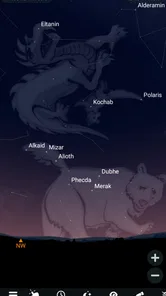
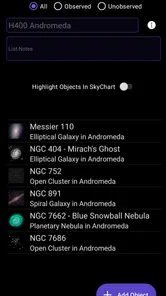
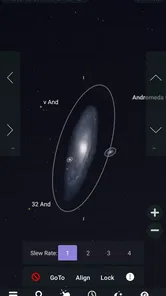
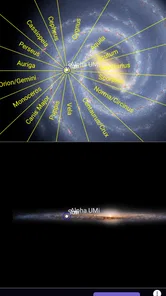
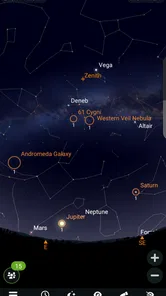
One of the first things I noticed about SkySafari 7 Pro is how detailed and expansive its star map is. You can zoom through the stars, planets, and even galaxies, all from the comfort of your couch. The app is incredibly intuitive, allowing you to point your device to any part of the sky and immediately learn what celestial bodies are hovering above you. It’s like having a guide who knows the universe like the back of their hand.
Features that Shine
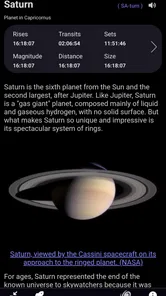
What sets this app apart is its robust set of features. For starters, it offers a huge database of stars, planets, and other celestial objects. The app includes a night vision mode which is perfect for those late-night star parties when you don’t want to ruin your night vision. Plus, it’s packed with educational content, so you can learn about each star or planet you come across. And if you’re into astrophotography, it’s got you covered with features that let you capture and share your findings with ease.
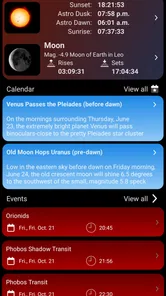
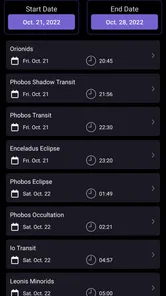
Another cool feature is the time travel option. Imagine being able to see the sky on any date in the past or future! This is perfect for planning stargazing sessions or simply indulging in some cosmic nostalgia.
Using the map as a learning tool
One useful way to explore is to pick a familiar anchor, such as the Moon or a bright planet, then expand the view to nearby objects. That gives the labels and surrounding patterns a practical context instead of turning the map into a catalogue to scroll through. I’d use this approach with a child or a friend who is new to astronomy: start with something easy to recognize, then follow the map outward and let curiosity set the pace.
More From Our News Desk

 Gmail
GmailGmail in a Busy Inbox: Who Benefits Most?
From first account to crowded workday, Gmail earns its place through dependable search and flexible sorting—but its best fit depends on how much inbox maintenance you can tolerate.

 Prime Video
Switching to Prime Video: What Changes in Your Viewing Routine
Prime Video can make a compelling second home for streaming, but switching means learning a different catalog, rental layer, and route from browsing to playback.

 Universal TV Remote Control
Universal TV Remote Control Works Best as a Reliable Backup
A phone remote earns its place through quick setup and reliable habits. Here is how to get more from Universal TV Remote Control—and where its limits show.

 Weather - By Xiaomi
Weather by Xiaomi Review: Clear at a Glance, Less Clear Up Close
Xiaomi’s weather app makes everyday forecasts quick to scan, but its calm surface can leave useful details and recovery paths harder to find than they should be.

 X
XX Under Pressure: Can It Recover When Posting Goes Wrong?
A resilience-focused review of X, examining setup, mistaken posts, interruptions, weak connections, and the gaps that matter when recovery needs to be dependable.

 Clash of Clans
Clash of Clans Is Won Between the Battles
Its raids are quick; its community is a long-term project of coordination, teaching, rivalry, and shared responsibility—with all the friction that entails.
Latest News



There is a trade-off to all that detail. A broad catalogue is rewarding when I have time to explore, but it can feel like too much if I only want a fast answer. I get more from it by setting a small goal before opening the app—identify one object, learn what is near it, or preview one future observing window. That keeps the depth useful rather than distracting.
User Experience and Design
The user interface is smooth and user-friendly. Even if you’re new to astronomy apps, you’ll find it easy to navigate. The developers have done a great job ensuring that the app is both functional and visually appealing. It runs smoothly on both Android and iOS, which is a big plus for me since I swap between devices quite often.
SkySafari 7 Pro also integrates seamlessly with telescopes, allowing you to control them directly from your phone. This is a game-changer for amateur astronomers who want to enhance their stargazing sessions with some tech-savvy flair.
Where setup can feel less effortless
The map is only as helpful as the orientation you start with. If the view seems out of step with the sky, I’d first check that the device is being held steadily and pointed toward the area I’m trying to identify, then compare a conspicuous object such as the Moon or a bright planet with the display. A mismatch doesn’t automatically mean the map is wrong; your position, the direction you’re facing, and the selected time all affect what should appear.
Telescope control is useful, but it adds a setup step that a simple sky guide does not have. Before relying on it during an observing session, I’d make sure the telescope and app are configured to work together and test the control indoors or in daylight where practical. That way, a connection or alignment issue is less likely to interrupt the moment when you’re outside and ready to observe.
Small checks that make a session smoother
If the sky view seems wrong, I would change one thing at a time rather than repeatedly tapping through controls. First compare the selected time with the actual observing moment; then check the direction I’m facing and whether a recognizable object lands in the expected part of the display. This makes it easier to tell whether the issue is orientation, timing, or simply an unfamiliar patch of sky.
For telescope use, I’d keep the first attempt deliberately simple: choose a target I can recognize in the map, confirm that the instrument responds as expected, and only then try a less familiar object. If the telescope does not follow the intended direction, pausing to check alignment and the app-instrument setup is more useful than assuming the object catalogue or map is at fault. These checks do not remove all setup friction, but they can prevent a small mismatch from turning into a frustrating night.
A practical routine for a clear night
For a short evening session, I’d use the time view before heading out: check what should be visible, choose one or two targets, and note their positions rather than trying to identify everything at once. Once outside, night vision mode can make the map easier to consult without flooding your eyes with a bright screen. I’d also keep the phone’s screen use brief between observations; the app can guide the session, but looking at the sky itself should remain the main event.
Time travel is more than a novelty when used this way. If a target is not visible at the moment, shifting the date or time can help you understand when it will be better placed. It is a planning aid, not a guarantee that conditions will cooperate: clouds, local obstructions, and the brightness of the sky still matter. For astrophotography, I would treat the app as a tool for locating and preparing rather than assume that map features replace a dedicated camera workflow.
One ordinary evening, used well
Imagine I have a clear stretch after dinner but only a little time outside. I can preview the sky indoors, choose one target that should be accessible, and use the map to understand where to look before stepping out. If a family member joins me, I can begin with a bright object they can see unaided, then explain how the surrounding map helps locate less obvious targets. That is a more satisfying use than trying to tour the entire sky in one sitting.
If I own a telescope, I would add its control only after the basic map routine feels familiar. That separation gives me a fallback: even if instrument setup takes longer than expected, I can still use the app to learn the sky and make the outing worthwhile. It is a practical advantage of having both educational exploration and telescope-oriented use in one app, provided I do not expect the more involved workflow to be effortless on the first attempt.
Who gets the most from it
I’d recommend it to someone who wants to learn the sky gradually, an amateur astronomer who enjoys planning targets, or a telescope owner interested in phone-based control. The depth gives repeat visits a purpose: instead of opening the app only to name a bright object, you can explore neighboring stars and less familiar objects, then use the sky map to build context.
If you only want a quick answer about a bright point overhead, a simpler free sky-identification app may be the more sensible choice. Likewise, if you do not own or plan to use a compatible telescope, telescope control may not justify choosing this more advanced option. SkySafari 7 Pro costs $9.99, with in-app purchases ranging from $4.99 to $39.99 per item, so I’d consider whether its deeper observing and learning tools match how often I’ll use them before paying.
Choosing it over a simpler planetarium app
The usual lightweight alternatives are easier to dip into when the only question is “What is that bright point?” They can be a better fit for occasional use, especially for someone who wants minimal setup and does not expect to plan observing sessions. I see this app as a step beyond that quick-identification role: its appeal is the combination of a detailed map, learning as you explore, time-based planning, and telescope control.
That combination is valuable only if I use it. Someone who enjoys preparing targets, revisiting the sky, or learning how objects relate to one another can make good use of the extra depth. Someone who rarely looks up may find a simpler tool more convenient and less costly. The app is also not a substitute for observing conditions or a dedicated astrophotography process; it helps me orient and plan, while the actual view and image depend on circumstances beyond the map.
When the app is not the cause
Not every disappointing session points to a software problem. If a predicted object is hard to see, light pollution, haze, clouds, buildings, or simply the object’s position can be the reason. I find it useful to separate “the map says it is there” from “the sky lets me see it”: the first helps me aim and learn, while the second depends on conditions beyond the app.
When something looks unexpected, I’d recheck the chosen time and viewing direction before changing settings at random. With telescope control, I’d also distinguish a map issue from a telescope alignment or connection issue by checking whether the on-screen view and the instrument respond consistently. That small troubleshooting habit saves time and makes the app more useful as a learning companion rather than a source of guesswork.
Questions worth settling before buying
Will it work for a beginner? I think so, if the beginner is curious enough to explore beyond a single identification and is happy to learn in small steps. The map can make the sky more legible, but its breadth may be unnecessary for someone who wants a one-tap answer. Starting with one familiar object helps keep the first sessions approachable.
Do I need a telescope to benefit? No: the map, object information, and time-based exploration can be useful on their own. A telescope becomes relevant if I want to use the control workflow, but I would not buy the app solely on the assumption that connecting an instrument will be automatic. Is it suitable for children? Its Everyone age rating makes it broadly appropriate, while an adult can help turn the detailed map into a manageable learning activity.
Can it promise a successful viewing or photo? No app can make clouds clear or remove obstacles from a viewing location, and I would not treat an astronomy map as a replacement for camera-specific planning. What it can do is help me decide what to look for and when to look. For an older device, I’d also check the operating-system requirement before purchasing: version 7.6.4.1 requires Android 10 or later.
Value, compatibility, and my verdict
The app has a 4.4 average from around 1.7 thousand ratings, and its age rating is Everyone. It was released on June 24, 2022, and version 7.6.4.1 requires Android 10 or later. Those details make it worth checking device compatibility before buying, especially if you are considering it for an older phone. Its 10 thousand-plus installs suggest a more specialist audience than the broadest casual astronomy apps, which fits its focus on depth and telescope use.
Compared with a basic planetarium app, this is the option I’d reach for when I want a richer map and a route from learning to observing through a telescope. A lightweight alternative is easier for occasional identification and may involve less setup; this one makes more sense when I’ll use its extra detail repeatedly. My practical advice is to start with one planned target, learn how the time and orientation controls affect the map, and only then build a larger observing routine.
Final Thoughts
In conclusion, SkySafari 7 Pro is a must-have app for anyone interested in astronomy. It’s like having a personal astronomer ready to answer your questions and guide your explorations. With its comprehensive features, ease of use, and seamless integration with telescopes, it’s an app that truly brings the universe to your fingertips. So, the next time you find yourself under a clear night sky, make sure you have SkySafari 7 Pro by your side to enhance the experience. Happy stargazing!
SkySafari 7 Pro Frequently Asked Questions
How much does SkySafari 7 Pro cost, and are there additional purchases?
SkySafari 7 Pro is a paid astronomy app, so you should expect to purchase it before using it. It also offers in-app purchases, which may add to the overall cost depending on what you choose. If you are comparing astronomy apps, consider whether its professional star map and telescope-control features match the way you plan to observe the sky.
What is SkySafari 7 Pro, and who is it designed for?
SkySafari 7 Pro is an education app built around astronomy, with a professional star map and telescope control. It can suit beginners who want help identifying objects in the sky as well as experienced observers looking for a detailed planning and observing tool. Its feature set is more comprehensive than a simple sky-identification app, so it is worth considering whether you want that depth before downloading.
What features does SkySafari 7 Pro offer to enhance my stargazing experience?
SkySafari 7 Pro is packed with features designed to enrich your stargazing experience. It offers a vast database of stars, planets, and deep sky objects, along with detailed information and stunning visuals. The app includes telescope control, night vision mode, and the ability to simulate the sky from any location and time. Additionally, it provides educational content, including audio tours and historical data, making it a comprehensive tool for both amateur and seasoned astronomers.
Is SkySafari 7 Pro compatible with my telescope, and how do I set it up?
SkySafari 7 Pro is compatible with a wide range of telescopes. It supports telescope control via Wi-Fi or Bluetooth, allowing you to align and control your telescope directly from the app. To set it up, you need to ensure that your telescope is equipped with the appropriate hardware for wireless control. Follow the in-app instructions for a step-by-step guide on connecting your telescope, which typically involves selecting your telescope model and establishing a connection.
Does SkySafari 7 Pro require an internet connection to function?
SkySafari 7 Pro is designed to work offline, which is ideal for stargazing in remote locations without internet access. Once the app is installed, most of its features, including the star charts and telescope control, do not require an internet connection. However, some features, such as downloading new data or updates, will require internet access. It is recommended to download any necessary updates or additional data while connected to Wi-Fi before heading out for stargazing.
Pros
- Comprehensive star map with detailed constellations.
- Real-time sky tracking and navigation tools.
- Includes extensive database of celestial objects.
- Customizable settings for personalized experience.
- Offline mode available for remote locations.
Cons
- Interface may be overwhelming for beginners.
- Requires significant storage space on device.
- Some features require in-app purchases.
- Initial setup can be time-consuming.
- Battery drains faster during extended use.












