

SkySafari 7 Plus
- 99.00
- 4.4
- Installs
- 10.00K
- Price
- $6.99
Screenshots
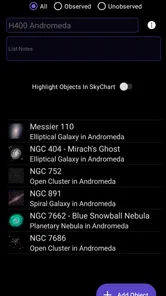
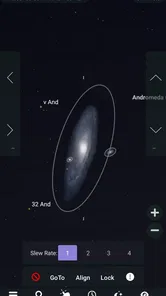
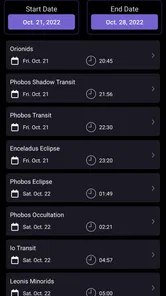
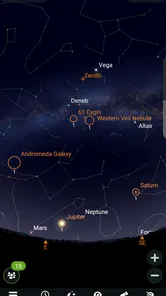
Analysis by Reviewed
I like SkySafari 7 Plus most as a bridge between curiosity and observation: it helps turn “What am I looking at?” into a chance to learn how the sky fits together. It is more than a quick star-name finder, but that added depth comes with a price and a little more to explore. If you enjoy looking up often, the extra context can be worthwhile; if you only want an occasional identification, a simpler option may suit you better.
A useful tool before you step outside
One practical way to get more from an astronomy app is to decide what you want from it before opening it under a dark sky. I’d use this one indoors to explore a patch of sky or choose a few objects, then take the phone outside with a simple plan. That avoids turning an observing session into a long stretch of screen navigation, and it gives the chart a clear purpose: helping me find something I’ve already decided to look for.
It is also useful when plans change. If the sky is hazy or you have only a few minutes, there is no need to treat a session as a full tour of the heavens. I’d pick one recognizable target, use the chart to orient myself, and save more detailed exploration for another evening. That small adjustment makes the app feel helpful rather than demanding.
What makes its depth worthwhile
The strongest case for choosing this astronomy guide is the combination of a live chart, an extensive catalogue, audio explanations, and time-based views. Those elements support different kinds of curiosity: finding an object, learning about it, or seeing how the sky changes. I especially like that the app can work as both a companion outdoors and a way to explore astronomy when observation is not practical.
The catalogue’s scale is most valuable for people who enjoy following a question beyond the first answer. Spot a bright object, identify it, and then explore what else is nearby; that is a more rewarding workflow than scrolling through objects without a goal. Beginners can keep things simple, while more experienced hobbyists have room to dig deeper. The trade-off is that a large selection can feel like too much if all you want is a fast, uncomplicated label.
For a family outing, I would let one person use the chart to identify something and then ask everyone to find it with their eyes before listening to more detail. It creates a natural pause between looking at a screen and looking at the sky. Audio descriptions can add context without requiring the phone to be passed around constantly, although in a noisy setting or a quick stop, reading a short label may be more convenient.
Where it can feel less convenient
A rich astronomy tool is not automatically the easiest choice in every situation. Outside, it is possible to spend more time managing the device than observing, particularly if you arrive without a target in mind. I’d keep a short list of things to look for and treat the chart as a reference, not as an invitation to explore every menu at once. That approach matters especially when you are with people who would rather spend the evening talking and watching than learning an app.
More From Our News Desk

 Gmail
GmailGmail in a Busy Inbox: Who Benefits Most?
From first account to crowded workday, Gmail earns its place through dependable search and flexible sorting—but its best fit depends on how much inbox maintenance you can tolerate.

 Prime Video
Switching to Prime Video: What Changes in Your Viewing Routine
Prime Video can make a compelling second home for streaming, but switching means learning a different catalog, rental layer, and route from browsing to playback.

 Universal TV Remote Control
Universal TV Remote Control Works Best as a Reliable Backup
A phone remote earns its place through quick setup and reliable habits. Here is how to get more from Universal TV Remote Control—and where its limits show.

 Weather - By Xiaomi
Weather by Xiaomi Review: Clear at a Glance, Less Clear Up Close
Xiaomi’s weather app makes everyday forecasts quick to scan, but its calm surface can leave useful details and recovery paths harder to find than they should be.

 X
XX Under Pressure: Can It Recover When Posting Goes Wrong?
A resilience-focused review of X, examining setup, mistaken posts, interruptions, weak connections, and the gaps that matter when recovery needs to be dependable.

 Clash of Clans
Clash of Clans Is Won Between the Battles
Its raids are quick; its community is a long-term project of coordination, teaching, rivalry, and shared responsibility—with all the friction that entails.
Latest News



Screen use is another real trade-off. The chart is useful for orientation, but staring at a bright display can interrupt the experience of seeing the sky directly. I recommend checking an object, lowering or putting away the phone, and giving your eyes time to settle back into the surroundings. If you are sharing the view, a quick explanation before putting the device away can be better than keeping it in everyone’s hands.
The purchase decision also depends on how you expect to use it. The app costs $6.99, and optional in-app purchases range from $3.99 to $29.99 per item. I would consider the core experience first and avoid buying extras on impulse; a person who stargazes regularly and likes deeper exploration may see more value than someone who opens a sky guide only once in a while. It is an education app from Simulation Curriculum Corp., rated for Everyone, and its Android version 7.6.4.1 requires Android 10 or later.
There is a practical difference between learning about the sky and predicting whether you will be able to see it. Simulated views can help you explore how the sky appears at different times, but they do not make clouds disappear or guarantee a good observing night. I’d use the app to prepare for what to look for, while making the actual decision to go outside based on the conditions around me.
Turning sky curiosity into a routine
A useful everyday scenario is a short walk after dinner. I might notice a bright point, open the chart long enough to orient myself, and then use an explanation to understand why it caught my attention. If I have more time, I can explore nearby objects or revisit the view indoors later. If I do not, even one identification can make the walk feel more connected to the night sky without demanding a full observing session.
For a planned outing, I’d prepare differently: choose a small area to explore, review it before leaving, and decide which features I actually want to use outside. This is a small but worthwhile workflow change. It limits fiddling in the dark and makes it easier to share the experience with someone who is new to astronomy. You can also use time controls to connect a preview at home with the sky you are about to see, while remembering that the preview is about the sky’s arrangement, not local weather.
How it compares with simpler sky maps
Many basic sky-map apps are best at answering one immediate question: what is that object? This app is a better fit when the first answer leads to another. Its chart sits alongside explanatory audio and the ability to explore different sky views, giving it more of a learning-and-discovery feel than a minimal lookup tool. That extra scope is a strength if you enjoy spending time with astronomy, but it can be unnecessary complexity for someone who wants a name and nothing more.
I would not choose a deeper guide solely because it offers more to explore. A casual user may get a better experience from a simpler free alternative, especially if cost and speed matter more than context. On the other hand, someone who regularly plans observing sessions or enjoys learning at home may appreciate having identification, explanation, and exploration in one place. The right choice depends less on how impressive a catalogue sounds and more on whether you will use its breadth.
Who should install it—and who should pass
I’d recommend it to curious beginners who want a guided way into astronomy, families who like turning questions into short learning moments, and hobbyists who want more than an occasional object label. Its current average is 4.3 from around 635 ratings, and it has over 10,000 installs. Those figures offer a sense of its audience, but the more important question is whether you will use the app often enough to benefit from its richer approach.
I’d suggest passing if you rarely look at the night sky, prefer the fastest possible answer, or would rather avoid a paid app with optional purchases. It may also be a poor fit for an outing where the priority is simply being outside together and using phones as little as possible. You can still make the most of it in short bursts, but the strongest value comes when you enjoy exploring rather than checking a label and closing the app.
If you are wondering whether it can help without prior astronomy knowledge, I think it can, provided you begin with a narrow question rather than trying to understand everything at once. If you are deciding whether to use it outdoors or at home, both make sense: the live chart supports orientation outside, while the simulations and explanations offer a way to explore when you are indoors. And if you are concerned about getting distracted by the screen, a simple plan—identify, listen or read, then put the phone away—keeps the app in a supporting role.
A balanced recommendation
One of the standout features of SkySafari 7 Plus is its extensive celestial database. Whether you’re looking for planets, stars, or galaxies, this app has got you covered. With over 100 million stars and 750,000 galaxies, it’s like carrying the entire universe in your hands. The app's interface is clean and user-friendly, making it easy to navigate through the cosmos without feeling overwhelmed.
A large catalogue is valuable even if you never try to identify every object. I find it more helpful to choose one target before a session than to scroll through a long list outside, where darkness, cold, or a dim screen can make fiddling frustrating. For a beginner, starting with something easy to recognize and then following nearby objects is a better use of that breadth than treating the database as a checklist.
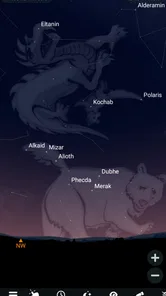
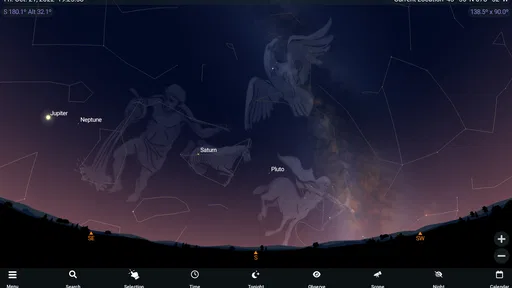
Another feature that blew me away is the interactive sky chart. You can point your device at the sky, and it instantly identifies stars and constellations in real-time. It’s like magic! Plus, the time-lapse feature allows you to see how the sky changes over time, which is just mesmerizing to watch.
In everyday use, I’d treat the chart as a guide rather than an unquestionable answer: compare its view with the actual sky and give yourself a moment to orient the phone. That small habit makes it easier to understand what you’re seeing instead of just reading labels. It is also a practical way to turn a quick evening outside into a short learning exercise with a friend or child.
Out of This World Experience
The app doesn’t just stop at visuals. The audio descriptions are a fantastic addition, offering detailed explanations of celestial events and objects. This makes learning about space both informative and entertaining. I found myself using this feature quite often, especially during meteor showers or lunar eclipses.
Audio is particularly handy when you want to keep your eyes on the sky instead of continually checking the screen. At a group viewing, I’d use it to give everyone some context before passing the phone around. The trade-off is that explanations are most useful when you have time to listen; if you only want a quick answer, an audio description may feel slower than a glance at a chart.
What’s also really cool is the ability to simulate past or future sky views. Ever wondered what the sky looked like on the day you were born? Or maybe you want to see what it’ll look like 100 years from now? SkySafari lets you do just that, adding a personal touch to your stargazing adventures.
That simulation also gives the app a useful role indoors: you can explore a sky view before a planned observing session, then use the live chart outside to connect the preview with what is overhead. I would not confuse a simulated view with a forecast of viewing conditions, though. It helps with the astronomy and timing, not with whether the night will be clear where you are.
Who Will Get the Most From It
As an education app from Simulation Curriculum Corp., SkySafari 7 Plus suits curious beginners, families, and hobbyists who want more than a basic star-name lookup. It is a paid app at $6.99, with in-app purchases ranging from $3.99 to $29.99 per item, so I’d think about how often you expect to use its deeper tools before spending. Its Everyone age rating makes it suitable for a broad audience, while its 4.3 average from around 635 ratings suggests that many users find it worthwhile. It has over 10,000 installs, and version 7.6.4.1 requires Android 10 or later.
Compared with a simple sky-map app, this one leans further into learning and exploring: the chart is only part of the appeal, alongside audio and the ability to revisit different times. That extra depth is a good fit if you enjoy asking follow-up questions about what you see. If you only want an occasional name for a bright object, a simpler free alternative may be a better match; paying for a richer astronomy tool makes less sense when you rarely stargaze.
For a realistic first outing, I’d pick a clear evening, open the chart, and focus on a small patch of sky rather than trying to tour everything at once. If the display feels distracting, use it to identify an object and then put the phone away while you observe. This keeps the app in its best role—as a reference that supports looking up, not a screen that replaces it.
Final Thoughts
In conclusion, SkySafari 7 Plus is a must-have for anyone passionate about astronomy or just curious about the stars. Its robust features, user-friendly interface, and interactive elements make it a top pick for both novice and seasoned stargazers. So, grab your phone, download the app, and get ready to explore the universe like never before. Just remember to charge your phone, because once you start using this app, you won’t want to put it down!
My recommendation is strongest for people who will use the chart, explanations, and time controls together, whether for a planned night outside or for learning from home. If your interest is occasional and strictly practical, the price and additional purchases may be more than you need. For me, the best reason to choose it is that it can turn a passing glance at the night sky into a more informed, memorable moment.
SkySafari 7 Plus Frequently Asked Questions
What is SkySafari 7 Plus, and who develops it?
SkySafari 7 Plus is an education app described as an astronomy guide to the night sky. It is developed by Simulation Curriculum Corp. and is aimed at people who want to explore the sky and learn about celestial objects. Its educational focus can make it useful both as a companion for looking up at the night sky and as a way to build familiarity with astronomy.
What does SkySafari 7 Plus cost, and is it suitable for all ages?
SkySafari 7 Plus is a paid app priced at $6.99, with optional in-app purchases ranging from $3.99 to $29.99 per item. Its content rating is Everyone, so it is rated as suitable for a broad audience. Before downloading, consider the initial purchase as well as any optional extras, and choose whether those additional purchases are relevant to how you plan to use the app.
What platforms is SkySafari 7 Plus available on?
SkySafari 7 Plus is available on Android and iOS platforms, making it accessible for a wide range of smartphone and tablet users. Whether you have an Android device or an iPhone/iPad, you can download and enjoy the app's comprehensive stargazing capabilities with ease from the respective app stores.
What are the main features of SkySafari 7 Plus?
SkySafari 7 Plus offers a myriad of features such as detailed star maps, real-time sky simulations, and a vast database of celestial objects. Users can explore constellations, track satellites, and even use augmented reality to enhance their stargazing experience. The app also provides educational content, making it a great tool for both amateur astronomers and seasoned stargazers.
Does SkySafari 7 Plus require an internet connection to function?
SkySafari 7 Plus does not require a constant internet connection to function, which is perfect for stargazing in remote areas. It allows offline access to star charts and celestial data. However, for certain features like updates or community sharing, an internet connection might be necessary to ensure optimal app performance.
Pros
- Extensive star catalog for accurate stargazing.
- Augmented reality feature enhances experience.
- Easy-to-use interface for all user levels.
- Real-time notifications for celestial events.
- Offline mode for remote location use.
Cons
- Some features require in-app purchases.
- Battery drain during extended use.
- Not available on Windows OS.
- Occasional glitches in older devices.
- Limited language options.












