SkyLock - Lock Screen
- 39.00
- 3.7
- Installs
- 1.00M
- Price
- Free
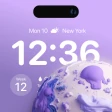
Screenshots
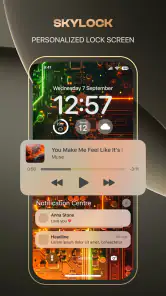
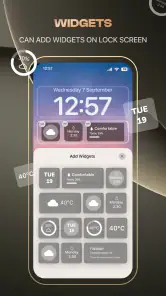
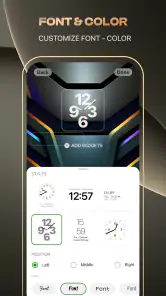
Analysis by Reviewed
Have you ever wished your lock screen could do more than just show the time and date? Well, let me introduce you to SkyLock - Lock Screen, the app that turns your lock screen into a personalized dashboard of information and functionality. I recently gave it a spin, and here's everything you need to know about it.
Customizing Your Lock Screen Experience
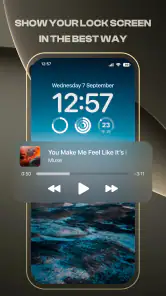
The first thing that stood out to me about SkyLock - Lock Screen was its incredible customization options. From the moment I installed it, I was greeted with a plethora of choices that allowed me to tweak every aspect of my lock screen. Want to add weather updates? Done. Need quick access to your favorite apps? Easy peasy. The app lets you personalize your lock screen to reflect your style and needs, which is a game-changer for those of us who rely on our phones for everything.
Intuitive User Interface
Now, you might be wondering if all these features make the app cumbersome to use. Fear not! The developers have done a stellar job at keeping the interface intuitive and user-friendly. Even if you're not the most tech-savvy person, navigating through SkyLock's settings is a breeze. The menus are well-organized, and the app provides helpful tips along the way. It's like having a friendly guide showing you all the cool tricks your phone can do.
Boosting Productivity with Widgets
One of my favorite features is the integration of widgets. Whether it's a quick glance at my calendar events or controlling my music, the widgets make everything accessible without even unlocking the phone. It’s perfect for those moments when you need information at a glance or want to quickly toggle functionalities without going through multiple apps.
Security Features That Matter
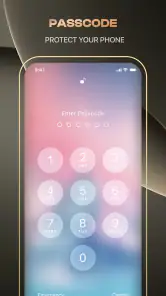
While customization is fantastic, security is paramount, and SkyLock doesn't disappoint here either. It comes with robust security features to ensure that your information stays safe. With options like fingerprint or passcode lock, you can rest easy knowing that your phone's data is protected. I found the security settings easy to configure, and it gave me peace of mind knowing my info is locked tight.
Battery Efficiency
Another aspect worth mentioning is how efficient the app is in terms of battery usage. Often, apps that offer extensive features tend to drain your battery life, but SkyLock seems to have nailed the balance. During my time using it, I didn't notice any significant battery drain, which is always a win in my book.
In conclusion, SkyLock - Lock Screen has genuinely transformed the way I interact with my phone. Its ability to combine functionality with simplicity is impressive, and the level of customization it offers is unparalleled. If you're looking to make your lock screen more than just a static barrier, give SkyLock a shot. It's like having a brand-new phone experience without the hefty price tag!
More From Our News Desk

Clash of Clans Is Won Between the Battles

Android Auto Makes the Case for Quieter Car Software

MobiOffice: Transforming Mobile Productivity with Seamless Integration

EA SPORTS FC™ Mobile Soccer: Redefining Mobile Sports Gaming

How Microsoft OneDrive Became a Mobile Productivity Giant

How Google Translate Breaks Language Barriers Effortlessly
SkyLock - Lock Screen Frequently Asked Questions
What is SkyLock - Lock Screen and how does it work?
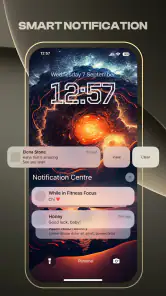
SkyLock - Lock Screen is an innovative app designed to enhance the security and functionality of your smartphone's lock screen. By integrating advanced security features with customizable lock screen options, it provides a seamless and secure user experience. The app allows you to set personalized themes, quick access to apps, and even notifications directly from the lock screen. It works by running in the background and activating whenever your phone is locked, ensuring that only you have access to your device.
Is SkyLock - Lock Screen free to use?
SkyLock - Lock Screen offers a free version with basic features accessible to all users. However, to unlock premium features such as advanced customization options, ad-free experience, and enhanced security settings, users can purchase the premium version through in-app purchases. This allows users to tailor their lock screen experience according to their needs while supporting the app's development.
What customization options does SkyLock - Lock Screen offer?
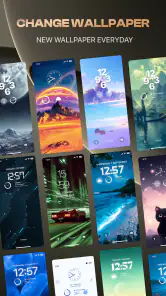
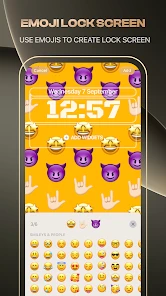
SkyLock - Lock Screen provides a wide range of customization options to personalize your device's lock screen. Users can choose from various themes, wallpapers, and widgets to tailor the appearance. Additionally, the app allows customization of shortcuts and notifications, enabling quick access to frequently used apps directly from the lock screen. This level of customization ensures that your lock screen is not only secure but also reflects your personal style.
How does SkyLock - Lock Screen enhance phone security?
SkyLock - Lock Screen enhances phone security by incorporating multiple layers of protection. It supports biometric authentication methods such as fingerprint and facial recognition, ensuring that only authorized users can unlock the device. Additionally, it offers PIN and pattern lock options for added security. The app also features anti-theft measures, including remote lock and wipe capabilities, providing peace of mind in case of device loss or theft.
Can I use SkyLock - Lock Screen on both Android and iOS devices?
Yes, SkyLock - Lock Screen is available for both Android and iOS platforms, making it versatile for users across different devices. This cross-platform compatibility ensures that whether you are using an Android smartphone or an iOS device, you can enjoy the enhanced security and customization features that SkyLock offers. The app is optimized for each operating system to provide a smooth and efficient user experience.
Pros
- Customizable lock screen interface.
- Wide range of widgets available.
- Battery-efficient performance.
- Smooth and user-friendly UI.
- Supports various unlocking methods.
Cons
- Limited free features available.
- Contains in-app advertisements.
- Widgets can clutter the screen.
- Occasional lag on older devices.
- Limited customer support options.
- Category
- Personalization
- Version
- 1.0.10











