Skull-iQ
- 849.00
- 1.7
- Installs
- 500.00K
- Price
- Free

Screenshots



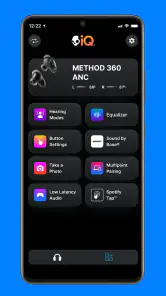
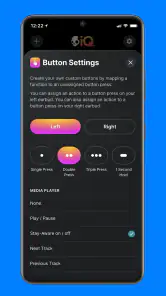



Analysis by Reviewed
I’d think of Skull-iQ less as a general-purpose organizer and more as a companion for compatible Skullcandy earbuds and headphones. That distinction matters in a shared home: the app’s value depends on who is using the audio gear and whether they want its smart controls, not on keeping a family calendar or coordinating chores. When someone borrows a device, I’d treat the app as part of that person’s own listening setup rather than a household hub.
Start with the listener, not the whole household
Before relying on it, I’d have the regular user install the app and explore it while their compatible Skullcandy device is nearby. Skullcandy Inc. makes the app, whose focus is its smart audio technology. In practice, that makes the key question simple: does this person want app-based access to their device’s controls? If they only need basic playback, their phone’s built-in audio settings or the controls on the headphones may be enough.
For a shared tablet or phone, I’d avoid treating one person’s app setup as a neutral default for everyone. A listener may prefer different settings or controls from another household member, and passing around a device can make those preferences harder to keep straight. My practical approach would be to let the main listener manage the setup on their own phone, then let others use the headphones in the way that works without assuming the app provides separate household profiles.
A realistic handoff before the commute
Picture a weekday morning: one person is listening while packing lunch, then a housemate wants the same headphones for a call on the way out. The useful question is not whether the app can coordinate that handoff; it is whether the regular owner can keep their preferred device controls on their own phone while the borrowed headphones remain usable by someone else. I’d agree on the handoff first, then avoid changing app settings in a rush. That small habit reduces the chance that one person’s quick adjustment becomes a mystery for the next listener.
If several people take turns with one pair, I’d also decide who is responsible for returning it and charging it rather than relying on an app to remember. Skull-iQ is most useful when the person who knows the gear can make a deliberate adjustment, not when everybody is tapping around to solve a household logistics problem. For occasional borrowing, simple verbal coordination is more dependable than expecting an audio companion to act like a shared-device manager.
Where coordination helps—and where it stops
A useful everyday scenario is getting ready to leave: one person uses their Skullcandy gear while another is waiting to borrow it for a call or a commute. Having the app available to the regular listener can make it easier to reach the device-related options they care about without searching through unrelated phone menus. But it is not a shared schedule, device checkout, or family communication tool. I would coordinate borrowing directly rather than expecting the app to manage who has the headphones or whose settings should take priority.
That boundary is also helpful when troubleshooting. If the audio gear is being used by someone else, first check whether the issue is with the headphones, the phone’s audio connection, or the app’s device controls; changing several things at once makes it harder to tell what fixed the problem. I’d keep the app’s role narrow and make one adjustment at a time, especially when the same pair is passed between listeners.
More From Our News Desk

Clash of Clans Is Won Between the Battles

Android Auto Makes the Case for Quieter Car Software

MobiOffice: Transforming Mobile Productivity with Seamless Integration

EA SPORTS FC™ Mobile Soccer: Redefining Mobile Sports Gaming

How Microsoft OneDrive Became a Mobile Productivity Giant

How Google Translate Breaks Language Barriers Effortlessly
A practical tip is to separate a connection problem from a preference problem. If sound is coming through but the listener dislikes how the device behaves, look at the app’s available controls only after confirming the headphones are connected to the phone that person is using. If the connection itself is the issue, changing a device option may not help. Keeping those two checks separate saves time and makes it easier to undo a change if it does not improve the experience.
Age, trust, and the low rating
The app is rated Everyone, so its listed age classification is broad, but I’d still have an adult help a younger listener with setup and explain which phone and audio device they are using. That is sensible household guidance, not a claim that the app offers parental controls. The app is free to install, with in-app purchases listed from $4.99 to $49.99 per item, so I’d review any purchase prompt before approving it, particularly on a device shared with a child.
I’d also temper expectations with its user feedback: the average is 1.7 from around 2.9 thousand ratings, with around 849 written reviews. That is a notably weak reception, so I would not install it on every family device just because someone owns Skullcandy gear. Start with the person who needs the controls, check whether the app behaves well with that setup, and keep the ordinary phone controls as a fallback if the experience is frustrating.
For a younger user, my approach would be to make the boundary clear: the adult can help with the initial setup and any purchase decision, while the listener can use the audio gear in an age-appropriate way. The broad age classification does not answer household questions about spending or shared phones, so those are better handled through the family’s normal device rules. I would not treat the app itself as a substitute for those conversations.
What it is—and what it is not
Skull-iQ has over 500 thousand installs and is free, but those figures do not tell me whether it suits a particular pair of headphones or a household’s habits. It is a Music & Audio app, currently at version 3.1.0, with a minimum operating-system requirement of 10. If your device meets that requirement and you want the app’s Skullcandy-focused smart features, trying it with one regular listener is a reasonable first step. If your main goal is shared accounts, family controls, or an all-purpose audio manager, I’d look elsewhere instead.
That is the main difference from the alternatives people often reach for. A phone’s built-in audio settings are usually the simpler choice when all you need is basic playback or a quick connection check. A general audio app may suit someone who wants a broader tool across different brands, while Skull-iQ makes more sense when the listener specifically wants Skullcandy’s device-focused options. I’d choose based on the gear already in use, not on the assumption that one app should manage every sound-related task in the home.
There is also a useful trade-off in keeping the app on just one person’s phone. That can make ownership and settings easier to understand, but it is less convenient if another household member regularly wants to change device options for themselves. In that situation, I’d first ask whether those adjustments are genuinely needed or whether the built-in headphone controls are enough. If the app adds more handoffs than it removes, the simpler arrangement is probably the better one.
Before installing, I’d check two basics: whether the regular listener’s phone meets the minimum operating-system requirement, and whether their headphones are compatible with the app’s smart features. Then I’d try one setting or control at a time, rather than changing several things and guessing which one helped. That is a better test than judging it from a quick glance at the interface, and it gives the household a clear reason to keep or remove the app.
My household verdict is deliberately cautious: use it as an individual companion for compatible Skullcandy audio gear, not as infrastructure for everyone’s devices. A focused trial is more useful than installing it across the home—one listener can find out whether the controls are worth keeping, while everyone else can continue using their usual audio options. That makes the decision practical: keep it if it solves a real device-control need, and skip it if it adds another layer without improving the listening routine.
Skull-iQ is a groundbreaking app that has caught my attention in the vast sea of mobile applications. It's like having a personal assistant right in your pocket, ready to make your life easier and more organized. Let me take you on a journey to explore what makes Skull-iQ stand out in the crowded app market.
What is Skull-iQ?
Skull-iQ is an innovative app designed to enhance your productivity and keep you on track with your daily tasks. It's like having a smart planner with AI capabilities, allowing you to manage appointments, reminders, and even your to-do lists with ease. The app is available on both Android and iOS platforms, making it accessible to a wide range of users.
User Interface and Experience
First things first, the user interface of Skull-iQ is sleek and intuitive. Navigating through the app feels like a breeze, thanks to its well-organized layout. The developers have done a fantastic job in ensuring that users can easily access all the features without feeling overwhelmed. It's minimalistic yet packed with all the functionalities you need to stay productive.
Features that Stand Out
One of the standout features of Skull-iQ is its AI-driven reminders. Imagine never forgetting a meeting or a friend's birthday again! The app intelligently analyzes your schedule and sends timely notifications to keep you on top of your commitments. Additionally, the app offers a task management system that allows you to prioritize and categorize tasks, making it easier to focus on what truly matters.
Another noteworthy feature is the integration with other apps. Skull-iQ seamlessly connects with your calendar, email, and even social media accounts. This integration ensures that all your important information is centralized, reducing the need to switch between different apps. It's like having a digital hub for all your activities.
Performance and Reliability
In terms of performance, Skull-iQ does not disappoint. The app runs smoothly without any noticeable lags, even when handling multiple tasks simultaneously. It's reliable and ensures that your data is safe with its robust security measures. The developers are constantly updating the app, ironing out any bugs and adding new features that enhance the overall user experience.
Final Thoughts
In a nutshell, Skull-iQ is a must-have app for anyone looking to boost their productivity. Its AI capabilities, combined with a user-friendly interface, make it a standout choice for managing your daily activities. Whether you're a busy professional or someone who just wants to stay organized, Skull-iQ has got you covered. Give it a try, and you might just find it becoming an indispensable part of your daily routine.
Skull-iQ Frequently Asked Questions
What phones and operating systems can run Skull-iQ?
Skull-iQ is an app in the Music & Audio category, developed by Skullcandy Inc. It requires Android 10 or later, so check your phone’s operating system before installing. The app is free to download, and its age rating is Everyone. If you use an iPhone, check the App Store’s compatibility details for your specific device before proceeding.
What is Skull-iQ and how does it work?
Skull-iQ is an innovative app designed to enhance your audio experience with smart features and seamless integration with your Skullcandy devices. It functions by connecting your smartphone to your Skullcandy headphones, allowing you to control music, manage calls, and access virtual assistants hands-free. The app provides an intuitive interface for customizing audio settings, firmware updates, and more, ensuring an optimal listening experience.
Is Skull-iQ compatible with all Skullcandy devices?
While Skull-iQ is designed to work with a wide range of Skullcandy headphones and earbuds, it is not universally compatible with all models. The app primarily supports newer models equipped with Bluetooth and smart features. To ensure compatibility, it's recommended to check the specific model details on the Skullcandy website or within the app's compatibility section before downloading.
What are the key features of Skull-iQ that enhance user experience?
Skull-iQ offers several key features that enhance the user experience, including voice control for hands-free operation, customizable equalizer settings for personalized sound, and seamless integration with virtual assistants like Google Assistant and Siri. Additionally, the app provides real-time firmware updates, ensuring your device always operates with the latest features and improvements. These features make Skull-iQ a must-have for tech-savvy users seeking an advanced audio experience.
Is Skull-iQ free to use, or does it require a subscription?
Skull-iQ is free to download and use, offering a comprehensive range of features at no additional cost. There is no subscription required to access the app's core functionalities, such as voice control, firmware updates, and audio customization. This makes it an attractive option for users looking to enhance their Skullcandy device capabilities without incurring extra expenses. The app also lists in-app purchases, so review any purchase prompts before confirming them.
Pros
- Intuitive user interface for easy navigation.
- Seamless integration with other smart devices.
- Customizable features to suit personal needs.
- Reliable performance with minimal bugs.
- Regular updates enhance functionality.
Cons
- Limited compatibility with older devices.
- Occasional connectivity issues reported.
- Lacks advanced customization options.
- Requires a stable internet connection.
- Some features locked behind paywall.
- Category
- Music & Audio
- Version
- 3.1.0












