SketchPad - Doodle On The Go
- 467.00
- 3.4
- Installs
- 1.00M
- Price
- Free
Screenshots
Analysis by Reviewed
I often decide whether to keep a drawing app after trying one small task: can I open it, make a mark, and get back to what I was doing without turning the moment into a setup project? SketchPad - Doodle On The Go is aimed at that quick, casual kind of drawing. It’s a free art and design app from Kaffeine Software, and its simple appeal is being able to sketch or scribble on a phone when paper isn’t handy. That makes it worth considering for rough ideas, though I wouldn’t treat it as a substitute for a full desktop art studio.
Where a quick sketch can get stuck
On a phone, the biggest obstacle is often not inspiration but interruption: a small screen, an incoming notification, or uncertainty about whether a drawing has been saved. I’d use this app for a loose composition, a visual reminder, or a playful doodle, rather than assuming every sketch is ready to become a finished illustration. Before starting anything you’d hate to lose, check how the app presents its save and sharing controls and make a test drawing you can safely discard.
That little test is useful for another reason: it tells you whether the available controls feel comfortable on your device. A finger is less precise than a stylus, and even a familiar drawing tool can feel awkward if you’re used to working on a larger canvas. If your first marks seem clumsy, try a simple shape or lettering exercise before judging the app on a detailed piece.
A practical test can also reveal whether the app fits the way you actually capture ideas. I’d try drawing a quick map or a rough arrangement of objects, rather than beginning with a portrait that demands careful lines. If the result is legible enough to remind you what you meant, the app has done its job; if the controls make even a basic shape frustrating, a paper notebook or a more specialized drawing app may be a better everyday choice.
Setup checks before you start drawing
The app is free, rated for Everyone, and runs on Android 5.0 or later. It has reached over a million installs, with an average rating of 3.4 from around 2,100 ratings, so opinions are mixed enough that I’d approach it as a practical tool to try rather than a guaranteed fit. Its current version is 2.2.3. Those details help set expectations, but the best test is still whether it behaves well on your own device and suits the way you like to draw.
If installation or opening gives you trouble, I’d start with ordinary checks: confirm that the device meets the Android requirement, make sure there’s room for another app, and try closing and reopening it. If a sketch matters, save a small test and confirm you can find it again before spending time on a larger idea. These are sensible habits for any mobile drawing app, not evidence of a specific fault in SketchPad.
It’s also worth deciding where the phone fits into your drawing routine before you invest time in a larger project. A quick doodle made during a commute has different needs from a sketch you plan to develop into finished artwork. For the first, convenience matters most; for the second, you’ll want to know how comfortably you can return to the work and move it into the next tool you use. Testing that handoff early is more useful than discovering a limitation after you have filled the screen with detail.
More From Our News Desk

Clash of Clans Is Won Between the Battles

Android Auto Makes the Case for Quieter Car Software

MobiOffice: Transforming Mobile Productivity with Seamless Integration

EA SPORTS FC™ Mobile Soccer: Redefining Mobile Sports Gaming

How Microsoft OneDrive Became a Mobile Productivity Giant

How Google Translate Breaks Language Barriers Effortlessly
A calmer workflow for everyday doodles
For a quick note, I’d keep the first pass deliberately simple: block in the main shape, add only the detail that helps explain the idea, then save before sharing. That order makes it easier to stop when the useful part is done. It also avoids spending time polishing a sketch that was only meant to remind you how a chair, poster layout, or character pose should look.
If something seems to go wrong, pause before repeating taps or closing the app. Check whether the drawing is still visible, look for a save or export option, and make a copy or share it only after confirming the result. If the problem happens with several apps or the device itself is unresponsive, the cause may be broader than this drawing tool; restarting the device and checking for general storage or performance issues is a reasonable first step.
For a realistic day-to-day example, I might sketch the layout of a shelf while waiting for a delivery, label the main sections, then save it before switching apps to check measurements. The drawing does not need to be beautiful; it needs to remain readable after the interruption. I’d use short labels and clear outlines, and avoid relying on a tiny detail that could disappear among finger marks. That kind of use takes advantage of a phone without pretending it offers the same comfort as a larger drawing surface.
Unleashing Creativity on the Move
One of the standout features of SketchPad - Doodle On The Go is its incredible accessibility. Imagine you're sitting in a park, sipping on coffee, and suddenly struck by a creative idea. With SketchPad, you can whip out your phone and get doodling in seconds. It's all about capturing those fleeting moments of creativity.
User-Friendly Interface
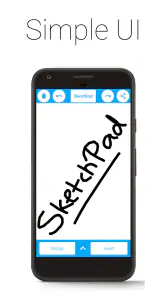
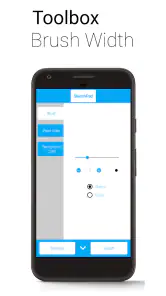
Now, let's talk about the interface. Honestly, it's as intuitive as they come. You don't need to be a tech wizard to navigate your way around this app. The tools are neatly organized, making it a breeze to switch between brushes, colors, and other options. Plus, the app's design ensures that it runs smoothly, without those annoying lags that can disrupt your creative flow.
Tools and Features Galore
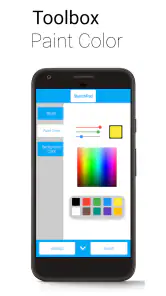
SketchPad is loaded with a variety of brushes and effects that can make your doodles pop. From traditional pencil and ink to digital brushes that add texture, there's no shortage of ways to express yourself. And let me tell you, the color palette is expansive. You can mix and match colors, bringing your artwork to life with vibrant hues.
Besides, the app supports layer-based editing, which is a game-changer for anyone serious about their digital art. It offers the flexibility to work on different elements without messing up your base sketch.
Layers are most useful when you plan a change rather than when you simply want a second place to draw. I’d keep a rough layout separate from any cleaner marks, so experimentation doesn’t force me to redraw the starting idea. For a tiny phone sketch, that extra organization may be unnecessary; for a character pose or a poster thumbnail, it can make revisions less stressful. I would still check how layers behave in a quick test before relying on them for a piece with lots of detail.
There’s a useful trade-off here: layers can protect a rough foundation from later edits, but they also add a decision to a process that may be appealing precisely because it is informal. I’d use them when I expect to move or revise a distinct part, not automatically for every doodle. If all you need is a visual reminder, a single simple drawing is easier to manage; if the sketch is becoming a draft, separating its parts can make experimentation less risky.
Choosing it over a more elaborate drawing app
Compared with a feature-heavy illustration app, a small sketching tool makes more sense when speed matters more than a long production workflow. I’d reach for SketchPad to plan a room arrangement, jot down a visual idea during a break, or let a child make a casual drawing. For precise linework, extensive revisions, or a project that must move between devices and software, I’d choose an option whose export and file-handling process I already trust. The trade-off is straightforward: less commitment at the start, but less reason to assume it will cover every later stage of a finished artwork.
A useful everyday routine is to sketch an idea while waiting for a friend, save it before putting the phone away, and review it later on a larger screen if the concept deserves more work. That turns the app into a capture pad rather than the only home for an important project. I’d also keep drawings visually simple when working with a finger: broad shapes and clear contrast are easier to manage on a small display than tiny details that need repeated correction.
If you’re wondering whether it suits a beginner, I think it can be a low-pressure place to try drawing without first learning a complex interface. If you’re an experienced artist, it may still be handy for thumbnails and spontaneous studies, but I wouldn’t choose it as my main workspace without checking that its file workflow fits my needs. Someone looking for polished exports, careful project organization, or a dependable cross-device process should compare alternatives before settling in.
For a beginner, the best way to judge it is not to compare a first attempt with polished digital illustrations. Try a few basic forms, then see whether the controls let you communicate an idea without fighting the phone. A more advanced artist can make a different test: create a small thumbnail, revise one part, and check whether the result can move into the next stage of their process. If that handoff is central to your work, an established illustration app with a workflow you already know may be the safer pick.
SketchPad was released on January 21, 2018, and its 3.4 average from around 2,100 ratings suggests it won’t please everyone. I’d read that as a reason to test it with a modest task, not as a verdict on whether it will work for you. Its Everyone age rating also makes casual family doodling a reasonable use, while adults should still supervise device use in the usual way. The key question is simple: does it make the first sketch easier, without getting in the way of what you want to draw?
Sharing and Saving Made Easy
Once you've created your masterpiece, SketchPad makes it super simple to share your work with friends or on social media. You can save your doodle in various formats, ensuring it's easy to upload or print. This feature is especially handy for those who love showcasing their art to the world.
And let’s not forget about the cloud storage option. This ensures that your artwork is safe and sound, even if you switch devices. It's like having an art gallery in the cloud!
For anything I care about keeping, I’d verify the actual result rather than assume a save or cloud copy worked: reopen the drawing if possible, or check that the shared file appears where I expect it. That’s particularly helpful before changing devices. If your goal is simply a disposable doodle, this extra check may feel unnecessary; for a sketch you plan to revisit, it’s a sensible safeguard.
When a drawing does not appear where I expect, I’d first distinguish between a problem with the sketch itself and a problem with the way it was saved or shared. Check the app again before making another version, then look in the place you chose to send or store the result. Repeating the same action in a hurry can leave several confusing copies, so a calm check is more useful than tapping through every available option.
My practical recommendation is to try one small drawing first, then decide whether the controls and the way you save or share work for you. It’s best suited to quick ideas and relaxed sketching, not to anyone who needs a fully dependable professional pipeline from the first stroke to final delivery. If that distinction matches what you want, it can be a convenient little drawing space to keep close at hand.
In conclusion, SketchPad - Doodle On The Go is more than just an app; it's a gateway to unleashing your inner artist, anytime and anywhere. Whether you're doodling for fun or working on a serious project, this app is a must-have for anyone who loves to draw. So, next time inspiration strikes, you know exactly where to turn!
SketchPad - Doodle On The Go Frequently Asked Questions
Is SketchPad - Doodle On The Go free to download, and who is it for?
SketchPad - Doodle On The Go is a free Art & Design app from Kaffeine Software, intended for sketching, doodling, or simply scribbling while you are on the go. Its content rating is Everyone, so it is presented as suitable for a general audience. The app has been available since January 21, 2018, and its current version is 2.2.3.
What platforms is SketchPad - Doodle On The Go available on?
SketchPad - Doodle On The Go is available for both Android and iOS devices, making it accessible to a wide range of users. Whether you own a smartphone or a tablet, you can download this app from the Google Play Store or the Apple App Store and start doodling anytime, anywhere.
Does SketchPad - Doodle On The Go offer offline functionality?
Yes, SketchPad - Doodle On The Go offers offline functionality, allowing users to create and save their doodles without an active internet connection. This feature is particularly useful for those who wish to sketch on the go, in places without Wi-Fi or cellular data access.
Are there any in-app purchases or advertisements in SketchPad - Doodle On The Go?
SketchPad - Doodle On The Go is a free app that includes optional in-app purchases for additional features and tools. While the free version contains advertisements, users can choose to make a purchase to remove ads, enhancing their drawing experience by using the app without interruptions.
What tools and features are available in SketchPad - Doodle On The Go?
SketchPad - Doodle On The Go boasts a variety of tools and features designed for both novice and experienced artists. Users can enjoy a wide range of brushes, colors, and textures, along with layers and undo/redo options. The app also provides easy sharing options to showcase your work on social media.
Pros
- User-friendly interface for quick doodling.
- Wide range of colors and brush styles.
- Offline functionality enhances portability.
- Supports high-resolution exports.
- Real-time collaboration feature.
Cons
- Limited advanced drawing tools.
- Occasional lag on older devices.
- In-app ads can be intrusive.
- Lacks cloud storage integration.
- No text tool for annotations.
- Category
- Art & Design
- Version
- 2.2.3











