

SingUp: AI Music Generator
- 901.00
- 3.5
- Installs
- 100.00K
- Price
- Free

Screenshots
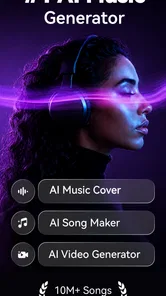
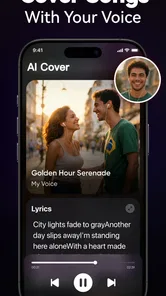
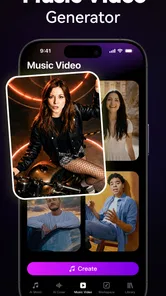
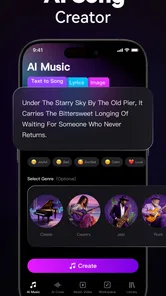
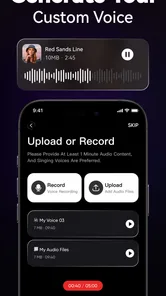
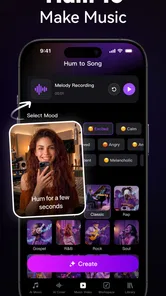
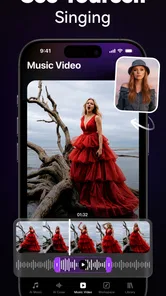
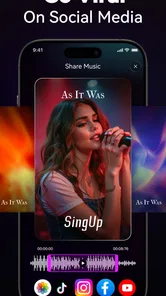
Analysis by Reviewed
I approached SingUp: AI Music Generator as a practical music-making app rather than a replacement for a full recording studio. Its main appeal is clear: it brings singing, cover-song creation, and music-video ideas into one mobile experience, so you can experiment without first learning a complicated desktop program. After spending time with it, my view is that SingUp works best as a playful creative tool for quick vocal projects, rough concepts, and shareable experiments. It is less convincing for anyone who expects studio-level control, detailed editing, or a completely free music-production workflow.
That distinction matters because the app sits between several familiar categories. It is not simply a music player, and it is not only a karaoke utility. It is a Music & Audio app from TALENT ME TECH. that focuses on the space between singing along and producing something you can call your own. The free download makes it easy to try, while optional purchases priced from $4.99 to $39.99 per item mean that regular users should think about how much they actually want to create before committing money.
What the experience feels like in everyday use
The easiest way to understand SingUp is to imagine a casual evening when you have a song idea in your head but no desire to open a computer, connect equipment, or arrange a complicated project. You might choose a familiar song, record your voice, and explore how the result feels as a cover. On another day, you may want to turn a short vocal idea into a more complete music presentation. That is where the combination of voice, music, and video gives the app more character than a basic karaoke program.
I found the mobile-first approach appealing because it lowers the barrier to starting. You can test an idea while it is still fresh instead of postponing it until you have time for a full recording session. That immediacy is especially useful for beginners who are more interested in hearing a result than understanding every technical step behind it. It also suits singers who want to compare different takes or create something informal for friends.
The store summary describes the experience through three simple ideas: cover songs, voice, and music video. Those are not separate reasons to install the app; they work together as a compact creative loop. A cover gives you a starting point, your voice supplies the personal element, and the visual side makes the result feel more finished than an isolated audio clip. The strongest part of SingUp is how quickly it turns a casual vocal attempt into a small creative project.
Recording is more useful when you treat it as a sketchbook
My advice is to approach the first few sessions as experimentation rather than performance. Record a short section, listen back, and pay attention to timing, pitch, and the overall mood before trying to make a polished version. This mindset makes the app less intimidating and helps you discover whether its style suits your voice. It also prevents a common frustration with mobile music apps: spending too long preparing a project before learning whether the final result is enjoyable.
For a singer, one useful workflow is to record the same passage in contrasting ways. Try a restrained take first, then a more energetic version, and compare the emotional effect. Even when the app does not replace detailed vocal production, this process can help you decide which interpretation is worth developing elsewhere. In that sense, SingUp can serve as a portable idea catcher, not just a place to make a finished post.
More From Our News Desk

 Gmail
GmailGmail in a Busy Inbox: Who Benefits Most?
From first account to crowded workday, Gmail earns its place through dependable search and flexible sorting—but its best fit depends on how much inbox maintenance you can tolerate.

 Prime Video
Switching to Prime Video: What Changes in Your Viewing Routine
Prime Video can make a compelling second home for streaming, but switching means learning a different catalog, rental layer, and route from browsing to playback.

 Universal TV Remote Control
Universal TV Remote Control Works Best as a Reliable Backup
A phone remote earns its place through quick setup and reliable habits. Here is how to get more from Universal TV Remote Control—and where its limits show.

 Weather - By Xiaomi
Weather by Xiaomi Review: Clear at a Glance, Less Clear Up Close
Xiaomi’s weather app makes everyday forecasts quick to scan, but its calm surface can leave useful details and recovery paths harder to find than they should be.

 X
XX Under Pressure: Can It Recover When Posting Goes Wrong?
A resilience-focused review of X, examining setup, mistaken posts, interruptions, weak connections, and the gaps that matter when recovery needs to be dependable.

 Clash of Clans
Clash of Clans Is Won Between the Battles
Its raids are quick; its community is a long-term project of coordination, teaching, rivalry, and shared responsibility—with all the friction that entails.
Latest News



Another practical habit is to use headphones while recording whenever possible. This helps you hear the backing material and your own voice more clearly, reducing the temptation to sing too loudly or drift away from the rhythm. It also makes it easier to judge whether a problem comes from your performance or from the way the phone is capturing sound. The app may be approachable, but your recording environment still affects the result.
Where the music-video angle adds genuine value
Many singing apps stop once the audio has been recorded. SingUp is more interesting when you want the performance to have a visual identity as well. A music video does not need to be elaborate to be useful. For a short cover, a themed visual presentation can make the result feel intentional, especially when you are sharing it socially or keeping it as a personal creative experiment.
I see this as a strong fit for people who think in terms of performance rather than audio alone. A singer may care about the mood, presentation, and sense of occasion as much as technical sound quality. Someone preparing a casual birthday message, a playful challenge for friends, or a quick demonstration of a new vocal idea may appreciate having the visual element close at hand instead of moving between several unrelated apps.
There is also a creative trade-off here. Convenience is the reason to use an all-in-one app, but a single app rarely gives the same depth as dedicated tools for every stage. If your priority is precise video editing, layered sound design, or detailed control over a final production, you may eventually prefer separate audio and video applications. SingUp makes the journey shorter, but it does not remove the difference between quick creation and professional post-production.
The practical limits I noticed
The biggest limitation is not that SingUp is difficult to understand; it is that its convenience can create expectations that a mobile app cannot always meet. Users who want fine control over every vocal layer, exact mixing decisions, or a carefully engineered master may find the experience restrictive. The app is more naturally suited to accessible creation than to technical perfection.
That matters most for experienced musicians. If you already work comfortably with a digital audio workstation, a dedicated vocal recorder may give you better control over takes, effects, arrangement, and export decisions. In that situation, SingUp could still be useful for quick inspiration, but it is unlikely to become the center of your workflow. I would not install it expecting it to replace a serious studio setup.
The purchase structure is another point to consider. SingUp is free, which is helpful for testing the basic appeal, but in-app purchases ranging from $4.99 to $39.99 per item create a meaningful difference between casual exploration and sustained use. Before buying anything, I would spend enough time with the free experience to decide whether you will record regularly or only open the app occasionally. A person who sings once every few weeks may get more value from treating it as an occasional creative toy than from paying for features they rarely use.
I also recommend checking your expectations around the word “AI.” It can suggest that an app will automatically solve every musical problem, but a generated or assisted result still depends on the source performance, the song choice, and the decisions you make. SingUp can help you move from an idea to a presentable experiment, yet it does not remove the need to sing in time, choose a suitable key or style, and listen critically. The best results come from using its assistance as part of the process rather than expecting it to rescue an unprepared recording.
Three workflows that make more sense than simply pressing record
First, use the app as a rehearsal mirror. Choose a section that gives you trouble, record it several times, and compare the takes immediately. Listen for where your breathing becomes rushed or where your phrasing loses energy. This is more useful than recording an entire song repeatedly because it focuses your attention on one musical problem at a time.
Second, use it as a concept tester before investing in a larger production. If you are writing lyrics or imagining a cover arrangement, create a quick version and ask whether the idea works emotionally. A rough mobile result can reveal that a chorus feels too low, a verse needs more space, or the chosen style does not match your voice. Discovering that early can save time in a more demanding recording setup.
Third, separate creation from sharing. Make a private test first, listen back later, and only then decide whether the music-video treatment is worth completing. This two-stage workflow reduces the pressure to perform perfectly on the first attempt. It also makes the visual tools more purposeful: instead of adding decoration automatically, you are using them when the underlying performance already communicates something.
These approaches are more valuable than treating SingUp as a one-tap novelty. They turn the app into a lightweight practice and ideation tool. The trade-off is that you must supply the judgement. The application can make starting easier, but it cannot decide which take sounds most convincing or whether a visual presentation supports the song.
Who should install it, and who should skip it?
I would recommend SingUp to beginners who want a friendly way to explore singing and cover creation without assembling several tools. It is also a good match for casual performers, social-media-minded creators, and people who enjoy testing musical ideas on a phone. If you like the feeling of turning a small vocal moment into something more presentable, the app’s combined approach should make sense.
It may also suit a singer who is nervous about recording. Starting with a short, informal project can be less stressful than opening professional software full of unfamiliar controls. The app’s approachable format gives you room to experiment before you decide whether you want to learn more advanced production techniques.
I would be more cautious if your main goal is detailed audio engineering. Producers who need extensive track management, exact effect chains, or deep mixing control should look toward a dedicated workstation. Likewise, if you only want a simple karaoke session and have no interest in shaping a vocal idea or presenting it visually, a more focused karaoke app may be faster and less distracting.
Parents and younger users may appreciate that the content rating is Everyone, but I would still treat any music-sharing activity as something that deserves ordinary supervision and good judgement. The age label makes the app broadly accessible; it does not automatically make every public sharing decision appropriate for every child.
Compatibility, adoption, and what the numbers suggest
SingUp was released on March 26, 2024, and version 2.19.1 requires Android 8.0 or later. That makes checking your device’s operating-system version a sensible first step before trying it. The app has passed the early-experiment stage in terms of public interest, with over 100 thousand installs, around 3.1 thousand ratings, and an average rating of 3.5. I read that as moderate evidence that people are trying it, while also suggesting that the experience will not satisfy everyone equally.
The review volume is also substantial enough to remind me that this is not an entirely untested concept. At the same time, a 3.5 average is not a reason to assume universal polish. It points toward a product with a clear audience but some friction, whether that comes from expectations, creative limitations, device differences, or the purchase model. I would use the free entry point to form my own opinion rather than relying on the rating alone.
Because this is a mobile music tool, device conditions matter more than they might with a reading or utility app. Microphone quality, headphone use, available storage, and a quiet room can all influence how enjoyable recording feels. If your phone has a weak microphone or you usually record in a noisy environment, the app may seem less impressive than it does under better conditions. That is not a reason to dismiss it, but it is a reason to judge the whole recording setup rather than the app in isolation.
My final judgement
SingUp succeeds when it keeps music-making immediate. I like that it connects a vocal performance with the possibility of a cover and a music-video presentation, because that combination gives casual singers a clear reason to keep experimenting. It is approachable enough for someone who has never used serious production software, yet flexible enough to act as a quick sketchpad for a more experienced vocalist.
Its weaknesses are equally clear. The free price makes trying it easy, but the in-app purchase range means frequent users should decide carefully how much the experience is worth to them. The app’s accessible workflow is a strength for beginners and a limitation for producers who expect deep control. Its AI-oriented identity may attract people looking for effortless results, but the quality of the outcome still depends on your performance, musical choices, and willingness to review your own work.
My recommendation is therefore specific: install SingUp if you want a low-pressure way to sing, test cover ideas, and turn short performances into more complete mobile creations. Give it a fair trial with headphones, a quiet space, and a small recording goal rather than attempting a perfect full song immediately. If you need professional mixing, exact editing, or a simple karaoke-only experience, choose a more specialized alternative instead.
For the right person, SingUp is best understood as a creative launchpad, not a complete recording studio. That is a modest promise, but it is an honest one. I would recommend it to curious singers and casual creators who value speed and experimentation, while advising serious producers to keep their main tools elsewhere.
SingUp: AI Music Generator Frequently Asked Questions
Does SingUp: AI Music Generator offer cover-song or music-video features?
SingUp’s store summary highlights cover songs, voice, and music video features, alongside its focus on AI music creation. These options may appeal if you want to explore different ways of presenting a song rather than only generating an audio track. Check the available tools and their requirements in the app before starting a project, as the options you can use may depend on your chosen workflow.
What devices can run SingUp: AI Music Generator?
SingUp is an Android app that requires Android 8.0 or later. Before downloading, check your device’s operating system version and make sure you have enough space for an app in the Music & Audio category. The app is developed by TALENT ME TECH. Its age rating is Everyone, making it broadly suitable from a content-rating perspective, though younger users should still follow their family’s usual guidance about app use.
What is SingUp: AI Music Generator?
SingUp: AI Music Generator is an app designed to help users create original music with artificial intelligence. Depending on the available tools, you can generate songs from text prompts, select a musical style, experiment with vocals or instrumental arrangements, and turn simple ideas into shareable tracks. It is aimed at both beginners and creators who want a quick way to explore musical concepts.
How does SingUp create songs with artificial intelligence?
The app generally works by using your instructions, lyrics, genre choices, mood selections, or other creative settings to produce a musical composition. After entering an idea, SingUp processes the request and generates an arrangement that may include melodies, rhythms, instrumentation, and vocals. Results can vary, so creating several versions may be necessary before finding a track that matches your expectations.
Is SingUp: AI Music Generator free to use?
SingUp is free to download, with in-app purchases ranging from $4.99 to $39.99 per item. It may offer free access to some features, while other options can require payment. Before making a purchase, review the pricing and terms shown in the app so you understand what is included and whether a purchase suits the way you plan to use the service.
Pros
- Generates original songs quickly from simple text prompts.
- Offers multiple genres and moods for creative experimentation.
- Useful for creating background music and short audio ideas.
- Easy interface makes music generation accessible to beginners.
- Can help overcome writer’s block during songwriting sessions.
Cons
- Generated vocals may sound unnatural or lack emotional expression.
- Results can vary widely even when using similar prompts.
- Advanced editing and arrangement controls may feel limited.
- Some features or song exports may require a paid subscription.
- Generated tracks may need manual mixing before professional use.












