

Silly Smile Wallpaper & Sound
- 110.00
- 4.8
- Installs
- 5.00M
- Price
- Free

Screenshots

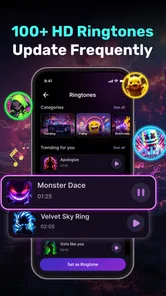
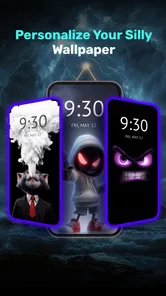
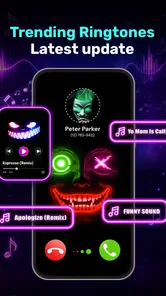
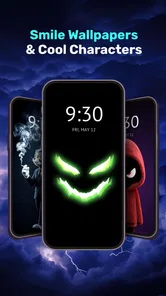

Analysis by Reviewed
The appeal of a silly smiling face on a phone is easy to understand: it can make an ordinary screen feel less serious without asking you to change how you use the device. Silly Smile Wallpaper & Sound is a free personalization app from Daily Tool Labs that pairs playful live-wallpaper styling with custom ringtones. My first impression is that it works best as a small mood lift, not as a deep customization toolkit. Whether it earns a lasting spot depends on how much you enjoy seeing the same cheerful visual every time you unlock your phone.
That narrow focus is useful when I know exactly what kind of change I want: a bit of silliness, not a weekend project. It also makes the decision easier. I would approach it as a single, strong visual choice rather than expect it to supply a rotating collection of moods or solve every part of a phone’s appearance.
From the first-week novelty to everyday use
I find the first few days with a playful wallpaper are the easiest part: a quick glance at the screen can make a familiar phone feel less routine. The more useful test comes after that first impression, when the animation and ringtone have to fit ordinary habits rather than just look fun while browsing. I’d pay attention to whether each one feels welcome on its own, which is where the everyday experience begins.
A quick way to change the phone’s mood
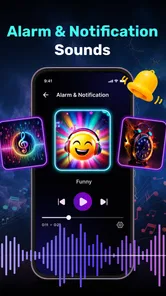
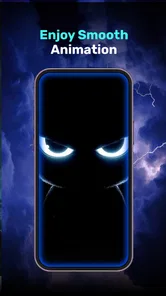
During the first few days, this kind of app has an obvious advantage over a static wallpaper: the screen feels more animated and personal. A silly smile is deliberately uncomplicated, so it suits someone who wants a lighthearted look rather than a carefully coordinated theme. You can also use a custom ringtone to extend that playful feel beyond the home screen. That pairing gives the app a clearer identity than a wallpaper picker that only changes one image.
The best everyday use is probably a phone that feels too plain or too formal. For example, if I were setting up a spare device for a family member who enjoys cheerful visuals, I would consider a smile-themed live wallpaper as an easy way to make it feel more welcoming. It could also suit someone who likes changing their lock-screen mood now and then but does not want to spend an evening arranging icons, widgets, and matching colors.
There is a practical trade-off, though. Live wallpaper is something you notice in brief moments, not a feature you actively use throughout the day. The ringtone is more noticeable when it plays, but it is also easier to tire of a novelty sound after hearing it repeatedly. I would choose a sound that remains pleasant at ordinary call volume rather than one that is funny only the first time.
The app is rated for Everyone, which makes its playful premise approachable for a broad audience. It is available for free, while optional in-app purchases range from under a dollar to just under forty dollars per item. I would treat the free experience as the sensible place to start: see whether the look and sound fit your routine before considering any purchase.
More From Our News Desk

 Gmail
GmailGmail in a Busy Inbox: Who Benefits Most?
From first account to crowded workday, Gmail earns its place through dependable search and flexible sorting—but its best fit depends on how much inbox maintenance you can tolerate.

 Prime Video
Switching to Prime Video: What Changes in Your Viewing Routine
Prime Video can make a compelling second home for streaming, but switching means learning a different catalog, rental layer, and route from browsing to playback.

 Universal TV Remote Control
Universal TV Remote Control Works Best as a Reliable Backup
A phone remote earns its place through quick setup and reliable habits. Here is how to get more from Universal TV Remote Control—and where its limits show.

 Weather - By Xiaomi
Weather by Xiaomi Review: Clear at a Glance, Less Clear Up Close
Xiaomi’s weather app makes everyday forecasts quick to scan, but its calm surface can leave useful details and recovery paths harder to find than they should be.

 X
XX Under Pressure: Can It Recover When Posting Goes Wrong?
A resilience-focused review of X, examining setup, mistaken posts, interruptions, weak connections, and the gaps that matter when recovery needs to be dependable.

 Clash of Clans
Clash of Clans Is Won Between the Battles
Its raids are quick; its community is a long-term project of coordination, teaching, rivalry, and shared responsibility—with all the friction that entails.
Latest News



Who is likely to enjoy it
I can see this working well for people who enjoy expressive phone themes, want an uncomplicated visual change, or like having a ringtone with more personality than the default sound. It may also be a fun choice for a secondary phone where battery life and a restrained appearance matter less than a bit of character. The app has attracted over five million installs and holds a 4.8 average from around sixteen thousand ratings, suggesting that its straightforward idea has found an audience.
On the other hand, I would skip it if you prefer a clean, static home screen, need a highly coordinated theme, or find animated backgrounds distracting. Someone looking for a broad wallpaper library, detailed editing tools, or a complete icon-and-widget makeover will probably be happier with a general customization app. This one’s appeal is its specific silly-smile personality, not a promise to redesign every part of the phone.
It is also worth thinking about who shares the device or sees its screen. A playful look can be a nice personal touch on a phone used mostly at home, but it may not match a work setting where you want a quieter appearance. That does not make the style unsuitable for adults; it simply means the right choice depends on where and how you use your phone, not just whether the smile makes you laugh once.
Does it keep earning space after the novelty?
For me, lasting value depends less on novelty than on whether the app still suits the way I use my phone a few weeks later. I’d treat the wallpaper and sound as separate choices, and keep only what remains enjoyable in real settings, such as a busy day or a quiet room. That makes it easier to judge the ongoing upkeep and decide whether this focused style deserves a permanent place.
Month-to-month value comes down to fit
After the first week, the important question is not whether the animation is amusing once. It is whether it still feels pleasant after repeated unlocks and whether the ringtone remains useful rather than becoming an inside joke that has outlived itself. For someone who enjoys a cheerful screen every day, that small recurring lift can be enough. For someone who changes wallpapers only when a new season or major event arrives, the effect may fade quickly.
A useful way to judge it is to separate the two parts of the experience. Keep the live wallpaper if it makes the screen feel brighter without pulling your attention away. Keep the ringtone only if you can recognize it easily and do not mind hearing it in public. There is no need to treat the wallpaper and sound as an all-or-nothing package; choosing the part that suits your habits is a more realistic way to get ongoing value from a personalization app.
For a realistic trial, I would change the wallpaper first and leave my familiar ringtone in place for a few days. Then I would decide whether the visual still feels welcome during ordinary tasks, rather than judging it while browsing the app. If it passes that test, I would try a sound separately and pay attention to how it feels during an actual call. This staged approach helps isolate what is working and avoids making two novelty choices at once.
Compared with the usual alternatives, a static wallpaper is simpler and avoids animation, while a general wallpaper app is usually the better direction for people who want lots of visual styles to browse. A ringtone-only app may be a better fit if changing call sounds is the main goal. Silly Smile Wallpaper & Sound makes most sense when you specifically want both a playful screen treatment and a matching sound option, rather than a universal customization library.
Small maintenance choices make a difference
Live wallpapers are not entirely set-and-forget in the way a still image is. If you change your look often, you will need to decide whether the animated smile still suits the new theme or clashes with it. My practical suggestion is to try it on a home screen that is not crowded with visually busy icons. A simple layout gives the animation room to read as a cheerful accent instead of another competing element.
It is also worth checking your phone’s own wallpaper and sound settings after making changes. That helps you understand which choice is currently active and avoids the common annoyance of expecting a new look or ringtone when the phone is still using an older selection. I would make one change at a time, live with it for a day, and then decide whether to adjust the other. That makes it easier to tell whether the wallpaper, the sound, or the combination is what you actually enjoy.
Battery and performance are reasonable things to consider with any live wallpaper. I would not assume this particular app causes a problem, but if you notice a change in battery life or responsiveness after applying an animated background, switch back to a static image and compare your normal use. That simple test is more useful than leaving a feature enabled out of habit when you are not sure it suits your device.
The current version is 1.7.13, and the minimum operating-system requirement is Android 8.0. If your phone runs an older system, compatibility is a key reason to look elsewhere. If it meets the requirement, the decision is less about technical complexity and more about whether an animated smile belongs on a screen you see so often.
For anyone weighing the optional purchases, I would first work out whether the basic combination has become part of your routine. A one-off screen refresh is not a strong reason to pay for more; repeated enjoyment is a better signal. Since the available purchase amounts vary, I would check the individual in-app options carefully and avoid assuming that any particular purchase is needed to enjoy the app.
Where repetition can wear thin
The very simplicity that makes the concept easy to understand can also limit its staying power. A smile-themed look has a strong, specific tone; it is not a neutral background that blends into every mood or setting. If you use your phone for work, prefer understated visuals, or regularly switch between different aesthetic themes, the same playful style may start to feel out of place.
Sound repetition is another likely source of fatigue. A ringtone is heard in moments when you may be busy, in a quiet room, or around other people, so a sound that seems amusing while browsing can feel less appropriate in daily life. Before settling on one, think about where your phone usually rings and whether you need a tone that is easy to distinguish without being conspicuous. A familiar, subtle ringtone may serve those situations better.
There is also a difference between a quick novelty and a habit. If you enjoy changing your phone’s appearance as a small personal ritual, revisiting the wallpaper and sound can be part of the fun. If you prefer to set a theme once and forget about it, you may find that the app’s specific look has limited recurring value after the initial change. Neither reaction is a flaw; it simply means the app suits people who genuinely like this style more than people searching for endless variety.
A useful sign that the novelty has worn off is not simply that you stop noticing the animation; it is whether you feel relief when you switch it off. If the phone seems calmer or easier to read with a static background, that is a reasonable reason to move on. Personalization should make the device feel more comfortable to use, not create a small obligation to keep defending a choice you no longer enjoy.
My long-term verdict
I would recommend Silly Smile Wallpaper & Sound to someone who wants a deliberately cheerful phone and is happy with a focused, playful identity. It is most convincing as a low-effort way to make a device feel less generic, especially if a matching ringtone sounds appealing too. The free starting point makes it easy to see whether that mood works for you before spending anything.
I would not choose it as my main customization tool if I wanted broad control over a phone’s appearance, a subdued design, or a large range of styles to rotate through. I would also avoid keeping the live wallpaper simply because it was amusing on installation day. Give it a week of normal use, notice whether you still enjoy seeing it, and keep only the parts that make your phone feel better rather than busier.
Overall, this is a focused personalization app whose long-term value rests on a simple question: do you still like the silly smile after it becomes part of the daily background? If the answer is yes, its lighthearted look and custom ringtone can earn a place on your phone. If the charm fades, a static wallpaper or a more flexible theme app will probably serve you better. That makes Silly Smile Wallpaper & Sound an easy recommendation for fans of cheerful customization, but not a must-have for everyone.
Silly Smile Wallpaper & Sound Frequently Asked Questions
What is Silly Smile Wallpaper & Sound?
Silly Smile Wallpaper & Sound is a personalization app centered on playful smile-themed images and sound effects. Depending on the version available on your device, it may let you browse wallpapers, preview sounds, and apply selected items to your phone. Check the app’s screenshots and description before downloading, since the exact collection and features can change with updates or vary by region.
Can I use the wallpapers on my home screen and lock screen?
Wallpaper apps commonly offer options to set an image as the home screen background, the lock screen background, or both, but the available choices depend on the app version and your phone’s operating system. Preview an image and check the system’s wallpaper settings before applying it. Some devices may crop or reposition pictures differently to fit their screen.
Does Silly Smile Wallpaper & Sound include sound effects or ringtones?
The app’s name suggests that it combines smile-themed wallpapers with audio, but the number and type of sounds, as well as options to use them as ringtones or notification alerts, may vary. Review the listing and in-app options to confirm what is included on your device. Also check whether audio can be previewed and whether extra content requires a purchase.
Is Silly Smile Wallpaper & Sound free, and does it contain ads or in-app purchases?
The cost and monetization can differ by platform, country, and release version. Before installing, look at the app store listing for its price, advertising disclosures, and any in-app purchases or subscriptions. If the app is free, ads may appear while browsing or selecting content; avoid tapping purchase prompts unless you understand the charge and have confirmed it is something you want.
What permissions or privacy details should I check before downloading?
Review the app’s store-page permissions and privacy information before installation, especially if it requests access that seems unrelated to choosing wallpapers or playing audio. Requirements can differ across Android and iOS, and may change after updates. You can also check the developer’s privacy policy to learn what information may be collected, how it is used, and whether data is shared with third parties.
Pros
- A playful choice for users who enjoy quirky
- humorous phone themes.
- Wallpaper and sound options offer more than a purely visual customization.
- Can add a distinctive look and feel to a compatible device.
- Lighthearted designs may appeal to kids and fans of silly characters.
- Easy way to refresh a phone’s appearance without changing its launcher.
Cons
- The goofy style may not suit users who prefer minimalist wallpapers.
- Available designs and sounds may feel limited after repeated use.
- Some wallpapers may crop differently across screen sizes and aspect ratios.
- Sound effects could be distracting if enabled in public or quiet settings.
- Check permissions and ads before downloading
- as these can vary by version.











