

Sibley Birds 2nd Edition
- 84.00
- 4.3
- Installs
- 10.00K
- Price
- $19.99
Screenshots
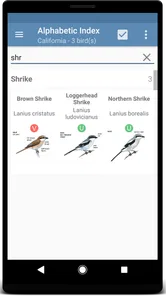
Analysis by Reviewed
I approached Sibley Birds 2nd Edition as a field reference rather than a casual bird-themed app. That distinction matters. Its purpose is to help identify North American birds from a photograph or a call, but the real value comes from slowing down the identification process and giving you a dependable reference to consult when a quick guess is not enough. I found it most useful when I treated it as a companion for observation, not as an automatic answer machine.
The app sits in the Books & Reference category and is developed by mydigitalearth.com. It costs $19.99, carries an Everyone age rating, and has reached more than ten thousand installs. Its average rating is 4.3 from roughly two hundred ratings, with around eighty reviews. Those figures suggest a fairly focused audience: this is not trying to be a mass-market social app, and it makes more sense for someone who genuinely wants a North American bird guide on a phone or tablet.
Where identification usually gets stuck
The first difficulty is not necessarily a technical failure. Bird identification is simply uncertain when the view is brief, the light is poor, or the sound is mixed with traffic and wind. A photograph may show only a silhouette, while a call can be distorted by distance. In those moments, an app can narrow the possibilities, but it cannot replace attention to shape, behavior, habitat, season, and sound quality.
I would not open this guide expecting a single tap to settle every mystery. The strongest experience comes from comparing several clues. If a bird is perched high in a tree, I might begin with the picture, then check the illustration and listen to the relevant call before deciding whether the match feels convincing. That extra step is useful because it helps prevent the common mistake of accepting the first bird that looks vaguely similar.
Another point of friction is choosing the right starting point. A person who has never used a field guide may instinctively search by color alone. That can be misleading: many species share brown, gray, black, or white plumage, and lighting changes color dramatically. I get better results by starting with the bird’s overall size and shape, then checking the most distinctive markings. A bright wing patch, eye stripe, crest, tail pattern, or unusual bill can be more informative than the dominant body color.
Sound identification has its own traps. A recording made beside a busy road may contain several overlapping calls, and a bird can sound different when alarmed, communicating with a mate, or calling from a hidden position. If the result seems surprising, I replay the sound and compare it with what I actually observed. I also avoid treating a short, unclear recording as proof. The app is most helpful when the audio is one clue among several rather than the only evidence.
Why the familiar alternatives can be less useful
A general web search is convenient, but it often produces a mixture of photographs, regional pages, videos, and unrelated results. That can be helpful for exploration, yet it is not always efficient when I am standing outside with a bird in view. A broad identification service may also encourage a fast answer without showing me why the answer fits.
More From Our News Desk

 Gmail
GmailGmail in a Busy Inbox: Who Benefits Most?
From first account to crowded workday, Gmail earns its place through dependable search and flexible sorting—but its best fit depends on how much inbox maintenance you can tolerate.

 Prime Video
Switching to Prime Video: What Changes in Your Viewing Routine
Prime Video can make a compelling second home for streaming, but switching means learning a different catalog, rental layer, and route from browsing to playback.

 Universal TV Remote Control
Universal TV Remote Control Works Best as a Reliable Backup
A phone remote earns its place through quick setup and reliable habits. Here is how to get more from Universal TV Remote Control—and where its limits show.

 Weather - By Xiaomi
Weather by Xiaomi Review: Clear at a Glance, Less Clear Up Close
Xiaomi’s weather app makes everyday forecasts quick to scan, but its calm surface can leave useful details and recovery paths harder to find than they should be.

 X
XX Under Pressure: Can It Recover When Posting Goes Wrong?
A resilience-focused review of X, examining setup, mistaken posts, interruptions, weak connections, and the gaps that matter when recovery needs to be dependable.

 Clash of Clans
Clash of Clans Is Won Between the Battles
Its raids are quick; its community is a long-term project of coordination, teaching, rivalry, and shared responsibility—with all the friction that entails.
Latest News



This guide feels more like a dedicated reference shelf compressed into a mobile format. That makes it less spontaneous than a purely automated recognition tool, but more useful for learning the visual and acoustic differences between similar birds. If your priority is instant recognition from one blurry photograph, a specialized camera-first service may suit you better. If you want to inspect a candidate carefully and build your own judgment, this app has a stronger reason to exist.
Setup checks before heading outdoors
The best preparation is simple: install the current version, open the guide while you have a reliable connection, and make sure you understand how you want to use it before you are in the middle of a sighting. The current version is 1.1.15, and it supports devices running Android 5.0 or later. I would check compatibility before paying, especially if you are using an older phone or tablet.
I also recommend testing the app indoors with a few familiar bird photographs. This is not only a technical check. It gives you a chance to learn how the reference presents information and how quickly you can move between image-based and sound-based investigation. A short practice session is far less frustrating than trying to learn the interface while a bird is about to fly away.
Storage and battery planning are worth considering for outdoor use. A long walk with the screen bright and audio active can drain a phone faster than expected, regardless of which bird guide is installed. I carry a charged device and avoid leaving unrelated apps running in the background. If the app seems slow during a sighting, I first reduce the workload on the phone rather than assuming the identification tool itself is broken.
There is also a practical payment question. At $19.99, this is a deliberate purchase, not an app I would install casually just to try one identification. I think the price makes more sense for regular birdwatching, study, teaching, or travel across North America. Someone who only wants to identify an occasional bird in the garden may be happier starting with a free reference or a public birding resource.
The Everyone rating makes it approachable for families and younger learners, but age suitability is not the same as ease of use. A child may enjoy matching a picture, while a beginner could still need guidance with similar species. I would use it with a young birder by asking questions such as “What did you notice first?” and “Which marking rules out the closest alternative?” That turns the app into a learning exercise instead of a guessing button.
A setup habit that improves later accuracy
Before leaving home, I create a mental checklist of what I need to observe: approximate size, body shape, bill, tail, wing markings, movement, location, and sound. I do not need to write down every detail, but remembering these categories keeps me from focusing only on color. When I later consult the guide, I have better evidence to compare against its illustrations and audio material.
For photography, I take more than one image when possible. A single frame may hide the bill or wings, while a second image from a slightly different angle can reveal the feature that matters. I do not zoom so aggressively that the image becomes a block of pixels. A clear, moderately framed photograph is often more useful than a heavily enlarged one.
For sound, I try to record a few seconds before and after the main call rather than tapping the record button too late. I keep the phone pointed toward the source when I can, but I do not chase the bird noisily. The goal is to preserve a usable clue without disturbing the observation. This workflow makes the app more valuable because the input is better before identification even begins.
Recovering when the workflow breaks
When an identification attempt goes nowhere, I start by separating the problem into three parts: the observation, the phone, and the app. If the photograph is dark or the call is buried in background noise, repeating the same search will not improve the evidence. I return to the original sighting and ask whether I can describe the bird more precisely.
If the screen is slow or the app does not respond as expected, I close other demanding applications, reopen the guide, and try again with a simpler task. I also check that the phone has enough free storage and that the operating system meets the Android 5.0 minimum. These are ordinary checks, but they prevent a weak device setup from being mistaken for a problem with the reference itself.
A useful recovery method is to change the clue rather than repeat it. If a picture produces several plausible birds, I move to the call. If the call is unclear, I compare body shape and habitat. If both are uncertain, I use the guide to study the differences between the leading candidates and then watch the bird again. The most reliable recovery is a change of evidence, not a louder guess.
I also avoid making a final decision from an isolated feature. A white patch, for example, may appear on several unrelated birds. I look for combinations: the patch with the tail shape, the bill with the posture, or the call with the location. This is one of the app’s best educational uses because it encourages a more disciplined process than simply matching a dominant color.
A realistic backyard example
Imagine noticing a small bird near a feeder just before sunset. The photograph is usable, but the bird is partly hidden by a branch and the colors look muted. I would first note the approximate size and silhouette, then inspect the visible wing and head markings. Rather than accepting the first close match, I would compare the candidate illustrations and check whether the bird’s posture and tail movement make sense.
If the bird calls again, I would listen for the rhythm and tone, not only the volume. A short recording may help confirm or challenge the visual guess. If the two clues disagree, I would keep the identification tentative and return to the guide later with a better photograph. That is a more honest result than forcing certainty from incomplete evidence.
For a family, this same situation can become a small outdoor lesson. One person watches the bird, another records the call, and a third checks the illustrations. The app supports that shared process without requiring everyone to know the answer in advance. It is especially good for turning a brief backyard encounter into a reason to notice details that would otherwise be missed.
When the app is not the cause
Some disappointing results come from conditions no identification guide can control. Fog, glare, dense foliage, distance, wind, and overlapping bird calls all reduce the quality of the input. A phone microphone is also vulnerable to handling noise, clothing rustle, and nearby conversation. If an identification seems weak, I first inspect the circumstances of the observation before blaming the software.
Regional context matters as well. A bird that is common in one part of North America may be unusual in another, and migration can make an apparently unexpected sighting possible. I use location and timing as supporting clues, not as automatic proof. The app can help me compare candidates, but I still need to apply basic field judgment.
This is also not the ideal choice for someone who wants a social birding network, shared sightings, or a heavily automated camera experience. Its appeal is the focused reference function. A person who values community reports, live observations, or one-tap photo recognition above careful comparison should look at a different type of tool.
Likewise, a professional researcher who needs specialized data management may require a separate system for recording observations. I see this app as a guide for identification and learning, not as a replacement for every notebook, database, or scientific workflow. It can sit beside those tools, but I would not buy it expecting a complete field-record platform.
The price is the main practical trade-off. Free web pages and general-purpose bird apps can cover basic curiosity, while this paid reference is easier to justify when you repeatedly study North American species. Before purchasing, I would ask how often I expect to use it and whether I enjoy comparing birds manually. If the answer is “rarely” and “not really,” the cost may feel excessive.
My practical verdict after using it as a field guide
I recommend Sibley Birds 2nd Edition to birdwatchers who want a serious, portable reference and are willing to do more than accept an automatic label. Its combination of picture-based and call-based investigation gives me two useful routes into an identification, while the guide format encourages closer observation. The app is particularly appealing for beginners who want to learn why similar birds differ, as well as experienced observers who prefer a focused reference on their phone.
I would skip it if my only goal were occasional novelty identifications, or if I expected flawless answers from poor photographs and noisy recordings. The $19.99 price also means that casual users should think about their habits before buying. A free alternative may be enough for a handful of backyard questions, while a community-oriented service may be better for sharing sightings and following other birders.
For me, the strongest workflow is to observe first, capture a clear image or short sound, compare more than one clue, and keep uncertain results provisional. I would also practice indoors, check device compatibility, and carry a charged phone before relying on it outdoors. Those small habits reduce the most common friction and make the guide feel much more responsive in real use.
With its 2018 release, Everyone rating, and support for Android 5.0 and newer, it is not positioned as a cutting-edge gadget so much as an established reference app. That suits its purpose. I value it less for speed than for the way it makes me look twice at a bird’s markings and listen more carefully to its call. If you want a thoughtful North American bird guide rather than a disposable recognition shortcut, this is a worthwhile purchase.
Sibley Birds 2nd Edition Frequently Asked Questions
What does Sibley Birds 2nd Edition cost, and is it a one-time purchase?
Sibley Birds 2nd Edition is listed at $19.99, so it is worth checking the purchase details in your device’s app store before downloading. The app is a paid field guide rather than a free bird-identification tool. Its value will depend on how often you use detailed species information, illustrations, range maps, and other reference features while birdwatching or studying.
Which birds can I look up with Sibley Birds 2nd Edition?
The app is focused on identifying birds of North America, whether you are comparing a picture or listening for a call. It is designed as a regional reference for birdwatchers exploring North American species, rather than as a general guide to birds worldwide. If you mainly observe birds in another part of the world, check that the app’s coverage fits your needs before buying.
What is Sibley Birds 2nd Edition?
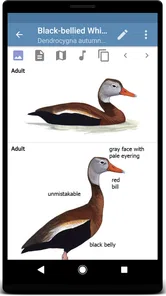
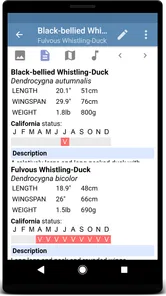
Sibley Birds 2nd Edition is a digital field guide based on David Allen Sibley’s well-known bird illustrations and identification work. It is designed for birdwatchers who want detailed species information, range maps, vocalization references, and comparison tools in one place. The app focuses on North American birds and is especially useful during outdoor observations, travel, or study sessions at home.
Does Sibley Birds 2nd Edition work without an internet connection?
A major advantage of Sibley Birds 2nd Edition is that much of its core reference material can be used offline after the necessary content has been downloaded. This is helpful in parks, forests, wetlands, and rural areas where mobile coverage may be limited. Users should prepare in advance by downloading the app’s available data and checking storage requirements before heading into the field.
What identification features are included in the app?
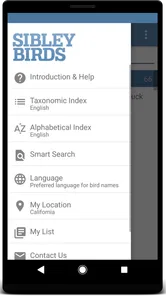
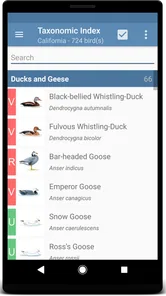
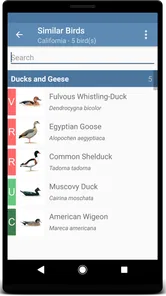
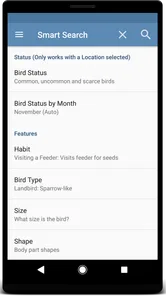
The app provides several tools to help identify birds, including detailed illustrations, species descriptions, range information, and comparisons between similar birds. Depending on the platform and included content, users may also find bird sounds, searchable names, and filters based on location or appearance. It is most effective when used alongside careful observation of size, shape, behavior, habitat, and markings.
Pros
- Detailed species accounts support confident bird identification.
- Includes range maps and habitat information for many North American birds.
- Useful for both beginners and experienced birdwatchers.
- Works as a convenient field reference without carrying the printed guide.
- Covers plumage variation
- behavior
- and seasonal identification details.
Cons
- Its large content library can require considerable storage space.
- The interface may feel dated compared with newer birding apps.
- Focused mainly on North American species
- limiting international usefulness.
- Some advanced information may feel overwhelming for casual users.
- A paid app may be expensive for users who only birdwatch occasionally.











