

SI Tickets
- 27.00
- 3.3
- Installs
- 50.00K
- Price
- Free

Screenshots
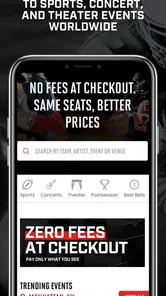
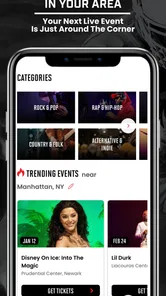
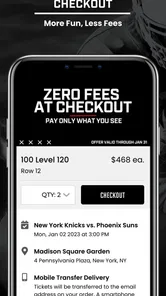
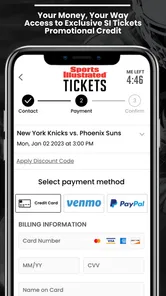
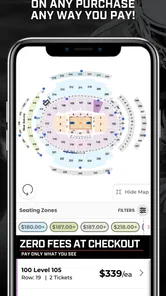
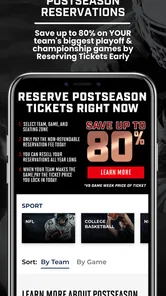

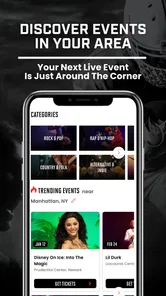
Analysis by Reviewed
Getting back to a concert, game, or other live event can be exciting, but the ticket on your phone becomes part of the experience the moment you leave home. I spent time looking at SI Tickets as an event app from SI Tickets by Sports Illustrated, and my main takeaway is simple: it is most useful when you treat it as a preparation tool as much as a ticket-buying or ticket-access companion. The app is free, aimed at everyone, and built around the practical problem of moving from a digital purchase to a real seat.
That sounds straightforward, yet event apps are judged in stressful moments. You may be walking toward a venue, dealing with a weak mobile signal, searching for the right order, or trying to show your ticket while people are waiting behind you. In those situations, a clean path to the relevant event matters more than a long list of extras. My experience with this kind of app is that the best results come from using it before the travel begins, not treating it as something to open for the first time at the entrance.
How SI Tickets fits into a real event day
The app sits in the events category, where it competes with venue-specific apps, ticketing services, mobile websites, and email confirmations. Its appeal is convenience: instead of keeping a ticket message buried in an inbox or switching among several browser tabs, I can use one dedicated place for the event-related task. That makes sense for someone who attends different kinds of live events and wants a more focused mobile route than a general web search.
SI Tickets by Sports Illustrated is not presented as a complicated entertainment platform. The store summary, “Get back to live events with SI Tickets!”, points toward returning to in-person experiences rather than building a social network or adding unrelated content. I like that focus. When I open an event app, I want to spend less time navigating and more time confirming the event, checking the ticket details, and getting on with the day.
The practical question is whether it is better than the usual alternatives. A venue’s own app may be stronger when you need parking instructions, venue maps, food ordering, or detailed local information. A mobile browser can be quicker if you only need to retrieve one confirmation and do not want another app installed. Email is familiar, but it is also easy to lose the right message among promotions and unrelated conversations. SI Tickets makes the most sense for people who want a dedicated event workflow without depending entirely on an inbox.
There is also a useful distinction between buying a ticket and managing the moment of entry. I would not assume that installing this app alone solves every venue-specific requirement. The event organizer’s rules, the ticket format, and the phone’s ability to display the relevant screen still matter. My recommendation is to open the app well before leaving, identify the event you need, and make sure you understand what screen you will need at the venue.
When the network becomes part of the ticket experience
Connectivity is the quiet factor behind nearly every mobile event experience. At home, on a reliable Wi-Fi connection, the app may feel uncomplicated. On the way to a venue, the situation changes. You might be underground, inside a crowded arena, moving between cellular towers, or standing in a queue where many people are using their phones at once. A ticket app can feel excellent in one location and frustrating in another without the app itself changing.
More From Our News Desk

 Gmail
GmailGmail in a Busy Inbox: Who Benefits Most?
From first account to crowded workday, Gmail earns its place through dependable search and flexible sorting—but its best fit depends on how much inbox maintenance you can tolerate.

 Prime Video
Switching to Prime Video: What Changes in Your Viewing Routine
Prime Video can make a compelling second home for streaming, but switching means learning a different catalog, rental layer, and route from browsing to playback.

 Universal TV Remote Control
Universal TV Remote Control Works Best as a Reliable Backup
A phone remote earns its place through quick setup and reliable habits. Here is how to get more from Universal TV Remote Control—and where its limits show.

 Weather - By Xiaomi
Weather by Xiaomi Review: Clear at a Glance, Less Clear Up Close
Xiaomi’s weather app makes everyday forecasts quick to scan, but its calm surface can leave useful details and recovery paths harder to find than they should be.

 X
XX Under Pressure: Can It Recover When Posting Goes Wrong?
A resilience-focused review of X, examining setup, mistaken posts, interruptions, weak connections, and the gaps that matter when recovery needs to be dependable.

 Clash of Clans
Clash of Clans Is Won Between the Battles
Its raids are quick; its community is a long-term project of coordination, teaching, rivalry, and shared responsibility—with all the friction that entails.
Latest News



That is why I would not wait until the entrance to sign in, locate an order, or investigate an unfamiliar screen. My preferred routine is to check the event while I still have a stable connection. I look at the date, venue, and ticket information, then return to it shortly before traveling. This does not guarantee that every venue interaction will be smooth, but it reduces the number of network-dependent steps left for the most stressful part of the day.
A useful, slightly overlooked habit is to keep the phone charged and avoid closing the app immediately after finding the relevant event. I also keep the confirmation message or purchase information available through the original channel when possible. That is not a criticism of SI Tickets; it is sensible preparation for any digital ticket system. If one route becomes slow, having already identified the details gives me a better chance of recovering without starting from scratch.
The app’s free price makes it easy to try without adding a purchase decision of its own. Still, free does not mean frictionless. The real cost can be time spent signing in, waiting for content to load, or resolving an account issue when the line is moving. I would judge the app less by how quickly it opens in a quiet room and more by how confidently I can reach the right event after a poor connection or an interrupted session.
Using it while walking, traveling, and waiting
Mobile context changes how I use an event app. At home, I can read carefully and compare information. On public transport, I may have one hand free and only a short moment to check details. Outside a venue, I need large, obvious actions and minimal backtracking. SI Tickets is most valuable when it keeps the event task compact enough to handle in those situations.
Imagine a realistic evening: I leave work, travel across town, and realize I want to confirm the event details before meeting friends. I open the app during a station stop, check the relevant listing, and avoid searching through old email while walking. Later, near the venue, I want to reach the ticket without repeatedly typing the same information. That workflow is where a dedicated app earns its place. It turns a vague “I know I bought something” feeling into a more organized check before arrival.
I would avoid doing anything complicated while walking through a crowded area. If the app requires attention, I stop somewhere safe, let the page load, and only then continue. This sounds obvious, but event days encourage rushed phone use. A few seconds spent preparing in a quiet place is better than trying to troubleshoot while standing at a gate or crossing a busy street.
For travelers, the important trade-off is convenience versus dependence on a live connection. A mobile app can be easier than a desktop site when plans change on the move, but it also places more responsibility on the phone. Screen brightness, battery level, signal quality, and account access all become part of the ticket routine. I see SI Tickets as helpful for mobile organization, not as a substitute for basic travel preparation.
The app is available for Android devices running version 8.0 or later, which covers a broad range of phones but still leaves very old devices outside its supported range. If you are using an older phone, I would check compatibility before relying on it for an important event. On a supported device, the more relevant question is whether the phone remains responsive and connected under real event conditions.
What to do when loading or access goes wrong
Every ticket app needs a recovery plan because failures rarely happen at a convenient time. The screen may take too long to load, the session may need attention, or the phone may briefly lose service. My first response would be to move away from the densest part of the queue if possible, stop repeatedly tapping, and give the app a moment to respond. Rapidly reopening the same screen can make confusion worse, especially when I am not sure whether the previous action completed.
If the network is weak, I would try a more stable location rather than assuming the ticket has disappeared. A venue entrance may be crowded, while a nearby open area has better reception. If I had already checked the event before leaving, I would use that preparation to verify that I am looking for the correct event rather than searching through every available option again.
Another practical tip is to distinguish between an app problem and an account problem. If the app opens but the expected event is missing, I would first confirm that I am using the same account or sign-in route connected with the purchase. If nothing loads at all, connectivity is the more likely first suspect. Keeping those possibilities separate prevents me from making unnecessary changes when the real issue is simply a temporary connection.
I also recommend not uninstalling the app or clearing information immediately before an event. Those actions may remove the easiest path back into the account and create a new sign-in task when time is short. If the app has been working, leave it alone and prepare it in advance. If there is a genuine issue, use the normal support or ticket-provider route rather than experimenting at the gate.
These recovery habits reveal one of the app’s limitations: a dedicated ticket app can streamline access, but it cannot control the venue’s network, the phone’s battery, or the account system behind the transaction. It is not fair to blame every delay on the interface. At the same time, a good event workflow should acknowledge that users will encounter those conditions. I would feel more comfortable recommending the app to someone who prepares a fallback than to someone who expects the phone to solve every last-minute problem automatically.
Keeping mobile data use sensible
For many users, the concern is not only whether the app works, but how comfortably it works on a mobile plan. Event information is usually something I need briefly, not something I want running continuously throughout the day. I would open SI Tickets when I have a clear task, let the relevant information load, and avoid repeatedly refreshing the same screen simply because I am nervous about entry.
That approach is useful for two reasons. It keeps the process calmer, and it avoids unnecessary network activity. If I am traveling to an event, I can check the details at home on Wi-Fi, then perform a shorter confirmation later. I would also avoid browsing aimlessly while on cellular data if I already know which event I am attending. The app is more efficient when used as a focused tool rather than as a place to repeatedly revisit information that has not changed.
Data-conscious use does require a little judgment. If plans change, I would refresh the event information when necessary rather than relying on an old assumption. If I am in an unfamiliar city, I may need to use mobile data for directions or other travel tasks at the same time, so preserving battery and attention matters as much as preserving data. The best routine is not to avoid connectivity, but to use it deliberately.
One trade-off compared with email is that email may already contain a copy of the transaction in a format I can search later. The advantage of SI Tickets is a more direct event-focused path; the disadvantage is that I may become dependent on the app being available at the exact moment I need it. I would keep the original purchase correspondence accessible, not because the app is unsuitable, but because redundancy is sensible when admission depends on a phone.
Who will get the most from it
I think SI Tickets is a good fit for someone who attends live events and prefers a dedicated mobile route instead of hunting through email or a browser. It is especially practical for people who manage several plans on the go, share event details with friends, or want to review the relevant ticket information before leaving home. The free download lowers the barrier to trying it, and the Everyone age rating makes it approachable for a broad audience.
It may also suit a less technical family member who needs a straightforward place to start. I would help that person prepare the app before the event, confirm the correct account, and practice reaching the event information once. That small setup step can make the actual day less intimidating. The app is not only for experienced ticket buyers; its value depends heavily on whether the user feels prepared.
I would be more cautious about recommending it as the only plan for someone with unreliable service, an aging phone, or a nearly empty battery. The same is true for a user who wants extensive venue services beyond ticket handling. In those cases, a venue’s own application or a browser-based workflow may be a better primary option, depending on what the event organizer supports. Someone who attends only one event and already has a clear confirmation email may not gain enough to justify changing habits.
The current version is 4.05, and the app has been available since June 7, 2021. Its presence on the platform is established rather than brand new, but that should not be confused with a guarantee that every event or device experience will be identical. Event technology depends on the organizer and the user’s setup as well as the app itself.
My connectivity-focused verdict
SI Tickets is a sensible event companion when I use it with realistic expectations. Its strongest quality is the way it can give a live-event task a dedicated home on a phone. Instead of treating the ticket as an afterthought hidden in messages, I can prepare the event before traveling and reduce the amount of searching needed at the venue.
The most important limitation is equally clear: the experience is shaped by connectivity, battery, account access, and venue conditions. I would not install it moments before an event and assume everything will be effortless. I would open it on a stable connection, identify the event, keep a fallback route available, and avoid unnecessary refreshing in a crowded entrance.
With that preparation, the app feels more useful than a generic mobile browser for regular event-goers, while a venue-specific app may still be better for detailed on-site services. Its average rating is 3.3 from over a hundred ratings, so I would approach it as a practical tool rather than an unquestionable replacement for every ticketing method. My final recommendation is positive but measured: try it if you want a focused way to manage SI Tickets events, especially when you value mobile convenience, but keep your purchase confirmation and a basic recovery plan close at hand.
SI Tickets Frequently Asked Questions
Is SI Tickets free to download, and which devices can run it?
SI Tickets is free to download and is intended for people looking for event ticketing on a mobile device. On Android, it requires version 8.0 or later, so check your device’s software before installing. The app is listed for everyone, making it suitable for a broad audience. Its current version is 4.05.
Who develops SI Tickets, and what is the app’s focus?
SI Tickets is developed by SI Tickets by Sports Illustrated and is an event-focused app. Its short store description is simply “SI Tickets,” while its summary invites users to get back to live events. That makes it relevant to people who want a mobile way to explore ticketing options and keep event-related activity together.
What is SI Tickets and what can I use it for?
SI Tickets is a mobile ticketing application designed to help users discover, purchase, and manage tickets for participating events, venues, or services. Depending on the available listings in your region, you may be able to view event details, compare ticket options, access digital tickets, and keep booking information in one place. Availability and supported features can vary by location and organizer.
How do I purchase tickets through SI Tickets?
After installing SI Tickets, you generally need to create an account or sign in before selecting an event and choosing the available ticket type, quantity, and seating options. Review the total price carefully, including service charges and taxes, before completing payment. Once the transaction is approved, the app should display your order confirmation and provide access to your digital tickets when supported.
Can I access my tickets without an internet connection?
Offline access depends on how SI Tickets and the individual event organizer deliver tickets. It is recommended to open the application while connected to the internet after purchasing, allow the ticket to load, and save any available digital pass to your device or wallet. Do not rely entirely on offline access unless the ticket is clearly available in the app without a connection.
Pros
- Buy and manage tickets directly from your smartphone.
- Digital tickets reduce the need for printed paperwork.
- Quick access to event
- travel
- or venue ticket details.
- Useful notifications can help you remember upcoming bookings.
- Simple interface makes ticket information easy to find.
Cons
- Some features may depend on the participating venue or organizer.
- Ticket transfers or refunds may not always be available in the app.
- A stable internet connection may be needed for certain actions.
- Account creation can be required before purchasing tickets.
- App performance may vary depending on device and operating system.











