Shortcut Maker
- 1.39K
- 3.6
- Installs
- 5.00M
- Price
- Free

Screenshots
Analysis by Reviewed
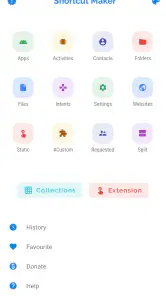
I judge a shortcut tool less by how many things it can place on a home screen and more by whether those routes remain understandable and dependable in everyday use. Shortcut Maker is most useful when I know what I want my phone to do but dislike digging through several screens to get there. It is a personalization app by Rushikesh Kamewar, built around making home-screen access more direct. Rather than replacing a launcher or changing how Android works, it gives you a way to arrange entry points to apps, app activities and settings. That focused purpose is appealing, though it also means the experience depends on what your device and installed apps allow.
Trust starts with a clear purpose
The app has been available since January 8, 2020, and its current version is 4.2.4. It is free to download, rated for Everyone, and supports Android 7.0 and later; optional in-app purchases range from $0.99 to $129.99 per item. It has a 3.6 average from around 22,000 ratings and over 5 million installs. Those figures suggest a widely used tool, not a guarantee that every shortcut will work the same way on every phone. I would treat it as a practical utility and check each shortcut after creating it, especially if it points to a less familiar app screen.
What you can control, and what to check
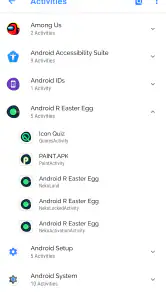
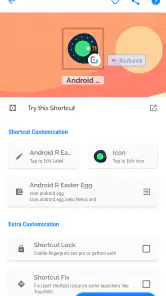
The useful choice here is deciding what deserves a place on your home screen. You can select an installed app, look for a particular activity within it, or create a route to a setting. Shortcut names and icons can be adjusted, which helps distinguish two routes into the same app. Before adding a shortcut, I’d keep its label specific—“scan receipt” is clearer than the app’s name if the shortcut opens a particular task.
There is a trust distinction worth keeping in mind: creating a shortcut is not the same as granting it permission to perform every action associated with its destination. The app’s purpose is to set up access points, but I would still review Android’s own permission prompts and settings whenever a destination asks for access to personal information or device functions. I would not assume that a shortcut changes the underlying app’s privacy behavior.
Permissions, choices and sensible caution
When a shortcut leads into a sensitive part of another app, I treat the destination app—not the shortcut icon—as the place to judge what information is involved. Opening a camera, account page or device setting can bring its own prompts and controls. I pay attention to those prompts as they appear and make the choice there, rather than interpreting a home-screen shortcut as permission to bypass them.
That distinction matters if you share a device or hand your phone to someone else. A clearly named shortcut can make a useful task easier to reach, but it can also make that destination more visible on the screen. I would avoid placing a route to private account information in a prominent shared area, and I would use a neutral label if a shortcut’s name could reveal more than I want at a glance. The convenience is real; so is the need to choose where that convenience is displayed.
Making shortcuts useful in daily routines
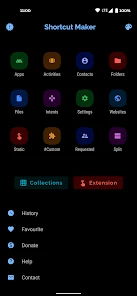
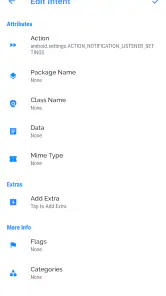
Using Shortcut Maker is a breeze. Once you have the app installed, you’re greeted with a clean and intuitive interface. You can create shortcuts by selecting from a list of your installed apps, or dive deeper by picking specific activities within those apps. For example, if you want a shortcut to directly open the camera in selfie mode, you can do that!
You May Like

Clash of Clans Is Won Between the Battles

Android Auto Makes the Case for Quieter Car Software

MobiOffice: Transforming Mobile Productivity with Seamless Integration

EA SPORTS FC™ Mobile Soccer: Redefining Mobile Sports Gaming

How Microsoft OneDrive Became a Mobile Productivity Giant

How Google Translate Breaks Language Barriers Effortlessly
You’re not limited to just apps and activities either. Shortcut Maker lets you create shortcuts for settings, like quickly toggling Wi-Fi or Bluetooth. It’s a feature-packed app that really puts the power in your hands.
A workflow that saves more than taps
A practical example is setting up a work-from-home screen with direct routes to the meeting app, a notes app, and the settings you commonly need. The benefit is not only speed: placing those shortcuts together makes a routine easier to repeat and reduces the chance of opening the wrong screen while you are in a hurry. I would build one or two shortcuts first, test them, and only then expand the layout. That small trial helps reveal whether an activity is genuinely useful or simply duplicates a button already easy to reach.
For settings shortcuts, think about context before adding them. A Wi-Fi route can help when you often switch networks, but it may be less convenient than the system’s quick settings panel if that panel is already one swipe away. Likewise, a shortcut that opens a deep app screen is worthwhile only if you use it regularly. The best setup is selective, not a home screen crowded with every option the app can expose.
Small routines where a direct route earns its place
One realistic use is arriving at a café or workplace where you regularly need to switch networks, open a particular work app and reach a note-taking screen. I would put only the destinations I repeatedly use together, then leave the rest of the home screen alone. That keeps the shortcut area tied to a real routine instead of turning customization into a project that needs constant maintenance.
There is also a useful way to decide whether an activity shortcut is worth keeping: compare the full route with the route you already take. If the app’s own landing page takes one tap to reach the same task, a dedicated icon may not improve anything. If the task is buried several screens down and you return to it often, the direct entry has a clearer payoff. This simple test prevents a tidy-looking setup from becoming a collection of shortcuts that add no practical value.
Customization with a little restraint
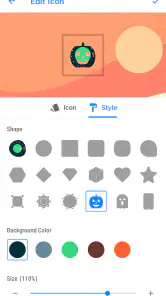
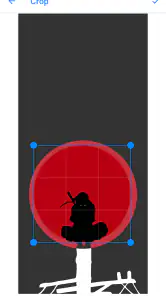
One of the standout features of Shortcut Maker is its customization options. You’re not just creating shortcuts—you’re creating shortcuts that look and feel exactly the way you want. Choose from a variety of icons, or even use your own images. You can also rename shortcuts to keep everything neat and organized. It’s like having a personal assistant that looks exactly how you want it to.
And if you're someone who likes to mix things up, you'll love the ability to create widget shortcuts. This means you can add a widget to your home screen that contains multiple shortcuts. It’s a great way to keep your home screen tidy while still having everything you need just a tap away.
Custom icons are most useful when they communicate the destination at a glance; using a different picture for every shortcut can look attractive but make the screen harder to scan. I’d group related shortcuts in a widget only when I use them as part of the same routine. If I need one action constantly, a single prominent shortcut is usually quicker than opening a widget and choosing from several.
Keeping a shortcut layout manageable
For a more reliable setup, I would treat labels and grouping as part of the shortcut itself, not as decoration to handle later. Names should describe the destination or action, and a widget should collect routes that belong together. For example, mixing occasional settings with a daily work routine may make the widget slower to use, even if it saves home-screen space. A small, coherent group is easier to scan than a dense panel of unrelated choices.
If an activity stops opening where expected, I would check whether the original app still offers that destination and then recreate the shortcut from its current activity list. A shortcut is a route, not a promise that another app will preserve the same internal screen forever. That is why I would keep a familiar way to reach important functions inside the destination app, rather than relying exclusively on a deep link for something time-critical.
When another approach may suit you better
Compared with relying on a launcher’s standard app icons, this app is more focused on creating routes to specific activities and settings. That extra depth is its main advantage, but it can also create more setup decisions. If all you want is to move an app icon or organize folders, your existing launcher is likely simpler. If you mainly need broad automation, a dedicated automation tool may be a better fit; Shortcut Maker is best when you want a direct, visible route rather than a chain of conditional actions.
It is also not ideal for someone who expects every activity to appear or behave identically across devices. App makers and Android versions can affect which destinations are available and whether a deep link continues to work. If a shortcut fails, I would first recreate it from the current app list and test the destination directly, rather than assuming the phone itself is malfunctioning.
Where its trade-off is clearest
The choice between this app and a launcher feature depends on how specific the route needs to be. A launcher is generally enough for arranging ordinary app icons, while this tool is more interesting when you want to point to an activity or setting rather than the app’s usual opening screen. For people who want automated actions based on conditions, a dedicated automation app has a different job and is likely a better match. I see Shortcut Maker as a middle ground: more targeted than rearranging icons, but not a replacement for automation.
It is also a poor fit if you want a completely hands-off setup. Finding the right activity can require trial and error, and a shortcut into another app may behave differently after that app changes. I would not build a complicated home-screen system around destinations I rarely use. The more valuable the task, the more important it is to keep a dependable in-app route available as a fallback.
Who I’d recommend it to
I’d suggest it to Android users who enjoy tailoring their home screen and can name a few repeated tasks that currently take too many taps. It is less compelling for people who rarely use settings shortcuts, prefer a minimal default layout, or do not want to spend time testing and organizing shortcuts. There is also a modest learning trade-off: choosing an app is straightforward, while deciding which activity is the right one may take some experimentation.
Shortcut Maker has around 1,400 reviews alongside its rating, and the mixed overall response is a reminder to judge it by your own device and workflow. For a quick test, create one shortcut to a frequently used destination, give it an unmistakable label, and try it several times over a day. If it saves effort without cluttering your screen, add another; if not, removing it is an easy way to keep your layout clean.
What I would test before relying on it
A low-risk first test is to choose a routine that is convenient but not essential, create one route, and open it more than once in different situations. Check that the label still makes sense when seen among your usual icons and that the destination is genuinely the screen you wanted. If it only works when you remember a particular sequence or requires more navigation after opening, it may not be the improvement you expected.
For anything related to personal accounts or device functions, I would also pay attention to which app or Android screen appears after tapping. The shortcut itself is an entry point; the destination controls what happens next. This makes the app easiest to trust when I use it for clear, limited routes and keep the normal permission and privacy decisions in the apps and system settings where they belong.
A measured recommendation
So, why should you consider downloading Shortcut Maker? Well, if you’re all about efficiency and personalization, this app is a must-have. It’s perfect for those who want to cut through the clutter and get things done faster. Plus, it’s just plain fun to see how many different shortcuts you can create.
I’ve found it particularly useful for accessing those hidden app features I often forget about. And let’s be honest, who doesn’t love a little extra customization on their phone?
Shortcut Maker isn’t just an app; it’s a tool that transforms how you interact with your device. Give it a try and see how it can simplify your digital life. Trust me, once you start using it, you’ll wonder how you ever lived without it!
Shortcut Maker Frequently Asked Questions
Can I customize the appearance of shortcuts created with Shortcut Maker?
Shortcut Maker is intended to help personalize your device by creating shortcuts for things you want to reach quickly. You can choose the shortcuts that suit your needs and arrange them on your home screen, making frequently used destinations easier to find. If appearance and layout matter to you, consider how each shortcut fits with the rest of your home screen.
Is Shortcut Maker available for iPhone or iPad?
Shortcut Maker is an Android personalization app, so it is intended for Android phones rather than iPhones or iPads. If you are considering downloading it, first check that your device is running Android. The app’s purpose is to create shortcuts for things you want to access, helping you personalize an Android device and reach selected destinations more directly.
Can I use Shortcut Maker without changing my phone’s home screen permanently?
Shortcut Maker is intended to add shortcuts that make selected apps, activities, or settings quicker to reach, so you can personalize your device without rebuilding your entire home screen. You choose which shortcuts to create and where to place them. If you later decide a shortcut no longer suits your layout, you can remove it like other home-screen items.
Will Shortcut Maker work with my Android phone?
Shortcut Maker is an Android personalization app, and its minimum operating-system requirement is Android 7.0. If your phone runs Android 7.0 or a newer version, it meets that stated requirement. The app is free to download, and its simple purpose is to create shortcuts for things you want to reach quickly. Check your phone’s Android version before installing.
What is Shortcut Maker and how does it enhance my smartphone experience?
Shortcut Maker is an app designed to streamline your smartphone usage by allowing you to create customized shortcuts for apps, activities, and even specific tasks or settings. By using this app, you can quickly access your most-used functions and personalize your device's interface to suit your workflow, ultimately saving time and improving efficiency.
Pros
- Highly customizable shortcuts.
- User-friendly interface.
- Integrates with other apps.
- Lightweight application.
- Saves time for frequent tasks.
Cons
- Limited widget options.
- Some features require premium.
- Occasional bugs reported.
- Can be complex for new users.
- Design feels a bit outdated.

- Category
- Personalization
- Version
- 4.2.4











