Drive and Shop with Shipt
- 11.55K
- 4.2
- Installs
- 1.00M
- Price
- Free

Screenshots
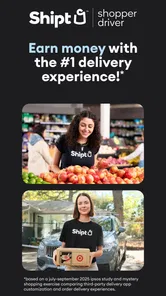
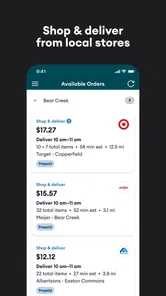
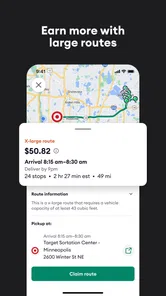
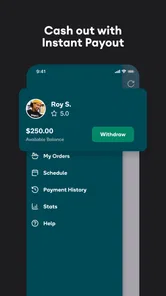
Analysis by Reviewed
I find Shipt: Shopper and Driver easiest to understand when I think of it as a work tool rather than a general delivery app: its main job is to help shoppers take customer orders, shop for the requested items, and complete deliveries. That makes readability and clear task flow more important than flashy extras. Shipt is a free business app from Shipt, and its 4.3 average across around 39,000 ratings suggests many people find it useful, though that alone can’t tell you whether the work will suit your routine.
Reading orders and finding your way around
The original experience is organized around orders and the steps needed to fulfill them. In my view, that task-first approach is a practical fit when you need to check details while moving between a store and a customer’s address. Clear order information can reduce avoidable confusion, but it does not remove the need to read carefully: a missed product detail or delivery instruction can still affect the job.
If you are new to this kind of work, take time with the in-app tutorial before accepting an order. I’d treat it as a way to learn the basic sequence, not as a substitute for checking each order’s particular requirements. A useful habit is to pause before leaving the store and review the order and delivery details once more; that small check is easier than trying to resolve an oversight after you have moved on.
Different abilities, different working conditions
Shopping and delivery combine reading, walking, handling items, and navigating a changing environment. That matters for people with low vision, limited mobility, fatigue, or sensory sensitivities. I can’t assume the interface or the work will be comfortable for everyone, so the best test is whether you can read the information you need and complete the physical parts of an order safely in your own circumstances.
There is also a difference between using an app at home and using it in a busy shop. Crowded aisles, background noise, poor lighting, and time pressure can make it harder to concentrate, even if the screen itself feels straightforward. If you know those conditions are difficult for you, consider whether the shopping and driving tasks are manageable before treating the app’s flexibility as a solution.
Where flexibility helps—and where it has limits
The appeal is the ability to fit orders around other commitments rather than follow a fixed shift. That can work well for someone with open pockets of time, such as a person who wants occasional work between other responsibilities. But flexibility does not mean every hour or location will be equally useful. You still need to judge whether an available order makes sense for your schedule and the effort involved.
For instance, a shopper with a free afternoon might use that window for an order and its delivery, then stop when they need to collect a child or attend an appointment. Someone who needs a predictable amount of work at a specific time may prefer a scheduled job instead. I’d compare the task’s travel and shopping demands with the time you actually have, rather than assuming that accepting an order will fit neatly into a short break.
More From Our News Desk

Weather by Xiaomi Review: Clear at a Glance, Less Clear Up Close

X Under Pressure: Can It Recover When Posting Goes Wrong?

Clash of Clans Is Won Between the Battles

Android Auto Makes the Case for Quieter Car Software

MobiOffice: Transforming Mobile Productivity with Seamless Integration

EA SPORTS FC™ Mobile Soccer: Redefining Mobile Sports Gaming
What is Shipt?
At its core, Shipt is an app that connects shoppers with customers who need groceries and other essentials delivered right to their doorstep. It’s kind of like being a personal shopper, but without the hassle of having to physically handpick products in a store for hours on end. The app gives you a list, you shop, and voilà! You deliver.
Setting Up and Getting Started
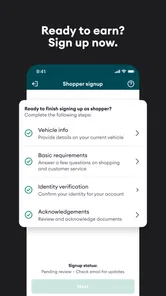
Getting started with Shipt is as easy as pie. After downloading the app, you’ll need to fill out an application form. They do a background check, which is pretty standard for these types of gig economy jobs. Once you’re approved, you can jump right in and start accepting orders.
What I found really neat is that the app provides you with a tutorial that walks you through the process of accepting and delivering orders. It’s super user-friendly, so even if you’re a complete newbie to the delivery game, you’ll get the hang of it in no time.
Flexibility and Earnings
This app is all about flexibility, which is perfect if you need to work around other commitments. You can choose when and where you want to deliver, which means you can work around your life, not the other way around. This is a huge win for anyone juggling multiple responsibilities.
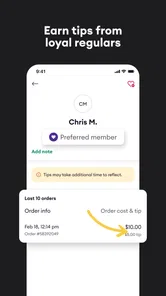
Now, let’s talk about the moolah. Shipt pays you per order, and while it’s not going to make you a millionaire overnight, it can definitely help pad your wallet. Plus, you get to keep 100% of your tips. Who doesn’t love a bit of extra cash?
User Experience and Support
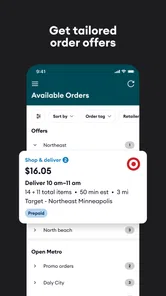
The app itself is pretty slick and easy to navigate. Orders are clearly laid out, and you can see all the details you need at a glance. One thing that stands out is the customer support. If you ever run into any hiccups, the Shipt team is quick to respond, which is a big plus in my book.
Another thing I appreciated is the community feel. There’s a lot of support from other shoppers, and Shipt even offers meetups and events to help you connect with fellow drivers.
What to weigh before relying on it
Shipt has been available since 2015, and its current version is 4.107.0 for devices running Android 7.0 or later. It has more than a million installs and an Everyone content rating. Those details make it easy to see that it is an established app, but they don’t promise a particular experience or income for an individual shopper.
Compared with courier work that focuses on picking up already-prepared food or parcels, this job includes choosing grocery items in a store. That extra step is the key trade-off: you may prefer the personal-shopping aspect, but it also means product substitutions and the time spent locating items are part of the task. If you want work with less in-store walking, another kind of delivery role may fit better.
One practical way to assess an order is to think beyond the displayed payout. Consider the full sequence—getting to the store, shopping carefully, and reaching the delivery address—against the time you can spare. I would also keep a simple record of the time and travel involved over several orders. That gives you a grounded way to decide whether the work is worthwhile for you, rather than judging it from one unusually easy or difficult run.
Choosing orders with your real day in mind
A useful way to test whether this work fits is to plan around the whole errand, not just the shopping list. Imagine you have a free afternoon before another commitment. You could first check how much time you genuinely have, then accept only work that leaves room to shop, handle any item changes, travel, and finish the delivery without rushing. I would avoid treating the gap between two appointments as usable work time unless it includes a realistic buffer.
That buffer matters because grocery orders can involve more than collecting familiar items. A product may be unavailable, or a requested size may need a closer look. Taking a moment to verify a substitute can prevent a frustrating handoff, but it also takes time. The practical trade-off is that careful shopping supports a better customer experience while making the work less predictable than a simple pickup-and-drop-off route.
If you are comparing this with other gig work, ask yourself which part of the task you would rather do. Shipt involves in-store searching and handling a customer’s requested basket; a prepared-food courier role generally centers on collecting an order that is already packed, while parcel delivery emphasizes carrying and routing packages. Those alternatives are not automatically easier, but they shift the effort away from grocery selection. I would choose based on the work you can do comfortably, not on the assumption that every delivery app offers the same kind of flexibility.
Making the work more manageable
One small workflow improvement is to prepare before you begin: make sure you have enough uninterrupted time, review the order carefully, and avoid trying to split attention between the app and another task. In a busy shop, stopping briefly in a safe place to read instructions is usually better than scanning the screen while walking. That habit is useful for anyone, and especially for shoppers who find noise, crowds, or rapid visual switching tiring.
It can also help to notice which parts of an order take the most energy. If walking through a large store is harder than driving, or carrying bags is the main strain, that difference should guide which jobs you accept and how often you work. I would not use a single smooth delivery as proof that every shift will feel the same; a different store layout, a heavier basket, or a more complicated address can change the experience.
For someone who is new to app-based shopping, a first order is best treated as a learning run rather than a reliable measure of long-term earnings. Pay attention to the time spent finding items, sorting out changes, and completing the drive. Keeping a private note of those stages gives you a more useful picture than looking only at the order’s headline amount. It also helps you identify whether you enjoy the customer-service side of the work or would rather do a job with fewer decisions.
Questions worth answering before you depend on it
People often want to know whether the app guarantees enough orders, what a typical day will pay, or whether they can do the work without driving. I would not plan a household budget around an assumed volume or payout. The app is a way into order-based work, but the value of that work depends on the opportunities available to you and the time and travel each one requires. If dependable hours are essential, a scheduled job is the safer comparison.
It is also reasonable to wonder whether grocery shopping can be done comfortably with a disability or sensory sensitivity. That depends on the person and the specific demands of an order: reading item details, moving around a store, handling products, and traveling to the customer all matter. I would test what is manageable in your own environment and avoid accepting work that would make you rush or compromise safety. A clear app flow cannot remove the physical and sensory demands of the errand itself.
Finally, if you are unsure whether you will like the work, think about the parts you can control before committing to a routine: how much time you set aside, whether you can handle the shopping and delivery sequence, and whether you are comfortable making careful choices when an item is unavailable. The tutorial can help you understand the basic process, but real orders are where you learn whether its pace suits you. I see that as a reason to start cautiously, not as a promise that every order will be straightforward.
Who is likely to find it useful?
I’d point Shipt toward people who are comfortable navigating stores, handling shopping tasks, and driving as part of a flexible side job. It may also suit someone who likes practical, varied work more than sitting at a desk. On the other hand, if you need guaranteed hours, a fixed routine, or work that avoids physical errands, I would look at a conventional part-time position or a different gig category instead.
Before installing, it is reasonable to wonder whether you can simply browse orders without committing, how much a typical shift will bring in, and whether the work can be done without driving. Those details depend on the actual opportunities and requirements available to you, so I would not build a budget around an assumed schedule or payout. Treat the app as a way to explore order-based work, then make a decision based on what you can safely and realistically do.
Final Thoughts
All in all, Shipt: Deliver & Earn Money is a solid choice if you’re looking to earn cash on the side. It’s flexible, user-friendly, and backed by a supportive community. While it may not be a full-time income replacement, it’s a great side hustle that lets you work on your own terms. So, if you’re up for the challenge and enjoy a little hustle, give Shipt a whirl and see how it fits into your lifestyle.
Drive and Shop with Shipt Frequently Asked Questions
What does the app’s name mean for someone looking to earn through Shipt?
Shipt: Shopper and Driver is aimed at people interested in doing shopping and delivery work, rather than customers simply looking to place a grocery order. Its store summary is “Deliver and earn money,” which gives a useful sense of its purpose. Before installing, consider whether you want a work-focused app and whether the shopper application process suits you.
Can I use Shipt: Shopper and Driver on both Android and iOS?
Shipt: Shopper and Driver is available for Android and iOS. On Android, the listed minimum operating system is version 7.0, so it is worth checking your phone’s software before downloading. For iOS, check compatibility in the relevant app store. The app is free to download, and its content rating is Everyone, though working as a shopper has separate eligibility requirements.
When was Shipt: Shopper and Driver released, and what version is available?
Shipt: Shopper and Driver was released on April 14, 2015, and its current version is 4.107.0. If you are considering installing it, check the version shown in your app store and keep the app updated to receive the latest available release. The app is developed by Shipt and is listed as a Business app, with a focus on delivery and earning money.
Is Shipt: Shopper and Driver free to download, and what is the app for?
Shipt: Shopper and Driver is a free Business app from Shipt, with the store summary “Deliver and earn money.” It is intended for people interested in shopping and delivery work through Shipt. Before downloading, consider whether you want an app focused on earning through deliveries rather than one designed only for placing grocery orders.
What is Shipt and how does it work?
Shipt is a delivery service app that connects users with personal shoppers who pick up and deliver groceries and household essentials. Users simply create an account, select their items from a store of their choice, and schedule a delivery time. Shipt shoppers then handle the rest, ensuring convenience and ease for customers.
Pros
- Flexible working hours.
- Instant payment options.
- User-friendly interface.
- Wide delivery area coverage.
- Real-time delivery tracking.
Cons
- Limited customer support.
- High competition for orders.
- Requires reliable vehicle.
- App occasionally crashes.
- Earnings may vary by location.












