

Shipmate - Cruise Tracker
- 3.94K
- 4.7
- Installs
- 1.00M
- Price
- Free

Screenshots


Analysis by Reviewed
Planning a cruise usually means jumping between a cruise line’s booking pages, ship reviews, excursion sites, price searches, and a calendar. Shipmate brings much of that preparation into one travel app from Cruiseline.com, with cruise tracking, deals, price alerts, reviews, excursions, and countdowns. I found it most useful as a planning companion rather than as a replacement for the cruise line’s own app.
The important starting point is cost: Shipmate is free to download and use. That makes it easy to try before committing your trip planning to it, although “free” should not be confused with a guarantee that every travel purchase or third-party booking connected with a cruise will also be free. The app itself is aimed at travelers who want one place to organize research, watch a fare, and keep an eye on an upcoming sailing.
How Shipmate fits into real cruise planning
I find Shipmate most useful when a cruise is still taking shape: it gives me a focused place to revisit a sailing instead of letting fare searches, ship opinions, and port ideas scatter across tabs. In this section, I’ll look at how that role fits alongside the tools travelers already use, and where a cruise-specific tracker is a better companion than a general travel app.
A practical home for the details that are easy to lose
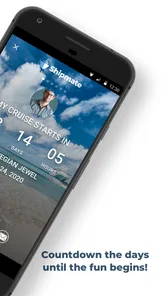
When I prepare for a cruise, the booking confirmation is only the beginning. I still need to remember the ship, sailing dates, itinerary, departure port, cabin information, and the decisions I have not made yet. Shipmate works well in that gap between booking and boarding. Its countdown gives the trip a visible place in my daily routine, while the tracking tools make it easier to return to the same cruise instead of starting a new search every time.
That sounds simple, but it solves a real problem. Cruise planning tends to become scattered across email, browser tabs, notes, and screenshots. A dedicated tracker gives the trip a recognizable center. I can use it while comparing sailings before booking, then continue using the same app after choosing one. That continuity is more useful than a collection of disconnected deal pages.
The app belongs to the Travel & Local category, and that description fits its role. It is not a full travel wallet, a navigation tool, or a substitute for onboard account management. Its focus is the cruise itself: finding relevant information, following a sailing, checking opinions, and preparing activities around the itinerary.
What the free access actually offers
Shipmate’s free price is one of its strongest reasons to test it. I do not have to make a purchase simply to see whether its cruise research tools suit my planning style. For a first-time cruiser, that lowers the risk of adding another app to an already crowded travel setup. For an experienced traveler, it makes the app a convenient second opinion when comparing options.
More From Our News Desk

 Weather - By Xiaomi
Weather by Xiaomi Review: Clear at a Glance, Less Clear Up Close
Xiaomi’s weather app makes everyday forecasts quick to scan, but its calm surface can leave useful details and recovery paths harder to find than they should be.

 X
XX Under Pressure: Can It Recover When Posting Goes Wrong?
A resilience-focused review of X, examining setup, mistaken posts, interruptions, weak connections, and the gaps that matter when recovery needs to be dependable.

 Clash of Clans
Clash of Clans Is Won Between the Battles
Its raids are quick; its community is a long-term project of coordination, teaching, rivalry, and shared responsibility—with all the friction that entails.

 Android Auto
Android Auto Makes the Case for Quieter Car Software
The car interface is no longer judged by how much it can do, but by how quietly it helps. Android Auto shows what drivers now expect—and what still gets in the way.

 MobiOffice: Word, Sheets, PDF
MobiOffice: Transforming Mobile Productivity with Seamless Integration
MobiOffice: Word, Sheets, PDF is redefining mobile productivity with a surprising blend of functionality and innovation.

 EA SPORTS FC Soccer Mobile 26
EA SPORTS FC™ Mobile Soccer: Redefining Mobile Sports Gaming
Dive into EA SPORTS FC™ Mobile Soccer, where immersive gameplay and strategic depth transform mobile sports gaming.
Latest News



The value is not just the absence of a charge. The useful part is the combination of tools: deals can help with discovery, price alerts can support waiting for a better fare, reviews can add traveler perspective, and excursion information can move planning beyond the ship itself. A countdown then remains useful after the research phase is over.
I would still keep expectations precise. Free access does not mean Shipmate can control cruise-line pricing, reserve every activity, or replace the terms of a booking. It is better understood as a research and tracking layer. I would use it to notice opportunities and organize decisions, then confirm the final details directly with the cruise line or the relevant excursion provider before paying.
Why price alerts are more useful than constantly checking
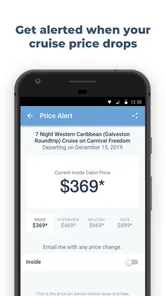
One of the more practical workflows is to use price alerts as a reason to stop repeatedly searching. Cruise fares can be distracting because it is easy to check the same route several times a day and mistake movement for progress. Setting an alert, where appropriate, turns the app into a passive monitor. I can decide what matters first—sailing, cabin type, itinerary, or budget—and let the alert bring me back when there is something worth reviewing.
The trade-off is that an alert is not a promise of a final saving. A fare may change while availability, cabin location, taxes, fees, or booking conditions also change. My habit would be to treat an alert as a prompt to compare the complete offer, not as an instruction to book immediately. That small distinction prevents a headline price from becoming the only part of the decision.
This is also where Shipmate differs from simply visiting a cruise line’s website. The cruise line is the authority for its own current booking terms, while Shipmate is more useful for watching and comparing the broader planning picture. I would use both: the app for discovery and reminders, the official booking channel for confirmation.
Reviews are helpful when read as evidence, not as a verdict
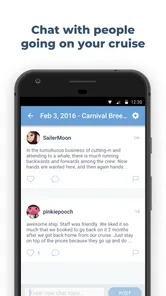
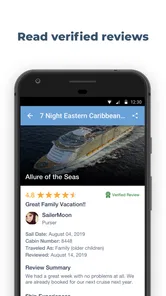
Cruise reviews can answer questions that glossy ship pages often avoid. Travelers may reveal whether a venue felt crowded, whether an excursion suited families, or whether an itinerary worked better for a relaxed traveler than for someone who wants constant activities. Shipmate’s review element is valuable because it puts that kind of traveler perspective close to the cruise research process.
Still, I would not treat an average score as a substitute for reading the details. A review written by a couple looking for quiet evenings may judge the same ship differently from a family seeking entertainment. I look for repeated, specific observations rather than one dramatic complaint. I also pay attention to the sailing context, since an experience can be shaped by itinerary, season, weather, and the traveler’s expectations.
The app has an average rating of 4.7 from around 13 thousand ratings, with roughly 3.9 thousand written reviews in its store presence. Those figures suggest that many users find it worthwhile, but they do not tell me whether it matches my own cruise habits. I consider the rating a useful confidence signal, then judge the app by how well its tracking and research flow fits my trip.
Excursion planning is where context matters most
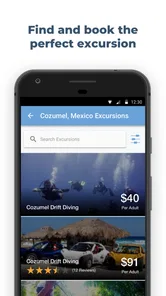
Excursion information can save time because it connects the port stop with an actual activity decision. Instead of thinking only about the ship, I can start asking more useful questions: do I want a guided tour, independent time ashore, a beach day, cultural sightseeing, or something with minimal travel from the port? That shift helps prevent an itinerary from becoming a list of places without a plan.
My advice is to compare excursions by practical fit rather than by the most attractive title. Check the amount of walking, the time away from the ship, the meeting arrangements, and how much flexibility remains if plans change. Shipmate can help start that comparison, but I would verify the current schedule and cancellation terms before treating an excursion as settled.
A less obvious use is to plan a backup for each important port. If the preferred activity sells out, costs more than expected, or no longer suits the group, a second choice prevents the day from being decided in a rush. I would save that alternative in my notes and use the app’s itinerary context to keep both options tied to the same sailing.
The countdown is small, but it changes how the app feels
Countdowns are not a booking feature, yet they give Shipmate a reason to remain useful after the exciting research is finished. I like that kind of light reminder because it turns a trip from an abstract reservation into something I can prepare for gradually. It can prompt practical tasks such as checking travel to the departure port, reviewing excursion choices, or confirming documents.
There is a psychological trade-off, though. A countdown can encourage useful preparation, but it can also create a false sense that everything is ready simply because the number is visible. I would use it as a planning trigger: when the trip gets closer, revisit the itinerary, confirm arrangements, and check official updates. The countdown is a reminder, not a final checklist.
Where it beats the usual alternatives
The usual alternative is to rely entirely on a cruise line’s app or website. That is often best for official reservations, onboard expenses, check-in tasks, and last-minute operational information. Shipmate has a different advantage: it is designed around the traveler’s broader research journey, including independent reviews, deal watching, price alerts, excursions, and a personal sense of progress toward the sailing.
Another alternative is a general notes app. Notes are flexible, but they require me to build the structure myself and remember to update everything. Shipmate is more focused for cruise-specific planning, so the information feels less like a homemade folder and more like a dedicated trip workspace.
Travel forums and social media can provide lively opinions, but they are harder to filter. Advice may be old, tied to a different ship configuration, or based on a traveler with completely different priorities. Shipmate’s cruise-centered format is more efficient when I want to compare a sailing and its surrounding decisions without searching through unrelated conversations.
On the other hand, a general travel app may be better for flights, hotels, maps, restaurant reservations, and a multi-city vacation that only includes a short cruise segment. Shipmate is specialized. That specialization is its strength for cruise planning and its limitation for an entire trip that extends well beyond the ship and ports.
Friction I noticed in the planning experience
The app’s focus can make it feel incomplete if I expect one tool to manage every part of travel. I would still keep the cruise line’s official app available, especially for booking-specific tasks and operational notices. I would also use a calendar or notes system for flights, hotel stays, transfer times, and personal packing reminders. Shipmate is strongest when I give it the cruise research job instead of demanding that it become my entire travel system.
Information-heavy planning can also require patience. Deals, reviews, and excursion choices are useful only when I slow down and compare them against the actual itinerary and the needs of my group. The app can put options in front of me, but it cannot decide whether a long excursion is sensible for a traveler with limited mobility, whether a port day is better left unplanned, or whether a cheaper fare has conditions I dislike.
There is another important trade-off with alerts. Notifications are valuable when they point to a meaningful change, but too many reminders can turn a helpful tracker into background noise. I would enable only the alerts connected to a real decision and review them with a clear rule, such as “compare the complete fare before acting.” That keeps the feature useful rather than reactive.
Who will get the most value from it
Shipmate is a particularly good fit for first-time cruisers who feel overwhelmed by ship choices, itineraries, and port activities. It gives them a cruise-specific starting point without requiring a paid subscription. The combination of reviews and excursion research can make unfamiliar decisions feel more manageable, especially when the traveler is still learning the difference between choosing a ship and choosing a sailing.
It also suits repeat cruisers who like to monitor prices or keep several possible trips in view. For them, the value is less about learning what a cruise is and more about reducing repetitive browsing. A tracker and alert workflow can make comparison more deliberate, particularly when someone is flexible about dates or ships.
Families and groups may benefit from using it as a discussion tool. I would have each person identify the priorities that matter most—quiet time, food, beaches, sightseeing, accessibility, or adventure—then use the reviews and excursion information to narrow the choices. This is more effective than letting the loudest preference decide the whole trip.
It is less suitable for someone who has already booked everything, knows the ship well, and only wants official boarding information. In that case, the cruise line’s own app may be enough. I would also skip making Shipmate my main tool if my vacation is primarily a road trip, a city break, or a complex international itinerary with only a cruise added at the end.
A realistic way I would use it before sailing
Imagine I am considering a cruise with a friend who wants beaches while I prefer history and local food. I would first use Shipmate to follow the candidate sailing and compare the available cruise information rather than relying on a single promotional page. We would read reviews separately, looking for comments connected to our priorities instead of arguing over the overall score.
Next, I would examine excursion possibilities at each port and mark one preferred activity plus one simpler backup. I would set a price alert only after deciding which sailing and cabin criteria are acceptable. If an alert arrives, I would compare the complete offer and confirm the details through the appropriate official channel rather than assuming the alert represents the final cost.
After booking, I would keep the countdown as a prompt for preparation. As the departure approaches, I would check transport to the port, review the excursion plan, and make sure the cruise line’s own requirements are handled separately. This workflow uses Shipmate for what it does best while avoiding the mistake of treating it as the sole source of travel truth.
Compatibility, audience, and long-term usefulness
The current version is 4.30.14, and the app requires at least iOS or Android version 12. That matters if you are planning to install it on an older phone or a device that has not been updated in a while. I would check compatibility before building a trip workflow around it, especially when traveling with a partner whose phone may use a different operating system version.
Shipmate is marked for a Teen audience. That makes sense for a travel-planning tool, but parents should still remember that cruise reviews and excursion discussions may reflect adult travel experiences and varied expectations. The app has passed the point of being a new experiment: it was released on January 28, 2011, and has reached over a million installs. Its established presence is reassuring, although popularity alone does not guarantee that every feature will suit every traveler.
I also appreciate that the developer is clearly identified as Cruiseline.com. When I use an app to research a purchase as significant as a cruise, knowing who is behind the product helps me understand its purpose. I still separate independent-looking guidance from official booking information and read the final terms where the transaction actually occurs.
My verdict on whether to install it
I recommend Shipmate to anyone who is actively comparing cruises, watching a fare, researching ports, or trying to keep an upcoming sailing organized. Because the app is free, the decision is mainly about usefulness and attention: if its focused tools reduce scattered research, it earns a place on the phone without asking me to buy into a paid system first.
The best value comes from using it as a cruise research companion, not as a replacement for official booking and travel-management tools. Price alerts should trigger careful comparison, reviews should be read for patterns, and excursion ideas should be checked against timing and personal ability. Those habits turn the app from a collection of attractive options into a practical planning aid.
I would skip it if I want one app for flights, hotels, maps, transfers, and every reservation on a wider vacation, or if my cruise is already fully planned and I only need official check-in information. For everyone else, especially first-time and comparison-minded cruisers, Shipmate is a sensible free addition that can make the decisions before embarkation calmer and more organized.
Shipmate - Cruise Tracker Frequently Asked Questions
Can Shipmate help me compare cruise deals before booking?
Yes. Shipmate - Cruise Tracker includes cruise deals and price alerts, which can help you keep an eye on options and changes while considering a trip. Treat these features as a planning aid: review the details of any offer and confirm the itinerary, terms, and final price with the cruise provider before booking. The app is free to download, but cruise reservations and travel services may cost extra.
Can I use Shipmate to read reviews and explore excursions?
Shipmate includes reviews and excursion information alongside its cruise-planning tools. These can help you research a sailing and think through activities before your trip. Use reviews as one input rather than a guarantee that your own experience will be the same, and check excursion details with the provider before making arrangements. Availability and suitability can vary by cruise, port, and sailing.
Does Shipmate include a countdown for my cruise?
Countdowns are among Shipmate’s listed features and can provide a simple way to follow the time remaining before a cruise. They are useful as a reminder and add a little anticipation while you prepare. Check that the sailing date you have selected is correct, especially if your plans change, and keep your booking confirmation and official cruise communications as the authoritative source for trip dates.
What should I check before relying on Shipmate for cruise planning?
Shipmate - Cruise Tracker is a travel app from Cruiseline.com for organizing cruise information, and its features include deals, price alerts, reviews, excursions, and countdowns. Before making plans based on anything in the app, check that the cruise and sailing details match your booking, then confirm important arrangements with your cruise line. This is especially useful if your itinerary or plans change.
Is Shipmate - Cruise Tracker compatible with my phone?
Shipmate is available for Android and iOS, but compatibility depends on your device and operating system. On iOS, the app requires version 12 or later. Before downloading, check the app’s requirements in the relevant store and make sure your device has enough available storage. Keeping your operating system and app up to date can also help you access the latest version and features.
Pros
- Tracks itineraries for many cruise lines in one place.
- Port details help with planning shore visits and excursions.
- Sailing countdowns make upcoming trips easy to follow.
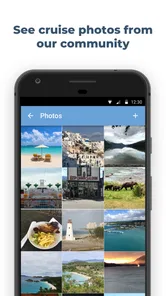
- Community updates can provide useful onboard information.
- Clean interface makes key cruise details quick to find.
Cons
- Cruise coverage may vary depending on the ship and itinerary.
- Some features may require an internet connection while traveling.
- User-submitted information can occasionally be outdated or incomplete.
- Notifications may not always arrive promptly at sea.
- Advanced tracking features may be limited without a paid upgrade.











