

Shimeji: Screen Buddies
- 16.30K
- 4.4
- Installs
- 10.00M
- Price
- Free

Screenshots
Analysis by Reviewed
I enjoy small touches that make a phone feel more personal, and a screen companion can add a little character without changing how I use the device. Shimeji: Screen Buddies is a personalization app from Digital Cosmos built around animated characters that appear on your screen. It is free to install, rated for Everyone, and has a 4.5 average from around 411,000 ratings. That popularity is encouraging, though I would still think about whether moving characters suit my own habits before leaving them visible all day.
Who will enjoy having a screen companion?
I see the strongest appeal for people who already enjoy character art, anime, game mascots, or virtual pets and want a little more life than a background image can provide. It is especially appealing if your phone is something you casually check throughout the day and you like small visual surprises between tasks. The characters are decoration, not a tool for organizing work, so I would approach the app as a playful extra rather than something that needs to improve productivity.
It is also a poor match for some perfectly reasonable preferences. If you value a quiet display, get distracted by motion, or use your phone mainly for reading and forms, a static wallpaper or a more restrained theme will likely feel better. I would be cautious about installing it on a device shared with someone who dislikes animated elements, too: personalization is most enjoyable when the person using the screen actually wants the character there.
A small test before making it part of your day
Rather than choosing several companions immediately, I would start with one and use the phone normally for a while. Check the screen while you are opening messages, reading a longer page, and navigating between apps. This is a more useful test than watching the character in isolation, because the real question is whether its movement fits around your habits. If it keeps pulling your eyes away, the issue may not be the character itself; it may simply be the wrong time or setting for an animated companion.
A practical routine could be to enjoy a character during a coffee break or while waiting for a reply, then turn the screen into a calmer place when you need to concentrate. That makes the app a deliberate bit of entertainment instead of background activity you have to tolerate. If you switch between relaxed and focused use often, it is worth checking whether changing the setup is easy enough for you to do in practice; a customization that takes too much fiddling may not fit a routine that changes every hour.
One useful trade-off to keep in mind is that adding more characters changes not only the amount of decoration but also how much is competing for your attention. A single companion can be easy to follow, while a group may make the display feel busier even if each character is charming on its own. I would add them one at a time and stop when the screen feels lively rather than crowded. That approach also makes it easier to notice which characters you actually enjoy seeing after the first few minutes.
Meet Your New Digital Pals
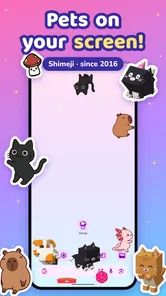
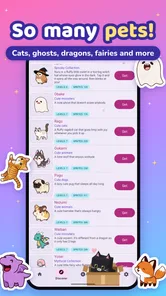
So, what exactly is Shimeji: Screen Buddies? Imagine having a mini Pikachu or a cute little cat wandering across your screen, climbing windows, and hanging from the cursor. That's precisely what this app offers. It's like having a virtual pet, only much more interactive and varied. The app features a wide range of characters, from anime favorites to classic game icons, and the best part is, you can have multiple Shimejis at once!
More From Our News Desk

 Gmail
GmailGmail in a Busy Inbox: Who Benefits Most?
From first account to crowded workday, Gmail earns its place through dependable search and flexible sorting—but its best fit depends on how much inbox maintenance you can tolerate.

 Prime Video
Switching to Prime Video: What Changes in Your Viewing Routine
Prime Video can make a compelling second home for streaming, but switching means learning a different catalog, rental layer, and route from browsing to playback.

 Universal TV Remote Control
Universal TV Remote Control Works Best as a Reliable Backup
A phone remote earns its place through quick setup and reliable habits. Here is how to get more from Universal TV Remote Control—and where its limits show.

 Weather - By Xiaomi
Weather by Xiaomi Review: Clear at a Glance, Less Clear Up Close
Xiaomi’s weather app makes everyday forecasts quick to scan, but its calm surface can leave useful details and recovery paths harder to find than they should be.

 X
XX Under Pressure: Can It Recover When Posting Goes Wrong?
A resilience-focused review of X, examining setup, mistaken posts, interruptions, weak connections, and the gaps that matter when recovery needs to be dependable.

 Clash of Clans
Clash of Clans Is Won Between the Battles
Its raids are quick; its community is a long-term project of coordination, teaching, rivalry, and shared responsibility—with all the friction that entails.
Latest News



How It Works
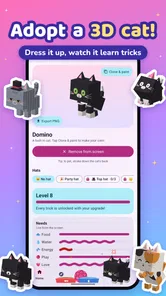
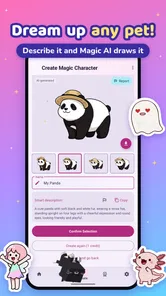
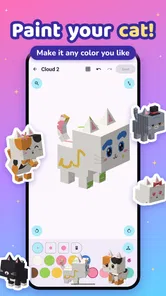
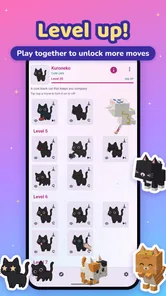
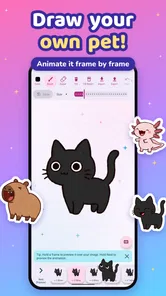
Getting started with Shimeji is as easy as pie. After downloading the app, you can choose from a plethora of characters. Once selected, these charming little buddies will appear on your screen, interacting with your mouse movements and even with each other. You can customize their behavior, making them more active or relaxed, depending on your mood or needs. Plus, if you're feeling creative, you can even design your own Shimeji!
That flexibility matters most when you treat the characters as occasional company rather than a permanent layer over everything. I would begin with one character, leave it active during a low-stakes moment, and see whether its movement feels charming or distracting. If the app offers choices for activity, a calmer setting is the sensible starting point while reading or messaging; a busier setup makes more sense when you are simply relaxing and browsing.
Interactive Fun on Your Screen
One of the coolest features of Shimeji is how interactive these characters are. They don't just sit there looking cute; they climb, jump, and even pull pranks. For instance, they might playfully hide your icons or dangle from your open windows. It's like having a little slice of chaos that makes using your device a bit more fun and spontaneous.
That playful interference is also the clearest trade-off. A character that moves across the screen can draw your attention away from a task, and jokes involving icons may not be welcome when you are trying to find something quickly. I would keep the app for breaks, casual browsing, or a home screen I enjoy looking at, then switch to a quieter setup before a focused work session. People who want a clean, motionless interface may prefer a static wallpaper or ordinary icon pack instead.
Beyond just being adorable, Shimejis can also be quite helpful. They can serve as a fun distraction during breaks, or even as a little stress reliever after a long day. Whatever your reason, these screen buddies are sure to bring a smile to your face.
Making It Fit Your Routine
A realistic way to use the app is to keep a favorite companion around while waiting for a message or taking a short pause between chores. If you often use your phone one-handed, notice whether a character’s movement gets in the way of tapping the controls you need; if it does, fewer companions or a less active behavior is a better fit. I would also try the app in the places I actually use my device, since a setup that feels fun during relaxed browsing may feel busy when I’m reading or filling out a form.
Compared with common personalization choices, such as a wallpaper, theme, or icon arrangement, Shimeji is more animated and playful, but it asks for more tolerance of movement on the screen. A wallpaper changes the look without competing for attention; a screen buddy adds personality through activity. That makes this a stronger choice for someone who likes interactive decoration than for someone whose main goal is a tidy, distraction-free display.
Why You'll Love It
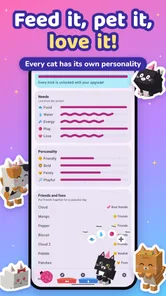
If you're someone who loves customization, Shimeji: Screen Buddies offers plenty of it. From choosing which characters to display to deciding how many you want on your screen at once, the app offers a level of personalization that makes it unique. Plus, the community is constantly growing, with new characters and features being added regularly.
The app is also quite light on resources, meaning it won't slow down your device—a common concern for apps running in the background. This makes it perfect for both work and leisure time, adding a bit of fun without any significant drawbacks.
In practice, I would avoid assuming that every character or behavior will suit every situation. More companions can make the screen livelier, but they can also make it harder to follow what is happening, so adding them gradually is a useful way to find a comfortable balance. If you are choosing it mainly to create a character yourself, explore the available creation options before making that the reason to install; the app’s appeal is strongest when its existing interactive choices already sound fun to you.
What to Expect as the App Evolves
Shimeji first appeared on December 24, 2016, and its current version is 9.3, a sign that the app has continued through multiple rounds of development. That history gives existing users a reason to check the current version when they revisit it, but it does not tell me exactly what has changed between releases. I would judge an update by whether the characters still behave comfortably on my device and whether the available customization fits my routine, rather than expecting a particular new feature.
For someone already using an earlier release, I would treat an update as a chance to reassess the experience, not as a promise that the app will feel entirely different. Notice whether the characters you rely on remain a good fit and whether your preferred level of activity still works for the way you use the phone. For a new user, version history is useful context, but the day-to-day decision remains simple: do you enjoy a moving companion enough to make room for it?
The app has passed 10 million installs and has about 16,000 written reviews, so it has clearly found an audience beyond people who only want a plain background. It is available free, with optional in-app purchases ranging from $0.99 to $19.99 per item, and it requires Android 8.0 or later. If you are deciding whether to spend anything, I would first try the free experience and only consider a purchase if a specific option you want is clearly available to you. If your device runs an older Android version, this release is not the right fit.
The free starting point makes it easier to decide whether this style of personalization is for you before paying for anything. I would browse what is available, spend time with the characters that appeal to me, and only consider an optional purchase when I can identify exactly what I want from it. That keeps the decision grounded in actual use rather than the assumption that more choices will automatically make the app more enjoyable. The listed in-app purchase range is broad enough that I would check the individual item before confirming a purchase.
One remaining question is practical rather than technical: will the movement feel like company or visual clutter after the novelty wears off? The easiest test is to start with a single companion, use it during a relaxed part of your day, and see whether you still enjoy it when you are doing something ordinary. I would also pay attention to whether its antics interrupt the apps and screen areas you rely on. If they do, reducing the activity or choosing a static customization option is a better answer than forcing yourself to keep it running.
What I would watch for in everyday use
The most useful signs of a good fit are small: whether I notice the character only when I want to, whether it leaves my routine feeling playful rather than cluttered, and whether I am happy with the choices I can use without paying. Those are more meaningful than simply counting how many characters I can put on screen. I would also pay attention to whether I keep the companion enabled after the first burst of novelty. If I repeatedly switch it off during ordinary tasks, that is a clear hint that a wallpaper or another quieter option suits me better.
Ultimately, I would choose Shimeji for personality, not utility. It makes the most sense for someone who likes animated characters and can enjoy them in short, casual moments, especially if a static background feels a little too plain. Someone looking for dependable organization, a work aid, or an entirely unobtrusive design should choose a different kind of personalization. The app’s charm depends on accepting that its characters are meant to be seen and sometimes noticed.
So, if you're looking to add a little personality to your device, why not give Shimeji a try? It's a delightful way to make your screen come alive with little buddies who are always ready to entertain and engage you. Trust me, once you start, you'll wonder how you ever lived without them!
My recommendation is more measured: try it if you enjoy animated characters and do not mind sharing your screen with a little movement. It is less suited to anyone who needs every screen element to stay still or who finds playful interruptions irritating. For me, its best role is a lighthearted bit of personalization for relaxed moments, with the option to step back to a simpler screen whenever focus matters more.
Shimeji: Screen Buddies Frequently Asked Questions
Is Shimeji: Screen Buddies suitable for children?
Shimeji: Screen Buddies has an Everyone content rating, so it is intended for a general audience. Its focus is on customizable screen pets that play, climb, and keep you company, rather than a traditional game with a story or competitive goals. As with any app, parents can decide whether its features and any optional purchases are appropriate for their child.
How popular is Shimeji: Screen Buddies?
Shimeji: Screen Buddies has attracted a large audience, with over 10 million installs and an average rating of 4.5 from around 411,000 ratings. Those figures suggest that many people enjoy using it as a playful way to personalize their screens. The app is developed by Digital Cosmos and is listed in the personalization category.
Is Shimeji: Screen Buddies free to download, and does it include purchases?
Shimeji: Screen Buddies is free to download, so you can try its screen companions without paying upfront. The app also offers in-app purchases, with individual items priced from $0.99 to $19.99. You can decide whether the free experience suits you before choosing to buy anything; the app is intended for personalization and centers on customizable animated pets.
What devices and software versions can run Shimeji: Screen Buddies?
The app is available for Android and iOS, making it an option for users on either platform. On Android, it requires version 8.0 or later, so check your device’s operating system before installing. Shimeji: Screen Buddies is a personalization app rather than a standalone game, adding animated companions to a device’s screen.
What is Shimeji: Screen Buddies and how does it work?
Shimeji: Screen Buddies is a playful app that brings animated characters, known as Shimejis, to your device's screen. These adorable little companions move around, interact with your screen elements, and can even be customized to perform various actions. By downloading the app, users can select their favorite characters and watch them come to life on their device, adding a fun and interactive element to everyday smartphone use.
Pros
- Interactive characters enhance user experience.
- Wide variety of cute buddies to choose from.
- Customizable features for personalization.
- Lightweight app with minimal storage use.
- Frequent updates with new characters.
Cons
- May drain battery if used extensively.
- Limited functionality beyond visuals.
- Can be distracting during work or study.
- Some features are locked behind paywall.
- Occasional bugs with character animations.











