Shiftsmart - Find Work
- 20.03K
- 4.0
- Installs
- 1.00M
- Price
- Free

Screenshots

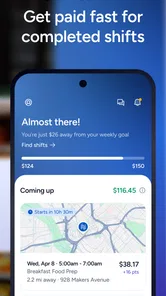
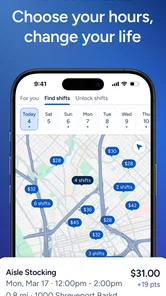
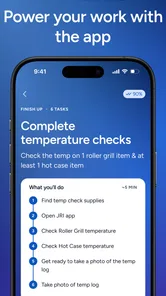
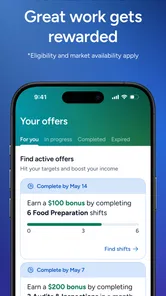
Analysis by Reviewed
Sharing a phone at home can make an ordinary work search feel like a household project. One person may be checking shifts while another needs the device, and a tempting opening can disappear from view if nobody has agreed who is using the account. I’d treat Shiftsmart as a personal work tool rather than a shared family calendar: it can help you look for flexible opportunities, but the decisions and account activity should stay with the worker.
Keep the account tied to the worker
Before browsing, decide whose profile is being used and keep that person responsible for it. A relative can help someone read listings or compare schedules, but signing up and making work commitments on another person’s behalf can blur important boundaries. The worker needs to understand the shift, be able to manage their own availability, and know which details they are sharing. On a shared device, logging out when finished and avoiding saved access on someone else’s profile are sensible habits.
This distinction matters because a shift is not just an item on a household to-do list. It affects the worker’s time, travel, and other commitments. I would not assume that one person’s account can serve several relatives, or that the app includes household profiles or family scheduling tools. Use a separate account for each worker where appropriate, and coordinate plans outside the app rather than treating it as a shared booking system.
Coordinate the practical details first
A useful routine is to check opportunities when you can also judge whether you can actually take them. Before accepting a shift, consider the trip there and back, existing appointments, and whether another household member is relying on you at that time. If you share transport or childcare, discuss those arrangements before committing, not after. That small pause can prevent a flexible shift from creating a stressful scramble at home.
For example, if you have an open afternoon, you might browse nearby work, compare the timing with your other plans, and then tell the people affected before making a commitment. Keep any confirmation or schedule details accessible to the worker, not just to the person who happens to share the phone. That makes it easier to catch a clash and keeps responsibility clear.
Age, trust, and sensible expectations
The app is rated for Everyone, but that content label is not the same thing as a promise that every job is suitable for every age or situation. Work opportunities involve real-world commitments, so I’d encourage younger users to involve a trusted adult and check the requirements attached to each opportunity. Adults should also read the particulars carefully rather than assuming a general app rating answers questions about eligibility.
Shiftsmart is a free business app from Shiftsmart, and its average rating is 3.2 from around 41,000 ratings. That mixed score is a reason to approach it with practical expectations: browse what is available in your area, assess each opportunity on its own terms, and do not build a household budget around work you have not secured. The app has more than a million installs, but popularity does not guarantee that the right shift will be nearby or fit your schedule.
More From Our News Desk

Weather by Xiaomi Review: Clear at a Glance, Less Clear Up Close

X Under Pressure: Can It Recover When Posting Goes Wrong?

Clash of Clans Is Won Between the Battles

Android Auto Makes the Case for Quieter Car Software

MobiOffice: Transforming Mobile Productivity with Seamless Integration

EA SPORTS FC™ Mobile Soccer: Redefining Mobile Sports Gaming
Ever found yourself scrolling through job apps, thinking, "There must be a better way to find gigs"? Well, let me introduce you to Shiftsmart - Find Work, an app that’s turning the job-hunting game on its head. If you’re tired of the same old routine and looking for something flexible and rewarding, this app might just be your new best friend.
What is Shiftsmart All About?
At its core, Shiftsmart - Find Work is designed for those who thrive on flexibility. Whether you’re a student, a stay-at-home parent, or just someone looking to make a few extra bucks, this app offers a plethora of opportunities. Picture this: a platform where you can scroll through available shifts, pick the ones that suit your schedule, and get to work. It's like having a job that perfectly fits around your life.
How Does It Work?
The process is pretty straightforward. First, you sign up and create a profile highlighting your skills and availability. Once that’s done, you can start browsing through a variety of shifts posted by companies looking for temporary workers. The app allows you to filter these shifts based on your preferences, making it super easy to find something that matches your skills and availability. And the best part? You get paid promptly after completing your shifts!
The Perks of Using Shiftsmart
One of the standout features of this app is its user-friendly interface. Navigating through the app is a breeze, even for those who aren’t particularly tech-savvy. Plus, the sheer variety of jobs means there’s something for everyone, from retail gigs to hospitality shifts. Another great aspect is the feedback system. After completing a shift, you can rate your employer and leave reviews, fostering a community of trust and transparency.
Moreover, Shiftsmart offers excellent customer support. If you ever run into issues, their team is quick to respond and resolve any concerns you might have. It’s reassuring to know that there’s always someone ready to help.
Why You Might Want to Give It a Try
If you’re someone who values flexibility and wants to escape the traditional 9-to-5 grind, Shiftsmart is definitely worth checking out. The app empowers you to take control of your schedule, allowing you to work when you want, where you want. It’s perfect for those who prefer a gig-based lifestyle or anyone in need of supplementary income.
On the flip side, if you’re looking for long-term job security, this might not be the right fit. The nature of gig work means there isn’t always a steady stream of shifts. However, if you’re okay with that and enjoy the freedom to choose, then go ahead and give it a whirl.
What to check before relying on a shift
I’d use the app as a way to discover possibilities, not as a substitute for checking the real-world details. A listing that looks convenient at first can be less attractive once you account for the commute, the time needed to get ready, or a clash with another responsibility. Compare the full commitment rather than judging by the shift hours alone. If you are trying to earn a specific amount for a bill, keep another plan available until you know the work is confirmed and completed.
It also helps to be selective about how you use filters. Narrowing the search to a perfect time or job type may make browsing quicker, but it can hide options you would have considered if you had a little flexibility. I’d first scan broadly to understand what kinds of work appear nearby, then tighten the criteria around genuine non-negotiables such as availability or travel. That approach is more useful than repeatedly refreshing a very narrow search and expecting a steady supply.
Where it fits among work-search options
Compared with general job boards, which tend to emphasize applications for ongoing roles, Shiftsmart is better suited to people who want to look for individual shifts and make short-term decisions. Compared with asking around locally, it gives you a focused place to browse opportunities, while a personal contact may offer context about a workplace that an app listing cannot replace. I would use those approaches together when possible: browse in Shiftsmart, then carefully evaluate the commitment before accepting.
This makes the app a stronger match for someone filling gaps in a changing schedule than for someone who needs predictable weekly hours, benefits, or a long-term employment path. It may also be a poor fit if you cannot travel to the available work, need guaranteed income, or have little room to adjust your day. Flexibility is useful only when the opportunities and your practical circumstances line up.
Getting started without overcommitting
When you first create a profile, take care to describe your actual availability and relevant skills rather than presenting an idealized schedule. A profile that reflects your real constraints is more useful than one that leaves you tempted to accept work you cannot reliably attend. Review each opportunity before committing, and keep a note of the timing and location in whatever calendar or reminder system you already trust. That simple step is especially helpful if you share household duties or a device with someone else.
People often want to know whether they can count on quick earnings or a constant stream of work. The app is aimed at finding shifts that may pay within days, but gig availability and payment timing should not be treated as identical guarantees for every situation. I’d plan around confirmed work and read the terms attached to an opportunity instead of assuming every listing follows the same pattern. If you need a stable paycheck above all else, a conventional part-time position may be a safer primary option.
For Android users, the current version is 87.0.0 and the listed minimum operating system is Android 6.0. It is free to download and rated for Everyone, so the initial cost is not the main decision; the more important question is whether the local opportunities suit your schedule and circumstances. I’d check that before investing time in building a routine around the app.
A practical way to test whether it suits you
I’d give the app a low-stakes trial rather than making it the center of a job search immediately. Start by checking whether the listings make sense for your location, skills, and actual free hours. Then estimate the whole time commitment, including travel and preparation, and compare that with what you would earn from other ways of using the same time. This is especially helpful if you are choosing between a one-off shift and a regular part-time role: the headline flexibility can look attractive, but reliability and total effort matter just as much.
For a realistic household example, imagine you have a weekday afternoon free while another person needs the car later. Browse before making plans, check the shift’s timing and location, and settle the transport arrangement with that person before accepting. If the trip leaves too little margin for the next commitment, skipping it is a sensible decision, not a missed opportunity. Keeping the worker’s own schedule in a calendar can also prevent a second household member from mistakenly assuming that an open-looking block is still available.
What the app cannot replace
Shiftsmart is most useful as a channel for finding and considering shift work; it should not be treated as a substitute for your own checks or a complete employment plan. A general job board may be better if you want to pursue a continuing position, while a direct conversation with a local employer can be more useful when you need details about duties, expectations, or the workplace before deciding. Those options solve different problems, so there is no need to choose just one. I’d use the app to explore short-term possibilities and keep a separate route open for steadier work.
That distinction also helps answer a common concern: can a person depend on the app for regular hours? I wouldn’t plan on a fixed routine until the opportunities you see actually support one over time. A flexible marketplace can be convenient when your availability changes, but it is a weaker foundation for rent, bills, or responsibilities that require predictable income. If consistency matters more than choosing individual shifts, a conventional part-time job is likely the better first step.
Make each commitment easy to verify
Before heading out, make sure you can find the relevant shift details without relying on another household member to remember them. Check the time and location, leave enough space for the journey, and tell anyone affected by your absence. If the phone is shared, agree on when the worker will have access to it for work-related messages and avoid passing around login access as a shortcut. These small steps are not special app features; they are practical safeguards that keep a personal work account and a shared household routine from getting tangled.
I’d also resist accepting an opportunity simply because it appears while you are browsing. A pause to compare it with your real availability can save more trouble than a fast decision creates value. If an opportunity does not fit, move on and check again when your circumstances are clearer. The app is a way to find options, not a reason to say yes to every option.
In conclusion, Shiftsmart - Find Work brings a fresh perspective to the job market. It’s a versatile tool for anyone looking to diversify their income streams or simply explore new work opportunities. Whether you're a seasoned gig worker or new to the scene, this app offers a seamless experience that’s hard to beat. So why not download it and see for yourself?
Shiftsmart - Find Work Frequently Asked Questions
Does Shiftsmart have shifts near me?
Shiftsmart focuses on part-time earning opportunities near you, so the app may be useful if you want to explore work in your area. What you can choose from depends on the opportunities available locally. Browse the listings after creating an account and consider whether the location, schedule, and requirements make each shift practical for you.
Is Shiftsmart free to download and use?
Shiftsmart is free to download, and users do not pay a fee just to access or use the app. Keep in mind that taking a particular shift may involve practical expenses, such as transportation or equipment, so factor those into your decision. Review the details of an opportunity before applying to make sure it makes sense for you.
Who can use Shiftsmart, and what should I check before creating an account?
Shiftsmart is intended for people looking for part-time work and flexible earning opportunities. Before signing up, consider whether the shifts shown in your area fit your schedule, skills, and transportation options. The app is free to download, and its age rating is Everyone, but particular work opportunities may have their own eligibility or qualification requirements.
What is Shiftsmart and how does it work?
Shiftsmart is a workforce management application designed to connect workers with available shifts across various industries. Users can browse and select shifts that suit their schedules, apply for them, and get paid directly through the app. It's an excellent tool for those seeking flexible work hours and opportunities to earn extra income. Its focus is on finding part-time opportunities nearby that pay within days, making it worth exploring if you want work that can fit around other commitments.
Is Shiftsmart available for both Android and iOS?
Yes, Shiftsmart is available for download on both Android and iOS platforms. You can find it on the Google Play Store for Android devices and the Apple App Store for iOS devices. This ensures that users with different types of smartphones can easily access and use the application. On Android, the app requires version 6.0 or later, so check your device’s operating system before downloading.
Pros
- User-friendly interface
- Wide range of job categories
- Flexible work schedules
- Quick payment processing
- Easy sign-up process
Cons
- Limited job availability in some areas
- Inconsistent work opportunities
- App occasionally crashes
- Customer support can be slow
- High competition for popular jobs











