Shadow Weather
- 1.54K
- 4.5
- Installs
- 100.00K
- Price
- Free
Screenshots
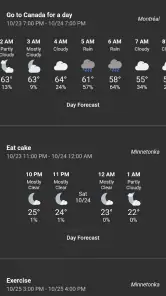
Analysis by Reviewed
When I open a weather app, I usually want one answer quickly: is the sky about to become a problem? Shadow Weather takes that question seriously by putting live lightning tracking and severe-storm awareness near the center of the experience. It is a free weather app from Shadow Weather LLC, and after using it, I see its strongest value in helping me make short-term decisions rather than simply checking a temperature for the afternoon.
The app has a focused identity. It is not just a decorative forecast screen with a large number and a sunny icon. Its appeal comes from connecting ordinary weather conditions with the possibility of rapidly changing storms. That makes it especially useful when I am deciding whether to walk, drive, exercise outside, take children to a park, or wait before starting an outdoor task.
Shadow Weather is available for Everyone and supports Android devices running version 7.0 or later. It is free to install, while optional in-app purchases range from $0.99 to $12.99 per item. That combination makes it easy to try without committing money immediately, although anyone who prefers a completely purchase-free weather experience should pay attention to which parts of the app are included at no cost.
Why the live lightning view matters more than another temperature forecast
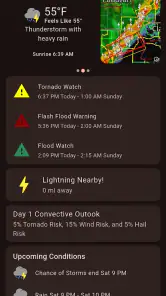
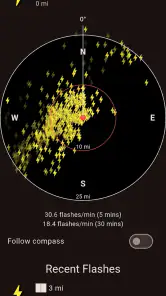
The most meaningful capability here is the live lightning tracker. A normal forecast can tell me that thunderstorms are possible, but that wording covers a wide range of situations. It may mean a distant chance later in the day, or it may mean that a storm is already developing nearby. A live view gives the forecast a sense of movement, which is much more useful when I am making a decision in the next few minutes.
I find this distinction important because weather plans rarely fail because I misunderstood the day’s high temperature. They fail when conditions change faster than expected. A lightning-focused view helps me think in terms of what is happening around me now, not only what a general forecast predicted earlier.
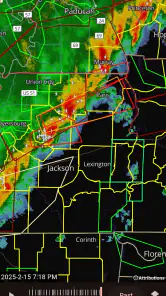
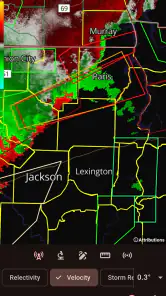
The severe-storm tracking angle adds another layer. I would not treat any weather app as a replacement for official emergency instructions, but Shadow Weather can act as a practical first check. If the app shows an active storm situation while I am preparing to leave, that is a good reason to pause, look at the broader forecast, and reconsider the route or timing.
The real benefit is decision support, not visual drama. A moving storm picture is useful only when it changes what I do. In my experience, the feature earns its place when I use it before committing to an outdoor plan, rather than opening it just to watch weather graphics.
More From Our News Desk

Clash of Clans Is Won Between the Battles

Android Auto Makes the Case for Quieter Car Software

MobiOffice: Transforming Mobile Productivity with Seamless Integration

EA SPORTS FC™ Mobile Soccer: Redefining Mobile Sports Gaming

How Microsoft OneDrive Became a Mobile Productivity Giant

How Google Translate Breaks Language Barriers Effortlessly
How I use the tracker before leaving home
My preferred routine is simple. I check the current conditions first, then look at the lightning or severe-weather information before deciding whether to go. If the situation looks unsettled, I check again shortly before leaving instead of assuming that the first look will remain accurate for the whole trip.
This is a small habit, but it avoids a common mistake: treating a weather forecast as a fixed promise. Storm conditions can make a forecast feel outdated quickly. Shadow Weather is most helpful when I use it as a current-awareness tool and not as permission to ignore what I can see and hear outside.
For a commute, I would check it before walking to a transit stop or starting a bicycle ride. For a longer drive, I would use it as one part of the preparation and still keep an eye on official warnings and local road information. The app can help me decide whether to delay departure, but it cannot remove the need for judgment once I am on the road.
What the experience feels like in everyday use
The app’s weather category is familiar enough that I do not need to relearn the basic purpose of the screen. The difference is the attention given to active storm conditions. Instead of making me dig through several layers before finding relevant information, the experience is aimed at getting me closer to the question, “Is this weather becoming dangerous or inconvenient right now?”
That focus is useful for people who already know what they want from a weather app. I do not need a long explanation when I am standing by the door with a bag in my hand. I want a quick indication of whether the next stretch of time looks calm enough for the plan I have in mind.
At the same time, I would not describe the app as a complete replacement for every other weather source. A weather app can show a situation, but local knowledge still matters. Buildings, hills, coastal areas, and road conditions can make the same storm feel very different from one neighborhood to the next. I treat the tracker as an additional lens, not as a guarantee.
A realistic scenario: deciding whether to continue an outdoor plan
Imagine that I have arranged an afternoon walk and the sky begins to darken while I am getting ready. A basic daily forecast may still show a mostly acceptable day, because the overall forecast is averaging several hours. Shadow Weather is more useful at this exact moment because the question has changed from “What is today like?” to “Is there an active storm pattern close enough to affect my next decision?”
I would open the app, inspect the current storm information, and decide whether to leave immediately, wait, or cancel. If the information suggests that conditions are worsening, I would rather postpone the walk than start it and hope the weather improves. If the situation looks limited or distant, I might continue while staying prepared to turn back.
This is where the app feels more practical than a standard forecast widget. It is not necessarily telling me everything about the day, but it is helping me handle uncertainty at the moment when uncertainty matters most.
Useful habits that make the feature more reliable
First, I check the app at two different moments when the plan matters: once while preparing and again just before leaving. That prevents an earlier glance from becoming false confidence. The second check is particularly useful for outdoor work, sports, and travel where returning quickly may not be easy.
Second, I use the lightning view to decide when to seek more information, not when to stop thinking. If the tracker suggests an active or developing threat, I consult official local alerts and use common sense. This workflow gives Shadow Weather an appropriate role: it is a fast awareness layer that can prompt a better decision.
Third, I avoid relying on a single visual impression when the consequences are serious. For a casual walk, a quick check may be enough to change my timing. For a vulnerable person, a remote outdoor location, or a long drive, I would combine the app with local warnings and a clear backup plan.
Where Shadow Weather fits, and where it does not
The app has a strong use case for people who care about changing storm conditions more than elaborate long-range planning. If I spend time outdoors, live in an area where thunderstorms can develop quickly, or simply dislike being surprised by lightning, its focus makes sense. The live tracker can turn a vague concern into a more concrete reason to wait or continue.
It is also a good choice for someone who wants to try a specialized weather experience without paying at the start. The app is free, and its average rating is 4.5 from around 5 thousand ratings, with roughly 1.5 thousand written reviews. More than 100 thousand installs indicate that it has found an audience beyond a tiny group of weather enthusiasts.
Still, those figures do not tell me whether it will suit every person. Someone who mainly wants a simple temperature glance, a basic weekly forecast, or a minimal home-screen widget may find the storm emphasis unnecessary. If my daily routine rarely involves outdoor decisions, I might prefer a simpler weather tool that stays out of the way.
The tradeoff between specialized awareness and simplicity
Adding storm information can make a weather app more useful, but it can also make the experience feel busier than a basic forecast. When I only want to know whether I need a jacket, lightning tracking is more information than I need. The app’s value rises with the importance of timing and falls when my question is routine and low-risk.
There is also a mental tradeoff. A detailed storm view may encourage me to keep checking conditions repeatedly, especially when the weather is unsettled. That can be helpful before an outdoor plan, but unnecessary checking can become distracting. I get the best results when I define the decision first: leave now, delay the activity, choose another route, or stay indoors.
The optional purchases are another consideration. Since the app is free to start and includes items priced from $0.99 to $12.99, I would try the basic experience before deciding whether any paid additions are worthwhile. I would not assume that paying automatically makes the information more accurate or that every user needs the same extras. The right question is whether a purchase improves a workflow I actually use.
How it compares with ordinary weather alternatives
Compared with a general weather app, Shadow Weather feels more purposeful when the immediate concern is lightning or severe storms. A conventional app may be better for broad daily planning, seasonal outlooks, or a quick glance at temperatures. I would choose between them based on the decision in front of me rather than expecting one app to do everything equally well.
Compared with checking a search engine or a standard forecast page, this app offers a more direct routine for storm awareness. I do not have to begin with a broad question and then interpret several pieces of information before deciding what they mean. Its advantage is the dedicated focus, especially when I already suspect that weather is changing.
Compared with official emergency alerts, it serves a different purpose. Official notices should carry more weight when authorities issue instructions. Shadow Weather is better viewed as a convenient monitoring tool that helps me notice conditions and decide when to investigate further. That distinction matters because convenience should never be confused with emergency authority.
Who gets the most from it
I would recommend Shadow Weather first to people whose plans are sensitive to short-term storm changes. Runners, cyclists, hikers, dog walkers, outdoor workers, parents arranging playground time, and anyone planning a picnic can all benefit from checking active lightning conditions before committing to the activity.
It may also suit people who have been caught by surprise by fast-moving storms and want a more deliberate pre-departure routine. The app does not eliminate uncertainty, but it can make uncertainty visible enough to influence a choice. That is a meaningful improvement over looking only at a static daily icon.
I would be more cautious about recommending it to someone who wants the most stripped-down weather interface possible. If the presence of storm information feels like clutter, or if the main need is a simple forecast for indoor planning, a basic alternative may be more comfortable. Likewise, people making high-stakes travel or safety decisions should use it alongside official sources rather than relying on it alone.
Device support and the decision to try it
The current version is 3.6.0, and support for Android 7.0 or later gives it a broad compatibility range for many older devices. That is helpful if I do not have a recent phone and still want a dedicated storm-tracking option. I would nevertheless keep expectations realistic: compatibility means the app can run on the supported system, not that every older device will feel equally quick or comfortable.
Because the starting price is free and the age rating is Everyone, trying it is relatively straightforward for households that want a weather tool with a storm-aware focus. I would spend a few days using it during ordinary weather and then during a changing forecast before considering any optional purchase. That gives me enough time to see whether the tracker genuinely changes my decisions or merely adds another screen to check.
My final recommendation
Shadow Weather stands out because it treats lightning and severe-storm awareness as a practical part of checking the weather, not as an afterthought. In my use, its best moment is the short window before an outdoor plan, when a broad forecast is too general and I need to know whether conditions are becoming a real concern.
I like it most as a companion for quick, local decisions: wait before leaving, change a route, shorten an activity, or stay indoors. I would not use it as my only source for serious warnings, and I would not recommend it automatically to someone who wants nothing more than a temperature and a simple forecast.
For the right user, though, the focused approach is valuable. If storms regularly affect your plans, the live lightning tracker can turn weather checking from passive browsing into a useful decision-making habit. That is the reason I would recommend giving Shadow Weather a try before paying for anything: its worth depends less on how often you admire the forecast and more on whether its storm information helps you make safer, better-timed choices.
Shadow Weather Frequently Asked Questions
Who makes Shadow Weather, and is it suitable for everyone?
Shadow Weather is made by Shadow Weather LLC and is a weather app intended for general use. Its content rating is Everyone, so it is suitable for a broad audience. If you are considering it for a child or for someone who depends on weather information for safety, remember that an app can support everyday planning but should not replace official warnings or emergency guidance.
What is Shadow Weather, and what does it offer?
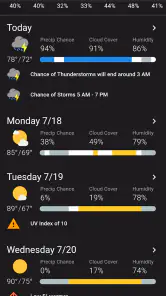
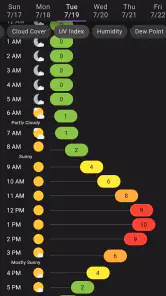
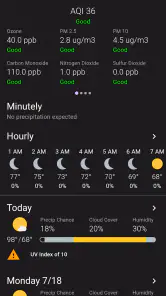
Shadow Weather is a weather app focused on delivering detailed, location-based forecasts and atmospheric information in a clean, modern interface. Its core focus includes smart weather conditions, a live lightning tracker, and a severe storm tracker. Depending on your location and subscription level, it may also provide current conditions, hourly and daily forecasts, radar or satellite information, severe-weather alerts, air-quality details, and other useful data. It is designed for users who want more information than a basic temperature-and-rain forecast.
Is Shadow Weather free to download and use?
Shadow Weather is free to download, but some features may require an in-app purchase. Purchases range from $0.99 to $12.99 per item. The free experience may include basic forecasts and current conditions, while advanced radar tools, extended forecast periods, additional weather data, customization, or an ad-free experience can vary by platform and plan. Review the purchase options in the app before paying, and choose only the features that suit your needs.
How accurate are Shadow Weather forecasts and alerts?
Forecast accuracy depends on your location, local weather conditions, and the data providers used by the app. Shadow Weather can be helpful for everyday planning, but no weather application is perfectly accurate, particularly during rapidly changing or severe conditions. Users should enable location access and notifications for relevant updates, while treating official government warnings and emergency services as the most authoritative source during dangerous weather.
What permissions does Shadow Weather require?
Shadow Weather may request location permission so it can provide forecasts for your current area and notify you about relevant weather events. It may also request permission to send notifications, use background updates, or display widgets, depending on the features enabled on your device. You can usually choose approximate location access or deny optional permissions, although doing so may limit automatic updates and alerts.
Pros
- Clean
- easy-to-read weather forecasts with useful daily details.
- Provides timely updates for changing conditions and upcoming weather.
- Helpful radar and forecast views for planning outdoor activities.
- Supports weather information for multiple saved locations.
- Minimal interface makes key weather data quick to find.
Cons
- Some advanced features may require a subscription or in-app purchase.
- Forecast accuracy can vary depending on location and local weather patterns.
- Frequent alerts may feel excessive unless notification settings are adjusted.
- Radar and detailed data may consume more battery or mobile data.
- Some locations may have fewer weather details than major cities.
- Category
- Weather
- Version
- 3.6.0











