ServerLife - Tip Tracker
- 1.06K
- 4.8
- Installs
- 100.00K
- Price
- Free

Screenshots
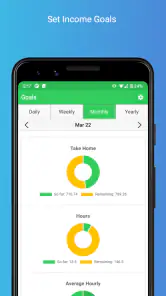
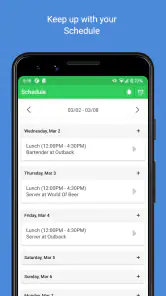

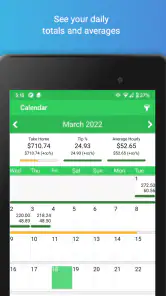
Analysis by Reviewed
Keeping track of tips sounds simple until the numbers arrive at different times, come from different shifts, and get mixed with driving or other income. I found ServerLife - Tip Tracker most useful as a focused finance app for people who need a quick place to record earnings while working, rather than as a full accounting package. Its purpose is clear: help servers, drivers, and similar workers build a more dependable picture of what they earn.
That narrow focus is the main reason I would recommend it to a friend who regularly receives tips. I would not choose it as a replacement for tax software, business bookkeeping, or a complete household budget. But for the awkward gap between finishing a shift and later trying to remember what happened, it offers a practical routine. The app is free to download, rated for Everyone, and comes from MZBApps LLC. It has also built a strong store reputation, with a 4.8 average from around 4.2 thousand ratings and more than 100 thousand installs.
How ServerLife fits into a real working day
The best way to use this app is to treat it as a capture tool. I would open it near the end of a shift, record the money while the details are still fresh, and use the accumulated entries to understand patterns over time. That sounds less impressive than a huge financial dashboard, but it solves a real problem: small cash amounts and irregular tips are easy to lose when they are written on receipts, left in a notes app, or trusted entirely to memory.
A realistic example would be a server finishing an evening shift with cash tips, card tips, and perhaps a separate amount from a shared pool. Instead of entering one vague total, the worker can use a consistent habit and keep the shift connected to the income it produced. A driver could use the same approach after a block of deliveries, while someone working several jobs could separate tip-based work from other earnings. The value comes from repetition. A single entry is not transformative; several weeks of disciplined entries can make income feel much less mysterious.
I especially like the idea of entering information immediately after work instead of waiting until the weekend. Delaying the task creates two problems: forgotten details and a growing pile of unfinished records. A tip tracker only earns its place on a phone if it takes less effort than reconstructing the same information later. ServerLife is aimed at that exact moment, when a worker needs to record something quickly and move on.
The app’s current version is 2.1.53, and its long availability since April 4, 2016 suggests that it is not a short-lived experiment. That history matters for an app used to build an income record. I would still keep normal financial records elsewhere when accuracy is important, but I would be more comfortable making this part of a routine than relying on a brand-new tool with no track record.
Speed expectations: quick entries matter more than visual extras
For this kind of finance app, perceived speed is less about elaborate animation and more about how quickly I can get from opening the app to saving an entry. ServerLife makes the most sense when it stays out of the way. A worker may be standing in a parking lot, sitting in a break room, or heading home after a long shift. The workflow should feel like a brief note, not another administrative chore.
More From Our News Desk

Clash of Clans Is Won Between the Battles

Android Auto Makes the Case for Quieter Car Software

MobiOffice: Transforming Mobile Productivity with Seamless Integration

EA SPORTS FC™ Mobile Soccer: Redefining Mobile Sports Gaming

How Microsoft OneDrive Became a Mobile Productivity Giant

How Google Translate Breaks Language Barriers Effortlessly
I would judge the app by a simple test: can I record a shift without mentally rebuilding the entire day? The focused nature of the product works in its favor here. It is not trying to be a bank, investment platform, or broad expense manager. That limited scope should make it easier to approach with a specific intention: record income, review it, and return to work or home life.
There is also a useful trade-off in not expecting a tip tracker to behave like a full desktop finance suite. A larger alternative may provide more categories, reports, and account connections, but it can also make a quick entry feel heavier. If I were choosing between a general budgeting app and this specialized tool for shift income, I would favor ServerLife when speed of capture is the priority.
That does not mean every interaction will feel effortless for every user. Anyone who wants automatic bank imports, complex reconciliations, or a detailed business ledger may find a focused tip tracker too limited. The app is strongest when the user already knows what needs to be recorded and wants a dedicated place to do it. It is weaker as a central command center for every financial decision.
Heavy-use moments: where a good routine can still become demanding
The most demanding period is likely not one unusually large entry, but a busy week with many shifts, multiple jobs, and inconsistent payment types. This is where organization becomes more important than the act of typing in a number. If I were using ServerLife heavily, I would decide in advance how I name or separate work sessions and would enter them at the same point in every shift. Consistency prevents the later review from becoming a puzzle.
A useful, non-obvious habit is to record the shift before dividing the money mentally into spending, saving, and bills. Mixing tracking with budgeting can lead to accidental omissions. I would first capture what was earned, then use a separate budgeting process to decide what happens to it. That keeps the app’s role clear and makes it easier to spot whether a low-income week was genuinely low or simply poorly recorded.
Another practical tip is to avoid using a single weekly total when the work itself varies. A server may have a quiet weekday and a strong weekend; a driver may have different results depending on the hours worked. Recording each work period gives the later picture more meaning. It can reveal that the average is being carried by only a small number of shifts, which is more useful than seeing one blended figure.
Heavy use can also expose a limitation common to focused trackers: the quality of the result depends on the quality of the input. If I forget to enter a cash tip, the app cannot repair that gap. If I record a shared tip pool without deciding how to represent it, later totals may be technically correct but personally confusing. ServerLife can support a careful workflow, but it cannot replace one.
For users with several income sources, I would establish a short end-of-day checklist. Record each relevant work session, distinguish tip income from other pay, and review the entry before closing the app. This takes discipline, but it is more reliable than trying to remember everything on payday. The app becomes valuable precisely because it encourages a repeatable process.
Reliability and recovery: useful records deserve a cautious approach
Reliability has two sides here. The first is whether the app remains dependable enough to use regularly. Its established release history and current version give me reasonable confidence that it is an actively maintained product rather than an abandoned calculator. Its store response is also encouraging: around 1.1 thousand written reviews sit behind the overall rating, which shows that many people have taken the time to describe their experience.
The second side is recovery when something goes wrong. That is where I would be careful. Income records matter, so I would not make any mobile tracker my only copy of important financial information. I would periodically transfer essential totals into whatever broader record I use for taxes, personal budgeting, or workplace documentation. This is not a criticism unique to ServerLife; it is sensible practice whenever a phone app holds information that may matter later.
I would also build recovery into the routine instead of waiting for a problem. After a particularly important week, I would review the totals and make sure the entries match my own notes or pay information. If a number looks unusual, it is easier to investigate while the shift is still memorable. This creates a second layer of confidence without turning every entry into an accounting exercise.
The app should appeal to people who want a dedicated record but still understand the difference between tracking and verification. I would trust it as a convenient working log. For formal tax preparation, employer disputes, or detailed business accounting, I would use it alongside more authoritative documents. That distinction is important because a clean-looking total is not automatically a complete financial record.
There is also a human reliability issue. The best tracker is the one I will actually open after work. A technically powerful alternative is not better if it feels too slow or complicated and causes me to postpone entries. ServerLife’s specialized purpose gives it a chance to become a habit, particularly for workers who have already failed with paper notes or a generic notes app.
Device constraints and cost considerations
ServerLife supports Android devices running version 7.0 or later, which covers a broad range of phones but still makes the operating-system requirement worth checking before installation. Someone using an older phone should confirm compatibility rather than assume every finance app will run. On a supported device, the app’s focused role should be easier to accommodate than a resource-heavy all-in-one service, although I would avoid making promises about battery use or memory consumption without testing the exact phone.
For everyday use, the important device constraint is practical access. If the phone is nearly full, outdated, or unreliable, even a simple tracker can become frustrating. I would keep the app updated when convenient, leave enough storage for normal phone operation, and avoid waiting until the end of a long week to discover that my device has become difficult to use. Those are ordinary precautions, but they matter more when the app is part of an income routine.
The download price is free, which lowers the barrier for a worker who wants to try the workflow without committing money first. There are in-app purchases ranging from $0.99 to $29.99 per item, so I would look carefully at what is included before buying anything. The free starting point is helpful, but users who want to keep costs predictable should treat optional purchases as a separate decision rather than assuming every capability belongs to the no-cost experience.
This pricing model also affects who should choose it. Someone who only needs occasional notes may be satisfied with the free option or may prefer a basic notes app. Someone who expects advanced tracking over a long period should decide whether the paid additions provide enough value for their particular routine. I would not pay simply because an app has more settings; I would pay only if a specific addition saves time or improves the accuracy of my records.
The Everyone content rating makes the app approachable for a wide audience, but that should not be confused with financial guidance. It is a tool for recording and reviewing income. Parents, teenagers with tip-based work, and adults can understand the basic purpose, yet anyone handling serious tax or business obligations should still learn the relevant rules and keep supporting documentation outside the app.
Who gets the most from it, and who should skip it
I think ServerLife is a strong fit for restaurant servers, delivery drivers, bartenders, and other workers whose earnings include frequent tips or fluctuate from one work period to another. It is also useful for someone who wants to compare work patterns without building a spreadsheet from scratch. The app’s dedicated identity makes more sense when tips are a recurring part of life rather than an occasional bonus.
I would be more hesitant to recommend it to someone with a fixed salary and no need to track individual work sessions. That person may get more value from a conventional budgeting app that focuses on bills, accounts, savings goals, and spending categories. I would also steer a small business owner toward bookkeeping software if they need invoices, expenses, payroll, or formal reports. ServerLife can record a slice of that activity, but it is not the whole financial system.
Compared with a paper notebook, the app offers a more structured and searchable routine, but paper has one advantage: it works without a charged phone or an app session. Compared with a notes app, ServerLife is more purpose-built, while notes may be more flexible for unusual situations. Compared with a spreadsheet, it should be easier for quick entries, but a spreadsheet offers more control for custom calculations and combining many income sources.
That comparison helped me define the right expectation. ServerLife is not necessarily the most powerful option in finance. It is potentially the more convenient option for a narrow, repeated task. Convenience is not a minor feature in this category; if it determines whether I record every shift or only the memorable ones, it directly affects the usefulness of the final totals.
My performance verdict after considering everyday use
My overall view is positive, with a clear boundary around what the app is meant to do. ServerLife looks best as a lightweight companion for capturing tip-based income close to the moment it is earned. Its focused purpose, free entry point, broad device support from Android 7.0 onward, and strong 4.8 average make it easy to justify trying for the right user.
The real performance win is not flashy speed; it is reducing the distance between earning money and recording it. When that distance stays short, the record becomes more complete. When the app is treated as a substitute for tax records, detailed bookkeeping, or a complete budget, the expectations become unfair and the limitations become more serious.
I would install it for a friend who regularly works for tips and wants a dedicated routine without starting with a complicated finance platform. I would tell that friend to record each shift consistently, review unusual totals, and keep important financial information in a second place. I would also mention the optional purchase range before they explore paid additions, so the free download does not create an unexpected assumption about the full experience.
In the end, ServerLife - Tip Tracker earns its place by addressing a very specific annoyance: scattered, easily forgotten work income. It will not make irregular earnings regular, and it cannot fix missing entries. But if you need a simple, focused way to build a clearer record of tips from servers, driving, or similar work, I think it is a sensible app to try. For broader money management, I would pair it with a proper budgeting or bookkeeping solution rather than asking it to become something it was not designed to be.
ServerLife - Tip Tracker Frequently Asked Questions
Is ServerLife - Tip Tracker free to download?
ServerLife - Tip Tracker is free to download, so you can try its tip and income-tracking tools without paying upfront. The app also offers in-app purchases, with prices ranging from $0.99 to $29.99 per item. Check the purchase details shown in the app before confirming anything, and consider whether its features fit your routine before choosing an optional purchase.
Who makes ServerLife, and which devices can run it?
ServerLife - Tip Tracker is made by MZBApps LLC and is available for mobile devices running Android 7.0 or later. Its focus is tipped workers who want to keep shift and income information organized. Before downloading, check that your device meets the minimum operating-system requirement and that you are selecting the correct version for your platform.
What is ServerLife - Tip Tracker used for?
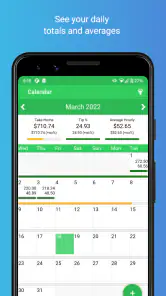
ServerLife - Tip Tracker is designed for restaurant servers, bartenders, delivery workers, and other tipped employees who want to record and review their income. After a shift, you can enter tips, hours, sales, and related details to build a clearer picture of your earnings. It is especially useful for comparing busy and slow shifts, monitoring trends, and organizing information that might otherwise remain scattered across notes or memory.
How does ServerLife help track tips and shift income?
The app lets you log information for individual shifts and keep those records together in one place. Depending on the details you enter, you can review cash and card tips, hours worked, sales, dates, locations, and other useful figures. Its value depends on consistent data entry: the application can organize and summarize your information, but it cannot automatically verify tips or correct amounts that were entered incorrectly.
Can ServerLife calculate hourly earnings and other useful statistics?
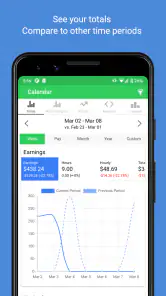
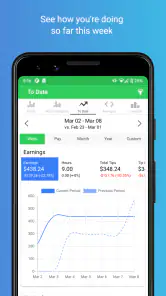
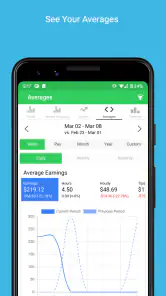
ServerLife - Tip Tracker is intended to turn shift records into practical earning statistics, such as total tips, average income, and earnings in relation to hours worked. These calculations can help you understand your effective hourly rate and identify your strongest shifts or workdays. Results will only be as accurate as the information you provide, particularly when reporting shared tips, deductions, overtime, or unpaid preparation time.
Pros
- Quickly records tips
- shifts
- and earnings in one place.
- Useful breakdowns help identify the most profitable days and shifts.
- Simple interface makes daily entries fast during busy work periods.
- Supports better budgeting by showing income trends over time.
- Helpful for servers
- bartenders
- drivers
- and other tipped workers.
Cons
- Manual entry can become tedious after every shift.
- Some advanced tracking features may require a paid upgrade.
- Income reports depend on accurate and consistent user input.
- Not ideal for teams needing shared workplace or payroll management.
- Privacy-conscious users may hesitate to store earnings data in an app.
- Category
- Finance
- Version
- 2.1.53











