

Selfira
- 115.00
- 4.7
- Installs
- 50.00K
- Price
- Free

Screenshots
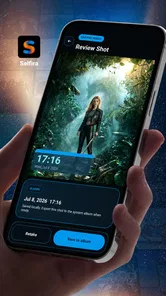

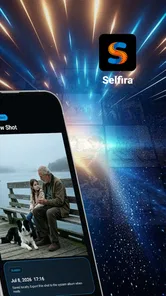
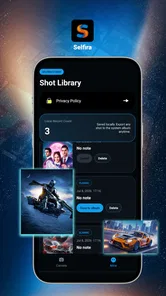
Analysis by Reviewed
I approached Selfira as a practical camera companion rather than a general photography editor. Its purpose is narrow but useful: it places a timestamped watermark on photos intended for local records. That immediately makes it different from a normal camera app, where the image is usually treated as a finished memory or a shareable picture. Here, the visible time is part of the record, and that changes how I think about framing, reviewing, and organizing each shot.
After using it, my impression is that Selfira works best when the photograph needs context at a glance. A picture of a meter, a delivery, a worksite, a repaired item, a room before a move, or a document condition can become easier to understand later when the capture time is visible on the image itself. I would not choose it as my only camera for portraits or creative photography, but I can see why a focused tool like this appeals to people who repeatedly need dated visual notes.
How I built a dependable everyday workflow
The most reliable way to use Selfira is to decide beforehand what the photo is meant to prove or remember. That sounds obvious, but it prevents the app from becoming a camera I open casually and then forget to organize. Before taking a picture, I ask myself whether the subject, the timestamp, and the surrounding context will still make sense when I look at the image later.
For example, imagine checking a rented apartment before handing back the keys. I would photograph each room from a position that shows the relevant surfaces, then take closer shots of marks or damage. The watermark gives each image a time reference, while the wider shots explain where the detail belongs. The useful habit is not simply “take a dated photo”; it is creating a small visual sequence that another person could understand without being present.
The same approach works for household maintenance. If I inspect a water meter, appliance display, parcel condition, or wall repair, I try to include enough of the surroundings to identify the location. A tight crop may show the number clearly but lose the evidence of where it came from. Selfira is more valuable when I treat every image as a future record rather than as a snapshot that only makes sense in the moment.
I also found it helpful to pause briefly before pressing the shutter. The timestamp is automatic context, but it does not replace careful composition. Reflections, glare, blocked labels, and tilted surfaces can still make a record hard to use. For anything important, I take a general view first and then a detail view. That small two-step routine is more dependable than trying to capture everything in one crowded frame.
Because the app is free and aimed at Everyone, it is easy to recommend for occasional personal documentation without making the user commit to a specialized paid workflow. It comes from Work zone limited, and its focused design makes more sense for people who want a straightforward record camera than for users searching for a full editing suite.
More From Our News Desk

 Gmail
GmailGmail in a Busy Inbox: Who Benefits Most?
From first account to crowded workday, Gmail earns its place through dependable search and flexible sorting—but its best fit depends on how much inbox maintenance you can tolerate.

 Prime Video
Switching to Prime Video: What Changes in Your Viewing Routine
Prime Video can make a compelling second home for streaming, but switching means learning a different catalog, rental layer, and route from browsing to playback.

 Universal TV Remote Control
Universal TV Remote Control Works Best as a Reliable Backup
A phone remote earns its place through quick setup and reliable habits. Here is how to get more from Universal TV Remote Control—and where its limits show.

 Weather - By Xiaomi
Weather by Xiaomi Review: Clear at a Glance, Less Clear Up Close
Xiaomi’s weather app makes everyday forecasts quick to scan, but its calm surface can leave useful details and recovery paths harder to find than they should be.

 X
XX Under Pressure: Can It Recover When Posting Goes Wrong?
A resilience-focused review of X, examining setup, mistaken posts, interruptions, weak connections, and the gaps that matter when recovery needs to be dependable.

 Clash of Clans
Clash of Clans Is Won Between the Battles
Its raids are quick; its community is a long-term project of coordination, teaching, rivalry, and shared responsibility—with all the friction that entails.
Latest News



What the watermark changes in practice
A visible timestamp is helpful because it travels with the image. If I export or share the photo later, the date and time remain part of what the viewer sees instead of depending entirely on file details or a separate message. That is especially convenient when images are copied between folders, attached to a conversation, or reviewed outside the original camera application.
There is also a trade-off. A watermark occupies part of the frame, so I would not use this mode for images where clean presentation matters. A timestamp can cover a small but important edge, and it may make a photo look more like documentation than a finished picture. I think of that as the central choice: Selfira adds traceability, but the added information has a visual cost.
For personal records, I prefer placing the subject so the lower edges and corners contain less important detail. That gives the timestamp room without hiding a label or measurement. When the subject fills the entire frame, I leave a little breathing space around it. This is a simple composition adjustment, but it makes the watermark less intrusive and keeps the photograph usable.
Settings I would check before relying on it
On a first run, I would inspect every available camera and watermark option rather than immediately starting a large batch of photos. The important question is not how many controls exist; it is whether the final image displays the information in a way that suits the record. Check the preview carefully, especially around the corners, and take a test image of something with readable text.
I would also confirm that the device’s clock is correct before making time-sensitive records. A camera watermark can only reflect the device’s current time, so a wrong phone clock can produce a misleading record. This is not a Selfira-specific weakness, but the app makes the issue more visible because the time is printed directly onto the image.
Another useful check is readability. A watermark that looks fine against a plain wall may become difficult to read over a dark object, bright window, or patterned surface. If the app offers presentation controls, I would choose the clearest option for the places where I expect to work. If it does not provide enough flexibility for a particular scene, I would change the composition instead of assuming the text will remain legible.
I would test the capture and review process before using it for an important inspection. Take a sample photo, open it from the device’s photo collection, and make sure the visible record looks the way you expect. This also answers a practical question many users have: the timestamp is useful only if it appears on the resulting image, not merely in a temporary camera preview.
Selfira runs on Android 8.0 and later, which keeps it accessible to many older devices. Still, the age of a phone can affect the overall experience through camera focus, storage speed, and image review. If the preview feels slow or the camera struggles in low light, the limitation may come from the handset rather than the app’s core idea. I would test it on the actual phone that will be used for the work.
Faster patterns for repeated records
Experienced use comes from reducing decisions. If I photograph the same type of subject every week, I keep a repeatable order: establish the location, capture the important detail, review the image, and move to the next item. This is faster than improvising every time, and it also makes the resulting collection easier to compare.
A useful pattern for inspections is to begin with a wide image, continue with medium-distance views, and finish with close details. The first image answers “where,” the middle images answer “what area,” and the last images answer “what exactly is visible.” The timestamp then helps place the sequence in time. This method is more informative than taking many nearly identical close-ups.
For recurring household readings, I would stand in roughly the same position and use similar framing each time. Consistency makes changes easier to spot. The app does not need to provide a special comparison mode for this habit to work; the discipline comes from repeating the same visual setup and letting the watermark preserve the capture moment.
When recording deliveries or items received in person, I would photograph the package before opening it, then document any visible issue from a wider angle and a close angle. The key is to avoid rushing straight to the damaged corner. A contextual image can show the whole item, while the detail image makes the problem clear. Selfira’s timestamped output fits naturally into that sequence.
For work-related use, I would create a simple naming habit outside the camera itself, such as sorting images into folders by project or location after the session. The watermark does not replace file organization. It supplies visible timing, but a large collection still benefits from a consistent storage routine. Users who expect the app to manage a complete evidence archive may find this separation inconvenient.
One of my favorite practical adjustments is to review immediately after a critical shot instead of waiting until the end. If glare hides a reading or the timestamp overlaps something important, I can retake it while I am still there. This matters more than taking a large number of images and discovering later that the essential one is unusable.
Where Selfira is stronger than a normal camera
The usual phone camera is better when I want flexible photography, fast sharing, portrait tools, or a clean image without visible text. It is familiar and often offers broader controls. However, a normal camera may leave me relying on file metadata, memory, or a separate note to explain when a picture was taken. That extra step is easy to lose when images move between apps.
Selfira’s advantage is the directness of its record-making purpose. The time is visible in the picture, so the image explains itself more readily. For a person who repeatedly photographs conditions, readings, objects, or progress, that can be more useful than a long list of creative controls. I would choose it when the timestamp is part of the reason for taking the photo, not merely a detail I might inspect later.
It also differs from taking a regular photo and adding text afterward. Post-editing gives more control over placement and appearance, but it adds another stage and creates opportunities to forget which time belongs to which image. A dedicated timestamp camera reduces that friction. The trade-off is that the watermark is created as part of the camera workflow, so I have less freedom to redesign the image afterward.
For users who already have a manual evidence system, a normal camera plus an organized note-taking method may be better. Someone who needs signatures, annotations, document scanning, cloud collaboration, or formal case management should look for a tool built around those tasks. Selfira is a focused camera utility, not a complete reporting platform.
Limits that become important in advanced use
The most important limitation is that a visible timestamp is not the same thing as independent verification. It tells the viewer what time the device recorded on the image, but it does not by itself establish who took the photo, where it was taken, or whether the device clock was accurate. I would use the app for personal records and everyday documentation, but I would not treat the watermark alone as a substitute for a formal evidence process.
Privacy is another consideration. A timestamp can reveal a routine or expose when a photo was made. Before sharing an image publicly, I would check whether the visible time gives away information I would rather keep private. Cropping or using a different camera may be preferable for casual social posts, especially when the record context is not needed.
The app’s narrow purpose also means it may feel limited during creative sessions. If I want exposure control, advanced focus behavior, filters, editing, or a polished composition workflow, I would return to the phone’s standard camera or a dedicated photography app. Selfira earns its place by solving one documentation problem clearly, not by replacing every camera tool.
Low-light scenes deserve realistic expectations as well. A timestamp does not improve the phone’s sensor, stabilization, or focus. If the subject is dark or reflective, I may need to add light, change the angle, or take several careful attempts. The app can make the time visible, but it cannot make an unreadable display readable.
I would also be cautious about assuming that every photo automatically becomes well organized simply because it carries a watermark. A visible date helps, but a folder full of images can still become confusing. For repeated projects, I recommend keeping a small written sequence or folder structure alongside the images. That is extra work, yet it prevents the app from being asked to solve an archiving problem it was not designed to handle.
Who will get the most from this camera
Selfira suits people who need quick local photo records: renters documenting a property, homeowners tracking repairs, workers recording progress, shoppers preserving the condition of an item at handover, or anyone keeping dated visual notes for personal reference. It is especially appealing when the user wants the time printed on the image without editing each photo afterward.
It is also a sensible choice for people who do not want a complicated system. The app is free, carries an Everyone age rating, and has reached over fifty thousand installs with a 4.7 average from around two thousand ratings. Those figures suggest a positive reception, but my recommendation still depends on the task: popularity does not change the fact that this is a specialized camera rather than a universal photography solution.
I would skip it if my main goal were beautiful travel photos, social media content, portraits, or extensive manual control. I would also look elsewhere if I needed built-in forms, automatic project reports, location-based records, or collaboration features. In those cases, the normal camera paired with a broader documentation tool may be a better fit, even if the workflow takes longer.
My verdict after settling into the habit
Selfira makes sense when a photo needs to answer a simple question later: when was this captured? Its strength is not visual creativity but removing a small, repeated step from local documentation. Once I frame the subject carefully, check readability, and use a consistent sequence, the app becomes a dependable part of a record-keeping routine.
The current version is 2.2.0, and I found the concept easiest to appreciate when I stopped treating the watermark as decoration. It is working information. That means I accept the less polished appearance, leave room for the text, and review important shots immediately. Those habits make the output more useful than simply opening the app and pointing the camera.
My recommendation is straightforward: choose Selfira if timestamped images are a regular need and you want a free, focused camera for local records. Keep your expectations realistic about verification, organization, and creative controls. For my own everyday documentation, I would keep it available as a specialist tool alongside the standard camera, not as a replacement for it. Its best result comes from a repeatable workflow: frame the context, capture the detail, check the watermark, and organize the images while the task is still fresh.
Selfira Frequently Asked Questions
What should I know about Selfira before downloading it?
Selfira is a Personalization app by Work zone limited, described as a timestamped watermark camera for local photo records. That makes it relevant if you want photos marked with a timestamp for your own records. It is free, has an Everyone age rating, and is available for devices running Android 8.0 or later. Check that your device meets this requirement before downloading.
What is Selfira, and what can I use it for?
Selfira is a self-improvement and personal wellness application designed to help users reflect on their habits, organize personal goals, and build a more mindful daily routine. Depending on the version available in your region, it may include guided activities, journaling tools, reminders, progress tracking, or personalized suggestions. It is best viewed as a support tool for everyday development rather than a replacement for professional medical or psychological advice.
Is Selfira free to download and use?
Selfira is free to download. Selfira may be available to download at no initial cost, but some features can require a subscription, one-time purchase, or in-app payment. Before starting a trial, carefully review the pricing, renewal frequency, and cancellation terms shown in the app store or inside the application. Free access may be limited to selected tools, while premium plans could unlock additional exercises, personalization options, progress features, or expanded content.
Does Selfira require an account or an internet connection?
The exact requirements can vary according to the platform and app version. Selfira may allow you to explore some sections before registering, although an account could be needed to save progress, synchronize information, receive personalized recommendations, or use subscription features. An internet connection is generally useful for signing in, downloading content, syncing data, and receiving updates. Some previously loaded functions may continue working offline, but this should not be assumed for every feature.
Is my personal information safe when using Selfira?
Because Selfira may involve personal reflections, goals, preferences, or wellness-related information, it is important to read the application’s privacy policy before creating an account. Check what data is collected, why it is processed, whether information is shared with service providers, and how long it is retained. Use a strong password, avoid entering highly sensitive details unnecessarily, and remember that the app should not be treated as a private clinical record unless its policies clearly provide that protection.
Pros
- Simple interface makes daily use easy for beginners.
- Helpful reminders can support consistent self-care routines.
- Private tracking lets users monitor progress at their own pace.
- Personalized insights make the experience feel more relevant.
- Works well for short check-ins when you have limited time.
Cons
- Some useful features may require a paid subscription.
- Progress can feel limited without regular and honest input.
- Customization options may be insufficient for advanced users.
- Notifications could become repetitive during long-term use.
- The app may not replace professional advice for serious concerns.











