Segway Mobility
- 671.00
- 3.2
- Installs
- 1.00M
- Price
- Free

Screenshots

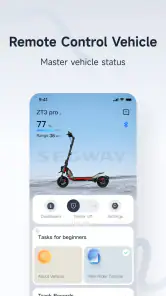
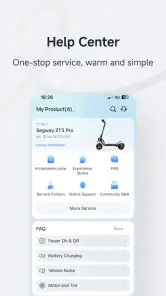
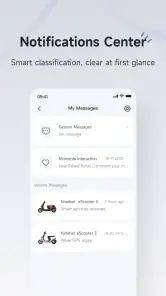

Analysis by Reviewed
I see Segway Mobility as a useful extra for people whose trips already depend on compatible Segway equipment, rather than as a travel app I would install to plan every kind of journey. Its appeal is practical: it brings vehicle-related information and ride records into a phone app. Whether that convenience is worth adding to your routine depends less on the download and more on how often you ride and which functions you actually use.
What the free download is worth
The app is free, so trying it does not require an upfront purchase. That makes the decision fairly simple for an existing Segway rider: install it, see whether it supports the device you use, and judge the practical value from there. The app is made by Ninebot(Beijing) Tech Co., Ltd.; it was released in 2020 and its current version is 6.9.9. It is rated for Everyone and requires Android 8.0 or later on Android.
Free access is useful, but it is not the same as a guarantee that every feature will suit every rider or every device. I would treat the app as a companion to compatible Segway equipment, rather than as a stand-alone travel service. If you do not own or plan to use a Segway product, the download alone is unlikely to replace a map, transit planner, or general travel app.
Where the companion approach helps
The strongest reason to use a device-linked mobility app is that it can bring ride-related information together instead of making you check several places. For everyday trips, that may mean taking a quick look at your vehicle before leaving, then reviewing how far you travelled afterward. This is a different job from a conventional navigation app: a map helps you plan a route across transport options, while a Segway companion is most relevant when the vehicle itself is central to the trip.
A practical routine is to check the app before heading out, especially if the ride is part of a commute or an errand with a time constraint. That small habit can help you notice whether the device is ready before you are already outside. For a longer outing, I would also plan a conventional backup route in advance rather than relying on one app for every travel decision. It is a sensible trade-off: the companion can support the ride, but general maps and public transport tools remain better for comparing buses, walking, or other ways to get there.
Getting Started: First Impressions
Setting up the app was as easy as pie. After a quick download from the app store, I was greeted with a sleek interface. It’s intuitive and straightforward, which is a big win for those of us who aren’t tech wizards. The app syncs effortlessly with your Segway device – all you need is Bluetooth. The initial setup took just a few minutes, and I was ready to roll.
Features That Stand Out
What really caught my attention were the app's features. The real-time diagnostics is a gem. It keeps you informed about your Segway’s battery life, mileage, and even temperature. It's like having a mechanic on call 24/7. Another cool feature is the anti-theft system. You can lock your Segway remotely, adding an extra layer of security when you're grabbing a coffee or running errands.
More From Our News Desk

Clash of Clans Is Won Between the Battles

Android Auto Makes the Case for Quieter Car Software

MobiOffice: Transforming Mobile Productivity with Seamless Integration

EA SPORTS FC™ Mobile Soccer: Redefining Mobile Sports Gaming

How Microsoft OneDrive Became a Mobile Productivity Giant

How Google Translate Breaks Language Barriers Effortlessly
For the fitness enthusiasts, the app tracks your rides and provides detailed data on your speed and distance. It’s like having a fitness tracker, but for your Segway. Plus, the social sharing feature lets you boast about your latest ride stats with friends. Who doesn't love a little friendly competition?
Using ride information thoughtfully
Ride records are most useful when you give them a purpose. I would look at distance and speed after a trip to compare familiar journeys, rather than treating every number as a performance target. On a regular commute, that can help you notice whether a detour added time or simply made the ride more pleasant. If sharing stats is not your thing, the practical benefit is still there: your own history can help you keep track of how you use the vehicle.
There is a trade-off to keep in mind with any phone companion while riding. Checking a screen in traffic can distract you, so I would set up anything important before moving and leave detailed checks until you have stopped somewhere safe. The app may make ride information accessible, but it should not encourage looking down while navigating streets. Riders who want a dedicated cycling computer or a broad activity tracker may also prefer those tools for their wider sport and exercise features.
Riding the Streets
Once everything was set, I took my Segway out for a spin. The app's navigation system is top-notch. It offers turn-by-turn directions, ensuring you never lose your way. Whether you're commuting to work or exploring new areas, the app has you covered. And if you're someone who loves exploring, the app suggests popular Segway routes – a great way to discover hidden gems in your city.
What I particularly enjoyed was the seamless connectivity. The app didn’t lag or crash, which is crucial when you’re on the move. It stayed connected, providing real-time updates and alerts. Plus, the app’s updates are regular, so you’re always equipped with the latest features and improvements.
Everyday fit and limitations
Picture a short weekday trip: I want to ride to a nearby errand, check the vehicle before leaving, and look back at the distance later. That is where a focused companion app can earn its place without needing to become the centre of the journey. On an unfamiliar trip, though, I would compare its route guidance with a general map before setting off, particularly if I need to combine the ride with walking or transit. The best choice depends on whether the trip is about managing a Segway or planning travel more broadly.
New owners may reasonably wonder whether they need the app immediately. If they want the connected functions described here, it is a natural place to start; if they only need to ride and do not care about app-based information, its value may be limited. Compatibility with the particular device matters too, so I would confirm that match before building a routine around it. Bluetooth-based setup also means the phone and vehicle need to connect as intended, making a quick check at home more convenient than troubleshooting just as you are about to leave.
Making the app part of a routine
For a rider who uses the same vehicle for several short journeys, I would keep the app’s role narrow and predictable: connect while parked, check the information relevant to that outing, and review the ride later if there is a reason to. That is more useful than opening it repeatedly just because it is available. It also gives you a simple way to tell whether the companion functions are genuinely saving effort or merely adding another screen to manage.
One non-obvious benefit of reviewing ride distance is that it can help distinguish a one-off outing from a genuine change in your travel habits. If you are considering whether a short commute is practical by Segway, a few records from ordinary days may be more informative than one unusually pleasant ride. I would compare like with like—similar destinations and conditions—rather than drawing conclusions from a single journey. The app can help you observe your own usage, but it cannot decide whether the route feels comfortable or suits your local streets.
There is also a sensible security routine around remote locking. I would treat it as an extra layer, not a replacement for choosing a suitable place to leave the vehicle or staying attentive to it. The convenience is clearest when you stop briefly for an errand and can secure the device through the app; it is less useful if you have not confirmed that the phone is connected and the control responds. Testing that process while stationary is a better idea than discovering how it works when you are in a hurry.
Choosing between this and other travel tools
Compared with a general map app, Segway Mobility has a more focused purpose. A map is the better first stop when the main question is how to get somewhere, especially if the trip could involve walking, public transport, or several route options. The Segway companion makes more sense when you have already chosen the vehicle and want connected information about it. I would use them alongside each other rather than expect either one to cover the other’s job completely.
It also occupies a different place from a generic fitness tracker. A broad activity app may suit someone who wants to compare many kinds of exercise, while the Segway app’s ride records are relevant to the vehicle and the trips made with it. If your main goal is training across activities, the specialist mobility companion may feel too narrow. If your question is simply how you use your Segway from day to day, a vehicle-focused history can be more directly useful than a general workout log.
For anyone deciding whether to download before buying or borrowing a device, I would not treat the app by itself as evidence that a particular vehicle will meet their needs. The practical test is whether the device you intend to use connects and whether the available information solves a real problem for you. A person who values battery and ride details may find that worthwhile; someone who only wants directions to a destination should start with a conventional navigation option instead.
Who is likely to get the most from it?
The clearest fit is a current Segway rider who likes checking vehicle information, wants ride records, or appreciates the option to lock the device through a phone. Regular commuters and people who use their vehicle for frequent short errands have more chances to benefit than someone who rides only occasionally. The app is available on a large scale, with more than a million installs, but popularity alone does not make it essential; the deciding factor is whether its connected functions match your own routine.
I would be more cautious if you are choosing an app before you know which device you will use, or if reliable route planning is your main requirement. A rider who dislikes phone interaction while travelling may prefer to check everything before leaving and use a separate map only when safely stopped. And if you do not own compatible Segway equipment, there is little reason to expect this companion to serve as a general local-travel guide.
Final Thoughts
Overall, the Segway Mobility app enhances the riding experience. It’s user-friendly, packed with features, and makes riding a Segway even more enjoyable. Whether you’re a casual rider or someone who uses a Segway for daily commutes, this app is a must-have. It’s not just about mobility; it’s about enhancing every ride with technology. So, if you’re ready to take your Segway experience to the next level, this app is the way to go.
With an average rating of 3.2 from around eleven thousand ratings and more than a million installs, its reception looks mixed rather than universally enthusiastic. I would take that as a reason to keep expectations practical: the app can be worthwhile when its connected tools fit your routine, but it is not automatically essential for every owner. Riders who want a general-purpose route planner, or who do not use compatible Segway equipment, are better served by a different option.
It has also drawn 671 written reviews, which gives prospective users another reason to approach it with realistic expectations rather than assuming every setup will feel identical. I would judge it on the basics that matter to me: whether my own vehicle pairs reliably, whether the information I care about is easy to find, and whether I remember to use those functions after the novelty of installing the app has passed. Those checks say more about personal fit than simply collecting features.
So my buy-or-skip verdict is straightforward: because the download is free, I would try it if I owned a compatible Segway and wanted phone-based ride or vehicle information. I would skip it as a general travel planner, and I would not make it a reason on its own to choose a particular vehicle. Its value is strongest as a practical companion; it is limited when the journey, rather than the Segway, is what needs managing.
Remember, the streets are yours to explore, and with the Segway Mobility app, the journey becomes just as exciting as the destination.
Segway Mobility Frequently Asked Questions
Is Segway Mobility free to download, and what does it cost to use?
Segway Mobility is free to download, and the app is listed as free. That makes it possible to install it without paying an upfront download price. Before using it, check the app’s current store page for any purchase or subscription details that matter to you, and review the terms shown there before choosing optional services.
What devices are compatible with the Segway Mobility app?
The Segway Mobility app is designed to be compatible with Android devices running version 8.0 or later, as well as iOS devices. It’s advisable to check the app store listing for specific device compatibility before downloading, and to make sure your phone’s operating system is supported. The app is formerly known as Segway-Ninebot, so you may recognize it under that name.
How does the Segway Mobility app enhance my riding experience?
The Segway Mobility app is intended to support the riding experience for Segway mobility products. It is the app from Ninebot(Beijing) Tech Co., Ltd., and belongs to the Travel & Local category. Its short store description is simply “Segway Mobility,” so check that the app is the one associated with your product before installing it.
Is Segway Mobility still maintained, and what version is available?
The current version is 6.9.9, and the app was released on January 20, 2020. It has more than one million installs, with an average rating of 3.2 from around 11,000 ratings and 671 reviews. Those figures offer a quick sense of its store presence, while individual experiences can vary depending on the device and how the app is used.
Is there a user guide or tutorial available for first-time users?
Yes, the Segway Mobility app includes a detailed user guide and tutorial designed for first-time users. Upon launching the app, you are guided through a setup process, which includes pairing your Segway device and understanding the interface. In-app tutorials can also be accessed anytime from the settings menu.
Pros
- Smooth ride with advanced stabilization
- Intuitive controls for easy navigation
- Long battery life for extended use
- Compact design for convenient storage
- Bluetooth connectivity for smart features
Cons
- Limited speed compared to competitors
- High price point for entry-level users
- Requires regular maintenance checks
- App interface can be confusing
- Not suitable for off-road terrain
- Category
- Travel & Local
- Version
- 6.9.9