

SEE's Michelangelo's Sistine
- 22.00
- 3.4
- Installs
- 50.00K
- Price
- Free

Screenshots




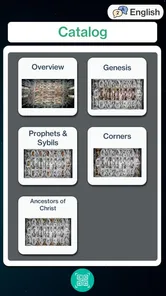
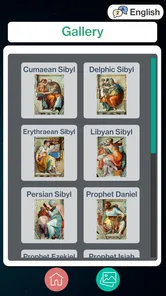
Analysis by Reviewed
I approached SEE's Michelangelo's Sistine as something I could use before, during, and after a visit to the exhibition rather than as a general art app. That distinction matters. It is an audio guide companion for SEE’s Michelangelo’s Sistine Exhibition, so its value depends on how well it fits into a shared cultural outing: one person may be holding the phone, another may be trying to follow the artwork, and everyone may want to listen at a slightly different pace.
My overall impression is positive but specific. This is a focused companion for people who want spoken context while viewing the exhibition, not a replacement for a broad museum guide, an art-history reference library, or a casual entertainment app. It is free, aimed at Everyone, and made by Venkata Reddy G. With a 3.4 average from roughly a hundred ratings, it has attracted some interest without reaching the level where I would treat its reputation as conclusive. I would judge it mainly by whether its focused audio approach suits the visit I have planned.
Using the guide as a shared exhibition companion
When I use an audio guide with other people, I find it helps to agree on a simple rhythm before anyone presses play: listen together, pause when someone wants a closer look, and move on only when the group is ready. That keeps the phone from becoming the focus and makes the guide a shared starting point rather than a soundtrack everyone has to obey. It also makes the practical setup worth considering before the visit.
One phone can change the whole experience
The most realistic household use is simple: two or more people arrive at the exhibition, and one phone becomes the shared guide. That can work well when the group wants to stay together. Instead of having everyone independently search for background information, the person carrying the device can start the relevant audio and let the others listen while looking at the work.
That arrangement also exposes the app’s main practical trade-off. A shared device creates one listening experience, not several. If one visitor wants to pause and look longer while another is ready to move on, the group has to decide whose pace to follow. I found that this is less a weakness in the app itself than a limitation of using any single audio guide for a mixed group.
For a couple or a small family, I would treat the phone as a conversation starter rather than something everyone must follow continuously. Listen to a section, look closely, then stop the audio and discuss what you noticed. That approach prevents the visit from becoming a march from one recording to the next and makes the guide useful even when attention spans differ.
Why an audio companion can be better than reading on the spot
Compared with searching the web during the exhibition, an audio guide keeps the phone from becoming a visual distraction. I can listen while keeping my eyes on the artwork, which is especially helpful when the purpose of the visit is observation rather than screen reading. A normal search can provide more background, but it also encourages visitors to jump between pages, compare sources, and stare down at the display instead of looking up.
More From Our News Desk

 Gmail
GmailGmail in a Busy Inbox: Who Benefits Most?
From first account to crowded workday, Gmail earns its place through dependable search and flexible sorting—but its best fit depends on how much inbox maintenance you can tolerate.

 Prime Video
Switching to Prime Video: What Changes in Your Viewing Routine
Prime Video can make a compelling second home for streaming, but switching means learning a different catalog, rental layer, and route from browsing to playback.

 Universal TV Remote Control
Universal TV Remote Control Works Best as a Reliable Backup
A phone remote earns its place through quick setup and reliable habits. Here is how to get more from Universal TV Remote Control—and where its limits show.

 Weather - By Xiaomi
Weather by Xiaomi Review: Clear at a Glance, Less Clear Up Close
Xiaomi’s weather app makes everyday forecasts quick to scan, but its calm surface can leave useful details and recovery paths harder to find than they should be.

 X
XX Under Pressure: Can It Recover When Posting Goes Wrong?
A resilience-focused review of X, examining setup, mistaken posts, interruptions, weak connections, and the gaps that matter when recovery needs to be dependable.

 Clash of Clans
Clash of Clans Is Won Between the Battles
Its raids are quick; its community is a long-term project of coordination, teaching, rivalry, and shared responsibility—with all the friction that entails.
Latest News



The focused format is also more approachable for someone who does not usually read art criticism. A visitor can absorb context in short listening moments without needing to know the vocabulary of Renaissance art first. I would particularly recommend that approach for a household where one person is enthusiastic about Michelangelo and another is attending mainly to share the experience.
There is a limit, though. An audio companion cannot respond to personal questions in the way a knowledgeable guide can. If someone wants to explore technique, restoration, historical disputes, or the wider development of Michelangelo’s work, a dedicated reference source will be more useful afterward. I see this app as a layer placed over the exhibition, not as the final word on it.
A practical routine for families and friends
My preferred routine would be to prepare before entering, choose one person to manage the phone, and agree that anyone can ask for a pause. That small agreement avoids the common problem where the device holder silently controls the entire pace. It also makes the audio feel less like a private listening session and more like a shared visit.
Another useful habit is to listen before moving to the next part of the exhibition. When people walk while trying to hear, they may miss both the explanation and the artwork. Staying in place for the length of a segment gives the guide room to do its job and lets younger visitors ask questions without holding up the whole group.
For a household with different interests, I would not insist that every person listen to every section. One visitor may prefer the major visual highlights, while another may want more historical context. The app is most successful when it supports those differences instead of becoming a checklist that everyone has to complete.
What I would do before relying on it
I would open the app before the visit and become familiar with its basic flow. That is not because it presents itself as complicated, but because any audio guide becomes awkward when the group is already standing in a busy entrance area. A quick trial lets the phone holder understand how to begin listening, pause, resume, and hand the device to someone else without interrupting the visit.
I would also check the phone’s sound level and battery before leaving home. Those are ordinary preparations, but they matter more for an audio-focused companion than for an app used for occasional reading. If the device is shared, headphones may not be practical for the whole group, so the household should decide in advance whether everyone will listen together or take turns.
That decision affects privacy and comfort. Shared listening is social and convenient, while individual listening gives each person more control. Since the app’s role is tied to the exhibition, I would avoid assuming that every visitor wants the same arrangement. The best setup is the one that leaves people free to look, talk, and move naturally.
Setup boundaries, coordination, and trust
I treat a shared exhibition phone as a small piece of group coordination, not just a playback device. Deciding in advance who will carry it, manage listening, and keep it separate from personal use can make the outing more relaxed, especially with children or a mixed-age group. With those boundaries settled, I can turn to what the app’s setup can reasonably support.
Keep the setup simple and purposeful
The current version is 3.0.0, and it runs on Android 7.0 or later. That makes it accessible to people using older supported Android devices, although I would still test the actual phone before the day of the visit. Compatibility is only one part of a smooth experience; screen condition, speaker quality, battery health, and the way the device is shared can matter just as much.
Because this is a free app, it is easy to consider installing it on more than one household device. That can be useful when two visitors want independent listening, but I would not assume that installing it creates any synchronized group experience. The safer expectation is that each device is used separately, with the household coordinating its own meeting points and pace.
This is one of the app’s less obvious trade-offs. Multiple phones offer independence, but they can also split the group’s attention. One person may be listening while another is already moving ahead. A single phone encourages coordination; several phones offer flexibility. I would choose based on the people attending, not simply on the number of devices available.
Account boundaries deserve attention
When an app is used on a shared household phone, I prefer to keep its role clearly separated from personal apps and personal information. The phone holder should be the person who is comfortable managing playback during the visit, while other family members should not need access to unrelated accounts or private material just to hear the guide.
I would avoid handing the device to a child without first checking what else is open on it. This is ordinary shared-device hygiene, but an exhibition visit often involves passing a phone around quickly. Locking the screen between uses, keeping notifications under control, and using a dedicated device when possible can make the experience calmer and more private.
I would also make sure the family understands who is responsible for the phone. In a crowded cultural venue, a child carrying the device may feel included, but an adult may be better placed to manage movement, sound, and safe handling. That is not a special feature of the app; it is simply the practical boundary I would set for a shared outing.
Coordination is more important than speed
The guide works best when the group agrees on a rhythm. I would nominate one person as the “audio lead,” but not as the person who makes every decision. Their job would be to start and stop the recording, check that everyone is ready, and signal when the group is moving on.
A useful variation is to let the youngest visitor choose when to pause for questions, provided the group is not blocking other visitors. This turns the audio into a prompt for observation rather than a lecture that must be endured. It also helps families avoid the assumption that a successful visit means completing every available piece of content.
For adults visiting with friends, the same principle applies. If one person has already seen the exhibition or knows more about Michelangelo, that person can help with context, but should not talk over the recording. The app is most valuable when it gives the group a common starting point and leaves room for personal reactions afterward.
Age suitability is broad, but attention is not
The Everyone age rating makes the app suitable in broad age terms, but that does not mean every child will enjoy an audio-led exhibition at the same level. Younger listeners may need shorter sessions, visible artwork to anchor their attention, and permission to ask questions rather than listen silently from beginning to end.
I would use it with children as a flexible aid, not as a test. Ask them to notice one detail while the audio plays, then let them explain what they saw. That turns passive listening into participation and reduces the pressure to absorb every historical point. Older children and teenagers may appreciate having a clear audio structure, especially if they are less interested in reading wall text.
Adults should also remember that “Everyone” describes the intended content suitability, not a promise that the app will manage a child’s device use. It does not remove the need for supervision, sensible volume, or agreement about when the phone should be put away. In a household, trust comes from setting those expectations before the visit.
Who should choose another option?
I would skip this app if I wanted a broad, ongoing art-history resource that could be used long after the exhibition. Its narrow purpose is a strength during the relevant visit, but it is also the reason it may feel limited to someone looking for biographies, timelines, image comparison, or a general museum companion.
I would also choose a human guide or a more comprehensive museum service if the group expects detailed questions answered in real time. An audio recording cannot adapt to whether a visitor is a beginner, a specialist, or someone who wants to linger on a particular detail. Likewise, visitors who dislike listening through a phone may prefer printed interpretation or a tour led by a person.
For a family that wants a low-pressure introduction to Michelangelo’s Sistine exhibition, however, the focused design makes sense. It avoids the clutter of a general-purpose art app and gives the visit a clear thread. The right question is not whether it replaces every alternative, but whether an audio companion is the format your group will actually use.
My household verdict
After considering the app as a shared household tool, I would recommend it to visitors who are specifically attending SEE’s Michelangelo’s Sistine Exhibition and want spoken guidance without turning the visit into a research project. Its free price removes an obvious barrier, and its Everyone rating makes it an easy candidate for a mixed-age outing. The developer, Venkata Reddy G, has kept the concept focused enough that its purpose is immediately understandable.
The rating of 3.4 is a reasonable reminder to keep expectations measured. I would not install it expecting a polished replacement for every museum service or an adaptive experience for each member of a group. Its success depends on preparation, device handling, and the willingness of visitors to coordinate their listening rather than compete for control of the phone.
My strongest recommendation is to use it as a shared prompt: listen together, pause often, and let the artwork—not the device—remain the center of attention. If your household values independent pacing, use separate devices only when that genuinely helps, and agree where to regroup. If privacy or personal-device boundaries matter, keep the app on one designated phone and avoid passing the device around unnecessarily.
In the end, SEE's Michelangelo's Sistine is a sensible specialist companion rather than an all-purpose art application. I would take it along for a planned exhibition visit, especially with friends or family who benefit from audio context. I would not choose it for broad art study, detailed expert discussion, or a fully managed family experience. Used within those boundaries, it can add structure and conversation to the outing while still leaving visitors free to look closely and form their own opinions.
SEE's Michelangelo's Sistine Frequently Asked Questions
What kind of app is SEE’s Michelangelo’s Sistine, and who develops it?
SEE’s Michelangelo’s Sistine is an events app designed as an audio guide companion for the SEE’s Michelangelo’s Sistine Exhibition. It is developed by Venkata Reddy G and is intended to accompany an exhibition visit with audio-guide content. The app may suit visitors who want a dedicated companion for exploring the exhibition, as well as people interested in Michelangelo and the Sistine Chapel.
Is SEE’s Michelangelo’s Sistine suitable for my device and age group?
The app is listed for devices running Android 7.0 or later, so it is worth checking your device’s operating system before downloading. Its content rating is Everyone, making it suitable for a broad audience. Compatibility can still depend on the specific device and platform, so review the app’s requirements in your app store before installing it.
What is SEE’s Michelangelo’s Sistine?
SEE’s Michelangelo’s Sistine is an educational and visual exploration app focused on Michelangelo’s famous artwork in the Sistine Chapel. It is designed to help users examine the chapel’s ceiling and related details through interactive content, high-resolution imagery, and explanatory information. The app is aimed at art lovers, students, tourists, and anyone interested in Renaissance history and religious art.
What can I explore in the SEE’s Michelangelo’s Sistine app?
The app lets you explore Michelangelo’s Sistine Chapel paintings in greater detail than is usually possible during a physical visit. Users can inspect individual scenes, study artistic details, and learn about the biblical subjects, characters, symbolism, and historical background connected with the frescoes. Its guided presentation makes it useful for both casual viewing and more focused art study.
Is SEE’s Michelangelo’s Sistine suitable for beginners and students?
Yes. SEE’s Michelangelo’s Sistine is accessible to users who may not have a background in art history. Explanations provide context for the major scenes and help clarify what viewers are seeing, while the visual exploration encourages closer observation. Students can also use the app as a supplementary learning resource when researching Michelangelo, Renaissance art, the Vatican, or the history of the Sistine Chapel.
Pros
- Detailed 360° views let you inspect the chapel from different angles.
- Useful audio commentary adds context to the artwork and its history.
- Works well for previewing the visit before traveling to Vatican City.
- Simple navigation makes the virtual tour accessible to most users.
- Includes high-resolution artwork views for closer examination of details.
Cons
- Some features may require payment or in-app purchases.
- The experience cannot fully reproduce the scale of the real chapel.
- Navigation can feel less intuitive on smaller phone screens.
- Large image files may use considerable storage and mobile data.
- Older devices may experience slower loading or reduced image quality.











