

Sched
- 288.00
- 4.1
- Installs
- 100.00K
- Price
- Free

Screenshots
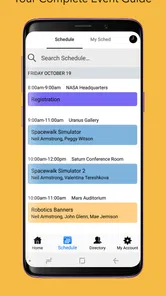
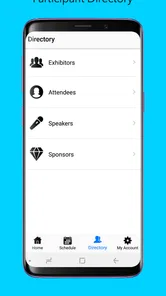
Analysis by Reviewed
When I attend an event that uses Sched, I treat it less like a general social app and more like a digital event program that stays close at hand. Its purpose is straightforward: help me view the schedule for a Sched-powered event without carrying around a printed timetable or repeatedly searching through a website. That narrow focus is also its biggest strength. I can open the app with a specific question in mind—what is happening next, where should I go, or which session should I keep in view—and get to the event information quickly.
Sched is a free Events app from Sched LLC, rated for Everyone. It has reached over 100 thousand installs and holds a 4.1 average from around 1.7 thousand ratings, which suggests that many attendees find it useful while still leaving room for the occasional event-specific frustration. I reviewed it with the mindset of a first-time attendee, concentrating on the path from installing the app to finding something genuinely useful rather than simply browsing the opening screen.
What to expect from Sched at an event
The first thing to understand is that Sched is not a universal calendar for every conference, concert, class, or community gathering. It becomes useful when the event itself is available through the Sched system. Once the correct event is selected, the app acts as a structured guide to that event’s sessions and timing. That distinction matters because a new user may install it before knowing whether the organizer has published the event there.
In practical use, I expect to see an event schedule arranged around sessions or activities rather than a broad news feed. This makes the app especially suitable for conferences, festivals, workshops, conventions, and other programs where several things happen at overlapping times. Instead of trying to remember a long list of titles, I can use the schedule as a reference throughout the day.
The experience is most valuable when the program is busy. A simple one-room event with three activities may not justify a dedicated schedule app, but a multi-track day can quickly become difficult to follow with a paper leaflet. Sched gives that timetable a more usable form on a phone, where I can check it while walking between rooms or deciding whether a session is worth crossing the venue for.
I also like that the app’s role is easy to explain to another attendee: find the event, inspect the program, and use it to plan the day. There is no need to learn a complicated productivity system before receiving value. That simplicity makes it less intimidating for people who are not enthusiastic about event technology.
At the same time, I would not expect it to replace every part of an organizer’s communication. A schedule app can show the program, but an attendee may still need the venue’s signs, staff directions, registration information, or other official messages. I use Sched as my schedule reference, not as a guarantee that every practical detail of attending an event will be handled inside one screen.
More From Our News Desk

 Gmail
GmailGmail in a Busy Inbox: Who Benefits Most?
From first account to crowded workday, Gmail earns its place through dependable search and flexible sorting—but its best fit depends on how much inbox maintenance you can tolerate.

 Prime Video
Switching to Prime Video: What Changes in Your Viewing Routine
Prime Video can make a compelling second home for streaming, but switching means learning a different catalog, rental layer, and route from browsing to playback.

 Universal TV Remote Control
Universal TV Remote Control Works Best as a Reliable Backup
A phone remote earns its place through quick setup and reliable habits. Here is how to get more from Universal TV Remote Control—and where its limits show.

 Weather - By Xiaomi
Weather by Xiaomi Review: Clear at a Glance, Less Clear Up Close
Xiaomi’s weather app makes everyday forecasts quick to scan, but its calm surface can leave useful details and recovery paths harder to find than they should be.

 X
XX Under Pressure: Can It Recover When Posting Goes Wrong?
A resilience-focused review of X, examining setup, mistaken posts, interruptions, weak connections, and the gaps that matter when recovery needs to be dependable.

 Clash of Clans
Clash of Clans Is Won Between the Battles
Its raids are quick; its community is a long-term project of coordination, teaching, rivalry, and shared responsibility—with all the friction that entails.
Latest News



Its current version is 1.62.3, and the app supports devices running Android 8.0 or later. That makes it accessible on many older Android phones, although anyone using an older device should still check compatibility before planning around it. Since it is free, there is little financial risk in trying it for an event, but the real question is whether that event has a useful Sched schedule ready for attendees.
Why the event selection matters
For a first-time user, choosing the correct event is more important than it may seem. Events can have similar names, recurring editions, or several related schedules. I slow down at this stage and check the event title and the program dates shown in the app before relying on anything I see. That small habit prevents a surprisingly annoying mistake: building a plan around the wrong edition or a similarly named gathering.
If the event organizer has published a clear, complete program, Sched feels focused and dependable as a timetable. If the schedule is sparse or still changing, the app cannot solve that underlying problem. My advice is to regard the app as a window into the organizer’s published program, not as an independent source that can fill in missing event planning.
Setting up and reaching the first useful screen
My recommended first setup is simple. Install the app before arriving, open it when you have a stable connection, and look for the event by its recognizable name. Doing this at home or before entering a crowded venue gives me time to confirm that I have the right schedule instead of trying to troubleshoot while a session is already starting.
Once the event is open, I scan the schedule rather than immediately reading every session. I look for the day, the time blocks, and the names of the rooms or tracks. This first pass creates a mental map of the program. It also shows whether the event is organized in a way that matches how I plan to attend: by time, by subject, by room, or by a particular track.
A useful first action is to choose one session I genuinely want to attend and follow its details through the schedule. I check when it begins, where it takes place, and what sits directly before and after it. That gives me more value than scrolling through dozens of titles because it turns the app into a decision tool. I am no longer just viewing information; I am testing whether the schedule helps me make a realistic plan.
For a first-time attendee, I suggest creating a small personal route mentally: one main session, one alternative if the first is full or unsuitable, and a little time for moving around. A timetable often looks more generous on a phone than it feels in a real venue. Switching between rooms, finding entrances, and taking a break all consume time. Sched helps me see the schedule, but I still need to plan like a person moving through a physical event.
One less obvious benefit is that the app can reduce the pressure to memorize session titles. I can use it as an external memory during the day. Before leaving a session, I check what is next instead of trying to recall the printed program or asking someone nearby. That is particularly helpful when the event has similar titles or several conversations happening at once.
A realistic first success
Imagine arriving at a weekend conference with three rooms running at the same time. I open Sched, select the conference, and find a talk that interests me. Rather than stopping there, I compare its start time with the next block and identify a second option nearby. When the first talk ends, I already know where I want to go next. That is the first meaningful success I look for: using the app to make one confident transition through the event.
This workflow is better than opening the app only after becoming lost. I prefer to prepare a rough plan during a quiet moment, then return to the schedule for adjustments. The app is most useful as a lightweight companion throughout the event, not as something I want to study intensely every few minutes.
For a group of friends or colleagues, I can also use the schedule as a shared reference without requiring everyone to use the same personal planning method. One person may care about talks, another about workshops, and another about breaks. Sched provides the common program, while each attendee can decide how much of it to follow. That is more flexible than forcing everyone into one fixed itinerary.
Common points of confusion and practical workarounds
The most common confusion is assuming that installing the app automatically means the desired event will appear. Sched is tied to event schedules, so the event must be available through the service. If I cannot immediately find what I need, I first recheck the event name and spelling, then confirm that I am looking for the organizer’s published schedule rather than a general directory of all possible events.
Another source of uncertainty is the difference between a session being listed and a session being guaranteed. A schedule can tell me what the program intends to offer, but real events can involve room limits, delays, changes, or cancellations. I therefore avoid treating the app as a reservation or admission pass unless the event instructions explicitly say so. For popular sessions, I leave extra time and pay attention to on-site announcements.
Overlapping sessions can also make the program feel more complicated than it first appears. I do not try to attend everything. Instead, I mark mentally which activity is my priority and which one is the fallback. If I plan every minute, a single delay can make the rest of the day frustrating. Sched is better at showing choices than deciding the right choice for me.
Room names deserve a careful look as well. A schedule entry may be clear to someone who already knows the venue but less obvious to a first-time visitor. I use the app to identify the room, then rely on venue signs or staff for the final route. This is one of the places where a dedicated timetable cannot replace physical orientation.
There is also a trade-off between convenience and dependence on the published schedule. A printed program may remain readable when a phone is low on battery, while a phone-based schedule is easier to search and update. My solution is to open the important parts of the program before the busiest part of the day and keep the device charged. I still pay attention to the event’s own instructions rather than assuming the app is the only reference.
Notifications and personal planning can be another area where expectations need to stay realistic. I do not install Sched expecting it to behave like a full calendar, alarm, or task manager. If I have a session that I absolutely cannot miss, I use my phone’s normal reminder tools as a second layer. That combination works better for me than asking the event schedule to manage every personal alert.
When another option may be better
Sched is a good fit when the event uses its schedule format and I mainly need to browse a structured program. A browser page may be enough for someone attending only one activity, especially if they do not want another app installed. A printed guide may be preferable for attendees who avoid phones during events or who expect limited battery life. A general calendar app is better when I need to combine the event with work meetings, travel, appointments, and personal reminders.
I would also skip relying on it as my main tool if the event’s information is scattered across several channels or changes constantly without a clear central schedule. In that situation, the organizer’s official announcements and on-site staff become more important than any timetable interface. The app is strongest when the underlying program is organized; it is not a substitute for organized event communication.
For accessibility and comfort, personal preference matters. Some people find a phone screen easier to enlarge and search than a printed sheet, while others find paper less distracting. I judge Sched by whether it lets me locate the information I need without adding stress. If the screen-based format makes me check my phone too often, I write down my key sessions and use the app only for changes.
Making the next event easier to manage
After the first successful use, I change my approach from simple browsing to preparation. Before the event begins, I identify the sessions that are genuinely important, note the gaps between them, and leave space for travel and rest. This keeps the schedule useful without turning the day into a rigid checklist.
A particularly effective habit is to review the following time block before the current one ends. I can then decide whether to stay for a discussion, move early to another room, or take a break. That small advance check is more practical than waiting until the final minute, when many other attendees may be moving at once.
I also compare the schedule with my real priorities. If I am attending for learning, I focus on sessions that build on one another. If I am attending for networking, I leave room between activities. If I am accompanying someone else, I choose a meeting point and use the schedule to coordinate rather than assuming we will find each other by chance. These are simple decisions, but the app makes the shared timetable easier to consult.
For organizers’ changes, I keep a flexible plan. I do not become frustrated when the program requires adjustment; I use the schedule to find the next reasonable option. The best event plan is not the one with the most sessions packed into it. It is the one that still works after a delay, a full room, or an unexpected change.
The app’s free price makes it easy to recommend as a low-commitment tool for attendees whose events are supported by Sched. Its Everyone age rating also makes it suitable for a broad audience, including families or mixed-age groups who simply need access to a shared program. The developer, Sched LLC, has kept the product’s central purpose clear: provide an event schedule in a form that is easier to carry and consult than a long document.
My final view is positive but specific. I recommend Sched to first-time attendees who have a Sched event in front of them and want a calmer way to navigate its program. I would not recommend installing it blindly as a general event-discovery or personal calendar app. Start by finding the correct event, confirm one session you care about, and use that choice to plan your first transition. If that workflow matches your needs, the app can become a quiet but genuinely useful companion for the rest of the day.
Sched Frequently Asked Questions
Which devices can I install Sched on?
Sched is available for Android devices, and its minimum operating-system requirement is Android 8.0. Before downloading, check that your device meets this requirement and has enough space for the app. Sched is an events app from Sched LLC, intended to help attendees view the schedule for events that use the platform.
Is Sched suitable for first-time users?
Sched is focused on a straightforward task: viewing an event schedule. Once you select an event, you can browse its program and find details about activities in one place. The experience can vary with the event organizer’s setup, but the app’s central purpose is clear, making it a practical option for attendees who want an event agenda on their phone.
What is Sched and what can I use it for?
Sched is an event-planning and conference-management app designed to help attendees organize their schedules and keep track of sessions, speakers, venues, and event updates. After selecting an event, you can usually browse its program, save activities to a personal agenda, and review useful information in one place. It is especially helpful for conferences, festivals, workshops, and other events with multiple activities happening at the same time.
Do I need an account to use Sched?
You can often browse an event’s schedule without creating a full account, depending on how the organizer has configured the event. However, signing in may be necessary to save a personalized agenda, synchronize your selections across devices, receive certain notifications, or interact with event features. Before downloading, keep in mind that some functions may also depend on whether the event organizer has enabled them in Sched.
Can I create and manage a personalized event schedule?
Yes, one of Sched’s most useful features is the ability to build a personal agenda from the available sessions and activities. You can review session descriptions, check times and locations, and mark the events you want to attend. This makes it easier to avoid conflicts and plan your day. Availability may vary, since organizers control the information and features shown for each event.
Pros
- Clean calendar view makes schedules easy to scan
- Useful reminders help prevent missed appointments
- Supports recurring events for regular commitments
- Simple interface is approachable for new users
- Syncing keeps schedules available across supported devices
Cons
- Some advanced planning tools may require a paid plan
- Calendar customization options can feel limited
- Notifications may need manual adjustment for each event
- Large schedules can become difficult to organize quickly
- Features may vary between the Android and iOS versions











