

Scary Neighbor Granny for MCPE
- 9.00
- 4.1
- Installs
- 500.00K
- Price
- Free

Screenshots
Analysis by Reviewed
When I want a change from building and familiar Minecraft PE routines, a horror-themed add-on can make exploration feel less predictable. Scary Neighbor Granny is aimed at that particular mood: suspense, stealth, and a threatening neighbor rather than a broad collection of maps or demos. I’d approach it as a focused detour, not a replacement for everything I normally do in MCPE.
Who is likely to enjoy this kind of scare?
I’d recommend trying it if you already like tense exploration and are comfortable with being startled while you work out what to do next. It makes more sense for a player who wants a specific horror premise than for someone opening a content app hoping to browse lots of unrelated options. If you mostly play to relax, build at your own pace, or avoid frightening themes, this probably isn’t the best fit.
The app is free and rated Everyone, but those details don’t settle whether its horror mood is suitable for a particular person. I’d use the actual player’s comfort level as the guide, especially with children: an age label is not a promise that every player will enjoy suspense or sudden scares. If you’re choosing it for someone else, it’s worth describing the theme plainly and letting them decide rather than surprising them with it.
A sensible first session
I’d begin when I have enough time to pay attention, rather than opening it for a few distracted minutes between other tasks. A realistic use case is an evening when I’ve finished what I need to do and want one focused MCPE session with a different atmosphere. I’d treat the first run as orientation: notice the spaces and routes, and avoid trying to solve everything at once. That gives me a better chance of learning from a tense encounter instead of feeling that I’m simply repeating it.
If I’m playing near a friend or family member, taking turns can make the suspense social without assuming the add-on has a special multiplayer feature. One person can watch while the other explores, then they can swap. I’d keep that casual and make sure everyone is comfortable with the scares; the point is to share the reactions, not pressure someone into playing a theme they dislike.
What this app offers—and what it does not replace
As a Libraries & Demo app from Mine Blox Crafting, this is a narrow, themed choice rather than a general MCPE resource shelf. The distinction matters when comparing it with the usual alternatives in that category. A library of maps or demo material is a better pick when I want variety, quick browsing, or several different kinds of content to choose from. This app is more appealing when I already know I want a Granny-centered horror experience and would rather spend my attention on that premise.
That focus is both its appeal and its trade-off. I wouldn’t expect one themed add-on to supply the breadth of a collection, and I wouldn’t choose it as a substitute for ordinary creative play. Before investing in a longer session, I’d check that I’m comfortable with how the add-on is meant to be used in my current MCPE setup. Keeping an experiment separate from a familiar world is a practical precaution if I care about preserving my usual plans.
More From Our News Desk

 Gmail
GmailGmail in a Busy Inbox: Who Benefits Most?
From first account to crowded workday, Gmail earns its place through dependable search and flexible sorting—but its best fit depends on how much inbox maintenance you can tolerate.

 Prime Video
Switching to Prime Video: What Changes in Your Viewing Routine
Prime Video can make a compelling second home for streaming, but switching means learning a different catalog, rental layer, and route from browsing to playback.

 Universal TV Remote Control
Universal TV Remote Control Works Best as a Reliable Backup
A phone remote earns its place through quick setup and reliable habits. Here is how to get more from Universal TV Remote Control—and where its limits show.

 Weather - By Xiaomi
Weather by Xiaomi Review: Clear at a Glance, Less Clear Up Close
Xiaomi’s weather app makes everyday forecasts quick to scan, but its calm surface can leave useful details and recovery paths harder to find than they should be.

 X
XX Under Pressure: Can It Recover When Posting Goes Wrong?
A resilience-focused review of X, examining setup, mistaken posts, interruptions, weak connections, and the gaps that matter when recovery needs to be dependable.

 Clash of Clans
Clash of Clans Is Won Between the Battles
Its raids are quick; its community is a long-term project of coordination, teaching, rivalry, and shared responsibility—with all the friction that entails.
Latest News



It also helps to separate the app from the base game in my expectations. A themed add-on is a way to pursue a particular kind of experience; it isn’t a reason to assume that every part of Minecraft PE will change. I’d first make sure I understand how I’m launching the content, then try it in a way that doesn’t disrupt a world I rely on. That simple workflow is especially useful when I’m helping a less experienced player get started.
Trying the horror add-on in MCPE
One useful way to approach a horror add-on is to treat the first session as a scouting run rather than a race to finish. I’d pay attention to the layout, notice which routes feel exposed, and remember where a retreat might be possible. That makes later attempts feel more deliberate, and it helps turn a sudden scare into a choice you can learn from. If you’re playing with someone else nearby, taking turns can also make the tense moments more fun without changing the basic solo challenge.
What to expect from this MCPE add-on
This is best suited to players who already enjoy suspense and don’t mind being surprised while exploring. It can be a welcome change when ordinary building feels too relaxed and you want a short, focused burst of tension instead. On the other hand, I wouldn’t pick it for a calm creative session, or for a younger player who dislikes jump scares simply because the app’s Everyone age rating does not guarantee that its horror mood will suit every child. I’d let the player’s own comfort level guide that decision.
Getting Started with the Mod
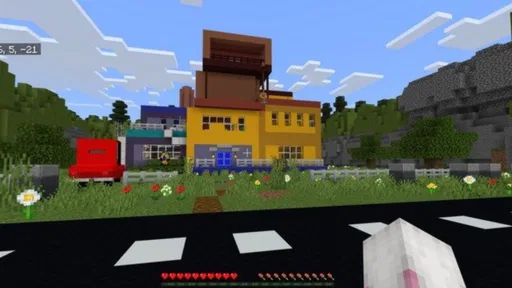
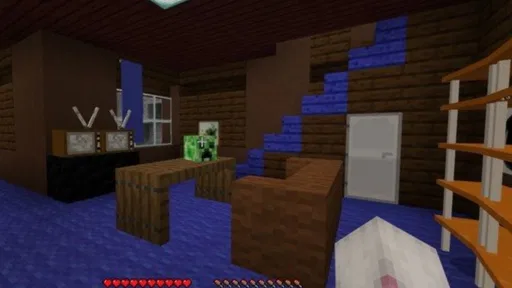
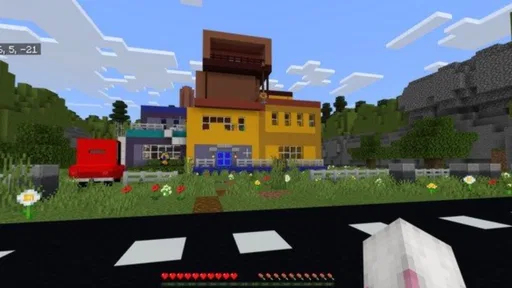
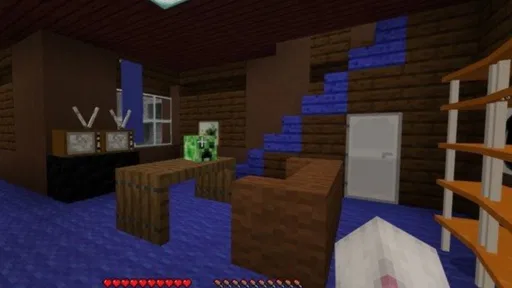
First things first, downloading and installing the Scary Neighbor Granny mod is a breeze. Once you've got it running, you’re immediately thrust into a creepy world that turns your usual MCPE experience on its head. The mod transforms the peaceful pixelated landscape into a spine-tingling adventure, complete with eerie sounds and a dark, unsettling atmosphere that keeps you on edge.
Diving into the Gameplay
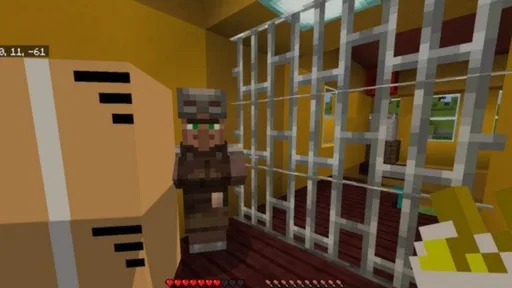
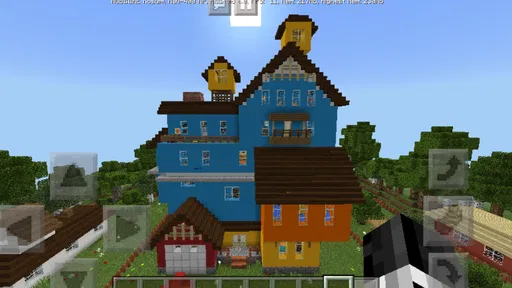
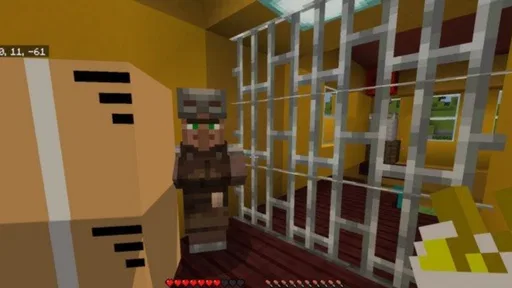
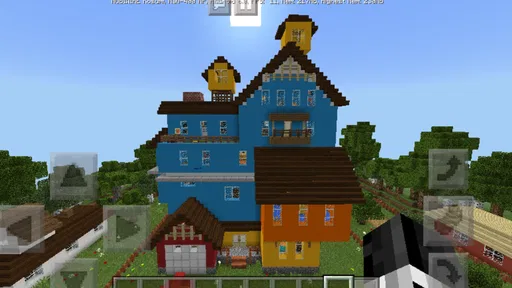
The premise is simple yet effective—you find yourself in a neighborhood where your neighbor, the notorious Granny, isn't the sweet old lady you’d expect. Instead, she’s out to get you, and escaping her clutches becomes your main mission. The gameplay involves sneaking around her house, solving puzzles, and avoiding traps that Granny has set up. It’s a heart-pounding experience, especially when you hear her footsteps approaching!
For a practical routine, I’d start a fresh session when I have enough uninterrupted time to explore instead of opening it in the middle of something else. When I get caught or lose track of what I was trying, I’d pause and think about what the encounter taught me before rushing back in. That small habit makes the puzzle-and-stealth mix easier to approach: learn a route, test one new idea, and avoid changing every tactic at once. It also keeps the tension enjoyable rather than frustrating.
As a mobile add-on, this is a different kind of choice from browsing a library of maps or demo content: those alternatives are better when you want variety and a quick preview, while this one makes more sense when you specifically want a horror-flavored MCPE detour. The trade-off is focus. If the Granny premise is not your thing, a broader collection is likely to give you more options; if it is, a narrower experience can be easier to settle into. I’d also check that the add-on fits the way you currently use MCPE before building a long session around it.
Why You Should Try It
What really sets this mod apart is its attention to detail. The developers have done a fantastic job of creating an immersive environment. From creaky floorboards to flickering lights, every element is designed to keep you on your toes. And let me tell you, the jump scares are real! Even the bravest players might find themselves jumping out of their seats.
The app is a free Libraries & Demo offering from Mine Blox Crafting, and its straightforward focus makes the appeal easy to understand: it is for people seeking a particular horror-themed Minecraft PE experience rather than a general-purpose toolkit. Before committing time to it, I’d think about what I want from a session—atmosphere and suspense, or a wide range of different material. That distinction is more useful than expecting one small add-on to replace every other way of exploring MCPE content.
It is also worth setting expectations around the word “mod.” This app is a doorway to a specific themed experience, not a reason to assume that every part of Minecraft PE will change. I’d keep my regular worlds and plans separate from an experiment, and make sure I understand how I’m launching the content before inviting someone else to join. That is a sensible habit with any add-on, especially when a player values a familiar world and does not want an unexpected change to their usual play.
Its current version is 1.20, and the app was released on February 19, 2023. Those details give me a useful point of reference, but they do not tell me by themselves how the experience has changed over time. Existing users can judge the current build against what they remember, while newcomers should focus on whether the horror setup suits them now. I’d watch for clear version notes before assuming a future change will affect compatibility, content, or the way the add-on behaves.
How it fits into a regular MCPE routine
For someone deciding whether to try it, the practical questions are simple: is it free, does the phone meet the stated minimum system requirement, and is the horror theme a good fit? The app is free, rated Everyone, and lists Android 5.1 as its minimum OS. Its 4.2 average from around 1,400 ratings and more than 500,000 installs suggest that plenty of players have given it a look, but popularity cannot predict whether you’ll enjoy its scares. I’d use those figures as context, not as a promise of a perfect fit.
A useful compromise is to try it when you can give the experience your attention, then return to ordinary building or a broader content library when you want a more open-ended session. That keeps the add-on in its strongest role: a focused change of mood, rather than a replacement for everything MCPE can offer. If you prefer predictable exploration, dislike being startled, or mainly want a wide selection of demos, I’d choose another option instead.
What to watch as the app evolves
For existing users, the current build is the most relevant reference point; a version label alone doesn’t explain whether an update changes the content, compatibility, or setup. I’d look for specific release notes before changing a familiar routine, especially if I’ve already found a way to use the add-on that works for me. New players can take the same cautious approach: first see whether the present experience suits them, then decide whether it deserves a regular place in their MCPE rotation.
The app has eight written reviews alongside its broader rating history, so I’d treat individual comments as personal experiences rather than a complete guide to how it will run for everyone. When checking feedback, I’d focus on comments that describe a concrete issue or explain the device and setup involved, rather than relying on a vague claim that it is either perfect or broken. That is a more useful way to judge a focused add-on than trying to infer every detail from popularity alone.
Final Thoughts
In conclusion, if you’re looking for a mod that combines the thrill of horror with the creativity of MCPE, then Scary Neighbor Granny is a must-try. It’s a beautifully crafted mod that delivers on both scares and fun, making it perfect for both horror enthusiasts and casual gamers alike. So, grab your device, download the mod, and get ready for a chilling adventure. Just remember, keep your wits about you and happy gaming!
Scary Neighbor Granny for MCPE Frequently Asked Questions
Is Scary Neighbor Granny for MCPE free, and what kind of app is it?
Scary Neighbor Granny for MCPE is a free app in the libraries and demo category, presented as a Minecraft PE mod. Its short description is “Scary Neighbor Granny,” and its store summary invites players to enjoy the Minecraft mod. The app is developed by Mine Blox Crafting, so check that the app name and developer match when choosing a download.
What is Scary Neighbor Granny for MCPE?
Scary Neighbor Granny for MCPE is a thrilling modification for Minecraft Pocket Edition that introduces a chilling character known as Granny. This mod adds an element of horror and suspense to the game, where players must navigate through challenges and puzzles to escape Granny's traps and survive. It’s designed for players who enjoy a mix of adventure and horror in their gameplay.
How do I install the Scary Neighbor Granny mod on MCPE?
To install the Scary Neighbor Granny mod on Minecraft Pocket Edition, you first need to download the mod file from a trusted source. Ensure your device allows installations from unknown sources. Then, use a file manager to locate the downloaded mod file and import it into your Minecraft game. Always back up your game data before installing new mods to prevent data loss.
Is Scary Neighbor Granny mod safe to use?
While the Scary Neighbor Granny mod is generally safe when downloaded from reputable sources, it’s vital to be cautious. Mods from unofficial sources can sometimes contain malware or cause game instability. Always read user reviews, check the credibility of the source, and ensure your device has up-to-date antivirus protection before downloading and installing any mods.
Can I play Scary Neighbor Granny mod with friends?
Yes, you can enjoy the Scary Neighbor Granny mod with friends by hosting a multiplayer session in Minecraft Pocket Edition. Make sure all players have the mod installed on their devices to ensure compatibility. Playing with friends can enhance the experience, making the game more engaging and fun as you work together to outsmart Granny.
Pros
- Immersive horror experience
- Engaging puzzle challenges
- Regular updates with new content
- Interactive environment
- Free to download and play
Cons
- In-app purchases necessary
- High battery consumption
- Frequent ads disrupt gameplay
- Limited language options
- Requires stable internet connection










