Scandit SDK Showcase
- 77.00
- 4.1
- Installs
- 500.00K
- Price
- Free

Screenshots
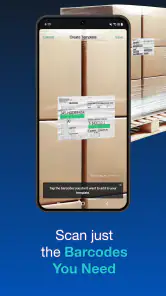
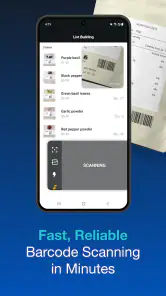
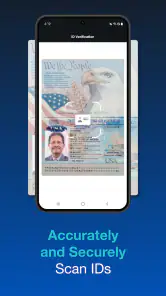
Analysis by Reviewed
I can see a shared-device use for Scandit SDK Showcase, but it helps to be clear about what it is: a demonstration app for evaluating Scandit AG’s barcode and ID scanning technology, not a general household organizer. If someone in your home is curious about how phone scanning works, it offers a hands-on way to try it. I would not treat it as a shared inventory, shopping, or family coordination system; its value is in exploring scanning rather than managing what a household owns.
A small, useful shared-device experiment
On a family or shared phone, I’d use the app as a short, purposeful demo: one person opens a scanning example, another supplies a package or code to test, and you compare how the camera handles it. That makes the app useful for a parent showing a teenager how codes can be read, or for a small team assessing a scanning workflow together. The important distinction is that sharing the device does not automatically create shared records or household accounts. I’d keep any conclusions or notes about a test in whatever method the group already uses.
A realistic example is a household member who helps at a small shop and wants to show the family why a phone-based scanner might be useful at work. You can try a few labels together, discuss whether the scan is easy to trigger, and decide whether the technology seems relevant enough to investigate further. That is a worthwhile shared activity because everyone is observing the same demonstration. It is not a substitute for testing the shop’s actual process or deciding that a scan result alone is enough to run it.
For a practical test, choose a few different items already at hand rather than judging the scanner from one clean, easy barcode. Try a product label, a printed code, and a code displayed on another screen if available. The point is not to assume every format or condition will behave identically, but to see whether the demo fits the kinds of material your household or workplace actually handles. That small test is more useful than deciding from a single successful scan.
Setting boundaries before passing the device around
Because this is an SDK showcase, I’d treat each session as exploration, not as a place to enter personal information or rely on a scan as an authoritative result. If several people use the same phone, agree who is testing and what they are trying to learn. That avoids confusing an experiment with a dependable record-keeping routine, especially when the phone is also used for ordinary household tasks.
For a shared phone, I’d also keep the test narrow: decide which kinds of codes you want to examine, take turns, and stop once you have enough evidence to answer that question. This prevents an exploratory session from turning into aimless scanning, and it makes the result easier to discuss afterward. If the device is used by people with different levels of technical confidence, a simple explanation of the goal is more useful than expecting everyone to infer what the demo is meant to show.
This is also where the app differs from a basic camera scanner. A camera app is usually the quicker choice when you only need to read a QR code once. A dedicated shopping or inventory app makes more sense when the goal is saving items, organizing lists, or coordinating purchases. Scandit’s showcase is better suited to seeing how a scanning SDK performs and exploring its capabilities; it is not automatically the simplest tool for everyday scanning.
More From Our News Desk

Clash of Clans Is Won Between the Battles

Android Auto Makes the Case for Quieter Car Software

MobiOffice: Transforming Mobile Productivity with Seamless Integration

EA SPORTS FC™ Mobile Soccer: Redefining Mobile Sports Gaming

How Microsoft OneDrive Became a Mobile Productivity Giant

How Google Translate Breaks Language Barriers Effortlessly
Exploring the Features
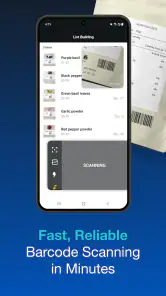
First off, the Scandit SDK Showcase app is not just about scanning, it's about efficiency and accuracy. You know that feeling when you try to scan a barcode, and it takes forever to focus? Forget about that with Scandit. The speed is phenomenal. I literally blinked, and the scan was done. It's like the app anticipates what you're about to do and gets it done in record time.
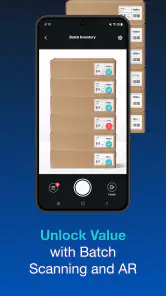
One of the coolest features has to be the augmented reality support. Imagine pointing your phone at a product and seeing all relevant information pop up on your screen. It's like living in a sci-fi movie where everything is interactive. This isn't just for show either; the AR feature is highly practical, giving you instant access to product details, pricing, and even reviews.
What the demo is useful for—and what it isn’t
The most valuable way I’d approach a showcase is as a way to explore a technology, not as proof that a finished business tool is ready to use. A scan is only one step in a larger workflow: someone has to decide what a recognized code means, where its information comes from, and what action should follow. For a curious household, the demonstration itself may be enough. For a team choosing a scanning solution, it is better treated as an early evaluation that helps sharpen questions for a proper trial.
That distinction also answers a common practical question: can I use it to keep track of everything at home? I wouldn’t choose it for that job. A household inventory needs a convenient way to save, label, find, and update records; a shopping list needs a way for people to coordinate changes. The purpose of this app is to let people examine Scandit’s scanning technology, so those organizing tasks are better handled by an app designed around them.
User Experience
Now, let's talk about the user interface. It's clean, straightforward, and dare I say, elegant. Navigating through the app is a breeze, even for those who aren’t tech-savvy. I appreciate how the app doesn't bombard you with unnecessary features. It's all about getting the job done, and it does so with style.
The setup process is also worth mentioning. You don't need a degree in computer science to get started. Just download, install, and you're good to go. It's perfect for anyone who wants to dive right into scanning without wading through complicated settings.
That low barrier to trying it is useful when one person in a group is more technical than the others. They can introduce the demo without turning the session into a setup lesson, then let someone else handle the phone and try the examples. I’d still explain what a successful scan does and does not establish: it shows that a code can be recognized in that test, not that the app has created a lasting record or verified everything linked to the code.
Performance and Reliability
Here's where Scandit SDK Showcase really shines. The performance is top-notch. Whether you're scanning in bright daylight or a dimly lit room, the app performs consistently well. It's like having a reliable friend who never lets you down.
And let's not forget about the app's ability to handle multiple barcode formats. From QR codes to Data Matrix codes, this app does it all. It's versatile and adaptable, which really sets it apart from the competition.
In terms of reliability, I haven't faced a single crash or bug. That's a big win in my book. The developers have clearly put a lot of effort into making sure the app runs smoothly, and it shows.
How I’d judge a scan in a real workflow
A useful test goes beyond asking whether a code was recognized. I’d check whether the result is clear to the person holding the phone, whether it suits the task, and whether the same kind of label behaves consistently enough for the intended setting. That is especially important if someone is considering scanning for work: the code labels, devices, and conditions they actually encounter matter more than a quick demonstration on a convenient package at home.
One practical tip is to separate “can it scan?” from “what should happen next?” A household user may only want a QR code opened, while a retailer or logistics team may need a scan to trigger a specific operational step. The SDK showcase is relevant to the second kind of question because it demonstrates scanning technology, but it should not be mistaken for the complete custom app that would connect a scan to an organization’s process. That distinction is especially useful when a technically minded family member is considering it for a small business.
Compared with a phone’s built-in camera, a showcase gives a more focused way to explore scanning capabilities, but it is not necessarily the fastest choice for a one-off QR read. Compared with a dedicated inventory app, it is aimed at a different stage of the problem: examining scanning rather than maintaining an organized collection of household records. I’d choose based on the next action I need. If I need a quick read, I’d start with the camera; if I need shared lists, I’d use a list or inventory tool; if I want to assess scanning technology, this demo is the more relevant option.
Age, trust, and the right audience
The app is rated for Everyone, and it is free, so trying it does not require a purchase decision. Still, I’d frame it for younger users as a technology demo rather than an entertainment app or a source of verified product information. A code can lead to content or information that depends on the code itself; I would supervise children’s browsing and explain that scanning does not make a destination trustworthy. That is a sensible habit with any camera-based scanner, not a special family feature.
For a parent, the useful conversation is less about letting a child scan everything nearby and more about teaching them to pause before opening a destination. A code is simply a way to present information or point toward something; it does not certify that the content is suitable or accurate. I’d keep the activity to codes chosen for the demonstration, stay nearby if a scan could lead to online content, and make clear that the app is not designed as a child-focused browsing environment.
Scandit SDK Showcase sits in the Libraries & Demo part of the app world, which explains why developers and people evaluating scanning tools are its natural audience. Its 4.1 average rating from around 1.6 thousand ratings and more than 500 thousand installs suggest that many people have tried it, but those figures do not tell me whether it matches a particular household need. I’d recommend it to curious users and teams who want to examine barcode and ID scanning; I’d steer someone who only wants occasional QR reading toward the scanner already built into their phone.
The app has been available since January 24, 2014, and version 8.0.1 is the current release. For a shared device, that makes it worth checking that the version offered for your operating system is compatible before planning a group test; the minimum requirement is Android 7.0. This is a small but useful setup check, particularly for an older spare phone that might otherwise be ideal for demonstrations.
Before setting aside a shared device for a demonstration, I’d check that it can run the app and that the screen and camera are comfortable for the people taking turns. A spare phone may be convenient because it avoids interrupting someone’s everyday use, but it is only helpful if it is compatible and usable for the task. If the app is being considered for a workplace decision, I’d also test on the kinds of devices and labels the team expects to use rather than assuming a household trial settles the question.
When another tool is the better fit
I would skip this app if my main goal were to scan occasional codes without exploring how scanning works. The built-in camera is usually more direct for that. I’d also choose a purpose-built inventory or shopping app if I needed a lasting shared list, because that is where saving entries and coordinating changes matter. The showcase makes the most sense for people who are curious about Scandit’s approach, developers considering scanning technology, or teams that want a first look before evaluating a solution more seriously.
There is a trade-off in that focus. A demonstration can make a technical capability easier to inspect, but it cannot by itself answer every question about a finished workflow. A business still needs to consider how scans will be interpreted and what its own process requires. For a household, that means enjoying the experiment without expecting a scanner to become an organizer. Keeping those expectations modest makes the app easier to judge fairly.
Final Thoughts
So, should you download Scandit SDK Showcase? Absolutely. If you're in need of a fast, reliable, and user-friendly scanning solution, this app is a no-brainer. It's not just an app; it's an experience that enhances how you interact with the world around you. Whether you're a tech enthusiast or just someone who loves convenience, Scandit is worth a spot on your device.
In the ever-evolving landscape of technology, it's great to see an app that not only meets but exceeds expectations. So go ahead, give it a shot, and prepare to be amazed at how much a simple scan can reveal.
My household verdict
For a shared phone, I’d install it when the goal is to demonstrate or assess scanning, then let each person try a few relevant examples under a clear expectation that this is a showcase rather than a shared database. It is a poor fit if your main need is coordinated shopping, saved household records, or a child-friendly browsing destination. For those jobs, a purpose-built list or inventory app—or the phone’s standard camera for a quick scan—is the more direct choice. As a free way to explore Scandit’s scanning approach, though, it can make a useful, focused test.
My recommendation is therefore specific: use it when the group wants to understand or evaluate barcode and ID scanning, and keep the experiment tied to a concrete question. If the household only wants convenience, a standard camera or an organizing app will likely involve less effort. If the aim is to learn what a scanning SDK can contribute, this is a more purposeful place to begin. That difference is what makes it worthwhile for some shared-device sessions and unnecessary for others.
Scandit SDK Showcase Frequently Asked Questions
What devices can run the Scandit SDK Showcase app?
The Scandit SDK Showcase is available for Android and iOS, and its listed minimum operating-system requirement is version 7.0. Before downloading, check that your device runs a compatible system version and that its camera works properly, since the app demonstrates scanning features. The app is free, so you can try it as a showcase without paying to download it.
Who develops Scandit SDK Showcase, and what kind of app is it?
Scandit SDK Showcase is an app developed by Scandit AG in the Libraries & Demo category. Its purpose is to let people explore the company's scanning technology through an interactive demonstration, rather than to serve as a general-purpose barcode utility. That distinction is useful to keep in mind if you are looking for a simple scanner for everyday shopping or personal organization.
What is the Scandit SDK Showcase app used for?
The Scandit SDK Showcase app is designed to demonstrate the capabilities of Scandit's barcode scanning technology. It allows users to experience the high-performance scanning features in various environments, offering an interactive way to explore how the SDK can be integrated into different applications for enhanced data capture.
Is the Scandit SDK Showcase app free to use?
Yes, the Scandit SDK Showcase app is free to download and use. It provides a hands-on demonstration of the Scandit SDK's features without any cost, allowing users to explore its functionalities and assess its suitability for their specific needs before considering a full integration.
Which platforms support the Scandit SDK Showcase app?
The Scandit SDK Showcase app is available on both Android and iOS platforms. Users can download it from the Google Play Store for Android devices or the Apple App Store for iOS devices, ensuring compatibility across a wide range of smartphones and tablets.
Pros
- Excellent barcode scanning speed.
- Supports a wide range of barcode formats.
- Easy integration into existing apps.
- Highly accurate and reliable results.
- Provides augmented reality capabilities.
Cons
- Requires a subscription for full features.
- May need powerful device for optimal performance.
- Limited offline functionality.
- User interface could be more intuitive.
- Some features may be overkill for basic needs.
- Category
- Libraries & Demo
- Version
- 8.0.1










