

Satellite Map Live Earth View
- 240.00
- 3.9
- Installs
- 5.00M
- Price
- Free

Screenshots
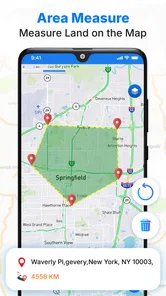
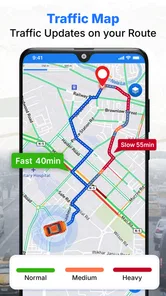
Analysis by Reviewed
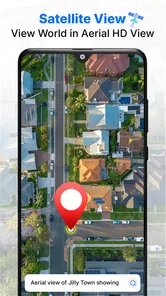
I use satellite maps differently depending on the question I’m trying to answer: sometimes I want a quick look at a destination, and sometimes I’m checking how a place fits into its surroundings. Satellite Map Live Earth View is aimed at that kind of casual exploration, giving me a visual way to move around the globe rather than a reason to replace a dedicated navigation tool. It’s a free Travel & Local app from GPS Driving & Voice Navigation Apps, and its appeal is easiest to judge when I treat it as a map to browse, not as a promise that every view is live or suitable for turn-by-turn driving.
Where a visual map helps in an ordinary day
I find this sort of app most useful before a journey, when I have a little time to explore without the pressure of following directions. If I’m meeting someone at an unfamiliar venue, for example, I can look at the broader area first and notice whether it sits among large buildings, open spaces, or a dense street pattern. That gives me a better mental picture before I leave, but it doesn’t tell me which entrance is open or which route is fastest. I still check the address and practical directions separately.
It can also be handy for deciding whether a destination deserves a closer look. When I’m choosing between two places to visit, I can compare their surroundings visually rather than relying only on names on a basic road map. I use that as a first impression, not a verdict: imagery may help me understand the setting, while opening hours, accessibility, and current travel conditions need their own sources. The distinction keeps a browsing session useful instead of turning a map image into a promise it cannot make.
A practical way to explore
My most useful habit is to begin with a place I already know, then zoom out and trace the surrounding area before searching somewhere unfamiliar. That makes the map easier to interpret: I can recognize the larger layout first, then inspect individual streets or landmarks. For an everyday example, if I’m considering a café in a neighborhood I haven’t visited, I can look at the area around it and get a better sense of nearby streets before deciding whether to check directions elsewhere. This is a visual planning aid, not a substitute for confirming an address or route with a navigation app.
Satellite imagery can also help with questions that a standard road map answers less vividly, such as whether a destination sits near a coastline, a large park, or a dense stretch of buildings. I find this especially useful when planning a trip from home: I can get a broad impression of a place before switching to a tool designed for schedules, live traffic, or precise arrival guidance. That distinction matters. A map view can support a decision, but it should not be treated as proof that a road is open or that an image shows current conditions.
Small habits that make browsing clearer
I get more from a map like this by keeping each search focused. I look up one destination, orient myself with recognizable landmarks, and only then zoom closer. Jumping rapidly between far-apart places can make the experience feel like endless scrolling rather than useful exploration. When I’m comparing two possible stops, I check each area in the same order—surroundings first, then street-level context where available—so I’m less likely to mistake a striking view for a practical route.
It’s also worth checking what the app actually offers on your device before building a routine around a particular view. The listing presents it as a satellite map, while individual viewing options and map coverage can shape what you see in practice. A reliable connection is important for loading map imagery, so I’d browse a destination before setting out rather than depend on a fresh view while moving. If I need spoken guidance, dependable offline directions, or traffic-aware routing, I use a purpose-built navigation app instead.
More From Our News Desk

 Weather - By Xiaomi
Weather by Xiaomi Review: Clear at a Glance, Less Clear Up Close
Xiaomi’s weather app makes everyday forecasts quick to scan, but its calm surface can leave useful details and recovery paths harder to find than they should be.

 X
XX Under Pressure: Can It Recover When Posting Goes Wrong?
A resilience-focused review of X, examining setup, mistaken posts, interruptions, weak connections, and the gaps that matter when recovery needs to be dependable.

 Clash of Clans
Clash of Clans Is Won Between the Battles
Its raids are quick; its community is a long-term project of coordination, teaching, rivalry, and shared responsibility—with all the friction that entails.

 Android Auto
Android Auto Makes the Case for Quieter Car Software
The car interface is no longer judged by how much it can do, but by how quietly it helps. Android Auto shows what drivers now expect—and what still gets in the way.

 MobiOffice: Word, Sheets, PDF
MobiOffice: Transforming Mobile Productivity with Seamless Integration
MobiOffice: Word, Sheets, PDF is redefining mobile productivity with a surprising blend of functionality and innovation.

 EA SPORTS FC Soccer Mobile 26
EA SPORTS FC™ Mobile Soccer: Redefining Mobile Sports Gaming
Dive into EA SPORTS FC™ Mobile Soccer, where immersive gameplay and strategic depth transform mobile sports gaming.
Latest News



How to make the map useful without asking it to navigate
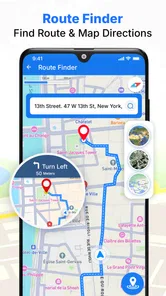
For me, the best workflow has three stages: explore while stationary, make a note of the useful context, and then use a navigation tool for the actual trip. That division is especially helpful when I’m traveling somewhere unfamiliar. I can inspect the wider area here, then switch to an app whose directions and route details are designed for getting from one point to another. Keeping those jobs separate makes it less likely that I’ll mistake a visually interesting view for reliable travel guidance.
Settings and expectations worth checking
Before a longer browsing session, I’d check the app’s available viewing choices on my device and see how readily the map loads on my connection. That is a practical test, not a claim that every view or area behaves the same way. I’d also take a moment to orient the map around a known landmark before zooming in. If the image becomes harder to read at a closer scale, zooming back out can restore useful context instead of encouraging me to guess what a small patch of imagery represents.
People often wonder whether a satellite view is live in the everyday sense of showing what is happening right now. I wouldn’t use it that way. A satellite-style image can be valuable for recognizing the layout of an area, but it should not be treated as a live camera or a reliable way to check current traffic, weather, construction, or whether a business is open. For those questions, I look for current information from a tool suited to that specific task.
Repeatable habits for quicker comparisons
When I’m weighing up two possible destinations, I use the same sequence for both: find the place, zoom out enough to understand the surroundings, and then look more closely at the immediate area. This small routine makes comparisons fairer because I’m not judging one location from a broad view and the other from a close one. It also keeps me from wandering through unrelated searches when all I need is a sense of where each place sits in the neighborhood.
Another useful habit is to do the visual checking before I’m under time pressure. If I’m already on the way, a navigation app is more practical than stopping to browse satellite imagery. Before leaving, I can use this app to build a rough mental picture, then keep the destination’s address available for the route tool. That’s a simple workflow, but it handles a common frustration: satellite views can help me understand a place while still leaving the exact turn-by-turn work to another app.
Unveiling the World at Your Fingertips
Opening up Satellite Map Live Earth View feels like having a global tour guide in your pocket. I mean, who wouldn't want to have a bird's eye view of the Eiffel Tower or the Grand Canyon? The app offers you a real-time satellite view of any location across the globe. And the best part? It’s all just a tap away. Whether you're planning your next trip or just in the mood to explore, this app has got you covered.
The Features that Make You Go "Wow!"
Let's talk features, shall we? One of my personal favorites is the 3D view. It's like watching a 3D movie, but you get to control the camera angles! Not only can you zoom in and out, but you can also tilt and rotate the view to get the perfect angle. And if you're into exploring the night sky, the app's got a star map feature that'll let you gaze at the stars and planets. It's like having a mini observatory in your hands!
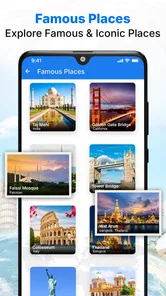
Another gem is the street view. Ever wondered what the streets of Tokyo look like? Or the bustling markets of Marrakech? The street view lets you wander through streets as if you're actually there. It's perfect for virtual travel or even just satisfying your curiosity about different cultures and places.
What to expect from the experience
The app belongs to a category crowded with general map viewers, and I’d choose between them based on the job rather than the most dramatic-looking screen. For checking a landmark or casually surveying a city, this app’s mix of satellite imagery and the views described above can make exploring feel more engaging than a plain street diagram. For getting to an appointment, however, a familiar navigation app with route-focused tools is the sensible choice. I wouldn’t rely on a visual impression alone to judge access, walking distance, or current road conditions.
There’s a useful trade-off here: rich map imagery is enjoyable to inspect, but it can take more attention and connectivity than a simple map. I avoid making a long chain of searches while on the move; instead, I explore beforehand and keep a separate route tool ready if I need practical guidance. That workflow suits curious travelers and students who want to understand a place visually. If you mainly need reliable directions, minimal data use, or an offline map for a trip, I’d skip this as your primary tool and choose an option built around those needs.
Who should use it, and who should look elsewhere
I’d recommend it to someone who enjoys exploring places from home, wants a visual starting point for trip planning, or needs a map view to support a school or personal geography project. It is also a reasonable companion for a traveler who likes to preview surroundings before switching to a route planner. The free price makes it easy to try for occasional browsing, and its Everyone age rating makes it suitable for a broad audience.
I would not make it my only map app if I were commuting, driving somewhere unfamiliar, or depending on directions that need to work without a reliable connection. In those situations, a dedicated navigation app is a better fit because its central purpose is route guidance rather than visual exploration. Someone who mainly wants a quick, uncluttered street map may also prefer a conventional map interface. The right choice comes down to whether the question is “What does this place look like?” or “How do I get there now?”
User Experience: Smooth Sailing or Choppy Waters?
Now, I know what you're thinking, "All these features must make the app slow and clunky, right?" Surprisingly, no! The user interface is as smooth as butter. Navigating through the app is super intuitive, and I didn't experience any lagging or crashes. It’s like the developers waved their magic wand and made everything seamless. Kudos to them!
However, a little heads-up: make sure you have a stable internet connection. All those stunning images and real-time updates do need some decent bandwidth. But hey, that's a small price to pay for a virtual ticket around the world, right?
Checking fit before you settle in
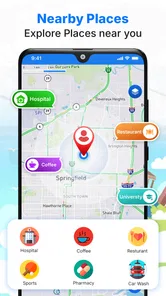
The practical questions I’d ask before making it part of a routine are straightforward: can I find the places I care about, does the view load comfortably on my connection, and does the app provide the kind of guidance I need? I’d test a familiar neighborhood first, then search a destination I’m planning to visit. That quick comparison helps me see whether its imagery is useful for my purpose without assuming every area will look equally detailed or every view will answer the same question.
Satellite Map Live Earth View is rated for Everyone, has a 4.0 average from around 3.9 thousand ratings, and has been installed over a million times. It was released in October 2022, and version 2.7.2 is listed for Android 7.0 and later. Those details make it accessible to a broad range of Android users, but the right choice still depends on your habits: occasional visual exploration is a good fit, while route-critical travel calls for a dedicated navigation option. I’d also keep expectations grounded around imagery: a satellite-style map is a way to inspect a place, not a live camera pointed at every street.
Final Thoughts: Worth Downloading?
So, would I recommend Satellite Map Live Earth View? Absolutely! It's not just an app; it's a gateway to the world. Whether you're a travel enthusiast, a student working on a geography project, or just someone who loves to explore, this app is a treasure trove. It's informative, fun, and a little bit magical. So go on, download it, and let your inner explorer run wild!
My recommendation is more specific than that enthusiastic sign-off: I’d try it if I enjoy browsing places, preparing for a trip, or giving a geography project a visual starting point. The app is free, which makes that experiment easy, but I’d treat it as a companion to—not a replacement for—navigation software when timing and directions matter. The best results come from using its imagery deliberately, checking the area before travel, and switching to a route-focused map whenever I need dependable guidance.
Satellite Map Live Earth View Frequently Asked Questions
Do I need an internet connection to explore maps in Satellite Map Live Earth View?
The app is designed around satellite maps, route navigation, and viewing your current location, so an internet connection is useful when loading map information and seeking updated directions. If you plan to use it while traveling, check that you have connectivity before relying on map features. It is a travel and local app, and its main purpose is to help users find routes and see their location on a map.
What features does Satellite Map Live Earth View offer?
Satellite Map Live Earth View offers a wide array of features including real-time satellite imagery, street maps, and 3D terrain views. Users can explore detailed geographical locations, view live traffic updates, and even explore space views. The app also provides GPS navigation and local search functionalities, making it a comprehensive tool for both casual and professional use.
Is Satellite Map Live Earth View free to use?
Yes, Satellite Map Live Earth View is free to download and use, but it does offer in-app purchases for additional features. Some advanced functionalities, such as ad-free experience and enhanced map details, may require a subscription or one-time purchase. Users can choose to upgrade based on their needs.
How accurate is the real-time satellite imagery?
The real-time satellite imagery provided by Satellite Map Live Earth View is highly accurate, sourced from reputable satellite services. However, the frequency of updates can vary depending on the location and the service's coverage. While major cities receive frequent updates, remote areas might experience slight delays in imagery updates.
Can I use Satellite Map Live Earth View for offline navigation?
Satellite Map Live Earth View primarily relies on internet connectivity for live updates and navigation. However, the app does offer an offline mode where users can download specific maps for later use without internet access. This feature is particularly useful for users traveling to areas with limited connectivity.
Pros
- High-resolution satellite imagery.
- Real-time weather updates.
- User-friendly interface.
- Offline map availability.
- Street and terrain views.
Cons
- Consumes a lot of data.
- Limited offline features.
- In-app purchases.
- Frequent ads.
- Battery drain issues.











