Samsung SmartTag
- 135.00
- 3.7
- Installs
- 50.00K
- Price
- Free
Screenshots
Analysis by Reviewed
Have you ever wished to have a magical way to find your keys when they mysteriously disappear right when you're about to leave the house? Well, that's where the Samsung SmartTag comes into play. This nifty little device is designed to help you track and locate your belongings with ease. Let's dive into what makes this gadget a must-have for the forgetful souls among us.
Design and Usability
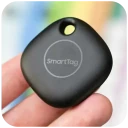
The first thing you'll notice about the Samsung SmartTag is its compact and sleek design. It's small enough to attach to your keychain or slip into your bag without adding any noticeable bulk. The build is sturdy, giving you confidence that it can withstand the daily grind. Plus, it comes in a few color options, so you can choose one that suits your style.
Setting up the SmartTag is a breeze. Simply connect it to your smartphone via the SmartThings app, and you're good to go. The app is intuitive and user-friendly, making the whole process feel seamless. You can easily pinpoint the location of your tagged items on a map, and if you're within Bluetooth range, you can make the SmartTag ring to help you locate it.
Performance and Features
The performance of the SmartTag is where it truly shines. It uses Bluetooth Low Energy (BLE) technology, which means it has a decent range and is gentle on your smartphone's battery. The tag itself boasts a battery life of several months, so you won't need to worry about constant recharges.
One of the standout features is the ability to use the SmartTag as a remote control for smart home devices. Imagine turning off your lights or adjusting your thermostat by simply pressing a button on your keychain. It's like having a tiny assistant in your pocket!
In terms of accuracy, the SmartTag is pretty reliable. While it's not going to give you pinpoint accuracy like a GPS, it does a fantastic job of getting you close enough to your lost item to make the search a whole lot easier. And if you're out of Bluetooth range, the app will show you the last known location, so you have a starting point for your search.
Real-World Use Cases
Let's talk about real-world scenarios. The SmartTag is perfect for those who are constantly misplacing their belongings. Whether it's your keys, wallet, or even your pet's collar, this device can save you from a lot of frustration. I personally found it invaluable during a recent trip when I had to keep track of multiple bags and gadgets.
More From Our News Desk

Clash of Clans Is Won Between the Battles

Android Auto Makes the Case for Quieter Car Software

MobiOffice: Transforming Mobile Productivity with Seamless Integration

EA SPORTS FC™ Mobile Soccer: Redefining Mobile Sports Gaming

How Microsoft OneDrive Became a Mobile Productivity Giant

How Google Translate Breaks Language Barriers Effortlessly
Moreover, if you live in a smart home ecosystem, the integration with Samsung's SmartThings is a game-changer. You can automate tasks and control devices with a simple click, making your life a bit more convenient.
For pet owners, attaching a SmartTag to your pet's collar can give you peace of mind. If they wander off, you'll have a way to track them down quickly. It's not a substitute for a GPS tracker, but it's certainly better than nothing.
Final Thoughts
In conclusion, the Samsung SmartTag is a handy little gadget that offers a lot more than just item tracking. Its seamless integration with the SmartThings ecosystem and its ability to function as a remote control for your smart home devices make it a versatile addition to your tech lineup. While it might not replace a dedicated GPS tracker for some applications, it certainly hits the mark for everyday use.
So, if you're tired of tearing your house apart looking for your misplaced items, or if you want a simple way to add a bit of smart convenience to your life, the Samsung SmartTag might just be the perfect solution for you.
Samsung SmartTag Frequently Asked Questions
What is Samsung SmartTag, and how does it work?
Samsung SmartTag is a Bluetooth-powered tracking device designed to help users keep track of their personal belongings, like keys, wallets, or bags. By attaching the SmartTag to an item, you can utilize the Samsung SmartThings app on your smartphone to locate it. The app provides a map interface and proximity-based alerts, making it easier to find lost items within a 120-meter range in open areas. It works exclusively with Samsung Galaxy devices, ensuring seamless integration and reliability.
Is Samsung SmartTag compatible with all smartphones?
No, Samsung SmartTag is not universally compatible with all smartphones. It is designed to work specifically with Samsung Galaxy smartphones that support the Samsung SmartThings app. This includes most recent models running Android 8.0 or later. If you do not own a compatible Samsung device, you may not be able to use the SmartTag effectively, as it relies on the SmartThings ecosystem for its operations.
How long does the battery last in a Samsung SmartTag, and is it replaceable?
The Samsung SmartTag comes equipped with a replaceable CR2032 coin cell battery, which typically lasts around 300 days depending on usage patterns. When the battery is low, users receive a notification via the SmartThings app, allowing ample time to replace it. This feature ensures continuous operation without significant downtime, as the battery can be easily replaced by the user without any specialized tools.
Can Samsung SmartTag be used to track pets or children?
While Samsung SmartTag is primarily designed for tracking personal belongings, some users may consider using it to monitor the location of pets or children. However, it's important to note that SmartTag relies on Bluetooth connectivity, which limits its effective range to approximately 120 meters in open spaces. For tracking beyond this range, especially in crowded or dense areas, users might need to explore GPS-based solutions for more reliable real-time tracking.
What should I do if my Samsung SmartTag is lost or stolen?
If your Samsung SmartTag is lost or stolen, you can use the Samsung SmartThings app to view its last known location on the map. Additionally, the SmartTag can emit a loud alert sound, helping you locate it if it's nearby. Unfortunately, if the SmartTag is out of range or stolen, recovery can be challenging, as it relies on Bluetooth for location tracking. Users may need to consider reporting the loss or theft to local authorities if deemed necessary.
Pros
- Easy to set up and use.
- Compact and lightweight design.
- Strong Bluetooth range.
- Compatible with SmartThings.
- Replaceable battery.
Cons
- Limited to Samsung devices.
- No GPS tracking feature.
- Short battery life.
- Requires SmartThings app.
- Limited color options.
- Category
- Libraries & Demo
- Version
- 3.4










