

Salt Lake City Public Library
- 27.00
- 4.5
- Installs
- 10.00K
- Price
- Free

Screenshots

Analysis by Reviewed
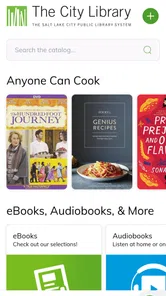
When I tested Salt Lake City Public Library’s mobile app, I approached it as something a household might actually use rather than as a flashy entertainment download. It is a free library app from Salt Lake City Public Library, built around browsing the catalog and accessing the library’s Digital Library. That focus makes its value easy to understand: it puts a library search tool in your pocket, but it also means the experience depends on how well it fits your family’s existing library habits.
I found it most useful as a shared household starting point. One person can look for a novel, another can check whether an audiobook is available, and someone else can browse digital material without opening a desktop browser. The app is listed in the Libraries & Demo category, and that description is accurate. It is not trying to replace every library service or become a general reading platform. Its job is narrower, and the best experience comes from treating it as a convenient front door to The City Library rather than as a complete household organizer.
How the app works when several people share one device
A realistic use case is a parent sitting with a child before a weekend visit to the library. The child wants a particular book, the parent wants to find something for a commute, and the household may also be interested in digital borrowing. Instead of writing down titles and searching later, I would use the app to browse possibilities while the conversation is happening. That makes discovery more immediate and reduces the chance of forgetting a title by the time everyone gets home.
There is also a useful difference between browsing together and managing separate reading choices. On a shared phone or tablet, the app can serve as a common catalog window, but each person should still treat their own library activity as their own responsibility. A household may discuss titles together, yet borrowing decisions, account access, and reading history should not automatically be assumed to belong to everyone using the device. The key household habit is separating shared discovery from personal account activity.
I would especially recommend using it during a short planning session. Rather than opening the app every time someone remembers a book, keep a small household list of titles and search them together when there is a clear moment. This makes the app feel less like another notification-driven service and more like a practical library companion. It is a small workflow change, but it helps prevent children’s choices, a parent’s holds, and a partner’s digital reading interests from becoming one confusing stream.
The app is also helpful for spontaneous browsing. If you are waiting somewhere and want a new book, searching by title or exploring the catalog is more useful than relying on a general bookstore app, because the result is connected to the library context. That distinction matters when your goal is to borrow rather than buy. I would still keep expectations realistic: catalog browsing is the central benefit, so people looking for extensive reading statistics, social recommendations, or a full personal media dashboard may find the experience limited.
What I would do before handing over a shared phone
Before letting another household member use the app, I would check which account is active and avoid assuming that the last person’s session is suitable for the next person. This is particularly important on a family tablet, where one person may leave the device open after searching. A child may only want to browse, while an adult may be checking personal borrowing activity. Those are different tasks, even when they happen on the same screen.
More From Our News Desk

 Gmail
GmailGmail in a Busy Inbox: Who Benefits Most?
From first account to crowded workday, Gmail earns its place through dependable search and flexible sorting—but its best fit depends on how much inbox maintenance you can tolerate.

 Prime Video
Switching to Prime Video: What Changes in Your Viewing Routine
Prime Video can make a compelling second home for streaming, but switching means learning a different catalog, rental layer, and route from browsing to playback.

 Universal TV Remote Control
Universal TV Remote Control Works Best as a Reliable Backup
A phone remote earns its place through quick setup and reliable habits. Here is how to get more from Universal TV Remote Control—and where its limits show.

 Weather - By Xiaomi
Weather by Xiaomi Review: Clear at a Glance, Less Clear Up Close
Xiaomi’s weather app makes everyday forecasts quick to scan, but its calm surface can leave useful details and recovery paths harder to find than they should be.

 X
XX Under Pressure: Can It Recover When Posting Goes Wrong?
A resilience-focused review of X, examining setup, mistaken posts, interruptions, weak connections, and the gaps that matter when recovery needs to be dependable.

 Clash of Clans
Clash of Clans Is Won Between the Battles
Its raids are quick; its community is a long-term project of coordination, teaching, rivalry, and shared responsibility—with all the friction that entails.
Latest News



I would also avoid saving a password or leaving account details visible on a device that guests regularly use. That is not a criticism unique to this app; it is simply sensible account hygiene for any library service. The app makes library access more convenient, and convenience can encourage people to leave a session open. A quick sign-out or account check at the end of a browsing session is a worthwhile routine when the device is shared.
For a household with several readers, I would establish a simple rule: browsing can be collaborative, but account actions happen only when the account holder is present. That boundary is easy for adults to understand and can be explained to older children without making library use feel complicated. It also prevents the common problem of someone searching for a title and accidentally continuing in another person’s account.
One practical tip is to search separately for physical and digital possibilities when planning a reading list. A title that looks ideal in the catalog may not be available in the format a person expects. If one family member needs an audiobook for travel and another wants a print book, the same search result should not be treated as an automatic solution for both. The app’s value is in helping you investigate those options, not in removing the need to check the format and availability that actually suit the reader.
Coordinating books without turning the app into a family noticeboard
In my experience, the app works best when coordination stays simple. A household can use it to agree on a few titles, compare options, and decide who will look for what. It is less suitable as a complete shared calendar or family task manager. I would not rely on it alone to remind everyone about due dates, coordinate a group reading plan, or maintain a household inventory. Those jobs are better handled by the tools your family already uses for reminders and notes.
A useful approach is to give each person a clear purpose during a shared search. One person can look for fiction, another can check children’s material, and an adult can investigate digital options. This avoids several people repeating the same search and makes the app feel faster, even when the household is browsing together. It also encourages better conversations about format: a child may prefer a physical book, while a commuter may prioritize something that can be used away from home.
I would keep a separate note with a few promising titles rather than relying on memory. This is one of the non-obvious advantages of treating the app as a discovery tool: you can browse broadly without needing to make an immediate borrowing decision. A family can explore during breakfast, narrow the list later, and then let each account holder handle their own next step. That separation keeps the catalog search relaxed instead of making every search feel like a commitment.
The same workflow helps couples and roommates who share a device but not a reading life. You can browse together while retaining different tastes and account boundaries. Someone looking for a mystery does not need to see another person’s personal activity to benefit from the catalog. In that setting, the app feels more respectful than a single shared profile would, provided users remain attentive to which account is open.
Compared with a general search engine, the advantage is context. A web search may show reviews, retailers, or unrelated results, while this app is designed around The City Library’s collection and Digital Library. Compared with a dedicated reading app, however, it is less likely to provide a rich reading environment or a broad cross-library experience. If your household uses multiple library systems, shops for books, or tracks reading across several services, you may still need other apps alongside it.
Age context and the trust required for younger users
The app carries a Teen content rating, which gives families a useful age context, but I would not treat that label as a substitute for household judgment. Library catalogs contain material for many age groups, and a teen rating does not mean every result will suit every child. Parents and guardians should still guide younger readers toward appropriate searches and discuss how the library account is being used.
For an older child or teenager, the app can be a good way to build independent library habits. A teen can search for school reading, personal interests, or digital material while an adult remains available for questions. I like that this encourages choice without requiring the whole household to browse every title together. The important boundary is that independence should grow alongside an understanding of personal account responsibility.
For younger children, I would use the app with an adult nearby. Shared browsing can turn the catalog into a conversation: why does a title look interesting, what format would be useful, and what should be saved for a later visit? That approach is more valuable than simply handing over the phone and expecting the app to filter every choice automatically. The app should support family guidance, not replace it.
Trust also matters between adults. If several people use one tablet, the device itself becomes the point of risk rather than the catalog search. I would avoid treating a household’s shared screen as permission to inspect another person’s account. A library app may feel harmless, but borrowing choices can still be personal. Clear expectations make the convenience of shared use much more comfortable.
Another realistic situation is a teenager searching for a title while a parent is helping with a school project. The parent can assist with catalog terms and format choices, then let the teen continue independently. If the search moves into personal account actions, I would make sure the correct account holder is the one completing them. This small distinction teaches digital responsibility without creating unnecessary barriers to finding books.
Everyday strengths, practical friction, and who should skip it
The strongest part of the experience is its directness. The store summary says it is for browsing the catalog and Digital Library, and that is exactly where I would place its usefulness. I do not have to begin with a retailer, a review site, or a broad internet search when my intention is to explore library material. For Salt Lake City residents who already use The City Library, that focused path can save time and make library browsing feel more natural on a phone.
Its limitations come from the same focus. People who expect a polished all-in-one reading service may find the app too narrow. It is not the right choice if your main goal is to purchase books, organize a collection from many providers, or maintain a detailed reading journal. A general ebook app may be better for reading itself, while a dedicated tracking service may be better for statistics and long-term lists. I would use those tools alongside this app rather than expecting one library app to cover every need.
There is also a household trade-off between convenience and clarity. A shared device makes browsing easy, but it increases the need to check the active account before moving beyond search. Families that are comfortable with that routine should have little trouble. Households that want one universal profile for everyone may find separate account responsibilities less convenient, especially when several people are borrowing at once.
The app has a 4.5 average from around 63 ratings, with roughly 27 written reviews, and it has passed the 10,000-install mark. Those figures suggest a modest but positive user base rather than a mass-market platform. I would read that as a sign that the app serves a specific local purpose well enough for many users, not as proof that it will suit every library workflow. Its audience is naturally centered on people connected to Salt Lake City Public Library.
It is free, which removes the main barrier to trying it. The current version is 2026.08.19, and it requires Android 6.0 or later. That broad Android compatibility is useful for households keeping an older phone or tablet in circulation, although the practical experience will still depend on the device and the way the household manages accounts. The app was released on March 10, 2018, so it is not a brand-new experiment; I see it as an established library utility that has continued to receive updates.
I would skip it if I lived outside the library’s service area and had no reason to use The City Library’s catalog or Digital Library. A general library discovery service would make more sense for someone who needs to search across different systems. I would also skip it as a primary choice if I wanted an app centered on reading books inside the same interface. This app is most convincing before the reading begins, when you are deciding what to find and borrow.
My household verdict after using it as a library companion
Salt Lake City Public Library makes the most sense as a focused catalog and Digital Library doorway for people who already belong to, or regularly use, The City Library. I would recommend it to a household that wants quick shared browsing while still respecting separate account boundaries. It is especially practical for planning a library visit, finding options for different readers, and checking digital possibilities without starting from a general web search.
My recommendation comes with one condition: keep the roles clear. Use the app together for discovery, but let each person manage their own account activity. For teenagers, combine independence with occasional guidance. For younger children, browse alongside them. For adults sharing a tablet, check the active session before continuing. These habits make the app more useful and avoid the confusion that can come from treating a shared device as a shared identity.
I would not describe it as a complete family reading system, and I would not choose it over a broader service for people who use several library networks. Its strength is local focus, not universal coverage. That focus is precisely why it can be better than a generic alternative when your next book is waiting in The City Library’s catalog.
In the end, I see this as a sensible free utility rather than an app that needs constant attention. It helps a household move from “what should we read?” to “what can we find through our library?” with less friction. If that is the question you ask most often, downloading it is an easy decision. If your needs extend to cross-library searching, detailed reading management, or a full in-app reading experience, keep your expectations modest and use a complementary tool for those jobs.
Salt Lake City Public Library Frequently Asked Questions
What devices can I use the Salt Lake City Public Library app on?
The Salt Lake City Public Library app is available for Android and iOS devices, making it possible to browse the library’s catalog and Digital Library from a phone or tablet. On Android, the current version requires Android 6.0 or later. Before installing, check that your device’s operating system meets the requirement and that you are downloading the app published by Salt Lake City Public Library.
What is the Salt Lake City Public Library app used for?
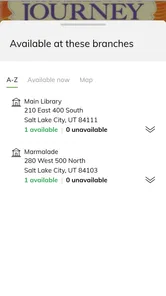
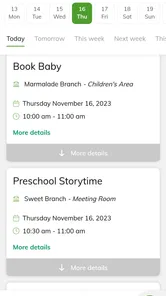
The Salt Lake City Public Library app gives users a convenient way to connect with the library from an Android or iOS device. After signing in, you can review your account, search the catalog, place holds, renew eligible items, explore digital resources, and check library information such as locations, opening hours, events, and available services without needing to visit a branch first.
Do I need a Salt Lake City Public Library card to use the app?
A library card is generally required for personalized features such as viewing checked-out materials, managing holds, renewing items, and accessing certain digital content. However, some public information may be available without signing in, including catalog browsing, branch details, event listings, and general library news. Users should check their account status and contact the library if login credentials do not work.
Can I borrow ebooks, audiobooks, or other digital media through the app?
The app may provide access to the Salt Lake City Public Library’s digital collections, depending on the services currently supported and your library membership. Digital borrowing can include ebooks, audiobooks, magazines, streaming media, or links to partner platforms. Availability, borrowing periods, and compatible devices vary, so it is worth checking each title’s details before borrowing or downloading it.
Can I renew library materials and manage holds from the app?
Yes, the app is designed to make common account tasks easier, including checking due dates, renewing eligible physical items, placing holds, and reviewing your position in a hold queue. Renewals are not guaranteed because restrictions may apply when another patron has requested an item, the renewal limit has been reached, or the account has unresolved issues.
Pros
- Free access to e-books
- audiobooks
- movies
- music
- and digital magazines.
- Mobile library card makes borrowing and account management convenient.
- Useful event listings for classes
- talks
- clubs
- and community activities.
- Search tools help locate books
- branches
- programs
- and library services.
- Supports multiple library locations across Salt Lake City.
Cons
- Some digital titles may have long waitlists or limited borrowing periods.
- Certain features require an active local library card and account.
- App performance and catalog availability may vary by device or connection.
- Branch information and opening hours may occasionally need updating.
- Not all library resources can be accessed directly through the app.










