

Sad ringtones phone 2024
- 8.00
- 3.9
- Installs
- 100.00K
- Price
- Free

Screenshots
Analysis by Reviewed
I look for a ringtone that suits how I actually use my phone, not just one that sounds catchy in a preview. Sad Ringtones Phone 2024 takes a focused approach: it is a free sound-selection app for anyone who prefers reflective, melancholy tones to the usual bright notification tunes. That narrow mood is its clearest strength, though it also means this is not a general-purpose audio library.
A focused choice for a particular mood
The app comes from Ringtones Rayman and sits among library-style and demo apps. Its Teen age rating is worth keeping in mind if you are choosing it for a younger family member. It has an average rating of 3.9 from around 670 ratings, with over 100,000 installs. Those figures suggest it has found an audience, but I would treat them as context rather than proof that its sound will suit your taste.
The practical question is whether you want a collection with a consistent emotional character or a broad catalog spanning every genre. If you want a sad or wistful tone for calls, this app has a more specific purpose than a typical ringtone picker. If you want comedy sounds, current pop songs, or a huge range of unrelated styles, a general ringtone library is likely a better fit.
The Emotional Connection
First things first, this app is a treasure trove for those days when you're feeling a bit down. The collection of ringtones here is vast, with each one crafted to echo a range of melancholic emotions. Whether you're in the mood for something that feels like a gentle drizzle or a full-on emotional downpour, Sad Ringtones Phone 2024 has got you covered.
Exploring the Features
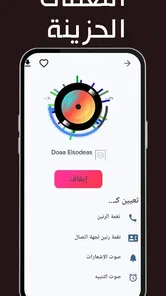
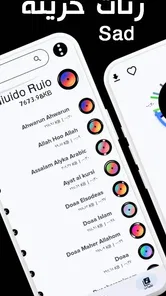
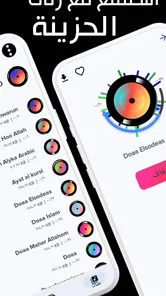
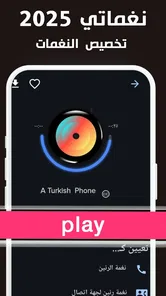
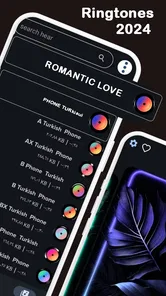
Upon opening the app, the interface is clean and straightforward. No unnecessary frills, just a simple design that lets you dive straight into the collection. I appreciated the ease of navigation—finding the right tone for your mood is as easy as pie. You can browse through categories, listen to previews, and even set the ringtones directly from the app.
One feature I found particularly cool is the ability to customize your own ringtones. You can tweak the existing ones or even mix and match to create something uniquely yours. It's a bit like being a DJ for your own mood!
Choosing a tone that works in daily life
A tone that sounds moving through headphones can be too somber or subtle when a phone rings in a busy room. I would preview candidates at a comfortable listening level, then choose one that remains easy to recognize without making every call feel dramatic. A restrained melody may suit a personal call, while a more distinctive sound can be easier to notice when the phone is in a bag.
More From Our News Desk

 Gmail
GmailGmail in a Busy Inbox: Who Benefits Most?
From first account to crowded workday, Gmail earns its place through dependable search and flexible sorting—but its best fit depends on how much inbox maintenance you can tolerate.

 Prime Video
Switching to Prime Video: What Changes in Your Viewing Routine
Prime Video can make a compelling second home for streaming, but switching means learning a different catalog, rental layer, and route from browsing to playback.

 Universal TV Remote Control
Universal TV Remote Control Works Best as a Reliable Backup
A phone remote earns its place through quick setup and reliable habits. Here is how to get more from Universal TV Remote Control—and where its limits show.

 Weather - By Xiaomi
Weather by Xiaomi Review: Clear at a Glance, Less Clear Up Close
Xiaomi’s weather app makes everyday forecasts quick to scan, but its calm surface can leave useful details and recovery paths harder to find than they should be.

 X
XX Under Pressure: Can It Recover When Posting Goes Wrong?
A resilience-focused review of X, examining setup, mistaken posts, interruptions, weak connections, and the gaps that matter when recovery needs to be dependable.

 Clash of Clans
Clash of Clans Is Won Between the Battles
Its raids are quick; its community is a long-term project of coordination, teaching, rivalry, and shared responsibility—with all the friction that entails.
Latest News



For a realistic routine, imagine setting a reflective ringtone for a close contact while keeping a more neutral sound for work calls. That way, the app’s mood becomes a personal touch rather than a soundtrack imposed on every interruption. Before changing a tone, I’d also check the phone’s own sound settings so the ringtone volume and vibration still fit the places I usually take calls.
Directly setting a tone from an app can save a few steps, but it is still sensible to confirm the result with a test call. Phones handle sound settings differently, and the selected tone should be checked after applying it, especially if you use separate settings for calls and notifications. I would make one change at a time rather than replacing several sounds at once; it is easier to tell which choice is working.
Making the most of previews and customization
There is a useful distinction between choosing a sound because it feels moving in the moment and choosing one that will work as a recurring alert. I’d listen to a few options back to back, then pause before setting anything. That short break helps reveal whether I genuinely like the melody or was simply drawn to the first one that matched my mood.
If you customize a tone, I’d keep the result recognizable rather than layering so much variation into it that it stops working as an alert. A ringtone has a practical job: it needs to tell you that a call is coming. A personal variation can make it feel less generic, but clarity matters more than making it elaborate.
Another small but useful approach is to assign a sound with care instead of changing every alert at once. Start with one contact or one call setting, live with it for a while, and then decide whether you want more. This keeps a distinctive sound from becoming background noise and makes it easier to reverse a choice that turns out to be distracting.
Setting the Mood
Now, let's talk about the ringtones themselves. Each tone is crafted with a unique blend of instruments and sounds that evoke a sense of nostalgia or poignant reflection. I found myself getting lost in some of the tunes, each one telling its own story. The sound quality is top-notch, making sure every note hits just right.
For those who like to switch things up often, the app also offers a daily ringtone feature. This means you can start each day with a new sound, keeping things fresh without having to dive back into the library constantly.
Where its focused approach helps—and where it doesn’t
The app’s strongest use is as a mood-specific source, not as a replacement for every sound on a phone. Compared with broad ringtone collections, its appeal is that it stays within a reflective emotional lane instead of asking you to sift through unrelated styles. That can make choosing easier if melancholy tones are exactly what you want; it is less useful if you are still exploring what kind of ringtone you like.
For everyday use, I’d be selective about where that mood appears. A gentle, wistful call tone can feel personal for a close friend, while a more neutral built-in sound may be better for work, appointments, or situations where you need to identify a call quickly. The app can provide the style, but your phone’s normal sound controls remain the better place to manage volume and vibration for different surroundings.
It also helps to think about repetition. A melody that feels comforting when you choose it may become tiring if it plays every time someone calls. The daily option can be appealing to someone who enjoys variety, but people who prefer a stable, familiar alert may be happier selecting one tone and leaving it alone. Neither approach is inherently better; it depends on whether novelty or consistency matters more to you.
What to expect from the focused library
The dedicated mood is also the main trade-off. If you get tired of melancholy sounds quickly, or want one app to cover alarms, message alerts, and playful call tones, this may feel limiting beside a broader library. I would use it as a source for a particular style rather than assume it can replace every sound choice on a phone.
Version 1.13 is listed for devices running Android 5.1 or later. The app is free, so it is easy to try without making a purchase decision, but the useful test is personal: listen to several previews and decide whether you still like the tone after imagining it interrupting an ordinary day. A sound can be lovely once and tiring as a repeated call alert.
Practical checks before settling on a ringtone
If you are wondering whether a chosen tone will work for calls or other alerts, I’d treat setting it as the start of the decision, not the end. Confirm which sound category you changed in the phone’s settings, then test it in the way you normally carry your device. A ringtone that is easy to hear on a desk may be less noticeable inside a bag, while a very prominent one can feel excessive in a quiet room.
For someone who changes sounds frequently, keep track of which tone is assigned to which purpose. It is easy to forget whether a reflective melody was meant for all calls or only for a particular contact. Changing one setting at a time and checking the result avoids that confusion and makes it simpler to return to a familiar default if the new choice doesn’t suit your routine.
The app is specifically an Android option, so iPhone users should not assume they can install it or set its tones in the same way. On Android, the stated minimum operating system is 5.1, which makes it relevant to a wide range of devices that meet that requirement. Either way, the essential question is whether you want this particular emotional style, rather than simply wanting any new ringtone.
Final Thoughts
In a world where most ringtone apps focus on upbeat and catchy tunes, Sad Ringtones Phone 2024 dares to be different. It's like a musical companion for those introspective moments. Whether you're going through a breakup, reflecting on life, or just in need of a soundtrack for a rainy day, this app offers something special.
So, if you're looking for a way to connect with your emotions through sound, give this app a try. Just remember to have some tissues on hand; these ringtones might just hit you right in the feels!
Who I’d recommend it to
I’d suggest it to someone who already knows they enjoy wistful instrumental sounds and wants a phone tone with a softer emotional feel. It may also suit a person who likes changing a ringtone to match a season or a particular contact, rather than keeping one default sound indefinitely. If you prefer energetic alerts, need a wide range of genres, or want a sound that cuts through noisy surroundings above all else, I’d look elsewhere.
I’d also be cautious about choosing it for someone who wants practical alert sounds above all else. A restrained, melancholy tone can be enjoyable in a quiet setting but may not be the easiest signal to notice in a busy workplace or outdoors. For those situations, a phone’s built-in choices or a broader sound library with more forceful, varied alerts may be the more sensible option.
My verdict is that the app’s value lies in its clear point of view, not in being the only ringtone tool you will ever need. Browse with a specific use in mind, try a few previews, and keep the tone that feels pleasant after repeated listening. For that kind of small, personal customization, this focused library is an easy option to consider.
Sad ringtones phone 2024 Frequently Asked Questions
What devices and operating systems can run Sad Ringtones Phone 2024?
Sad Ringtones Phone 2024 is an app in the Libraries & Demo category, developed by Ringtones Rayman. Its Android version requires Android 5.1 or later, so checking your device’s software version before downloading is a sensible first step. The app is rated Teen, which may also be useful to consider when deciding whether it is appropriate for your household.
What features does the Sad Ringtones Phone 2024 app offer?
The Sad Ringtones Phone 2024 app offers a wide range of melancholic tunes perfect for those who enjoy more somber sounds. Users can browse an extensive library of sad ringtones, customize their own ringtone playlists, and even set specific ringtones for different contacts. The app also allows for easy downloading and sharing of ringtones with friends.
Is Sad Ringtones Phone 2024 free to download and use?
Yes, Sad Ringtones Phone 2024 is free to download and offers a variety of ringtones at no cost. However, it may include in-app purchases for premium features or additional ringtone packs. Users can enjoy most of the app's functionalities without spending any money, but opting for in-app purchases can enhance their experience.
What should I know about the app’s popularity and release history before downloading?
The app was released on May 17, 2023, and its current version is 1.13. It has been installed over 100,000 times and has an average rating of 3.9 from 667 ratings, alongside 8 written reviews. These figures offer a quick sense of its reach and user feedback, though individual preferences for ringtone collections can vary.
Can I use Sad Ringtones Phone 2024 on both Android and iOS devices?
Sad Ringtones Phone 2024 is designed to be compatible with both Android and iOS devices. This ensures that users across different platforms can easily download and enjoy the app's features. The app is available on the Google Play Store for Android users and the Apple App Store for iOS users, making accessibility seamless.
Pros
- Unique collection of sad ringtones
- User-friendly interface
- High-quality audio files
- Easy to set ringtones
- Regularly updated content
Cons
- Limited to sad tones only
- Contains ads
- No customization options
- Requires internet for download
- Limited free content










