

S4U Assen - Hybrid watch face
- 101.00
- 4.5
- Installs
- 100.00K
- Price
- $1.99
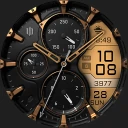
Screenshots
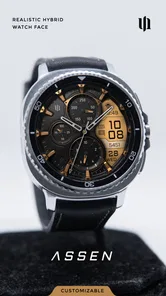
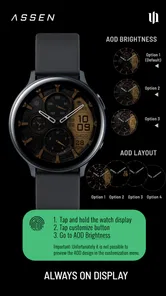
Analysis by Reviewed
I judge a watch face by a simple question: does it make the information I check often easier to glance at, while still looking like something I want to wear? S4U Assen - Hybrid watch face aims for that balance, pairing an analog-inspired appearance with digital smartwatch utility. It’s a personalization app from styles4you, and its appeal is less about changing how a watch works than making the display feel more considered and more your own.
Choosing a face that suits your routine
Before paying for any watch face, I’d think about what I actually look at during an ordinary day. If I mainly want time at a glance and prefer a traditional watch aesthetic, a hybrid design makes sense. If I want the screen to feel minimal, or I care more about displaying a particular set of complications, another style may be a better fit. The useful question here is whether Assen’s mix of classic looks and customization matches your habits, not whether it offers the most information possible.
There is a practical trade-off with any detailed face: a look that feels polished on a bright, uncluttered screen may be harder to read when I’m moving quickly or checking the time outdoors. I’d take a moment to try the layout in the lighting and situations I encounter most, then keep only the details I can recognize at a glance. That small check is more useful than customizing for appearance alone.
How to decide before buying
I’d also consider how often I change watch faces. Someone who likes to coordinate a screen with different clothes or occasions may get more from customization than someone who sets a face once and never revisits it. Assen is most appealing when the act of choosing a look is part of the fun, but it should still make sense in its default arrangement if you don’t want to spend time adjusting it.
Compatibility is a practical question worth settling before purchase: check that your smartwatch and its face-installation process support the app, then make sure you know where the watch’s own settings let you select and customize a face. That simple preparation avoids confusing a platform or setup issue with a problem in the design itself. The app is a watch-face purchase, not a replacement for the watch’s operating system or its companion tools.
Design and Usability
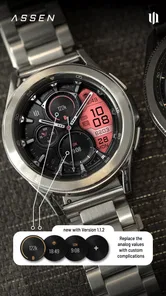
First off, the design of the S4U Assen - Hybrid watch face is absolutely stunning. It’s like having a classic watch but with a modern-day twist. The face is sleek, stylish, and lets you flaunt a bit of personality. The interface is super user-friendly, which means you won’t need a degree in rocket science to get it up and running. It’s all about swiping, tapping, and voila—you’re set!
Features that Stand Out
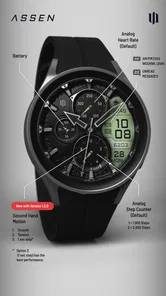
This app isn't just a pretty face; it packs some serious features under its belt. From tracking your steps to checking your heart rate, it’s got you covered. It even syncs seamlessly with your smartphone, so you get notifications and updates right on your wrist. And honestly, who doesn’t love being in the loop 24/7?
More From Our News Desk

 Gmail
GmailGmail in a Busy Inbox: Who Benefits Most?
From first account to crowded workday, Gmail earns its place through dependable search and flexible sorting—but its best fit depends on how much inbox maintenance you can tolerate.

 Prime Video
Switching to Prime Video: What Changes in Your Viewing Routine
Prime Video can make a compelling second home for streaming, but switching means learning a different catalog, rental layer, and route from browsing to playback.

 Universal TV Remote Control
Universal TV Remote Control Works Best as a Reliable Backup
A phone remote earns its place through quick setup and reliable habits. Here is how to get more from Universal TV Remote Control—and where its limits show.

 Weather - By Xiaomi
Weather by Xiaomi Review: Clear at a Glance, Less Clear Up Close
Xiaomi’s weather app makes everyday forecasts quick to scan, but its calm surface can leave useful details and recovery paths harder to find than they should be.

 X
XX Under Pressure: Can It Recover When Posting Goes Wrong?
A resilience-focused review of X, examining setup, mistaken posts, interruptions, weak connections, and the gaps that matter when recovery needs to be dependable.

 Clash of Clans
Clash of Clans Is Won Between the Battles
Its raids are quick; its community is a long-term project of coordination, teaching, rivalry, and shared responsibility—with all the friction that entails.
Latest News



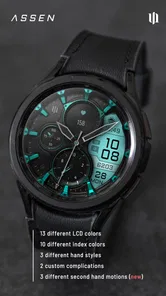
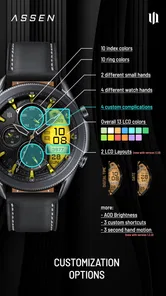
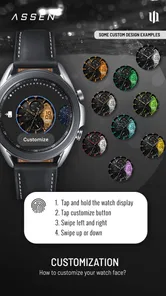
One of the standout features for me was the customizable options. You can tweak the look to suit your mood, whether you’re feeling bold or something a bit more subtle. It’s all about personalization, and that’s what makes it feel truly yours.
Making customization useful
I’d approach the options as a way to make the face more legible, not just more decorative. For example, before a busy day, I’d set up a restrained look that makes the information I care about easiest to spot; when I’m heading somewhere more formal, I might choose a cleaner style that sits comfortably with the rest of my outfit. The best setup is the one I can read without stopping what I’m doing.
For a realistic routine, imagine checking the time while carrying groceries, then glancing at a notification before deciding whether to take out your phone. A hybrid face can make that quick wrist check feel natural, while customization lets you keep the display aligned with what you tend to notice. It won’t replace a phone for longer replies or detailed tasks, but it can make brief checks feel less disruptive.
What to look for in daily use
One useful way to tune a watch face is to decide what deserves the most attention before changing anything. If step progress matters to you, make that the detail you can locate quickly; if you mostly want the time and occasional notifications, resist filling the screen with information just because an option exists. This keeps the display purposeful and helps you judge whether the hybrid arrangement is genuinely useful rather than merely attractive.
I’d test the face during a few different kinds of moments: a quick glance while walking, a check under indoor lighting, and a look outdoors when the screen is competing with daylight. If a detail takes effort to find in any of those situations, simplify your setup or rely on the watch’s more focused alternative when readability matters most. A polished preview is not the same as a layout that works at wrist distance.
Performance and Battery Life
Performance-wise, the app is smooth as butter. I didn’t experience any lag or glitches, which is a big win in my books. And let’s talk about battery life—because what’s the point of a smart watch face if it drains your battery faster than you can say "hybrid"? Thankfully, the S4U Assen is pretty efficient on that front. It manages to keep things ticking without guzzling up power like there's no tomorrow.
Where other watch-face styles may fit better
Assen’s main appeal is the middle ground between an analog look and smartwatch information. A plain digital face is usually the clearer choice for someone who values immediate, simple reading above all else. A more traditional analog face may suit someone who wants the watch to look classic and rarely checks screen details. A heavily information-focused face can be more appropriate if you routinely need several pieces of data at once and are comfortable with a busier display.
Those alternatives are not automatically better; they make different compromises. I’d compare the actual layouts on my own watch rather than assume that one style is universally easier to use. Screen size, eyesight, and the way a person glances at the wrist all affect what feels readable. The best reason to choose Assen is that its particular visual balance works for you, not simply that it combines two styles.
What to weigh before switching
A face is one of the easiest parts of a smartwatch to change, but it still takes a little attention to settle on a layout that works. I’d compare Assen with a plain digital face and with other analog-style options on the same watch: the simpler alternative may be clearer if you want only the essentials, while a different hybrid design may suit you better if its visual arrangement feels more intuitive. Give yourself time to use the chosen layout through a normal day rather than judging it from a preview alone.
Assen is a particularly sensible choice if you like a traditional watch look and enjoy tuning the screen to your taste. It is less compelling if your priority is a stark, information-first display or if you never change the default appearance of your watch. Those preferences aren’t flaws; they simply make a basic built-in face or a different design a more straightforward choice.
Everyday trade-offs and switching back
Changing to a new face can affect more than appearance: it also changes where your eyes land when you check the watch. I’d give myself a normal day to learn the arrangement before deciding whether it feels intuitive. If I keep searching for the same information, that is a good reason to adjust the layout or switch back, rather than forcing myself to adapt to a design that does not fit my habits.
There is little reason to treat the purchase as an irreversible commitment. You can keep a familiar face available as a fallback and compare them in the situations where you use your watch most. That is particularly helpful if you rely on a glance during work or exercise: the more decorative option may be enjoyable at other times, while a simpler face may be more dependable when you need instant clarity.
Price and audience
The app costs $1.99, so I’d treat the purchase as a small style decision rather than a major smartwatch upgrade. Its Everyone age rating makes it broadly suitable, and its 4.6 average from around 2.6 thousand ratings suggests it has found an audience. It has been installed over 100 thousand times, but popularity alone would not decide it for me: the key is whether I like this particular analog-digital balance enough to keep it on my wrist.
The developer is styles4you, and the app was released on August 10, 2023. I’d think of the price as payment for a specific look and its customization, not as a promise that it will add new capabilities to the watch itself. If you already enjoy changing watch faces, that can be a reasonable personal purchase. If you only want a face that comes with your watch and are happy with it, there is no practical need to pay for a cosmetic change.
Who should pass
I would skip Assen if I prefer a very spare display, dislike spending time adjusting appearance, or need a face whose layout I already know is ideal for a particular work routine. It may also be a poor fit if the analog-inspired look is not your taste; customization cannot make a design feel right if its basic visual character is wrong for you. In those cases, the built-in faces or another style are sensible choices, not lesser ones.
On the other hand, it makes more sense for someone who likes a classic watch presentation but still wants a smartwatch face they can make their own. It can also suit a person who wants one everyday look that feels more personal than a default screen without turning the watch into a crowded dashboard. That distinction—style with useful glances, rather than maximum information—is the clearest way I’d describe its audience.
Final Thoughts
All in all, the S4U Assen - Hybrid watch face is a fantastic blend of style and functionality. It’s a great way to keep your wrist looking sharp while staying connected. Whether you’re a tech enthusiast or just someone who appreciates a good-looking watch, this app is worth checking out. It’s like having the best of both worlds on your wrist. Give it a whirl—you might just find it’s the upgrade you never knew you needed!
My recommendation is straightforward: choose it if the analog-digital balance appeals to you, you enjoy personalizing your watch, and you are willing to check that its information remains easy to read in your routine. Choose a simpler or more information-led face instead if clarity, minimalism, or a familiar layout matters more than appearance. For me, that is the useful test: after the novelty wears off, does the face still make ordinary wrist checks feel natural?
S4U Assen - Hybrid watch face Frequently Asked Questions
Is S4U Assen - Hybrid watch face suitable for someone who wants a realistic-looking watch display?
Yes. S4U Assen is a personalization app built around a realistic hybrid watch face, combining an analog-style appearance with digital information. It may appeal if you want a traditional watch-inspired look while keeping useful details visible on your smartwatch. Its stated audience rating is Everyone, and the app is developed by styles4you.
What features does the S4U Assen - Hybrid watch face offer?
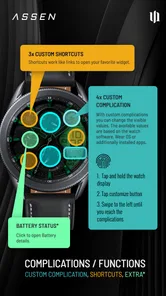
The S4U Assen - Hybrid watch face combines both analog and digital elements, offering users a sophisticated and versatile display. It includes customizable widgets, weather updates, step counter, battery status, and various color themes. Users appreciate the blend of classic watch aesthetics with modern digital functionalities, making it a stylish and functional choice for smartwatch enthusiasts.
Is the S4U Assen watch face compatible with all smartwatches?
S4U Assen - Hybrid watch face is specifically designed for smartwatches running on the Wear OS platform. Before downloading, users should ensure their device supports Wear OS to enjoy the full features of this watch face. Compatibility is crucial for optimal performance and user experience, as it may not function on non-compatible devices.
How can I customize the S4U Assen watch face?
Customization with the S4U Assen - Hybrid watch face is straightforward. Users can easily change the color schemes, select different widgets, and adjust the display settings directly from their smartwatch or through the companion app on their smartphone. This allows users to personalize their watch face according to their preferences and needs, enhancing user satisfaction.
Does S4U Assen - Hybrid watch face affect battery life?
The S4U Assen - Hybrid watch face is designed to be energy efficient, but like any app with active features, it may slightly impact battery life. Users can optimize battery usage by selecting simpler display settings and limiting the number of active widgets. Regular updates also help in maintaining efficiency and minimizing battery drain.
Pros
- Sleek and minimalist design.
- Customizable watch face features.
- Battery-efficient performance.
- Seamless integration with devices.
- User-friendly interface.
Cons
- Limited compatibility with older devices.
- In-app purchases for premium features.
- Occasional syncing issues.
- Limited color customization options.
- No offline functionality.











