S25 Launcher One Ui
- 501.00
- 4.7
- Installs
- 1.00M
- Price
- Free
Screenshots
Analysis by Reviewed
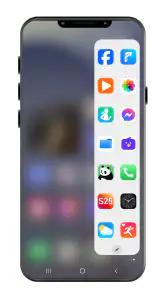
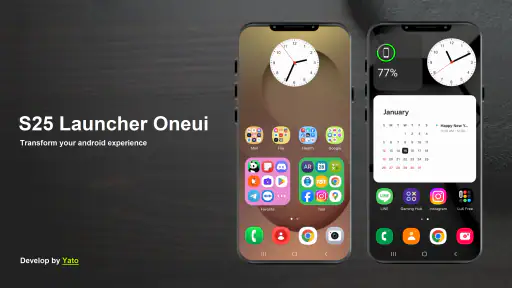
I like launchers that make a phone feel easier to use, not just different to look at. S25 Launcher One UI is a personalization app from YatoPlayroll that gives Android users a way to reshape their home-screen experience around a Samsung-inspired style. Its quick-access edge panel is the part that makes the idea practical: instead of treating the launcher as a cosmetic skin alone, it aims to put useful shortcuts within reach. Whether that suits you depends on how you use your phone and how much you enjoy changing its layout.
What the edge panel changes in everyday use
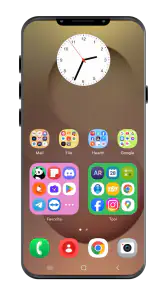
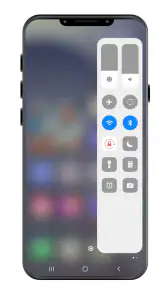
The clearest reason to try this launcher is the sidebar concept. On a busy screen, a quick-access panel can be more useful than adding yet another row of icons: I can imagine keeping frequently used apps close by while leaving the main home screen calmer. That trade-off matters if you prefer a tidy layout but still want shortcuts available without searching through pages. If you already have a home screen you like and rarely reach for side controls, the panel may feel like an extra interaction rather than a meaningful improvement.
A realistic use case is checking a message, opening a map, then returning to a task while moving around town. A sidebar can reduce the need to swipe through home-screen pages for familiar apps, though the benefit depends on which shortcuts you choose and where the panel sits. I’d start with only the few apps I reach for most, then adjust after a few days. Filling every available space immediately can make a supposedly faster route harder to scan.
Speed, stability, and heavier use
A launcher affects the most frequently repeated actions on a phone: returning home, opening an app, and moving between screens. The published experience describes smooth transitions, but real-world responsiveness can vary with the Android device, its workload, and the number of things happening in the background. I wouldn’t treat a launcher as a guaranteed way to make an older phone faster. Its value is more about organizing access and changing the interface than improving the underlying hardware.
For a useful first test, set up the home screen, try the edge panel during normal daily use, and notice whether the launcher remains comfortable when you switch rapidly between apps. If anything feels crowded or awkward, remove shortcuts before adding more customization. This is a practical way to judge whether the added layer helps under ordinary use rather than relying on a quick first impression. I also prefer to make one layout change at a time, so it is easier to tell which adjustment is helping and which is merely adding visual noise.
Who will enjoy it, and who may prefer another option
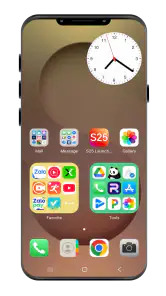
This is a better fit for someone who likes a One UI-inspired look and wants quick access without replacing Android itself. It is also appealing if you enjoy tuning icon sizes and grid spacing instead of accepting a default layout. If your priority is simply a reliable, familiar home screen with no setup, the launcher already built into your phone may be the more comfortable choice. Likewise, people who prefer a very different visual style may get more from a launcher designed around that preference than from a Samsung-like layout.
Compared with ordinary home-screen customization, the edge-launcher approach puts more emphasis on a side-access workflow. That can save a little friction for repeated tasks, but it is not automatically better than a dock, folders, or the phone’s existing shortcuts. I’d compare the options by asking which route feels natural with one hand and which keeps your most-used apps easiest to find. A dock is simpler and always visible; folders can group related apps without adding a side panel. The right choice is the one you reach for without thinking.
More From Our News Desk

Clash of Clans Is Won Between the Battles

Android Auto Makes the Case for Quieter Car Software

MobiOffice: Transforming Mobile Productivity with Seamless Integration

EA SPORTS FC™ Mobile Soccer: Redefining Mobile Sports Gaming

How Microsoft OneDrive Became a Mobile Productivity Giant

How Google Translate Breaks Language Barriers Effortlessly
First Impressions and Setup
Installing S25 Launcher One UI was a breeze. Right from the get-go, the app greets you with a clean and intuitive interface that's reminiscent of Samsung's renowned One UI. The setup process is straightforward, making it accessible even if you're not particularly tech-savvy. As someone who enjoys customizing my phone's aesthetic, I was thrilled with the myriad of options available right at my fingertips.
Design and Customization
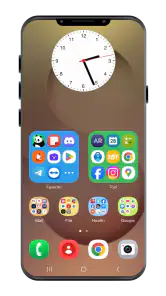
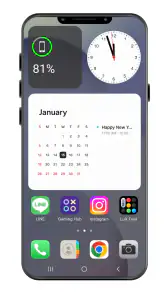
Once you're past the initial setup, the true beauty of the app unfolds. The design is nothing short of stunning, perfectly mimicking the One UI style with its soft curves and minimalistic icons. What’s more, the customization options are almost endless. Whether you're looking to tweak the home screen layout, change icon sizes, or apply new themes, S25 Launcher One UI offers a playground for creativity. I particularly enjoyed the ability to adjust the grid size, which allowed me to optimize my home screen for both aesthetics and functionality.
Performance and Usability
Performance-wise, this launcher does not disappoint. The transitions are buttery smooth, and I didn't notice any lag or stuttering, even when loading apps or switching between screens rapidly. It’s clear that the developers have put a lot of effort into ensuring that the app runs efficiently on a variety of devices. Whether you’re using a high-end smartphone or a more budget-friendly device, S25 Launcher One UI delivers a consistently smooth experience.
Additional Features
Aside from its eye-catching design, the app also packs some handy features that enhance usability. The gesture controls are a game-changer, offering a quick and intuitive way to navigate your phone. Plus, with the ability to hide apps or even lock them for added privacy, it feels like the developers thought of everything. And let’s not forget about the built-in widgets, which seamlessly integrate into the launcher and add a touch of convenience.
Compatibility and cost
The app is free to install, with optional in-app purchases ranging from 49 cents to $1.99 per item. It is rated for Everyone and requires Android 6.0 or later, so checking your phone’s Android version before installing is an easy first step. Its current version is 2.0.65. The launcher has a 4.7 average from around 33,000 ratings, with more than 1 million installs; that suggests plenty of people have tried it, though I’d still judge it by how it behaves on your own device. It was released on November 17, 2023, and is maintained by YatoPlayroll.
Small checks that prevent frustration
Before investing time in a custom layout, check that your preferred widgets and everyday shortcuts fit the way you actually use the phone. A launcher changes the home-screen layer, but it does not turn another brand’s device into a Samsung phone or guarantee that every visual element will behave exactly like Samsung’s own software. I’d also keep a note of the layout you like before experimenting with several changes; that makes it easier to restore a comfortable arrangement if a new grid or theme feels worse in daily use.
The hide and lock options may be useful when you want a less cluttered app view or a little extra separation on the home screen. I would not treat a launcher’s app-locking option as a replacement for the phone’s built-in security settings, though. For sensitive information, use the device’s own protection as well. That distinction is worth keeping in mind if privacy is the main reason you are considering the app, rather than its design and shortcuts.
What to expect from long-term use
After the novelty of a new look wears off, the important question is whether the layout still saves effort. I’d give the edge panel a few days of ordinary use rather than judging it after setup: if you keep reaching for it, it has earned its place; if you forget it exists, a simple dock or your phone’s standard launcher may be better. On a device that already feels busy, keep the layout restrained and see whether the added launcher layer remains responsive while you use your usual apps. If it does not feel dependable, switching back to the built-in launcher is a sensible choice, not a failure.
Using it without making the home screen harder
One useful way to set up the sidebar is to think in terms of moments rather than app categories. I’d choose shortcuts for things I open repeatedly while doing something else, such as checking a message during a break or bringing up a map while out, rather than duplicating every app already visible on the home screen. This keeps the panel purposeful and gives it a job distinct from the dock. If a shortcut takes longer to locate in the side strip than on the main screen, it is not earning its space.
Grid changes deserve the same deliberate approach. A denser layout can make more icons visible, but smaller targets may be less comfortable if you use the phone one-handed or often tap while walking. I’d test the arrangement with the apps I actually use, not just judge it by how balanced the page looks. The most attractive grid is not necessarily the one that makes routine taps easiest.
Choosing the right launcher for your habits
The usual alternatives solve slightly different problems. A phone’s built-in launcher is often the sensible choice if you want continuity and minimal setup; folders and a dock handle quick access with fewer interface changes. This app makes more sense when you specifically want a Samsung-like visual direction paired with a side-entry shortcut habit. If your priority is deep control over a completely different home-screen style, I’d compare it with launchers built around that sort of flexibility rather than expecting this one to suit every aesthetic.
It is also worth considering how often you change phones or reset your layout. A customized home screen can take time to make comfortable, so I would avoid rebuilding it all at once before deciding whether the sidebar belongs in your routine. Start with a familiar arrangement, add only the controls you know you will use, and change the rest gradually. That gives you a fair sense of the launcher without turning setup into a project.
Reliability and device constraints
A launcher sits in a prominent place in daily phone use, so even small interruptions can become noticeable. I would pay attention to whether the home screen returns as expected after switching between several apps, and whether the edge panel remains easy to call up during a busy session. If the phone feels less responsive after adding visual changes or extra shortcuts, simplify the layout first and see whether that helps. This is a more useful troubleshooting step than assuming the device itself needs replacing.
Android 6.0 is the minimum requirement, but meeting that requirement does not mean every phone will feel identical. A device with less room for background work may respond differently from a newer or less heavily loaded one, and the launcher cannot remove those hardware limits. If your phone is already struggling with everyday tasks, I’d stick with its built-in launcher unless you have a clear reason to change. For a smoother trial, make the launcher your default only after you have checked the basic layout and know how you would return to your previous setup.
Another practical question is whether you can go back if the new arrangement does not suit you. Because the launcher changes the home-screen experience rather than the phone’s underlying system, trying it need not mean committing to it permanently. Before making a lot of changes, take note of your current home-screen organization and confirm you can select your preferred launcher again through the phone’s settings. That small precaution makes experimentation feel lower-risk, especially if you rely on your phone for work or travel.
My performance verdict
For me, the strongest case for this app is not a promise of extra speed but a more deliberate route to the apps and layout I use most. The sidebar can make repeated actions feel more direct, while the One UI-inspired styling and grid controls give customization-minded users room to make the home screen their own. The trade-off is another layer to configure, and the best result depends on keeping that setup focused rather than overloading it with shortcuts and visual changes.
In conclusion, S25 Launcher One UI is a fantastic app that successfully brings the Samsung One UI experience to any Android device. Its emphasis on design, customization, and performance makes it a must-try for anyone looking to refresh their phone’s interface. Whether you're a customization enthusiast or just someone who appreciates a well-designed UI, this app offers something for everyone. Give it a shot, and you might just find yourself falling in love with your phone all over again!
S25 Launcher One Ui Frequently Asked Questions
Can I try S25 Launcher One UI before deciding whether it suits my home screen?
Yes. S25 Launcher One UI is free to download, so you can explore its One UI-inspired home-screen experience before spending money. It also offers optional in-app purchases, priced from about 49 cents to $1.99 per item. Take a moment to review any purchase prompt before confirming, particularly if you intend to use only the free features.
What does the quick-access sidebar and edge launcher do?
The quick-access sidebar and edge launcher are central to S25 Launcher One UI’s One UI-style experience. They are designed to give you a way to reach apps and launcher features from the edge of your screen, alongside the personalized home screen. If quick access is the main reason you are considering the app, this is the feature to explore first after installation.
Who develops S25 Launcher One UI, and when was it released?
S25 Launcher One UI is developed by YatoPlayroll and was released on November 17, 2023. It is a personalization app for Android, presented under the short name S25 Launcher. Its focus is a One UI-inspired launcher, including a quick-access sidebar and edge launcher, rather than a standalone game or general-purpose productivity tool.
Is S25 Launcher One UI free to download, and are there any optional purchases?
S25 Launcher One UI is free to download, so you can try its One UI-inspired home-screen experience without paying upfront. The app also offers optional in-app purchases, priced from about 49 cents to $1.99 per item. Check the purchase prompts before confirming anything, especially if you only want to use the free features.
What is S25 Launcher One UI and how does it enhance my Android device?
S25 Launcher One UI is a customizable launcher designed to mimic the look and feel of Samsung's One UI on any Android device. It enhances user experience by providing sleek design, intuitive navigation, and a range of personalization options, allowing users to tailor their home screens and app drawers to better suit their needs and aesthetic preferences. Its quick-access sidebar and edge launcher are central to the One UI-style experience.
Pros
- Smooth and intuitive user interface.
- Highly customizable home screens.
- Efficient RAM management.
- Frequent updates and support.
- Wide range of themes available.
Cons
- May drain battery faster.
- Limited widget support.
- Ads in free version.
- Occasional lag on older devices.
- Some features behind paywall.
- Category
- Personalization
- Version
- 2.0.65











