

RV Parks & Campgrounds
- 3.65K
- 4.4
- Installs
- 500.00K
- Price
- Free

Screenshots
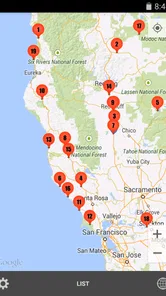
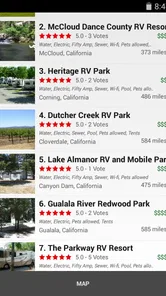
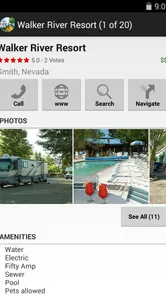
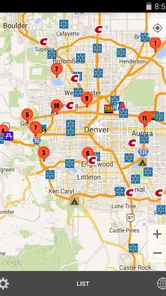
Analysis by Reviewed
Planning an RV trip is rarely difficult because of the driving itself. The harder part is deciding where to stop, whether a place suits your vehicle, and how to avoid wasting time on a campground that looks ideal on paper but does not fit your plans. I tested RV Parks & Campgrounds as a travel and local app from ParkAdvisor, and its main appeal became clear quickly: it puts a large amount of road-trip information in one place instead of making me jump between general map searches, campground websites, and fuel-finder apps.
The app is free to install, aimed at everyone, and has built a strong audience with an average rating of 4.4 from around 9,300 ratings. That does not make every listing equally useful, but it does suggest that the basic idea works for many travelers. I found it most valuable as a planning companion rather than as a complete replacement for official campground booking systems. It helps me discover options and compare stops, while I still treat the final reservation, opening status, and site rules as details worth checking directly.
How the current app fits into an RV trip
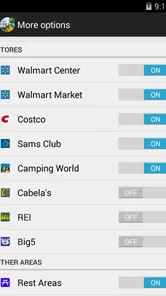
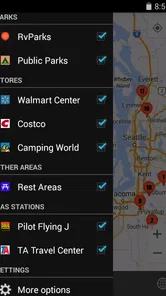
RV Parks & Campgrounds covers more than the name initially suggests. Its store summary points to over 40,000 locations, including RV parks, campgrounds, rest areas, gas stations, and stores. In practical use, that wider scope matters because an RV route is not just a chain of overnight stays. I may need a fuel stop before a long stretch, a rest area when a campground is too far away, or a nearby store for water, food, or a small repair item.
I like this broader approach because it reflects how people actually travel in a motorhome or trailer. A general navigation app can show many places, but it does not always present them from an RV owner’s point of view. A dedicated travel directory gives the search a more useful context: I am not simply looking for any nearby business; I am trying to find a practical stop for a larger vehicle and a particular kind of trip.
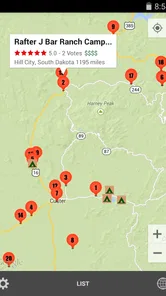
The app is especially helpful during the early planning stage. I can look along a route, identify possible overnight areas, and build a short list before committing to a detour. That is different from entering a destination into a standard map and accepting whichever result appears first. The dedicated category makes it easier to think in terms of travel rhythm: drive, refuel, rest, resupply, and continue.
What I use it for before leaving home
My preferred workflow starts with the route rather than with a single campground. I first consider how far I realistically want to drive, then inspect the areas around likely stopping points. This helps reveal alternatives when the most obvious destination is full, too expensive for my plans, or simply not well placed for the following day’s journey.
A useful but easy-to-miss habit is to search for more than one type of stop around the same area. A campground may be the intended overnight option, while a rest area or fuel station becomes the backup if the schedule changes. Looking at these categories together gives me a more resilient plan. I am less likely to make a tired late-evening decision based on the first result I happen to see.
More From Our News Desk

 Weather - By Xiaomi
Weather by Xiaomi Review: Clear at a Glance, Less Clear Up Close
Xiaomi’s weather app makes everyday forecasts quick to scan, but its calm surface can leave useful details and recovery paths harder to find than they should be.

 X
XX Under Pressure: Can It Recover When Posting Goes Wrong?
A resilience-focused review of X, examining setup, mistaken posts, interruptions, weak connections, and the gaps that matter when recovery needs to be dependable.

 Clash of Clans
Clash of Clans Is Won Between the Battles
Its raids are quick; its community is a long-term project of coordination, teaching, rivalry, and shared responsibility—with all the friction that entails.

 Android Auto
Android Auto Makes the Case for Quieter Car Software
The car interface is no longer judged by how much it can do, but by how quietly it helps. Android Auto shows what drivers now expect—and what still gets in the way.

 MobiOffice: Word, Sheets, PDF
MobiOffice: Transforming Mobile Productivity with Seamless Integration
MobiOffice: Word, Sheets, PDF is redefining mobile productivity with a surprising blend of functionality and innovation.

 EA SPORTS FC Soccer Mobile 26
EA SPORTS FC™ Mobile Soccer: Redefining Mobile Sports Gaming
Dive into EA SPORTS FC™ Mobile Soccer, where immersive gameplay and strategic depth transform mobile sports gaming.
Latest News



I also recommend checking the surroundings instead of judging a location in isolation. A park may be suitable for sleeping but inconvenient for groceries or fuel. Another may be slightly farther from the main attraction yet much better positioned for the next leg. The app is at its best when I use it to compare the whole stop, not merely to collect names.
A realistic use case on the road
Imagine leaving a campground later than planned after packing up in rain. The next destination is still several hours away, and the original overnight stop no longer feels realistic. Rather than searching the entire region from scratch, I can use the app to inspect possible RV parks and campgrounds along the remaining route, then check nearby fuel stations and stores before choosing a revised stopping area.
That scenario shows the app’s practical strength. It does not remove the need for judgment, but it reduces the number of separate searches I need to perform while tired or under time pressure. For a solo driver, that reduction in mental load is meaningful. For a family, it can also prevent the familiar argument that begins when everyone discovers too late that the planned stop is nowhere near food, fuel, or the next morning’s route.
What the current version suggests about its evolution
The current version is 4.4.9, and the app has been available since February 7, 2015. That long presence matters more to me than a flashy first impression. A travel directory needs time to build coverage and become familiar to the people who depend on it. ParkAdvisor has had years to shape this product around the repeated needs of RV travelers rather than treating it as a generic map with a few camping labels.
I would not interpret the version number alone as proof that every part of the experience is modern or equally polished. It is better read as evidence of an established product that continues to be maintained. The app’s current state feels focused on its core job: helping travelers locate relevant places and make a first comparison. It does not try to become a full trip-management suite, social network, or booking platform in the way some travel products do.
The minimum operating system is Android 4.1, which is unusually broad by today’s standards. For owners of older phones kept in an RV as a dedicated navigation or travel device, that can be useful. I would still pay attention to the actual condition of the phone and its connection, because operating-system compatibility does not guarantee that an old handset will feel fast or remain dependable on a long journey.
There is also a paid layer: in-app purchases are listed at $7.99 per item. I see that as a reason to decide early whether the free experience covers my needs. Occasional travelers may prefer to start without paying and judge the app during a normal planning session. Frequent RV users should consider whether the additional purchase offers enough convenience for their style of travel, rather than assuming that every useful planning function must be unlocked immediately.
How the evolution affects people who already use it
For existing users, the most important benefit of a mature directory is continuity. Once I become comfortable using one source for campground discovery, rest areas, fuel, and stores, I can return to the same workflow for different trips. I do not have to relearn an entirely different travel system every time I plan a route.
That consistency is particularly useful for people who travel seasonally. A winter trip, a summer campground circuit, and a last-minute weekend escape may have very different destinations, but the planning questions remain similar. Where can I stop? What is nearby? What is a sensible alternative? Keeping those questions inside one familiar app saves time.
At the same time, long-term users should avoid treating old saved knowledge as permanent truth. Campground conditions, opening arrangements, road access, and services can change. A listing that worked perfectly on one trip may not suit a larger rig or a different season later. I use the app to refresh my options, then verify the details that could affect the actual arrival.
The audience size also gives the app a practical advantage. It has more than 500,000 installs, so it is not an obscure experiment with a tiny user base. That does not guarantee that every destination has equal coverage, but it makes the directory feel like a serious tool for people who travel regularly. I am more comfortable using it as one part of my planning routine than relying on a brand-new directory with little history.
Where it beats ordinary map searches
General map apps remain better for turn-by-turn navigation, live traffic context, and checking a business’s broader surroundings. I would not replace those tools completely. Their strength is getting me from my current position to a chosen destination and showing the wider geography around it.
RV Parks & Campgrounds is more focused at the discovery stage. Instead of filtering a huge map full of unrelated businesses, I can begin with places relevant to an RV journey. That makes it quicker to build a shortlist and think about alternatives. The trade-off is that a specialist directory may not provide the same depth of live road information or the same universal business coverage as a major mapping service.
Dedicated campground websites and booking services can be better when I already know exactly where I want to stay and need current availability, reservation terms, or payment details. This app is more useful earlier in the process, when I am asking, “What are my realistic choices along this route?” I see it as a discovery and comparison tool, not as the final authority for every booking decision.
Three practical habits that make the app more useful
First, I create a primary stop and a fallback stop for each important travel day. The fallback does not need to be perfect; it only needs to be plausible and positioned sensibly. This prevents a single unavailable campground from forcing an improvised search after dark.
Second, I search around fuel and supply needs before I arrive at the campground. A large vehicle can make a small detour more complicated than it looks on a map. Finding a suitable fuel station or store in advance lets me combine errands with the route instead of making a separate trip after setting up camp.
Third, I use the app to challenge my first choice. If the first campground appears convenient, I look for another option nearby and compare the surrounding stops. This often exposes a better travel pattern: a slightly less central park may reduce the next day’s driving, or a stop near a store may be more practical than one that only looks close to the attraction.
These habits are more valuable than simply browsing a long list. The app contains enough location variety to support planning, but the quality of the result depends on how deliberately I use that information.
Remaining gaps and situations where I would skip it
The biggest limitation is that a directory cannot replace direct confirmation. I would not rely on a listing alone when traveling with a very large rig, arriving late, bringing pets, needing a specific hookup, or planning around accessibility requirements. Those details can determine whether a stop is genuinely suitable, and I prefer to confirm them with the location before making the final decision.
I also would not choose this app as my only tool for a trip that depends heavily on live navigation. Its role is strongest in finding and organizing possible places. A conventional navigation app is still the better companion for traffic, road closures, precise routing, and the final approach to a difficult entrance.
Travelers who rarely camp may find the specialist focus unnecessary. If I only need a hotel in a city, a standard travel service will probably be faster. Likewise, someone who already has a trusted campground network and books directly may gain little from browsing a broad directory. The app earns its place when the route is flexible, the destination is unfamiliar, or several kinds of stops need to be considered together.
The paid purchase option may also create a decision point. Because the app is free to start, I would install it before a major trip and test the exact planning tasks I care about. If the free experience already handles my route research, I would not pay simply because an upgrade exists. If I travel often and the paid item removes repeated friction, the $7.99 price per item may be easier to justify, but that value depends on personal frequency and expectations.
Another weakness is the temptation to confuse a large directory with a guarantee of completeness. A place can be absent, outdated, or less relevant to my vehicle than it first appears. I treat results as leads. For a casual overnight stop, that may be enough. For a tightly scheduled journey, I cross-check the final choice with the location itself and with my navigation tool.
What I would watch in future updates
As the product continues beyond version 4.4.9, I would like to see the experience become even clearer about the difference between discovery and confirmation. The most useful improvements would help travelers judge a stop quickly: what deserves a closer look, what needs a phone call, and what is merely a nearby point of interest.
I would also watch how well the app keeps its broad location coverage useful instead of overwhelming. A long list is valuable only when I can narrow it according to the needs of my vehicle, schedule, and route. Better organization would matter more to me than adding unrelated travel features.
For current users, the sensible approach is to keep using the app as a flexible planning layer while maintaining a second source for navigation and final verification. That combination plays to its strengths without asking it to solve problems it was not designed to solve.
My recommendation after using it
I recommend RV Parks & Campgrounds to RV owners, trailer travelers, and campers who want one focused place to explore overnight options and practical road stops. Its strongest quality is not a single spectacular feature; it is the way the app supports the chain of decisions that makes an RV trip work. I can think about campgrounds, rest areas, fuel, and stores as connected parts of the same journey.
ParkAdvisor’s app is not the right choice if I expect guaranteed availability, complete booking management, or live navigation to replace every other travel tool. It also requires sensible checking before arrival, especially when the vehicle, timing, or trip conditions are demanding. Those are fair limitations for a discovery-focused directory.
Still, I found the free starting point easy to justify for anyone planning more than a very simple camping outing. The Everyone rating makes it approachable, the broad Android compatibility helps older travel devices, and the established user base gives it the feel of a practical product rather than a temporary listing experiment. My bottom line is simple: use it to build a smarter shortlist, prepare a backup, and connect each overnight stop with the fuel and supplies around it. That is where this app provides real value, and where I would recommend keeping it on an RV traveler’s phone.
RV Parks & Campgrounds Frequently Asked Questions
Is RV Parks & Campgrounds free to download, and are there any in-app purchases?
RV Parks & Campgrounds is free to download, so you can try its campground-finding features without an upfront purchase. The app also offers in-app purchases, listed at $7.99 per item, so check the purchase details in the app before confirming anything. It is sensible to review those options and your device’s purchase settings if you want to avoid accidental charges.
Is RV Parks & Campgrounds suitable for my device and for family use?
The app is rated Everyone and is intended for a broad audience interested in travel and local places. It runs on Android devices with version 4.1 or later, which makes compatibility worth checking before downloading if you use an older phone or tablet. Confirm that your device meets this requirement and has enough available storage for installation and everyday use.
What is RV Parks & Campgrounds, and what can I use it for?
RV Parks & Campgrounds is designed to help travelers discover places to stay with an RV, camper, or tent. After exploring the app, I found it useful for browsing campgrounds, checking available facilities, reviewing location details, and planning overnight stops. It can be especially helpful during road trips when you need to compare nearby parks before choosing a destination. The app’s directory also covers rest areas, gas stations, and stores, which can help you look for useful stops along a route.
Does the app show important campground amenities and site information?
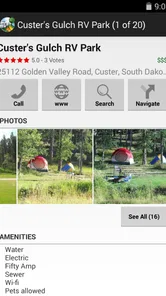
Yes, the app is intended to provide practical information that campers usually need before booking or arriving. Depending on the listing, you may find details about hookups, dump stations, showers, restrooms, Wi-Fi, pet policies, recreational facilities, and access conditions. However, information can vary between locations, so contacting the campground directly is still recommended for the latest rules and availability.
Can I use RV Parks & Campgrounds to find locations near my current position?
The app is useful for finding campgrounds based on a selected destination or your current travel area. Location-based searching can make it easier to identify nearby RV parks while you are on the road, particularly when plans change unexpectedly. You should enable the appropriate location permission if requested, and remember that results may depend on internet access and the accuracy of available campground listings.
Pros
- Find nearby RV parks and campgrounds using an easy-to-browse map.
- Useful location details help with planning overnight stops and longer stays.
- A practical option for road trips
- camping holidays
- and spontaneous travel.
- Listings can help compare different camping areas before choosing a destination.
- Convenient mobile access makes campground research possible while traveling.
Cons
- Listing accuracy may vary as campground details can change over time.
- Some parks may have limited photos
- reviews
- or amenity information.
- Filtering options may not cover every preference or camping requirement.
- Rural locations can be difficult to explore without a reliable internet connection.
- Availability and reservation details may require checking with the campground directly.











