

RV LIFE - RV GPS & Campgrounds
- 2.13K
- 3.9
- Installs
- 1.00M
- Price
- Free

Screenshots
Analysis by Reviewed
I judge an RV navigation app by whether it helps me make decisions before a tight turn or low bridge becomes an urgent problem. RV LIFE - RV GPS & Campgrounds is built around that particular kind of travel: it brings RV-focused route planning and places to stay into one travel app, rather than treating a motorhome like an ordinary car. I find that focus useful, especially when a trip involves unfamiliar roads and overnight stops.
Making the screen work for the trip
For me, the most useful way to approach the app is to separate planning from driving. A larger screen or a calm moment at home makes it easier to review a route, compare campgrounds, and check that the selected vehicle details reflect the rig on the trip. That preparation is particularly helpful for travelers who prefer more time to read and decide, rather than making choices while already navigating traffic.
I would also build a little slack into a route instead of treating the planned arrival time as a promise. An RV trip can involve slower progress, an unexpected stop, or a campground that takes longer to reach than its map position suggests. Keeping a reasonable alternative stop in mind makes the plan more usable for people who tire easily or need flexibility around breaks.
Readable choices before the wheels roll
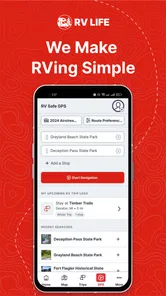
The first thing you'll notice about RV LIFE - RV GPS & Campgrounds is its user-friendly interface. It's like someone took the best parts of your favorite navigation app and tailored them specifically for RV enthusiasts. When you open the app, you're greeted with a clean, easy-to-navigate home screen that gets you where you need to go without any fuss. And trust me, that's a big win when you're trying to maneuver a house on wheels.
That straightforward feel matters most during planning, when I can look at a route and a possible overnight stop without juggling unrelated tools. I would still review the route before departure rather than assume a screen makes every road decision for me. A useful habit is to enter the RV's dimensions carefully and check that the profile matches the vehicle I'm actually driving; a borrowed trailer or a changed load can make old assumptions unsafe.
Navigation that accounts for the vehicle
I find the vehicle-focused approach most useful before a drive, when I can check the route, confirm the rig details, and think through likely stops without pressure. In this section, I’ll look at how that planning can make navigation choices more deliberate, while keeping clear that an app should support—not replace—attention to road signs and changing conditions.
Routing and campground decisions
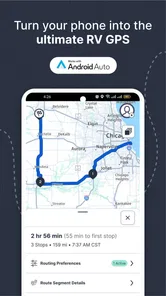
This app isn't just about getting you from point A to point B. It's packed with features designed to enhance your entire RV experience. One of the standout features is the RV-safe GPS routing. Have you ever driven under a bridge and held your breath hoping your RV would fit? With this app, those days are over. It calculates routes based on your RV's height, weight, and length, so you never have to worry about those heart-stopping moments again.
More From Our News Desk

 Weather - By Xiaomi
Weather by Xiaomi Review: Clear at a Glance, Less Clear Up Close
Xiaomi’s weather app makes everyday forecasts quick to scan, but its calm surface can leave useful details and recovery paths harder to find than they should be.

 X
X Under Pressure: Can It Recover When Posting Goes Wrong?
A resilience-focused review of X, examining setup, mistaken posts, interruptions, weak connections, and the gaps that matter when recovery needs to be dependable.

 Clash of Clans
 Is Won Between the Battles
Its raids are quick; its community is a long-term project of coordination, teaching, rivalry, and shared responsibility—with all the friction that entails.

 Android Auto
 Makes the Case for Quieter Car Software
The car interface is no longer judged by how much it can do, but by how quietly it helps. Android Auto shows what drivers now expect—and what still gets in the way.

 MobiOffice: Word, Sheets, PDF
MobiOffice: Transforming Mobile Productivity with Seamless Integration
MobiOffice: Word, Sheets, PDF is redefining mobile productivity with a surprising blend of functionality and innovation.

 EA SPORTS FC Soccer Mobile 26
EA SPORTS FC™ Mobile Soccer: Redefining Mobile Sports Gaming
Dive into EA SPORTS FC™ Mobile Soccer, where immersive gameplay and strategic depth transform mobile sports gaming.
Latest News



I like the idea of making vehicle size part of route planning, but I wouldn't treat any GPS as a guarantee that every approach, sign, or temporary restriction will be handled perfectly. I’d use the route as a planning aid, then obey road signs and use local judgment when conditions differ. That distinction is especially important on detours, in construction zones, or when a campground’s final access road is narrower than the main route.
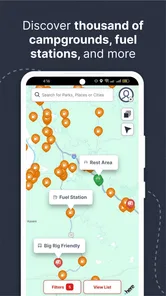
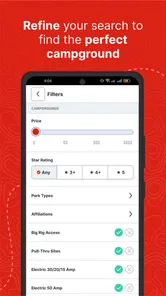
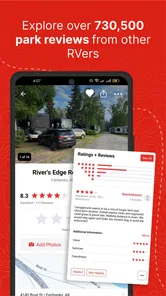
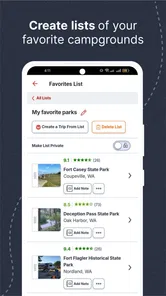
Another gem is the extensive campground database. Whether you're a fan of luxury RV resorts or prefer the rustic charm of national parks, this app has you covered. You can filter campgrounds by amenities, price, and even see reviews from fellow RVers. It’s like having a personal travel guide who knows all the best spots.
For a practical workflow, I’d compare a few candidate stops instead of choosing the first result: check which amenities matter for that particular night, read recent traveler feedback, and consider how far off-route a campground sits. A site that looks ideal on paper may not suit a late arrival or a large rig. This extra check turns the directory into a decision tool, rather than simply a list of pins.
One trade-off is that a campground’s listed features do not answer every question about whether it will work for a particular traveler. If a level site, a specific bathroom arrangement, or a quieter location is important, I would use reviews to identify what to ask and then confirm the detail directly before committing. That extra step takes time, but it is better than assuming a broad amenity label covers an individual need.
Trip planning, sharing, and real-world use
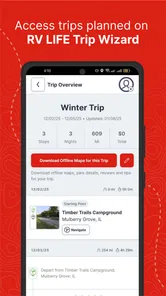
Planning your trip has never been easier. The app allows you to create detailed trip plans, including stops, attractions, and even gas stations along your route. It's like having a digital travel scrapbook that keeps everything organized. Plus, you can share your trips with friends and family, so they can follow along on your adventures. It's a great way to stay connected and share your travel stories.
Imagine leaving home for a multi-day drive with a planned fuel stop and campground for the evening. I’d map the route in advance, check the overnight options, and share the itinerary with someone expecting to hear where I’ll be. If weather, fatigue, or a delay changes the plan, the saved structure gives me a starting point for adjusting rather than forcing me to rebuild the whole trip from memory.
A realistic example is a family setting out after work for a weekend away. Before departure, one person can choose a campground and note a fuel stop, while the driver checks the route and the dimensions of the vehicle. If the group gets a late start, it is easier to compare the planned destination with a nearer overnight option than to search from scratch in the dark. The app helps organize those choices; I would still make the final call based on the actual road, energy levels, and site availability.
Compared with a general map app, the RV-specific emphasis is the main reason to choose this one: ordinary navigation is convenient for everyday driving, but RV travel raises vehicle-clearance and campground questions that a standard route screen may not bring together. On the other hand, if I’m driving a car, only need a quick address, or prefer to research every stop across several dedicated services, this may be more app than I need. It works best as a trip companion, not as a substitute for checking important road information independently.
And let's not forget about the community aspect. The app features a vibrant community of RVers who share tips, tricks, and experiences. Whether you're a seasoned traveler or a newbie, there’s always something new to learn from this passionate group.
For someone new to RVing, I’d use community advice as a prompt for questions, not as a universal rule: rig sizes, comfort with narrow roads, and travel styles differ. The same discussion can be useful for spotting practical considerations that a map cannot tell you, while a traveler who dislikes social features can focus on routes and campgrounds instead.
There is a practical distinction between using the community to discover an issue and treating a post as a current road report. A traveler’s experience may be useful for deciding what to investigate, but conditions can change and another RV may be a different size. I’d turn useful tips into a checklist for the next leg, then verify anything safety-critical through signs and current local information.
Comfort, access, and limits on the road
Accessibility is more than screen design when an RV is moving. I’d set up a route and review campground choices while parked, then let a passenger handle any necessary interaction on the road. That reduces rushed taps and keeps the driver’s attention where it belongs. For people who find small text, dense screens, or frequent visual checks tiring, the safest approach is to prepare the trip in advance and use spoken turn guidance if it is available in their setup, rather than relying on repeated glances.
Travel context also changes what “easy to use” means. A passenger can compare campgrounds while the vehicle is stopped; a solo driver should avoid searching or changing plans while driving. Bright sun, glare, road noise, and fatigue can make any phone-based navigation harder to follow, so I’d keep the device positioned safely and treat the app as one aid among signs, a co-driver, and common sense.
For travelers with hearing or sensory considerations, the key question is how the app fits into the whole driving setup, not whether one alert style will suit everyone. I would check the phone’s own sound and display settings while parked, then see whether the route remains understandable in the vehicle’s ordinary noise and lighting. Anyone who needs a particular alert or a very low-stimulation interface should test that personally before depending on it for a long, unfamiliar drive.
RV LIFE is developed by Social Knowledge, LLC, and it sits in the travel-and-local category. It is free to download, rated for everyone, and has an average rating of 4.3 from around 7,200 ratings, with over one million installs. The current version is 4.7.10, and in-app purchases range from $19.99 to $64.99 per item. I’d check the purchase details in the app before relying on any paid option, and consider whether its RV-specific planning is valuable enough for how often I travel.
Because the app is free to download but offers in-app purchases, I would begin by deciding which parts of the planning workflow I actually use rather than assuming every option is included at no cost. The purchase range is broad enough to make checking the specific item worthwhile before paying. Occasional travelers may find that a general map plus a separate campground search meets their needs; frequent RV travelers have more reason to weigh the convenience of a focused tool against its optional costs.
The main friction is that a specialized planner still depends on accurate vehicle details and sensible decisions from the person using it. Someone who only takes occasional short trips may find a familiar general map and a separate campground search simpler. A traveler who regularly drives a large RV, compares overnight stops, and plans routes ahead has more reason to keep this tool close. It is also worth asking whether the screen and interaction style fit your own vision, hearing, and comfort with phone navigation; the app’s RV focus does not automatically remove those personal barriers.
Who will get the most from it
The app is aimed at more than one kind of RVer: a first-timer can use route and campground planning to organize a trip, while an experienced driver may value having stops and travel details in one place. The best fit, in my view, is someone who travels often enough to benefit from RV-oriented planning but still wants to verify critical details. If you need a hands-free experience, have difficulty using a phone screen, or travel where connectivity is unreliable, test your own setup while parked before depending on it for a demanding drive.
It is less compelling for someone who rarely travels in an RV, already has a trusted planning routine, or wants a simple turn-by-turn tool without campground research and trip organization. It may also be a poor fit if you expect an app to replace direct checks about a route or a site. The value is in bringing RV-related decisions together, not in removing the judgment that those decisions require.
One useful way to judge the fit is to try a modest trip before building a complicated itinerary around it. Plan a familiar route, inspect a campground option, and see whether the vehicle profile and screen flow make sense to you while parked. That small trial can reveal whether the app helps you think more clearly or instead adds steps to a routine you already like.
As a travel app, RV LIFE has a clear purpose rather than trying to be a universal map for every journey. Its combination of RV routing, campground discovery, trip organization, and traveler discussion can make planning feel more joined up. I’d recommend it to RV owners who want those pieces together and are willing to double-check important choices. For a casual driver, or anyone who prefers a simpler navigation tool, a standard map may be the better fit.
When its RV focus is worth the extra planning
RV LIFE is most convincing when a journey has several moving parts: a large vehicle, multiple driving legs, overnight stops, and a need to share the plan. In that situation, putting route and campground research in one place can reduce the mental load of switching between a map, notes, and separate search results. The benefit is less about having a screen for every moment and more about having a coherent starting plan before departure.
For a short drive to a familiar destination, the extra RV-specific planning may not justify changing habits. A general navigation app is often quicker for a simple address, while a dedicated campground directory may suit someone who chooses sites first and builds routes elsewhere. I’d choose based on the decisions I actually need to make, not on the assumption that one app must handle every travel task.
The Final Word
In a nutshell, RV LIFE - RV GPS & Campgrounds is a must-have for anyone who spends time on the road in an RV. It's more than just a navigation tool; it's a complete travel companion that makes every journey smoother and more enjoyable. So, if you're planning your next big adventure, make sure to download this app and hit the road with confidence. Safe travels, and may your journeys be filled with unforgettable moments!
RV LIFE - RV GPS & Campgrounds Frequently Asked Questions
Is RV LIFE - RV GPS & Campgrounds suitable for someone planning their first RV trip?
It can be useful for newer RV travelers who want navigation, campground discovery, and trip-planning tools in one app. The RV-focused routing and campground directory can help with planning where to go and where to stop, while community reviews offer other travelers’ perspectives. It is still sensible to check route details and campground information before setting off, especially when driving a larger vehicle.
What features does RV LIFE - RV GPS & Campgrounds offer?
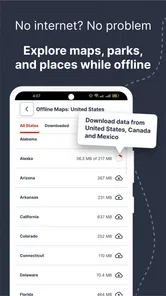
RV LIFE - RV GPS & Campgrounds provides a comprehensive suite of tools for RV enthusiasts, including GPS navigation tailored for RVs, a comprehensive campground directory, and trip planning features. The app offers offline maps, RV-safe routes, and community reviews of campgrounds, helping users find the best spots to park and enjoy their travel experience.
Is RV LIFE - RV GPS & Campgrounds available for both Android and iOS?
Yes, RV LIFE - RV GPS & Campgrounds is available for both Android and iOS devices. Users can download the app from the Google Play Store for Android devices and the Apple App Store for iOS devices, ensuring accessibility across different platforms for all RV travelers. The app is free to download, is rated for Everyone, and requires Android 10 or later on Android devices.
Does using RV LIFE - RV GPS & Campgrounds require an internet connection?
While RV LIFE - RV GPS & Campgrounds offers offline maps, which are useful in areas without internet access, certain features like real-time updates, reviews, and campground details may require an internet connection. It's advisable to download necessary maps and information before heading to areas with limited connectivity.
How accurate is the GPS navigation in RV LIFE - RV GPS & Campgrounds?
The GPS navigation in RV LIFE - RV GPS & Campgrounds is tailored specifically for RVs, providing routes that are safe and suitable for larger vehicles. It takes into account factors like low bridges, narrow roads, and weight limits. However, users are always encouraged to double-check routes and stay updated with local traffic laws.
Pros
- Comprehensive campground database.
- RV-safe GPS routing.
- Community reviews and tips.
- Offline maps available.
- Customizable trip planning.
Cons
- Limited free features.
- Occasional map inaccuracies.
- High battery consumption.
- Subscription required for full access.
- Some UI elements are outdated.











