

RUN-CHICKEN
- 116.00
- 4.3
- Installs
- 10.00K
- Price
- Free

Screenshots
Analysis by Reviewed
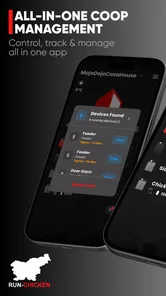
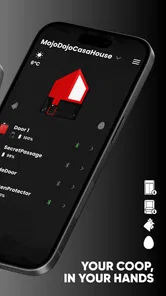
I approached RUN-CHICKEN as a practical home-control app rather than something I would open for entertainment. Its purpose is closely tied to the RUN-CHICKEN door, so the quality of the experience depends less on browsing through a large collection of tools and more on whether the app helps me manage that door at the right moment. The focus is precise control, GPS synchronization, and a more convenient way to handle a chicken coop routine from a phone.
That narrow purpose is also its biggest strength. I would not recommend it to someone looking for a general smart-home controller, a broad animal-care planner, or an app packed with unrelated household functions. I would recommend it to a RUN-CHICKEN owner who wants the door’s controls close at hand and prefers a phone-based workflow over repeatedly checking the mechanism manually.
How the app fits into a daily coop routine
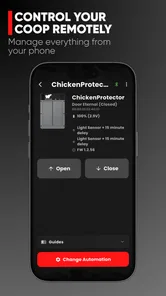
In everyday use, the most useful way to think about this app is as a bridge between the physical door and the situations that happen away from the coop. A morning check can be handled from the phone instead of becoming a separate trip outside, while an evening routine can be adjusted when plans change. That is especially helpful when the weather is unpleasant, the coop is at the far end of a garden, or I am already away from home.
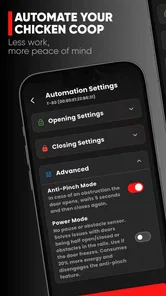
The GPS synchronization angle is important because it suggests a routine based on location rather than only on a fixed clock. That can make more sense for a chicken door: daylight and the owner’s location often matter more than a rigid schedule. Still, I would treat location-aware behavior as something to configure carefully, not something to activate and forget. A door is part of animal care, so I would always confirm how the app behaves in the particular setup before trusting it with an unattended routine.
A realistic example would be leaving home before the usual evening check. I could use the app to review the door’s status or adjust the control flow while I am still dealing with other tasks. If the phone has a reliable connection and the door responds as expected, that removes a small but recurring chore. The benefit is not dramatic in a single moment; it is the reduction of repeated trips over many days.
There is a useful distinction here between remote convenience and complete automation. The app can make control more accessible, but it does not remove the need to observe the birds, inspect the coop, or make sure the physical installation is healthy. I would still check for obstructions, unusual behavior, and battery or mechanism issues as part of normal care. A phone interface should support that routine, not replace it.
When connectivity becomes part of the control
The app’s network-dependent moments deserve more attention than the short store wording might suggest. Any action that relies on communication between the phone, the app, and the door can become less predictable when a signal is weak or a device has been left without a usable connection. I would avoid making an important door decision at the last possible second, especially before traveling or before a period when nobody will be nearby.
More From Our News Desk

 Gmail
GmailGmail in a Busy Inbox: Who Benefits Most?
From first account to crowded workday, Gmail earns its place through dependable search and flexible sorting—but its best fit depends on how much inbox maintenance you can tolerate.

 Prime Video
Switching to Prime Video: What Changes in Your Viewing Routine
Prime Video can make a compelling second home for streaming, but switching means learning a different catalog, rental layer, and route from browsing to playback.

 Universal TV Remote Control
Universal TV Remote Control Works Best as a Reliable Backup
A phone remote earns its place through quick setup and reliable habits. Here is how to get more from Universal TV Remote Control—and where its limits show.

 Weather - By Xiaomi
Weather by Xiaomi Review: Clear at a Glance, Less Clear Up Close
Xiaomi’s weather app makes everyday forecasts quick to scan, but its calm surface can leave useful details and recovery paths harder to find than they should be.

 X
XX Under Pressure: Can It Recover When Posting Goes Wrong?
A resilience-focused review of X, examining setup, mistaken posts, interruptions, weak connections, and the gaps that matter when recovery needs to be dependable.

 Clash of Clans
Clash of Clans Is Won Between the Battles
Its raids are quick; its community is a long-term project of coordination, teaching, rivalry, and shared responsibility—with all the friction that entails.
Latest News



My preferred workflow would be to open the app while I still have time to verify the result. After making a change, I would look for a clear confirmation and then, when practical, check the physical door later. That extra step matters because a command being sent is not necessarily the same as the door completing its movement. The app is most reassuring when it is used as part of a short verification loop rather than as a blind remote switch.
This also answers a question many owners will have: can the app be trusted when the phone has poor connectivity? I would not plan around that assumption. The right approach is to use it when the phone and the connected door system can communicate normally, then keep a local inspection habit for critical moments. If a user needs guaranteed operation in places with unreliable reception, a simpler manual routine may be less stressful.
Another subtle point is timing. A GPS-related action can be convenient when I am moving between home and another place, but location signals are not a substitute for understanding the coop’s real conditions. A shaded yard, a phone kept indoors, or a delayed location update can make a location-triggered routine feel different from the intention behind it. I would use GPS synchronization to reduce friction, while keeping the actual animal-care schedule in mind.
Using it from different mobile situations
The mobile experience makes the most sense in short, purposeful sessions. I would use it before leaving home, while returning from work, or during an evening check when I want to handle the door without carrying extra equipment. That is a better fit than expecting the app to remain open all day. The value comes from quick access at useful moments.
For a family or shared household, the practical question is who is responsible for the final check. A phone-controlled door can make tasks easier to divide, but it can also create uncertainty if two people assume the other person handled it. I would establish one simple rule: the person who changes the setting also confirms the result or tells the next person what happened. That is not a feature claim; it is a sensible operating habit for a connected animal-care device.
The app is also a reasonable fit for owners who dislike carrying a separate remote or walking to the coop for every adjustment. On the other hand, someone who rarely carries a phone, keeps the coop in an area with poor service, or prefers fully manual equipment may gain little from installing it. The convenience only appears when the phone is available and the connected setup is dependable.
I would also be cautious about using a small phone screen in a rushed situation. If I am trying to make a decision while driving, cooking, or handling the birds, the app should wait. A remote control is useful only when the owner can pay attention to what is being changed. For me, that makes it a planning and checking tool, not something to operate carelessly in the background.
What happens when a command does not go as expected
Failure recovery is where I would judge this app most strictly. A connected door needs a clear way to distinguish between a successful action, a delayed response, and an uncertain state. When something feels unclear, I would stop issuing repeated commands. Sending the same instruction several times can make a confusing situation harder to understand, particularly if the first request is still being processed.
My recovery routine would be straightforward: check the phone’s connection, reopen the app if the screen appears stale, inspect the displayed status, and then verify the physical door when possible. If the door is accessible, a direct visual check is more valuable than relying on an old screen state. If it is not accessible, I would avoid assuming that a second tap solved the problem.
This is one of the app’s natural limitations as a connected control layer. The convenience of remote access also introduces another point where communication can fail. A manual door has its own disadvantages, but its state is usually visible at the moment I touch it. With this app, I need to pay attention to confirmation and timing. That trade-off is acceptable for me, but not for everyone.
Before depending on it during a holiday or a long absence, I would test the complete routine while I am still at home. I would try the normal control, observe the door, and make sure another responsible person knows the fallback plan. This is one of the most useful non-obvious habits for a connected coop: test the recovery process before it becomes necessary, rather than discovering its weak point after leaving.
I would also keep the physical installation in the troubleshooting picture. If the door is blocked, misaligned, dirty, or affected by a mechanical issue, changing an app setting will not solve the underlying problem. The phone can tell me what I asked the system to do, but it cannot inspect every physical condition around the door. That is why an occasional hands-on check remains important even for a well-functioning setup.
Keeping phone use and data use sensible
Because GPS synchronization is part of the app’s appeal, I would think about data-conscious use before enabling every convenient behavior. Location-related functions can be useful, but I prefer to grant only the access needed for the routine I actually want. If I only need a quick control action at home, I would avoid building a more elaborate location habit than necessary.
I would also pay attention to the phone’s battery and connection habits. A phone that is constantly low on power, frequently switching between networks, or restricted from normal background activity may not provide the smoothest experience for a location-aware routine. I would not change system settings blindly, but I would check the phone’s behavior if synchronization seems delayed or inconsistent.
Data-conscious use is not just about privacy. It is also about reducing unnecessary complexity. The more automatic a routine becomes, the more important it is to know which part depends on location, which part depends on connectivity, and which part still requires a human check. I find that a simple setup is easier to trust than one filled with rules I cannot quickly explain.
The free entry point makes it easy to try the app before deciding whether its connected approach suits the household. The app is listed as free, with optional in-app items ranging from $3.99 to $39.99 each, so I would review any purchase screen carefully and decide whether an added function solves a real problem. For a single coop and a simple routine, paying for convenience only makes sense if it removes a repeated task without adding confusion.
That pricing structure also affects who should skip it. If the goal is simply to open and close a door manually, buying into a connected workflow may be unnecessary. If the goal is to manage a RUN-CHICKEN door from a phone and make location-aware routines part of daily care, the free starting point offers a practical way to evaluate the experience first.
What I would check before relying on it
Compatibility is an obvious first step. This is not a universal chicken-care app that becomes useful without the matching RUN-CHICKEN door. I would confirm that my hardware is supported and that the phone meets the stated minimum of Android 7.0 before spending time configuring anything. Owners using iOS should also check the appropriate platform listing and setup instructions for their device rather than assuming every screen behaves identically.
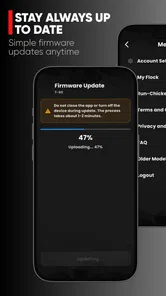
The current Android release is version 4.0.4, and the app comes from RUN-TIGER LLC. Those details are useful when checking that I have installed the intended application, especially if several similarly named products appear during a search. I would keep the app updated through the normal store process, but I would avoid updating immediately before an important trip unless I have time to test the door afterward.
The Everyone age rating makes the app broadly approachable, but that does not mean every household should hand control to every family member without a plan. The important issue is responsibility: whoever uses it should understand that a tap can affect an actual coop door. I would explain the routine to children and keep the final animal-care decision with an adult.
One practical tip is to create a short written backup routine near the coop. It can say who checks the door, what to do if the app shows an uncertain status, and who should be contacted if the physical door does not respond. That note is valuable precisely because it is independent of the phone. Connected tools work best when they are supported by a simple human fallback.
Who will appreciate the connected approach
I see the strongest fit for RUN-CHICKEN owners who want less repetitive walking and who are comfortable checking a phone before making a change. It should appeal to people whose coop is separated from the house, owners with changing schedules, and anyone who wants GPS synchronization to be part of a more flexible routine. The app’s average rating is 4.3 from around 470 ratings, which suggests a generally positive reception, while its 10K-plus installs show that it serves a focused audience rather than trying to be a mass-market home platform.
Those figures do not guarantee that the app will suit every installation. A connected door can feel excellent when the phone, network, and hardware cooperate, then frustrating when one of those links becomes uncertain. I would read the positive reception as encouragement to try it, not as a reason to skip testing. The best evidence for my own household would be a few ordinary mornings and evenings with the app.
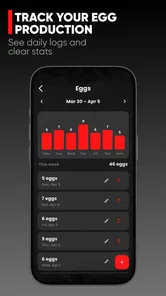
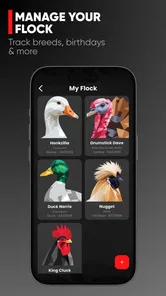
I would skip it if I wanted a broad home-automation dashboard, detailed flock records, or a replacement for direct coop inspections. I would also skip it if my setup is intentionally offline or if I am uncomfortable making animal-care decisions through a connected device. In those cases, a manual control or a simpler dedicated solution may be a better match, even if it offers fewer remote conveniences.
Compared with the usual alternative of walking to the coop, this app saves effort and can make timing more flexible, but it adds dependence on a phone and communication path. Compared with a general smart-home platform, it is more focused on the RUN-CHICKEN door and therefore less useful for unrelated household devices. That specialization is a benefit when the door is the only thing I need to manage, but a limitation when I expect one app to organize the whole home.
My connectivity verdict
After looking at the app through the lens of connectivity, I see it as a useful companion for the right RUN-CHICKEN owner, not a magic substitute for observation. Its best moments are short and practical: checking the door before leaving, adjusting a routine when plans shift, or using GPS synchronization to make the schedule fit real life more naturally.
The key trade-off is simple: remote convenience is valuable only when I keep a reliable verification habit. I would test the setup at home, avoid last-second commands, watch for unclear states, and maintain a physical fallback. Those habits make the connected experience much more dependable than treating the phone as an unquestionable source of truth.
For me, the app earns a recommendation when the household already owns the compatible door and wants phone-based control without turning chicken care into a complicated technology project. The free starting point lowers the risk of trying it, while the optional purchases deserve a practical cost-versus-convenience decision. If that describes your routine, RUN-CHICKEN is worth exploring. If you need guaranteed simplicity in a weak-signal environment, the usual manual alternative may still be the wiser choice.
RUN-CHICKEN Frequently Asked Questions
What is RUN-CHICKEN designed to do?
RUN-CHICKEN is a House & Home app from RUN-TIGER LLC, designed to help you optimize and control a RUN-CHICKEN door. Its store summary highlights precise control and GPS sync, so it is intended for people who want to manage their door through an app rather than treat it as a game. The app is free to download, with in-app purchases available.
Can I use RUN-CHICKEN with any automatic door?
RUN-CHICKEN is specifically presented as an app for optimizing a RUN-CHICKEN door. Its features are therefore relevant to owners of that product, rather than a general-purpose controller for doors from any manufacturer. If you are considering downloading it, first make sure you have a compatible RUN-CHICKEN door and review the product instructions so you know how the app fits into its setup and everyday use.
What is RUN-CHICKEN and how is the game played?
RUN-CHICKEN is a casual action game centered on guiding a chicken through fast-moving challenges while avoiding obstacles and trying to achieve the highest possible score. Gameplay is generally easy to understand, making it suitable for quick sessions, but the increasing speed and timing requirements can make later stages considerably more demanding. Players should expect reflex-based controls, repeated attempts, and score-focused progression rather than a long story campaign.
Is RUN-CHICKEN free to download and play?
RUN-CHICKEN can generally be downloaded without an upfront purchase, although the exact availability and monetization may depend on the Android or iOS version. Free versions of casual games commonly include advertisements, optional purchases, or both. Before installing, users should check the store listing for current pricing, in-app purchase details, and whether certain features, rewards, or ad-removal options require payment.
Does RUN-CHICKEN require an internet connection?
The basic gameplay of RUN-CHICKEN may work without a constant internet connection, which makes it convenient for short sessions while traveling or when mobile data is unavailable. However, an internet connection may still be needed for advertisements, online rankings, cloud-related features, updates, or purchases. Availability can vary by version, so it is best to test the game offline after installation rather than assuming every feature will function without connectivity.
Pros
- Simple one-touch controls make it easy to start playing.
- Quick rounds are ideal for short breaks or commutes.
- Bright visuals and funny chicken characters feel family-friendly.
- Increasing difficulty keeps the challenge engaging over time.
- The game is easy to understand without lengthy tutorials.
Cons
- Gameplay can become repetitive after extended sessions.
- Precise timing may feel frustrating on later obstacles.
- Some levels offer limited variety in scenery and mechanics.
- Progress may feel slow for players seeking constant rewards.
- Ads can interrupt the experience
- depending on the version.







