

Run Across America
- 279.00
- 3.8
- Installs
- 10.00K
- Price
- Free

Screenshots
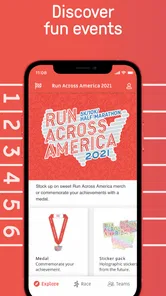
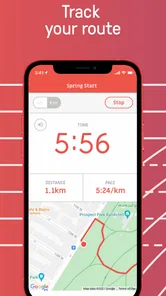
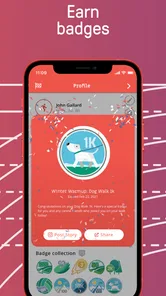
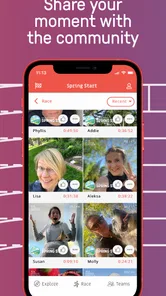
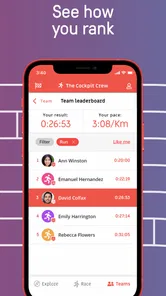
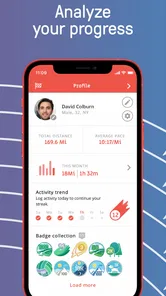
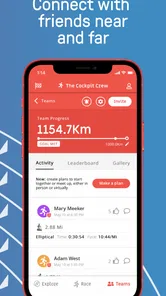
Analysis by Reviewed
I approached Run Across America as an event companion rather than as a general running tracker, and that distinction shapes my whole opinion of it. The app is built around the Run Across America experience, so its value depends less on how many training tools it offers and more on whether it helps participants stay connected to the event they have joined. In that role, it feels focused and approachable. It is free, aimed at everyone, and published by Cockpit Mobile, Inc., which makes it an easy app to try before deciding whether it deserves a permanent place on your phone.
My clear takeaway is that this is most useful when you already have a reason to follow Run Across America. If you are looking for a complete replacement for a running watch, a detailed training planner, or a broad social fitness network, I would look elsewhere. If your goal is to keep the event close at hand and use its dedicated mobile experience instead of relying on scattered messages or a browser, the app makes considerably more sense.
What the event-focused design gets right
The strongest part of the app is its narrow purpose. Many fitness applications try to cover workouts, nutrition, routes, coaching, competitions, badges, and social feeds all at once. That can be useful, but it also creates clutter. Run Across America has a more specific identity: it is the official mobile app for its namesake event. I found that focus easier to understand than the broad promise of a typical running platform.
That focus also changes how I would use it during a busy event period. Instead of treating the app as the place where every aspect of my running life must be managed, I would open it when I want event-related information and participation context. This is an important distinction for new users. The app is not necessarily competing with every running tool installed on a phone; it can sit alongside one.
For example, I might record a run with the tracker or watch I already trust, then use this app for the Run Across America side of the experience. That split is practical. Dedicated fitness tools are usually better for long-term training history, pace analysis, route mapping, and device integration. An official event app, by contrast, has a reason to exist because it keeps the event itself at the center.
I also appreciate the low barrier to entry. There is no purchase price, and the content rating is Everyone, so the app is not positioned as a specialist product for experienced athletes only. A casual participant, a family member following an event, or someone taking part for motivation rather than competition can approach it without feeling that they need to understand advanced running terminology first.
The current release is version 1.0.121, while the app first appeared on July 2, 2020. That combination suggests a product that has received continued version changes rather than remaining exactly as it began. I would still check that the app opens correctly and that its event information is current before relying on it on an important day, but the version history implied by the present release is more reassuring than an untouched launch build would be.
More From Our News Desk

 Gmail
GmailGmail in a Busy Inbox: Who Benefits Most?
From first account to crowded workday, Gmail earns its place through dependable search and flexible sorting—but its best fit depends on how much inbox maintenance you can tolerate.

 Prime Video
Switching to Prime Video: What Changes in Your Viewing Routine
Prime Video can make a compelling second home for streaming, but switching means learning a different catalog, rental layer, and route from browsing to playback.

 Universal TV Remote Control
Universal TV Remote Control Works Best as a Reliable Backup
A phone remote earns its place through quick setup and reliable habits. Here is how to get more from Universal TV Remote Control—and where its limits show.

 Weather - By Xiaomi
Weather by Xiaomi Review: Clear at a Glance, Less Clear Up Close
Xiaomi’s weather app makes everyday forecasts quick to scan, but its calm surface can leave useful details and recovery paths harder to find than they should be.

 X
XX Under Pressure: Can It Recover When Posting Goes Wrong?
A resilience-focused review of X, examining setup, mistaken posts, interruptions, weak connections, and the gaps that matter when recovery needs to be dependable.

 Clash of Clans
Clash of Clans Is Won Between the Battles
Its raids are quick; its community is a long-term project of coordination, teaching, rivalry, and shared responsibility—with all the friction that entails.
Latest News



Why an official event app can be more useful than a general tracker
The key advantage is context. A general tracker can tell me that I ran, how far I went, and perhaps how quickly I moved. It does not automatically understand why that activity matters to a particular event. An official app starts from the opposite direction: the event is the organizing idea, and the phone experience is shaped around it.
That matters when I am preparing for a group challenge. I may already know how to count miles or minutes, but I still want a clear connection between my personal effort and the event I joined. A dedicated app can make that relationship easier to follow than a standard fitness dashboard filled with unrelated workouts.
There is also a social advantage to using the same event-specific tool as other participants. Even without treating it as a full social network, a common app gives a group a shared reference point. When someone asks where to check event information, the answer is simpler than telling them to search through email, a website, a tracking service, and a messaging thread.
That is one of the app’s less obvious strengths: it reduces fragmentation. The benefit is not necessarily a spectacular feature on the screen. It is the possibility of replacing several small sources of event information with one recognizable destination. For participants who dislike administrative friction, that can be more valuable than another graph or training metric.
A realistic day-to-day use case
Imagine that I am taking part in Run Across America while balancing work and family commitments. I finish a short run before breakfast, but I do not have time to explore a complete fitness dashboard. I open the event app to check the information connected with the challenge, confirm that I am using the right event channel, and then get on with my day. Later, a friend asks how the group is progressing, and I can return to the same place rather than reconstructing the answer from separate tools.
That scenario shows where the app can earn its space. It does not need to replace every running habit. It needs to make event participation feel organized enough that the event remains visible during ordinary, distracted days. For a virtual or distributed challenge, that sense of continuity can help prevent the event from becoming something I remember only when I receive a notification or open a message.
My practical tip would be to install it before the event becomes urgent. Open it while you still have time to understand the layout, sign in or set up anything required, and confirm that the information you expect to use is easy to reach. Event-day troubleshooting is rarely enjoyable, especially when the phone is low on battery or the user is already moving between locations.
Where the experience has limits
The same specialization that makes the app understandable also limits its appeal. I would not choose it as my main running companion if I wanted a detailed training plan, sophisticated performance analysis, or a long-term personal record. Those jobs are usually handled better by established running trackers and wearable ecosystems designed around repeated workouts rather than one event identity.
This is not a criticism of the app’s purpose so much as a warning about expectations. Someone downloading it after seeing the word “run” may assume it works like a full GPS training product. That would be the wrong comparison. Its official-event role is the reason to use it, and outside that context its usefulness is likely to feel much narrower.
I also see a possible workflow weakness for people who already use several fitness services. If I record activities in one application, communicate with friends in another, and check event details in this one, I still have to manage those separate habits. The app may simplify the event information, but it does not automatically eliminate the need for a preferred tracker, watch, or messaging tool.
That trade-off is especially important for serious runners. They may care about splits, heart-rate zones, elevation, route accuracy, recovery trends, and training load. An event companion can complement that information, but it should not be mistaken for the system that produces it. I would keep my established training setup and add this app only if Run Across America participation justified the extra layer.
The public response is mixed but not alarming: the app holds a 3.8 average from over 500 ratings, with more than 200 written reviews. I read that as a reason to approach it realistically rather than as a simple endorsement or rejection. A dedicated event tool can work very well for the people whose needs match its design, while frustrating users who expected a universal running platform.
Another practical point is that an official app is only as useful as its event information at the moment I need it. I would not wait until the last minute to learn where important details are located. I would also keep an alternative way to access essential instructions if the phone has poor reception, the battery runs down, or the app needs an update. That is sensible preparation for any event-dependent mobile tool, not a claim that this particular app fails offline.
Who should use it, and who should skip it
I think the best audience is a person actively participating in Run Across America or closely following someone who is. The app is also a reasonable choice for casual runners who want an event-centered experience without paying for another service. Its free price and Everyone rating make experimentation easy, and the official status gives it a clear reason to be installed.
It may suit organizers and group participants who want a shared reference point rather than a collection of individual tools. It can also help someone who is motivated by belonging to an event more than by analyzing every workout. For that user, the emotional and organizational connection may matter more than advanced statistics.
I would skip it if I have no connection to Run Across America. A free download is not automatically useful, and an event-specific app has little reason to remain installed when the event itself is irrelevant to me. I would also skip it as my only running app if my priorities are structured coaching, detailed route planning, or deep smartwatch support.
There is a middle group for whom the decision depends on tolerance for separate apps. If I already have a reliable tracker and do not mind switching between tools, this app can complement my setup. If I want one application to record workouts, manage training, connect me with friends, and handle event details, I would choose a broader fitness platform instead.
Small habits that make the app more worthwhile
My first recommendation is to define the app’s job before using it. I would not open it expecting a complete diary of my athletic life. I would use it as the Run Across America reference point and keep my normal tracker for workout detail. That simple division prevents disappointment and avoids duplicating every activity manually across multiple services.
Second, I would review the app at three moments: before participation begins, during the event period, and after completing an activity or milestone. This turns it into a dependable routine instead of an application I install once and forget. The exact value of each visit will depend on the event information available in the current release, but the habit itself makes it less likely that I miss something because I never opened the official channel.
Third, I would make sure friends or teammates know which app I am referring to. Event discussions become confusing when one person means a general running tracker and another means the official event companion. Agreeing on a shared reference point can save more time than learning another advanced feature.
Finally, I would keep notifications and battery use in mind. I would allow the app the access needed for the parts I actually plan to use, but I would avoid turning every possible alert into a distraction. An event app should support my routine, not compete with work, navigation, family messages, and the fitness tracker that may already be monitoring the run.
My verdict after weighing the trade-offs
Run Across America is a focused, free event app with a clear purpose. I like it because it does not need to pretend to be an entire fitness ecosystem. Its best contribution is giving participants a dedicated place for the event, which can make a distributed running challenge feel more coherent and easier to follow.
Its limitations are equally clear. I would not rely on it for serious training analysis, and I would not install it without a real interest in Run Across America. The app works best as a companion to a running tracker, not necessarily as a replacement for one. That distinction should be part of the download decision.
For me, the recommendation is straightforward: if you are participating in the event, install it early and learn its workflow before you need it. Use your usual watch or tracker for the technical side of running, and let this app handle the event-centered side. If you are searching for a general-purpose running platform, choose a broader alternative instead.
The most honest way I can describe it is this: its value comes from relevance, not breadth. When Run Across America is part of your plans, that relevance may be enough to make the app genuinely useful. When it is not, the narrow design becomes the reason to move on.
Run Across America Frequently Asked Questions
Who publishes Run Across America, and what kind of app is it?
Run Across America is an event-focused app from Cockpit Mobile, Inc., presented as the official app for Run Across America. It is aimed at people who want an app connected with the event rather than a general-purpose fitness platform. If you are deciding whether it fits your needs, consider whether you are looking for event-related features or primarily want a standalone tool for tracking everyday workouts.
What is Run Across America?
Run Across America is a fitness and running app designed to turn everyday activity into a virtual journey across the United States. As you record outdoor runs, walks, or other eligible workouts, your progress is mapped along a cross-country route. The concept is aimed at making regular exercise more motivating by combining distance tracking with landmarks, milestones, and a long-term travel-style challenge.
How does Run Across America track my distance?
The app generally relies on your phone’s location services and motion data to measure activity, depending on the workout type and device permissions you provide. Before starting, make sure GPS access, physical activity tracking, and background permissions are enabled if requested. Accuracy can vary in buildings, dense cities, poor weather, or when battery-saving settings restrict location updates, so recorded distances may occasionally need checking.
Can I use Run Across America for walking, running, or other activities?
Run Across America is primarily intended for users who want to track running and walking progress, making it suitable for different fitness levels rather than only experienced runners. Some versions or challenges may support additional activity types, but available options can depend on the current app release. Review the activity screen after installation to confirm which workouts count toward your virtual journey.
Does Run Across America require an internet connection?
An internet connection may be needed for downloading the app, signing in, synchronizing workout data, loading maps, and viewing updated challenge information. GPS tracking itself can sometimes continue while you are exercising without a constant connection, but the app may not display every map detail or immediately save progress until you reconnect. For reliable results, open the app and sync before or after your workout.
Pros
- Simple controls make it easy to start playing immediately.
- Short running sessions are suitable for quick breaks.
- Bright visuals make the action easy to follow.
- Progression encourages players to improve their running distance.
- Works well for casual players seeking a lightweight game.
Cons
- Gameplay can feel repetitive after extended sessions.
- Limited variety may reduce long-term replay value.
- Frequent obstacles can feel frustrating during faster runs.
- Some features may require patience to unlock.
- The game may not appeal to players seeking deep strategy.











