

RTD MyRide
- 569.00
- 4.1
- Installs
- 500.00K
- Price
- Free

Screenshots
Analysis by Reviewed
When a household shares a phone, one transit app can become part of several people’s routines—but that does not automatically make every trip a shared account activity. I think RTD MyRide makes the most sense when each rider knows whose device and account they are using, and when the person travelling can handle the ride process themselves. That small distinction matters more than it might for a map app: a transit trip depends on the right person having the right ticket or travel details at the right moment.
One phone, several riders
Picture a parent and teenager leaving home at different times, with the phone usually kept by the parent. Before relying on one device for both journeys, decide who will carry it and who will be responsible for preparing the trip. If the phone stays at home, the person riding may not have what they need; if it goes with the teenager, the parent may not be able to use it for their own journey. I would treat shared use as a practical handoff, not assume the app manages separate household profiles.
That is also why I would avoid setting up a travel routine in a rush at the station. Work out which rider is using the device while there is time to check the app and understand the steps. For a household with independent commuters, separate phones can make responsibility clearer. For an occasional trip together, one person handling the phone may be perfectly workable, as long as the other rider is not expected to access it at the same time.
Keep setup and account responsibility clear
RTD MyRide is a transit app from Regional Transportation District, Denver CO, rather than a general ride-hailing service. Its scan-and-ride focus is useful to keep in mind when deciding whether it suits a particular journey: the relevant question is whether the trip is part of the RTD travel routine, not whether a car can be sent to a pickup point. I would set it up with the person who will actually use it, instead of leaving one household member to make every decision for everyone else.
That boundary is useful with shared devices, too. A family can agree who installs and maintains the app, but that does not establish that the app has family controls or separate child accounts. I would not count on those conveniences unless they are visible in the current app. The straightforward approach is to keep the device and login arrangements understandable, and have each rider check the app themselves before heading out.
When a household routine works best
A useful arrangement is to treat the app as belonging to the rider for the duration of a trip, even if another person helped install it or sort out the phone. For example, a parent can help a teenager rehearse the process at home, then let the teenager take responsibility for checking the app and carrying the device on a solo journey. That handover is more informative than simply showing which buttons to tap: it reveals whether the rider can manage the practical steps without someone beside them.
For a household with several regular commuters, agree on a simple rule before the week gets busy: each person uses a device they can access themselves, or everyone knows who has the shared phone at each travel time. This avoids the awkward case where one person assumes the phone is available while another has already left with it. The app can support an individual trip, but household coordination still happens between the people travelling.
More From Our News Desk

 Weather - By Xiaomi
Weather by Xiaomi Review: Clear at a Glance, Less Clear Up Close
Xiaomi’s weather app makes everyday forecasts quick to scan, but its calm surface can leave useful details and recovery paths harder to find than they should be.

 X
XX Under Pressure: Can It Recover When Posting Goes Wrong?
A resilience-focused review of X, examining setup, mistaken posts, interruptions, weak connections, and the gaps that matter when recovery needs to be dependable.

 Clash of Clans
Clash of Clans Is Won Between the Battles
Its raids are quick; its community is a long-term project of coordination, teaching, rivalry, and shared responsibility—with all the friction that entails.

 Android Auto
Android Auto Makes the Case for Quieter Car Software
The car interface is no longer judged by how much it can do, but by how quietly it helps. Android Auto shows what drivers now expect—and what still gets in the way.

 MobiOffice: Word, Sheets, PDF
MobiOffice: Transforming Mobile Productivity with Seamless Integration
MobiOffice: Word, Sheets, PDF is redefining mobile productivity with a surprising blend of functionality and innovation.

 EA SPORTS FC Soccer Mobile 26
EA SPORTS FC™ Mobile Soccer: Redefining Mobile Sports Gaming
Dive into EA SPORTS FC™ Mobile Soccer, where immersive gameplay and strategic depth transform mobile sports gaming.
Latest News



I would also keep a fallback plan separate from the app. A charged phone and a clear handoff can make a shared-device routine workable, but they do not solve every interruption. If the device is misplaced, unavailable, or needed by another rider, knowing what alternative travel arrangement the household can use is more valuable than assuming the app will cover every circumstance.
Your Personal Ride Companion
The first thing that struck me about RTD MyRide is its user-friendly interface. As soon as I opened the app, I was greeted with a clean and intuitive layout. It’s almost like the app knew what I wanted before I even tapped a button! Navigating through the options is a breeze, making it accessible for everyone, even if you’re not particularly tech-savvy.
Seamless Booking Process
Booking a ride with RTD MyRide is as easy as pie. All you need to do is enter your destination, and the app will take care of the rest. What’s more, it offers multiple ride options, from budget-friendly cars to more luxurious rides, depending on your mood or occasion. I found this feature quite handy, especially when I was in a hurry and needed a quick, no-fuss ride.
For a realistic weekday use, I would open it before leaving home rather than waiting until I am already at the stop. That gives me room to check the next action calmly and spot any setup problem before it becomes a last-minute scramble. If I am travelling with someone else, I would agree in advance on who handles the phone, rather than passing it back and forth while trying to board. The app is most useful when the traveller can complete the process independently, not when a second person must repeatedly intervene.
Real-Time Tracking
One of my favorite features of this app is the real-time tracking. Once your ride is booked, you can see exactly where your driver is and how long it will take for them to reach you. I appreciated this feature during peak hours when traffic can be unpredictable. It’s reassuring to know exactly when your ride will arrive.
There is an important category distinction here: despite the original ride-hailing-style descriptions, RTD MyRide is for public transportation, not for ordering a private car with a driver. If I am comparing it with a broad city transit planner, I would use that planner when I need to compare routes across different operators or explore an unfamiliar region. I would turn to this RTD-focused app when my task is to ride within the service it supports. A general map can help with orientation, but it is not automatically a substitute for the transit-specific scan-and-ride workflow.
Using it alongside a journey planner
I would not ask one app to do every part of a trip. A general mapping or transit-planning app can be useful for looking at the whole journey, especially when I am unfamiliar with an area or need to consider services beyond RTD. Once I know the RTD part is the one I need to take, MyRide has a more focused role: handling the transit interaction on the phone. Keeping those jobs distinct makes it easier to choose the right tool instead of expecting a local riding app to act like a regional travel directory.
For a visitor, that distinction can prevent a common planning mistake. I would first establish that the intended journey fits RTD, then use the app for the relevant ride process rather than relying on its name to imply broad coverage. Someone who rarely uses RTD and only needs directions across a city may be better served by a general planner as their everyday starting point. Someone who already knows the service and wants a phone-based way to ride has a clearer reason to keep this app handy.
One practical trade-off is that a digital travel routine puts more pressure on the phone being available and ready. I would check battery and access before setting off, particularly if I am depending on the app for the ride rather than keeping it as a backup. For a household sharing one device, the better choice may be a different arrangement if two people need independent access at overlapping times.
Safety First
In today’s world, safety is paramount, and RTD MyRide doesn’t skimp in this department. The app includes several safety features such as driver identification, ride-sharing details with family members, and an emergency button. These features provide peace of mind, knowing that your journey is secure from start to finish.
For families, I would separate reassurance from supervision. A younger rider may appreciate having a parent help with the first setup, but that does not mean the app replaces an agreed check-in plan or an adult’s judgement about whether a trip is appropriate. The content rating is Everyone, so age suitability at the store level is broad; readiness for independent travel is still a household decision. I would walk a new rider through the steps and make sure they understand what to do if the phone is unavailable.
Age, confidence, and trust
For a first solo trip, I would think less about whether a young person can operate a phone and more about whether they can make sensible decisions if the expected routine changes. Can they keep the device accessible, follow the agreed plan, and contact someone if they need help? Those are household questions, not tasks an app rating can answer. A parent can use a practice journey or a trip together to see where the rider feels unsure before handing over the responsibility.
It is also worth making expectations explicit between adults. If one person is helping another with setup, agree who is responsible for checking the journey details and who will carry the phone. That prevents a vague “I thought you had it” moment at departure. I would avoid treating access to one person’s device as proof that another rider has independent access; the actual handoff matters.
Payment and Rewards
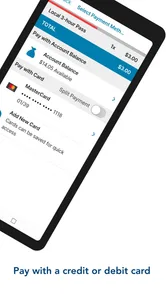
RTD MyRide offers multiple payment options, which is another plus. Whether you prefer to pay by card, cash, or even digital wallets, the app has got you covered. Additionally, the rewards system is a nice touch, allowing frequent users to earn points that can be redeemed for discounts on future rides. It’s a win-win situation!
Those payment and rewards claims should not be treated as a dependable guide to the current app: the safest habit is to check the choices actually shown in your version before planning a household budget around them. The live app experience can also be more useful than a broad trip-planning app for the specific task it supports, while a paper backup or another accepted way to travel may be wiser if a phone is lost, out of charge, or being used by someone else.
Who will get the most from it
RTD MyRide is free, and its current version is 7.9.2, with Android support starting at version 7.0. It has an average rating of 3.7 from around 1.3 thousand ratings, and more than 500 thousand installs. Those figures suggest a well-used local tool rather than a universal travel companion. I would recommend it most to people who regularly use RTD services and want a phone-based way to manage that part of their trip. If you mostly travel by car, need a multi-city planner, or depend on several household members using one device independently, another option or a separate setup may suit you better.
The app was released on November 1, 2017, and its Everyone age rating makes it broadly accessible, but I would still decide on use according to the rider’s confidence and the household’s phone-sharing arrangements. It has 540 reviews, so there is a meaningful body of user feedback to consult if you want to see what other riders have experienced. I would look for recent comments about the particular workflow you care about rather than assuming every feature works the same way for every trip.
If you are deciding whether it belongs on a shared family phone, the practical question is whether the same person can reliably have the device whenever a ride is needed. For a parent and child travelling together, one person can take the lead and keep the process simple. For separate journeys at similar times, shared access becomes a source of friction, and installing the app on the rider’s own supported device is the clearer setup. A household that cannot arrange either option may be better off using another suitable way to travel.
I would also judge the app by the specific job I need it to do, rather than by a broad promise of convenience. It is a sensible companion for an RTD rider who wants the transit process on their phone. It is not the right pick for ordering a car, planning every leg across multiple transit systems, or solving family logistics by itself. That narrower role is a strength when it matches your routine and a limitation when you expect a one-stop travel tool.
In conclusion, if you’re in the market for a reliable and efficient ride-sharing app, I’d definitely recommend giving RTD MyRide a try. Its blend of user-friendly features, safety protocols, and reward incentives make it a standout choice in the crowded world of ride-sharing apps. So, next time you need a ride, why not give it a go? You might just find your new favorite commuting companion. Safe travels!
RTD MyRide Frequently Asked Questions
Who develops RTD MyRide, and who is it intended for?
RTD MyRide is a travel and local app developed by the Regional Transportation District in Denver, Colorado. It is intended for people who use public transportation in the Denver metro area and want trip information and ride-related tools on their phone. The app is free to download and is rated for Everyone, so it may be considered by a broad range of travelers.
What devices can run RTD MyRide?
RTD MyRide is available for Android, and its listed minimum operating-system requirement is Android 7.0. Before downloading, check the version of Android on your device and make sure the app is compatible. The app’s current version is 7.9.2, so keeping your device’s software and the app updated can help you use the available features smoothly.
What is the primary function of RTD MyRide?
RTD MyRide is designed to facilitate easy travel planning and commuting via public transportation in the Denver metro area. The app provides real-time updates about bus and train schedules, allowing users to plan their journeys efficiently. Additionally, it offers information about route changes and service disruptions, making it an essential tool for anyone relying on public transit.
How user-friendly is the RTD MyRide app?
The RTD MyRide app boasts a user-friendly interface that is intuitive and easy to navigate. Users can quickly access schedules, maps, and fare information with just a few taps. The app is designed to cater to both tech-savvy individuals and those less familiar with smartphone applications, ensuring a smooth experience for all users.
Does RTD MyRide offer any fare payment options?
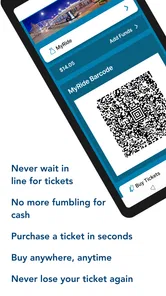
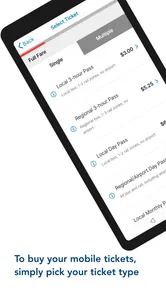
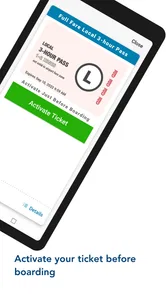
Yes, RTD MyRide allows users to purchase and store tickets directly within the app. This feature eliminates the need for physical tickets and simplifies the boarding process. Users can buy single-ride tickets, day passes, or monthly passes, all of which can be activated just before boarding a bus or train, enhancing convenience and reducing waiting times.
Pros
- User-friendly interface for easy navigation.
- Real-time updates on ride status.
- Wide coverage of transportation options.
- Allows advance ride booking.
- Integration with multiple payment methods.
Cons
- Limited support in rural areas.
- Occasional app crashes reported.
- High demand can lead to surge pricing.
- Some users experience delayed notifications.
- Requires constant internet connection.











