

Rosetta Stone Sapphire
- 78.00
- 4.5
- Installs
- 50.00K
- Price
- Free

Screenshots
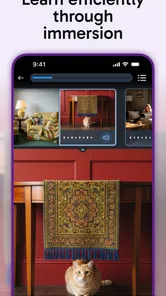
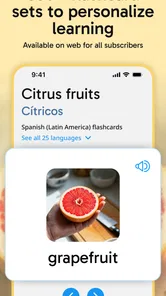
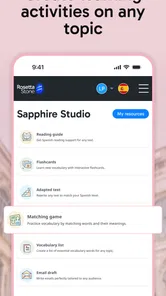
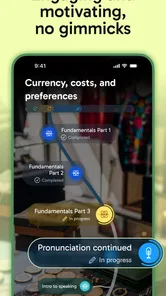
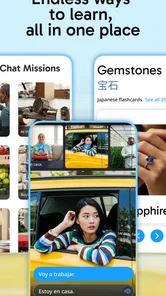
Analysis by Reviewed
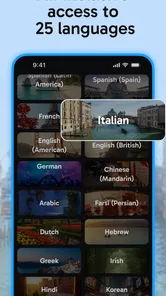
Rosetta Stone Sapphire is an education app from Rosetta Stone Ltd that takes a familiar language-learning idea and gives it a focused, modern home. I spent time with it as a study companion rather than treating it like a quick phrasebook, and my first impression is that it is best suited to people who want regular practice with speaking, listening, and recognition instead of a pile of isolated translations. It supports Spanish, Dutch, English, Polish, Japanese, and additional languages, so it can fit several different learning goals without forcing everyone into the same language.
The app is free to install and carries an Everyone age rating, which makes it approachable for families, students, and adults returning to language study. Its current version is 1.1.3, and the product is still relatively early in its public life, having arrived on April 28, 2026. That matters when deciding what to expect: I see a useful foundation, but I would not approach it as a completely mature replacement for every language resource already on your phone.
How Rosetta Stone Sapphire feels in everyday use
The strongest part of the experience is its clear educational purpose. Instead of encouraging me to tap through random vocabulary whenever I had a spare minute, it made more sense when I treated each session as a small appointment. Ten focused minutes after breakfast, a short review during a commute, or a speaking exercise before a trip all work better than opening the app without a plan.
That distinction is important because language learning apps often compete for attention with streaks, games, notifications, and colorful rewards. Sapphire feels more useful when I judge it by whether I can recognize and produce something later, not by how quickly I can finish a screen. If you want a study tool that keeps the subject visible and gives you a reason to return, it is easy to understand the appeal.
The language selection is also practical. Spanish is a natural choice for travelers and conversational learners, while English can serve people building confidence for work, school, or relocation. Dutch and Polish give the app value for learners with family or travel connections, and Japanese attracts users who need a different writing and sound system from the languages they may have studied before. The important point is to choose one language with a clear purpose rather than installing it simply because several options are available.
In my experience, the app makes the most sense when paired with a real-world target. For example, someone preparing for a visit to Japan could use a short daily routine to rehearse greetings, listening, and basic responses, then say those phrases aloud away from the screen. A person learning Spanish for conversations with relatives could keep a notebook of expressions that feel personally relevant and use the app to reinforce them. That second step—moving from recognition to actual speech—is where the study starts to become useful.
A better routine than casual tapping
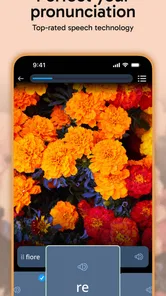
I recommend dividing a session into three parts. Start by reviewing material you have already seen, continue with new content while your attention is fresh, and finish by speaking without looking at the answer immediately. This approach exposes a weakness that is easy to miss in any language app: recognizing a correct answer is much easier than producing one from memory.
More From Our News Desk

 Gmail
GmailGmail in a Busy Inbox: Who Benefits Most?
From first account to crowded workday, Gmail earns its place through dependable search and flexible sorting—but its best fit depends on how much inbox maintenance you can tolerate.

 Prime Video
Switching to Prime Video: What Changes in Your Viewing Routine
Prime Video can make a compelling second home for streaming, but switching means learning a different catalog, rental layer, and route from browsing to playback.

 Universal TV Remote Control
Universal TV Remote Control Works Best as a Reliable Backup
A phone remote earns its place through quick setup and reliable habits. Here is how to get more from Universal TV Remote Control—and where its limits show.

 Weather - By Xiaomi
Weather by Xiaomi Review: Clear at a Glance, Less Clear Up Close
Xiaomi’s weather app makes everyday forecasts quick to scan, but its calm surface can leave useful details and recovery paths harder to find than they should be.

 X
XX Under Pressure: Can It Recover When Posting Goes Wrong?
A resilience-focused review of X, examining setup, mistaken posts, interruptions, weak connections, and the gaps that matter when recovery needs to be dependable.

 Clash of Clans
Clash of Clans Is Won Between the Battles
Its raids are quick; its community is a long-term project of coordination, teaching, rivalry, and shared responsibility—with all the friction that entails.
Latest News



A helpful trick is to pause before tapping. Look at the prompt, say your answer quietly, and only then check the screen. If you always select an option first, the app may feel easy while your real speaking ability stays behind. Sapphire becomes more demanding—and more valuable—when I use it as a prompt for active recall rather than as a multiple-choice activity.
I also found that short, repeatable sessions are more realistic than occasional long ones. A busy learner may have enough time for a few exercises while waiting for coffee, but not for a full lesson at night. The free entry point makes experimenting easy, although the presence of in-app purchases priced at $19.99 per item means you should understand your intended commitment before building your entire study plan around it.
What the current release tells me
The current version, 1.1.3, suggests that the app has already moved beyond a first rough launch, but I would still evaluate it as a developing product. The release date is recent enough that the experience may continue to change as Rosetta Stone Ltd refines the app. That is not automatically a disadvantage. Early users can benefit from improvements, but they should also be comfortable with the possibility that the balance of lessons, navigation, or paid content may evolve.
I would not claim that the version number alone proves a major redesign or a particular new feature. What it does provide is a useful marker for readers: if you compare your experience with an older installation or an earlier review, check that you are using the same release. Small interface changes can affect how quickly you find lessons, revisit practice, or understand what is included before paying.
For existing users, the practical question is whether the current build supports the way they already study. If you have a routine based on short sessions and repeated speaking practice, the app can slot into it without much ceremony. If you expect a complete personal curriculum, extensive progress analytics, or a broad social learning system, you should test the free experience first rather than assuming the name guarantees every feature associated with language-learning platforms.
The app’s public response is encouraging without being overwhelming. It holds a 4.5 average from around 500 ratings, with more than 70 written reviews, and it has passed 50 thousand installs. I read those figures as signs of real interest and generally positive reception, not as proof that every learner will find the same fit. A person who dislikes structured repetition can still find the routine limiting even if many other users enjoy it.
Where it fits beside familiar alternatives
Compared with a traditional textbook, Sapphire is more convenient for listening and speaking practice because the phone is always close by. A book can offer clearer explanations and a better overview of grammar, but it rarely prompts you to pronounce a phrase at the exact moment you need to practice it. I would use the app for repetition and a book for deeper reference when a sentence pattern keeps confusing me.
Compared with a flashcard app, the advantage is the possibility of a more guided path. Flashcards are excellent when you already know what you want to memorize, such as travel vocabulary or a family member’s common expressions. They are less helpful when you do not know which words belong together or how to turn them into speech. Sapphire is a better starting point for a learner who wants direction, while a dedicated flashcard system may be better for customizing every item.
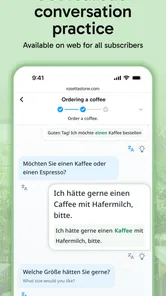
Compared with conversation-focused services, this app is more convenient for private practice. You do not need to schedule another person or feel embarrassed about making beginner mistakes in front of a tutor. The trade-off is that a lesson cannot fully reproduce the unpredictability of a real conversation. If your main goal is spontaneous discussion, use Sapphire as preparation and add live speaking with a teacher, exchange partner, or patient friend.
Compared with free online videos, the app offers a more deliberate reason to respond rather than passively watch. Videos can explain culture, pronunciation, and grammar in memorable ways, but they are easy to consume without testing yourself. I would choose Sapphire when I need a repeatable routine and videos when I need a different explanation of a difficult point.
Who will get the most from it
I think it is a good match for beginners, returning learners, travelers, and adults who need a manageable structure. It also suits people who prefer studying alone and want to practice aloud without an audience. The free installation lowers the barrier to trying a language, and the Everyone rating makes it suitable for a wide range of users, provided younger learners have the supervision appropriate to their own situation.
It is less convincing for someone who wants only a tourist phrase list for a weekend trip. That person may learn faster from a compact travel guide focused on directions, food, emergencies, and polite requests. Sapphire makes more sense when you want the phrases to connect to a broader learning habit rather than disappearing after the trip.
I would also hesitate to recommend it as the only resource for advanced learners. Once you can already hold conversations, you may need authentic news, novels, specialist vocabulary, or detailed grammar references. An app built around guided practice can remain useful for maintenance, but it may not challenge an advanced learner enough on its own.
Small frictions that affect the decision
The biggest trade-off is the gap between a free installation and a potentially paid learning path. You can begin without paying, which is helpful for testing the teaching style, but in-app purchases mean that serious use may involve a purchase decision. I would spend enough time with the free portion to answer three questions before committing: Do I enjoy the lesson rhythm? Do I actually speak during practice? Does the selected language match a goal I will still care about next month?
Another limitation is motivational rather than technical. No app can create time, confidence, or a reason to speak with another person. Sapphire can make practice easier to start, but it cannot guarantee that a learner will remember material that is never revisited. I would rather complete a short routine consistently than buy access and open it only when motivation happens to appear.
There is also a risk of confusing familiarity with fluency. Seeing the same kind of prompt several times can make answers feel obvious. To counter that, I suggest changing the order of practice: sometimes listen first, sometimes speak first, and sometimes write the phrase from memory before checking it. This is a simple but important way to turn the app from a recognition exercise into a stronger test of recall.
Travelers should add cultural and situational preparation elsewhere. Knowing a sentence is not the same as knowing when it sounds formal, casual, urgent, or unnatural. The app can support language practice, but a traveler should still learn local etiquette, transport details, and safety information from current, location-specific sources.
What I would watch as the product develops
Because the app is at version 1.1.3 and relatively new, I would watch how Rosetta Stone Ltd handles continuity for learners who build a long-term routine. Clear progress, dependable access to previously studied material, and a sensible relationship between free content and paid items will matter more to me than decorative changes.
I would also look for signs that the language choices receive balanced attention. Supporting Spanish, Dutch, English, Polish, Japanese, and more is appealing, but learners need consistent depth in the language they choose. A broad menu is useful only when each option leads to a study experience that feels complete enough for its intended audience.
Existing users should pay attention to release notes and revisit their personal routine after updates. If navigation changes, take a few minutes to confirm where review material and speaking practice now live. New users should do the opposite: start slowly, note which exercises help them remember, and avoid judging the entire app from one rushed session.
My overall view is positive but measured. Rosetta Stone Sapphire is most valuable when you treat it as a daily speaking-and-recall habit, not as a magic shortcut to fluency. The free starting point, broad language selection, and focused education category make it worth trying, while the paid items and developing release mean you should test the fit before making it your only resource.
If I were recommending it to a friend, I would say this: choose one language, attach practice to a specific real-life goal, say answers aloud before checking them, and combine the app with genuine conversation once you are ready. That workflow gives Sapphire a clear job. It helps you build a repeatable base, while books, videos, tutors, or local speakers fill the gaps that a phone app cannot reasonably cover.
For a beginner who wants structure without immediately buying a course, this is a sensible option. For an advanced learner, a last-minute tourist, or anyone expecting effortless fluency from passive tapping, another tool—or a combination of tools—will probably serve better. I would keep it installed for steady practice, but I would judge its long-term value by the language I can actually use away from the screen.
Rosetta Stone Sapphire Frequently Asked Questions
What devices and operating systems can run Rosetta Stone Sapphire?
Rosetta Stone Sapphire is an education app for learning languages on a mobile device. Before downloading, check that your device runs iOS 10 or later, since that is the minimum operating-system requirement. Keeping your device’s software up to date can also help the app run smoothly and ensure you can access its available learning features.
Who publishes Rosetta Stone Sapphire?
Rosetta Stone Sapphire is developed by Rosetta Stone Ltd. It is intended for language learning, with the app’s short description identifying it as Rosetta Stone Sapphire. If you are choosing an app for a school, workplace, or personal study, checking the developer name on the download page can help you confirm that you have found the intended product.
What is Rosetta Stone Sapphire?
Rosetta Stone Sapphire is a language-learning platform designed for organizations, schools, and other institutions that want to provide structured language training to their users. It typically combines guided lessons, pronunciation practice, vocabulary activities, and progress tracking in one account. Availability of specific courses, tools, and learning paths may depend on the subscription or access provided by your employer or institution.
Which languages can I learn with Rosetta Stone Sapphire?
The language selection can vary depending on the Rosetta Stone Sapphire plan and the organization that provides access. The app’s language-learning description includes Spanish, Dutch, English, Polish, Japanese, and more. Before downloading, check your invitation, account dashboard, or administrator’s information to confirm the exact languages included in your access.
Does Rosetta Stone Sapphire work offline?
Rosetta Stone Sapphire may allow certain lesson content to be downloaded for offline study, but offline functionality can depend on the mobile application version, account permissions, and the course configuration selected by your organization. You should sign in while connected to the internet first and download available lessons in advance. Progress may synchronize after you reconnect, so avoid deleting app data before synchronization.
Pros
- Short
- focused lessons fit easily into a busy daily routine.
- Speech-recognition activities encourage better pronunciation practice.
- Useful phrase repetition helps reinforce vocabulary over time.
- Progress tracking makes it easy to monitor completed lessons.
- The interface is clean
- organized
- and simple to navigate.
Cons
- Some advanced features require a paid subscription after the trial.
- Grammar explanations can feel limited for learners who want more detail.
- Repeated drills may become monotonous during longer study sessions.
- Offline access and downloaded lessons may depend on subscription status.
- The course may feel slow for users seeking rapid conversational fluency.












