

Rosetta Stone Classic (2024)
- 58.44K
- 4.6
- Installs
- 10.00M
- Price
- Free

Screenshots


Analysis by Reviewed
When I want a language app to do more than quiz me on isolated translations, I look for lessons that make me listen, read, and speak in context. Rosetta Stone: Learn, Practice takes that guided approach, and I think it works best when I treat it as a regular study habit rather than a quick phrasebook. It can help build familiarity with a language, but the way it asks you to practise also makes timing and surroundings matter.
Who benefits most from a steady routine
I find this app best suited to learners who want a regular, guided way to practise rather than a pile of unrelated vocabulary cards. It can fit into a commute, a quiet break, or a few minutes before bed. A useful routine is to do one lesson when you have enough focus to listen and speak, then revisit practice later when you have less time. That separation makes short sessions feel purposeful instead of rushed.
For example, if I were preparing for a trip, I’d practise a little each day and say the prompts aloud rather than silently tapping through them. That gives me a chance to notice which sounds feel awkward before I need to use them in conversation. It is not a substitute for speaking with another person, though: learners who need spontaneous back-and-forth conversation, detailed grammar explanations, or a classroom’s direct feedback may be better served by adding a tutor, conversation group, or structured course.
Getting Started with Rosetta Stone
First things first, installing the app is a breeze. It’s available on Android and iOS, so it’s easy to try on a compatible device. Once you open it, you’re greeted with a sleek and user-friendly interface. No overwhelming menus or confusing options here. Just a straightforward path into language practice.
The Learning Experience
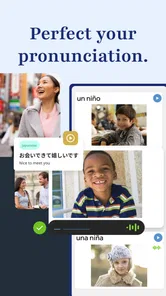
The app uses a combination of listening, speaking, reading, and writing exercises to immerse you in the language. What I love about it is the emphasis on speaking. You’ll be talking from the get-go, and the speech recognition is pretty darn accurate. It feels like having a personal tutor that’s always ready to help you practise pronunciation.
Each lesson is designed to build on the previous one, ensuring a solid foundation as you progress. The visual and audio cues help keep you engaged. Plus, there’s no pressure of exams or grades, just a friendly push towards fluency at your own pace.
Keeping practice useful under real-life conditions
Speech exercises work best when I can speak clearly without worrying about disturbing other people. On a noisy bus or in a shared room, I would focus on listening or reading and save spoken practice for a quieter moment. That small adjustment matters: a pronunciation activity is more useful when I can hear the prompt and respond without rushing.
More From Our News Desk

 Gmail
GmailGmail in a Busy Inbox: Who Benefits Most?
From first account to crowded workday, Gmail earns its place through dependable search and flexible sorting—but its best fit depends on how much inbox maintenance you can tolerate.

 Prime Video
Switching to Prime Video: What Changes in Your Viewing Routine
Prime Video can make a compelling second home for streaming, but switching means learning a different catalog, rental layer, and route from browsing to playback.

 Universal TV Remote Control
Universal TV Remote Control Works Best as a Reliable Backup
A phone remote earns its place through quick setup and reliable habits. Here is how to get more from Universal TV Remote Control—and where its limits show.

 Weather - By Xiaomi
Weather by Xiaomi Review: Clear at a Glance, Less Clear Up Close
Xiaomi’s weather app makes everyday forecasts quick to scan, but its calm surface can leave useful details and recovery paths harder to find than they should be.

 X
XX Under Pressure: Can It Recover When Posting Goes Wrong?
A resilience-focused review of X, examining setup, mistaken posts, interruptions, weak connections, and the gaps that matter when recovery needs to be dependable.

 Clash of Clans
Clash of Clans Is Won Between the Battles
Its raids are quick; its community is a long-term project of coordination, teaching, rivalry, and shared responsibility—with all the friction that entails.
Latest News



The approach also differs from flashcard-first language apps. Cards can be quicker for drilling isolated translations, while this app’s mix of audio, images, and spoken responses asks me to connect a phrase with a situation. I’d use both styles for different jobs: this for building familiarity with language in context, and a reference or grammar resource when I want a direct explanation of why a sentence is formed a certain way.
Practice Makes Perfect
The practice sessions are structured to reinforce what you’ve learned in the lessons. The app integrates everyday scenarios, so you’re not just learning words but also how to use them in real-life situations. Whether it’s ordering food at a restaurant or booking a hotel room, these exercises help you rehearse practical language.
Another useful feature is the ability to practise offline. So, if you’re on a flight or somewhere without Wi-Fi, your lessons are still accessible. This flexibility is a plus for people who want to make travel time count, provided they prepare their study plan before setting off.
Planning around access and cost
Offline access is especially handy if I prepare before leaving home: I can make sure the material I intend to practise is available, then use travel time without relying on a connection. I would still treat it as a planned study session rather than assume every part of learning works identically offline. When access matters, checking the app before a trip is a sensible habit.
The app is free to install, but it also offers in-app purchases, ranging from $0.99 to $299.99 per item. I’d explore the experience and decide whether its lesson style suits me before spending money. Its familiar, guided format is valuable if I stick with it; someone who only wants an occasional phrase lookup may find a free dictionary or translation tool a more practical fit.
Speed, stability, and device expectations
For a language app, the most noticeable “speed” is how quickly I can get into a focused exercise and understand what it asks me to do. The uncomplicated interface helps with that, while listening and speaking naturally require more attention than tapping through a list. I wouldn’t judge progress by how fast I can finish a session; the benefit comes from responding carefully and returning to material regularly.
Rosetta Stone Ltd develops the app, which is rated for Everyone and has a 4.6 average from around 401,000 ratings. It has more than 10 million installs, and the current version is 8.34.3. On Apple devices, it requires iOS 11 or later. Those details show that it has a broad audience, but they don’t guarantee the same experience on every device. I’d keep the app updated and allow enough free space for normal app use, particularly if I plan to study offline.
In heavier use, such as a longer session combining audio and speaking practice, I’d choose a stable connection when online and pause if the device becomes distracting or uncomfortable to use. If an exercise is interrupted, returning to the lesson and checking where I left off is more useful than trying to cram the whole session into one sitting. For me, reliability is partly about the app and partly about choosing a quiet moment in which its listening-focused activities can work well.
A practical study rhythm
A realistic weekday routine might be a lesson at home in the morning, followed by a brief review during a quiet lunch break. I’d use the first session for new material, when I have enough attention to connect the written cues with the audio, and keep the later session for recall rather than trying to rush through another full lesson. That split is particularly useful if my day is unpredictable: a late meeting can shorten the review without making the whole study plan feel wasted.
I’d also keep a small note of phrases I can recognise but cannot yet say comfortably. That turns the next speaking session into a targeted check instead of a vague attempt to “study more.” The app supplies structured practice, but deciding which weak spots deserve another pass is still my responsibility. This is one reason I wouldn’t use it as a passive background activity; the audio is easy to hear while multitasking, but the learning is more meaningful when I respond deliberately.
Choosing the right language-learning tool
Compared with a flashcard app, Rosetta Stone puts more weight on hearing language and associating phrases with visual situations. That can make it a better fit when I want to build a feel for how expressions sound and appear together, rather than simply memorise a translation pair. Flashcards still have an advantage when I want a fast, measurable vocabulary drill or need to review a personally chosen list.
It also occupies a different role from a translation app. A translator is the practical choice when I need to understand a sign immediately or check a phrase while travelling; it is not the same as practising how to produce that phrase myself. For open conversation, a tutor or language-exchange partner gives the unpredictable replies and human feedback this app cannot replace. I see the app as a useful middle ground for guided individual practice, not a single tool for every language-learning need.
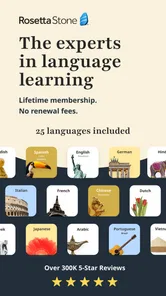
Rosetta Stone supports learning in English, Spanish, French, German, Chinese, and Japanese. That range makes it convenient if I am deciding between those languages, but the right choice still depends on what I need to do with one. A beginner building a foundation may appreciate the structured sequence, while someone preparing for a specialised exam may need materials focused on that exam’s format and vocabulary.
When the format may not suit you
If I only need a handful of travel expressions, the lesson-based approach may feel like more commitment than the task calls for. A phrasebook or translation tool is quicker for one-off questions. Likewise, learners who want grammar rules explained explicitly may find the contextual exercises less direct than a course that teaches rules and exceptions step by step.
The speaking emphasis is a genuine strength, but it can also create friction. I would not count on getting the most from pronunciation practice in a noisy setting, and I wouldn’t want to speak aloud where it feels awkward. If private space is hard to find, a study resource that supports quiet review may be easier to use consistently. The best app is the one I can realistically return to, not simply the one with the broadest lesson mix.
Is It Worth It?
So, is Rosetta Stone worth trying? In my opinion, yes, if you want a guided routine and are willing to participate actively in listening and speaking exercises. It can be a useful supplement to a class or a way to keep a new language present between lessons. It does not replace a full course, a live conversation partner, or a specialist resource when your goal calls for those things.
The app is free to download, and its in-app purchases make it sensible to judge the learning style before committing to paid access. I’d consider whether I am likely to use the guided lessons regularly, not just whether the first few exercises feel polished. A learner who enjoys contextual practice has a better chance of finding lasting value than someone who mainly wants instant translations or a quick grammar answer.
In conclusion, if you’re looking to build language skills through regular, active practice, give Rosetta Stone: Learn, Practice a try. It puts a structured set of listening, reading, writing, and speaking activities within reach, and offline access can help make prepared sessions more flexible. I’d choose it for steady guided study, pair it with real conversation when possible, and look elsewhere when speed, explicit grammar teaching, or spontaneous human feedback matters more.
Rosetta Stone Classic (2024) Frequently Asked Questions
Does Rosetta Stone focus on speaking practice as well as other language skills?
Yes. Rosetta Stone is presented as a language-learning and practice app, and its store summary highlights learning and speaking languages. Its lessons also cover reading and writing alongside speaking, so it can support several parts of language study rather than serving only as a phrasebook. That mix may suit learners who want to build practical skills through structured lessons.
Who develops Rosetta Stone, and is it a dedicated language-learning app?
Rosetta Stone is developed by Rosetta Stone Ltd and belongs to the education category. Its central purpose is learning and practicing languages, with a selection that includes English, Spanish, French, German, Chinese, and Japanese. If you are choosing an app specifically for language study, its focused educational purpose is a useful point to consider before installing it.
How much does Rosetta Stone cost to download and use?
Rosetta Stone is free to download, but it also offers in-app purchases, with prices ranging from $0.99 to $299.99 per item. That means the free download is not necessarily the same as access to every course or feature. Check the purchase options shown in the app before committing, and make sure they fit what you want from a language-learning app.
What Android version do I need to install Rosetta Stone?
On Android, Rosetta Stone requires version 11 or later. Before downloading, check your device’s software version in its settings to make sure it meets that requirement. The app is an education tool for learning and practicing languages, so compatibility is worth checking first if you use an older phone or tablet. The minimum OS requirement is specific to Android devices.
What languages can I learn with Rosetta Stone?
Rosetta Stone offers a wide range of languages to learn, including popular choices like Spanish, French, German, Chinese, and Japanese, among many others. The app provides comprehensive lessons designed to build your speaking, reading, and writing skills in a new language. It's suitable for beginners and advanced learners alike, making it a versatile tool for language acquisition.
Pros
- Comprehensive language courses.
- Interactive speaking practice.
- Offline learning available.
- User-friendly interface.
- Progress tracking features.
Cons
- Subscription required for full access.
- Limited free content.
- Some accents not covered.
- Occasional app glitches.
- Requires internet for updates.












