RoomBooking: Rental Calendar
- 0.00
- 0.0
- Installs
- 10.00K
- Price
- Free

Screenshots
Analysis by Reviewed
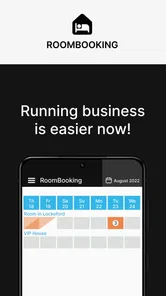
I found RoomBooking: Rental Calendar most useful when I treated it as a focused visual planner rather than as a complete hotel-management system. Its purpose is straightforward: help organize bookings for hotels, guest houses, and other rentable objects in a calendar. That narrow focus is also its main appeal. I can look at availability, place reservations into a schedule, and keep the basic rhythm of a property easier to understand than it would be in a notebook or a scattered set of messages.
The app is aimed at people who need a practical booking calendar on a mobile device. That includes owners of small guest houses, people managing a few holiday apartments, and anyone coordinating rooms without wanting to begin with a large desktop platform. In my experience, the best results come from using it as the central visual record of occupancy while keeping communication, payments, and guest documents in whatever tools already handle those jobs well.
How the calendar fits into a real booking routine
The simplest workflow starts with the calendar itself. I would first use it to understand which rooms or other rentable objects are available, occupied, or reserved for a particular period. Instead of searching through separate conversations, I can work from one date-based view and make the next decision from what is already scheduled. That is especially helpful during busy periods, when a quick visual check matters more than a long list of individual reservations.
A realistic example is a small guest house receiving a message while the owner is away from a computer. The owner can check the calendar on a phone before promising a room, place the booking into the appropriate period, and then continue the conversation through the usual messaging or payment channel. The important habit is to update the calendar immediately after confirming the reservation. Delaying that step creates the exact confusion a booking calendar is supposed to prevent.
I also recommend deciding on a naming system before entering many objects. If a property has several rooms or apartments, clear names make the calendar easier to scan. “Room 1” and “Room 2” may be adequate for a very small operation, but names based on location or capacity can reduce mistakes when several bookings are being handled quickly. This is not a flashy feature; it is a practical discipline that makes the app more dependable.
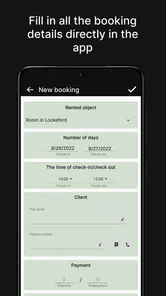
The same principle applies to dates. I would enter the reservation as soon as the guest has genuinely committed, not when the conversation merely looks promising. A tentative request and a confirmed stay are different things, and mixing them in one calendar can lead to unnecessary blocking. If the app gives you a place to record the booking details, use a consistent style so that another person helping with the property can understand the entry without asking for an explanation.
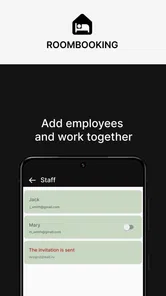
That shared understanding is important for small teams. A calendar can show that a room is occupied, but the people using it still need an agreed routine for cancellations, changes, cleaning, and late check-ins. I would not expect the app alone to replace those operational conversations. Its strength is giving the team a common schedule, while the surrounding process determines how accurately that schedule reflects reality.
More From Our News Desk

Weather by Xiaomi Review: Clear at a Glance, Less Clear Up Close

X Under Pressure: Can It Recover When Posting Goes Wrong?

Clash of Clans Is Won Between the Battles

Android Auto Makes the Case for Quieter Car Software

MobiOffice: Transforming Mobile Productivity with Seamless Integration

EA SPORTS FC™ Mobile Soccer: Redefining Mobile Sports Gaming
For a single apartment or a handful of rooms, this approach feels appropriately light. I can open a calendar instead of maintaining a complex spreadsheet with multiple tabs. Compared with a paper planner, the mobile format is easier to carry and revise. Compared with a general calendar app, a rental-focused tool is a more natural starting point because the schedule is organized around objects being booked rather than only around personal appointments.
That comparison also reveals the boundary. A general calendar may be better for someone who only needs reminders and occasional blocks of time. A spreadsheet may be better for a manager who needs formulas, detailed financial records, or custom reporting. A full property-management platform may be the better choice for a larger operation with many channels, staff roles, automated communication, and accounting requirements. RoomBooking sits in the useful middle ground between a paper schedule and a large business system.
What I would check before relying on it daily
Before making the app the main booking reference, I would create a small test schedule and deliberately edit it. Add a normal reservation, adjust its dates, remove it, and check whether the calendar still reads clearly afterward. This simple trial reveals whether the workflow feels comfortable on your phone and whether your preferred naming habits remain understandable once the calendar contains several entries.
I would also test the app during the moments that usually cause errors: a same-day arrival, overlapping requests, and a reservation that changes length. These situations are more informative than entering one perfect booking. If updating dates feels slow or unclear, that friction will become more noticeable during a busy weekend. Finding it early gives you time to refine your process instead of discovering the problem after accepting a guest.
Another sensible check is device compatibility. The app requires Android 7.0 or later, so it is accessible on many older Android phones, although the experience naturally depends on the handset and its screen. The current version is 1.70.0, which is the version I would look for when checking that the installation is current. Keeping the app updated is particularly sensible for a calendar, because reliability matters more than experimenting with an outdated build.
RoomBooking is free to install, which makes this kind of trial easy to justify for a small operator. The app is marked for Everyone, and it comes from ROOMBOOKING LLP. There are in-app purchases ranging from $1.99 to $64.99 per item, so I would review the available purchase prompts before building the workflow around anything beyond the basic installation. A free starting point is convenient, but a business user should still understand which parts of the experience may involve payment.
Settings and habits that make the view easier to trust
The most valuable “settings” are often the choices I make before the first real booking. I would decide which objects belong in the calendar, how they are named, and what information is essential in each entry. Avoiding unnecessary detail keeps the schedule readable. A calendar becomes less useful when every cell is filled with long notes that hide the dates and room identity.
I would separate the booking record from the guest conversation. The calendar should answer practical questions such as what is occupied and when. Messages, identification details, special requests, and payment discussions may belong elsewhere, depending on the property’s existing process. This separation reduces clutter and makes it less likely that sensitive or irrelevant information will be copied into a schedule that many people may need to view.
A useful routine is to review the calendar at two fixed moments: once when accepting new reservations and again before the day begins. The first check prevents double-booking; the second catches changes made since the previous review. Even if the app is simple, this habit turns it into a dependable operational checkpoint rather than a passive list that is only opened when something goes wrong.
I would also make the calendar part of the handover between booking and housekeeping. Once a reservation is entered, the property’s cleaning routine can use the dates as a starting point. The calendar does not need to contain every cleaning instruction to be valuable. It only needs to make departures, arrivals, and blocked periods visible enough that the next task can be planned accurately.
One subtle trade-off is that a clean calendar can look more certain than the underlying booking process really is. If a guest has asked for a room but has not confirmed, recording the request as a firm reservation may make the schedule appear unavailable. If you leave every tentative request out, you might forget to follow up. I would handle this by using a consistent internal rule: only confirmed stays block availability, while tentative requests are tracked through a separate reminder or communication habit.
This is also where the app should not be asked to do too much. I would not use a calendar entry as proof that money has been received, nor would I assume that a visible booking automatically informs the guest, cleaner, or colleague. The app is strongest when it records the decision that a space is reserved. Other tools and people still need to carry out the consequences of that decision.
Faster patterns for repeated bookings
Speed comes less from rushing through individual entries and more from making every entry predictable. I would keep the same order for checking availability, confirming dates, selecting the object, and recording the reservation. Repetition reduces the chance of overlooking a date or placing a booking against the wrong room. This is particularly useful when several inquiries arrive close together.
For properties with recurring guests, I would prepare the information I need before opening the app. Knowing the requested dates and the correct room in advance makes the calendar update a short confirmation step instead of a long search. If a customer regularly books the same object, a consistent naming convention helps me recognize it immediately without relying on memory.
Another efficient pattern is to process changes in batches only when they are genuinely low risk. For example, after receiving several housekeeping updates, I might review the next few days together. However, new reservations should be entered immediately rather than saved for a later administrative session. Batching routine review can save time; batching availability changes can create avoidable conflicts.
I also like using a “look ahead” habit. After entering a reservation, I would glance at the surrounding dates and the neighboring objects. This catches practical problems that a single-entry view may hide, such as an unusually tight turnaround between guests or several arrivals concentrated on one day. The calendar is valuable not just for answering “is this room free?” but also for showing the shape of the work ahead.
For a person managing rentals alongside another job, this visual overview may be more useful than a feature-heavy system that takes longer to maintain. The best tool is not always the one with the longest feature list. If RoomBooking encourages the owner to update availability consistently because it is quick to open and understand, it can outperform a more sophisticated alternative that is rarely kept current.
Still, I would not confuse simplicity with automation. The app can support a repeatable workflow, but the operator remains responsible for checking messages, confirming changes, and communicating with guests. Anyone expecting automatic distribution of availability across multiple booking services, automatic invoices, or a full customer-management pipeline should look toward a specialized property-management product instead.
Where the simple approach reaches its limits
The central limitation is scope. A rental calendar can organize dates and objects, but a growing accommodation business may need much more: financial tracking, guest histories, staff permissions, automated reminders, channel synchronization, and detailed occupancy analysis. I would choose RoomBooking confidently for a modest operation that mainly needs a clear calendar. I would hesitate if the calendar is only one small part of a complicated administrative system.
There is also a human reliability limit. If two people update bookings through different channels without a shared routine, the calendar can become outdated even when the app itself works correctly. Before blaming the software, I would establish one rule about who records a confirmed reservation and when. A clear owner for that step is more valuable than repeatedly checking an uncertain schedule.
Mobile convenience has a trade-off too. A phone is excellent for checking a booking while moving around a property, but a larger screen may be more comfortable when reviewing many rooms and dates at once. If your operation involves a dense schedule, you should judge the calendar at the busiest point rather than during a quiet week. A view that feels clear with three reservations may feel crowded with many more.
The purchase model is another point worth considering. The app is free, but optional in-app items are priced from $1.99 to $64.99. I would treat that as a reason to inspect the app’s available functions and purchase prompts before committing to a paid workflow. For a hobby host, even a small recurring expense may matter; for a professional operator, the more important question is whether any paid capability saves enough time to justify its cost.
Privacy and operational boundaries deserve common sense. A booking calendar should contain only the information needed to identify the reservation and manage the room. I would avoid putting unnecessary personal details into entries, especially if the phone is shared or visible to staff who do not need guest information. Keeping the calendar focused makes it easier to read and reduces the consequences of accidental exposure.
People who need a public booking page, direct customer payments, or automatic guest messages should probably begin with a platform designed around those functions. Likewise, a large hotel with layered staff access and reporting needs may quickly outgrow a lightweight calendar. RoomBooking is not the right answer simply because the business involves rooms; it is the right answer when the main problem is keeping rental availability organized without adopting a much heavier system.
My verdict after using it as a working calendar
I see RoomBooking as a practical tool for the owner who wants a dedicated rental schedule and is willing to maintain a few clear habits around it. Its value is not in replacing every business system. Its value is in making the booking picture easier to see, update, and discuss from a mobile device. For a small guest house, several rooms, or a limited set of rentable objects, that focus can be exactly what is needed.
The people I would recommend it to are independent hosts, small accommodation teams, and new rental operators who currently rely on paper, memory, or a general calendar. It is also a reasonable first step for someone who wants to test a structured booking workflow before paying for a larger platform. The free entry point lowers the barrier, while the Android 7.0 minimum keeps it usable on older compatible devices.
I would advise skipping it if your priority is automation rather than visibility. If you need a complete sales funnel, integrated payments, multi-channel availability, or advanced reporting, a dedicated property-management service will likely be a better long-term fit. A general calendar may also be enough when you manage only occasional personal bookings and do not need a rental-oriented structure.
My strongest recommendation is to use it with a repeatable operating rule: confirm the reservation, update the calendar immediately, review the nearby dates, and keep guest communication separate from the schedule. That combination makes the app more dependable than simply installing it and hoping the calendar remains accurate by itself. The real advantage is disciplined clarity, not complexity.
Overall, I would keep RoomBooking in mind for small-scale rental management where the calendar is the main daily challenge. It is a focused Business app from ROOMBOOKING LLP, available free to start, with a Everyone content rating and more than ten thousand installs. Those details do not determine whether it fits your property, but they frame it as an accessible option for people who want a straightforward mobile booking routine rather than a full hotel back office.
After trying to view it through the eyes of a busy host, my conclusion is fairly simple: if you need to see what is booked and keep that information current without carrying a complicated system, this app is worth testing. If your operation has already moved beyond calendar management, choose a broader platform instead. Used within its limits, RoomBooking: Rental Calendar can give a small rental business a calmer, more repeatable way to manage availability.
RoomBooking: Rental Calendar Frequently Asked Questions
Is RoomBooking: Rental Calendar free to download, and are there in-app purchases?
RoomBooking: Rental Calendar is free to download, so you can try its rental-calendar approach without paying upfront. The app also offers in-app purchases, with listed items ranging from $1.99 to $64.99 each. Review the purchase options in the app before committing, particularly if you plan to use it for ongoing rental work and want to understand which tools are included at no cost.
What devices can run RoomBooking: Rental Calendar?
RoomBooking: Rental Calendar is available for Android devices running version 7.0 or later. Checking your device’s operating system before downloading can help avoid compatibility problems. The app is a business tool from ROOMBOOKING LLP, and its general-audience rating makes it suitable for users of all ages; its practical value will depend more on whether its rental-calendar workflow fits the way you organize bookings.
What is RoomBooking: Rental Calendar used for?
RoomBooking: Rental Calendar is designed to help property owners, hosts, and small rental businesses organize reservations in one place. After reviewing its workflow, the app appears focused on managing booking dates, checking availability, and keeping rental information easier to follow than a paper calendar or scattered messages. It can be useful for rooms, apartments, holiday homes, and other short-term rental properties.
Can I manage multiple rooms or rental properties with the app?
The app is intended to support rental scheduling, so it may be suitable for users handling more than one room or accommodation. However, the exact number of properties, calendars, or listings you can create may depend on the version and device platform. Before downloading, hosts with a larger portfolio should check the current store description and test whether the organization tools match their preferred booking workflow.
Does RoomBooking: Rental Calendar include reminders or notifications?
A rental calendar is most useful when it helps prevent missed check-ins, overlapping reservations, and forgotten departures. RoomBooking: Rental Calendar may provide date-based organization and reservation tracking, but notification features can vary by release. Users should review the app’s permission requests and settings after installation to confirm whether reminders, alerts, or calendar notifications are available and enabled on their device.
Pros
- Simple calendar view makes bookings easy to track at a glance.
- Useful for managing multiple rooms or rental properties in one place.
- Quick booking updates help reduce scheduling conflicts.
- Suitable for hosts who prefer a focused rental-management tool.
- Clear availability information supports faster booking decisions.
Cons
- May lack advanced features found in full property-management platforms.
- Users may need time to configure rooms
- rates
- and booking rules.
- Limited integrations could require manual updates from other services.
- Small screens may make detailed calendar management less convenient.
- Feature availability may vary depending on the app version or plan.











