Rock & Crystal Identifier App
- 311.00
- 4.7
- Installs
- 100.00K
- Price
- Free
Screenshots
Analysis by Reviewed
I enjoy apps that turn an ordinary walk into a small learning opportunity, and Rock & Crystal Identifier fits that idea well. It is an education app from SL-Solutions that uses a photo or the phone’s camera to help identify a rock, crystal, stone, mineral, or gemstone. I found the concept most useful when I treated the result as a starting point for investigation rather than an unquestionable scientific verdict.
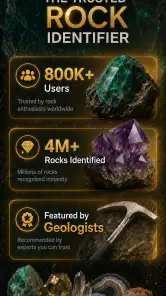
The app is free to install, aimed at Everyone, and available for Android devices running version 7.0 or later. Its current version is 7.3.8, and the project has been available since December 30, 2023. With a 4.7 average from around 6,300 ratings and more than 100,000 installs, it has clearly attracted a substantial audience for a focused geology tool. That popularity makes sense: identifying an interesting stone from a picture is faster and more approachable than opening a long mineral guide and comparing dozens of entries manually.
How the current experience works in everyday use
My first recommendation is to photograph the specimen carefully before asking the app to identify it. A clear, well-lit image gives the tool a much better chance than a dark snapshot taken while the stone is still in a pocket or on a cluttered table. I prefer placing a rock on a plain surface, filling much of the frame, and taking another image from a slightly different angle if the first result seems uncertain.
The camera option is convenient for a quick outdoor check. If I find a colorful pebble on a trail, I can point the phone at it instead of waiting until I get home. The photo route is more useful when I want to control the lighting and composition. That distinction is easy to overlook, but it changes the quality of the experience: the app can only work with the visual information it receives.
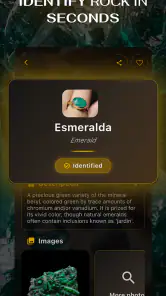
Once an image has been submitted, the suggested identity can help narrow the field. That is particularly useful for beginners who know a specimen is unusual but do not yet recognize the difference between a mineral, a rock, and a gemstone. I would still compare the suggestion with the specimen’s visible traits, such as color distribution, transparency, texture, layering, and crystal shape.
The most reliable habit is to use the result as a shortlist, not as a laboratory certificate. A photograph cannot reveal every property that matters in geology. Two stones may look similar while differing in hardness, composition, origin, or treatment. For casual learning, collecting notes, and deciding what to research next, the app is practical. For buying an expensive gem or confirming a valuable specimen, I would use a qualified expert and appropriate testing instead.
A better identification workflow than simply pointing and tapping
I get more value from the app when I gather context before taking the picture. I note where I found the object, whether it was loose or attached to a larger formation, how heavy it feels for its size, and whether its surface is glassy, dull, metallic, or earthy. None of those observations replaces the image, but they give me a way to judge whether the suggested answer makes sense.
More From Our News Desk

Clash of Clans Is Won Between the Battles

Android Auto Makes the Case for Quieter Car Software

MobiOffice: Transforming Mobile Productivity with Seamless Integration

EA SPORTS FC™ Mobile Soccer: Redefining Mobile Sports Gaming

How Microsoft OneDrive Became a Mobile Productivity Giant

How Google Translate Breaks Language Barriers Effortlessly
For a collection, I would photograph each item in a consistent setup. The same background and similar lighting make visual comparisons easier later, especially when several stones have related colors. I also keep a simple written record with the date, location, personal observations, and the app’s suggestion. That turns a one-time scan into a small field journal and makes it easier to notice when a result deserves further checking.
A less obvious tip is to avoid photographing only the most attractive face of a specimen. The underside may show grain, matrix, banding, or a rough break that is more informative than a polished-looking front. If the first identification feels too broad or surprising, I would reshoot the reverse side rather than repeatedly submitting the same image.
Lighting deserves special attention with crystals and translucent stones. Strong direct light can create glare and hide surface detail, while a very warm indoor bulb can distort the apparent color. Diffused daylight is usually a better compromise. I also avoid placing a flashlight directly behind a transparent specimen unless I am deliberately checking how light passes through it; otherwise, the bright background can overwhelm the details the camera needs.
Where the app is genuinely useful
This is a good companion for a curious beginner, a family exploring stones together, or a student who wants a quick prompt for further reading. It can make a nature walk more interactive without requiring specialized vocabulary at the outset. A child can start with “What is this?” and then move toward better questions about formation, location, hardness, or crystal structure.
I can also see value for casual collectors who have accumulated unlabeled pieces. The app may help organize a mixed box into rough groups before the owner consults a book or specialist. It is especially handy when the alternative is leaving every specimen unidentified because a traditional reference feels too technical.
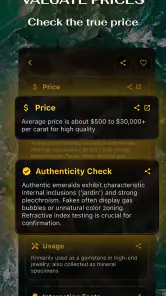
Another useful scenario is shopping for inexpensive decorative stones. If I see an unfamiliar piece at a market, a quick image-based suggestion can give me a term to investigate. I would not use that result alone to judge authenticity or fair value, but it can prevent me from having no starting point at all.
Teachers and parents may appreciate the low barrier to entry as well. Instead of beginning with a long explanation of mineral classification, they can let students make a visual guess, discuss why the guess might be right or wrong, and then compare the image with observable evidence. The educational value comes from that conversation, not merely from the label on the screen.
How it compares with books, search tools, and specialist help
Compared with a printed rock and mineral guide, this app is quicker when I have no idea where to begin. A book is slower for a novice but often better at explaining distinguishing features, lookalikes, geological context, and testing methods. I would use the app to generate a likely category, then use a trusted reference to learn why that category fits.
Compared with a general image-search tool, the focused purpose is its advantage. A broad search may return attractive but irrelevant images, commercial listings, or confidently worded pages that do not match the specimen. A dedicated identifier keeps the first step centered on rocks, crystals, stones, minerals, and gemstones. The trade-off is that a specialist app still depends heavily on the quality and limits of its visual recognition.
Compared with a local rock club, museum, gemologist, or geologist, the app is more convenient but less authoritative. Human specialists can ask follow-up questions, inspect the sample from every side, and use physical tests. If the identification affects a purchase, insurance decision, scientific project, or claim about a rare find, personal expertise is the better option.
In other words, I would not frame this as a replacement for geology references. I see it as the first layer in a sensible process: capture a useful image, receive a candidate, inspect the specimen critically, and verify the interesting cases with stronger evidence.
What the current version means for existing users
The current release, 7.3.8, is the version I would evaluate when deciding whether to try the app today. The app has also been available since late 2023, so it is not merely an untested concept appearing for the first time. That gives existing users a reason to keep checking the current build rather than relying on an old installation or outdated impressions.
Still, a version number by itself does not tell me that every identification will be accurate or that the experience suits every phone. I would judge the update in practical terms: does opening the camera feel straightforward, do images submit without unnecessary friction, and are the suggestions useful enough to guide the next step? Those are the questions that matter more than the number attached to the release.
For someone who already uses the app, the best way to benefit from a current installation is to improve the input rather than expect the software to rescue a poor photograph. Clean the lens, avoid motion blur, show the complete specimen, and take a second view when the surface has important details. That workflow can make the tool feel more dependable without pretending that image recognition has become a definitive test.
The app’s audience size also suggests that it has moved beyond a purely experimental niche. Around 6,300 ratings and over 100,000 installs indicate meaningful interest from people who want an accessible way to explore geology. I would interpret that as evidence of usefulness for casual discovery, not proof that every result is equally strong across every type of specimen.
Costs, access, and the main source of friction
Rock & Crystal Identifier is free to download, which makes it easy to test before deciding whether it belongs in a regular collection workflow. The free entry point is important for students, families, and occasional users who may only identify a few stones during a holiday or weekend walk.
There are in-app purchases ranging from $8.99 to $59.99 per item. That creates a decision point for anyone who only wants an occasional answer. I would begin with the free experience and consider paying only after deciding that the app is useful often enough to justify the expense. A heavy collector may see more value than someone who finds one interesting pebble every few months.
The presence of paid items is also a reason to slow down before committing. A person hoping for a single quick identification should not assume that a paid option automatically turns a visual suggestion into professional verification. Payment may improve access or convenience, but it does not change the physical limits of identifying a specimen from an image. For important stones, expert examination remains the sensible safeguard.
Another limitation is the possibility of ambiguity. Natural specimens are messy: weathering changes surfaces, mixed rocks contain several materials, and polished or treated pieces may look unlike their original form. A result that sounds plausible can still be wrong when the image lacks scale, context, or a clear view of the texture. I would be cautious with unusual colors, highly reflective surfaces, tiny fragments, and objects photographed through plastic or glass.
People who want detailed geological lessons may also find the experience too focused on recognition. If your main goal is to study mineral chemistry, geological time, field-testing methods, or regional formations, a textbook, course, museum resource, or specialist community will offer deeper instruction. This app works best as an accessible doorway, not as a complete education in earth science.
Who should try it, and who should choose another tool
I would recommend it to someone who regularly asks what a stone might be, wants a visual first step, or enjoys turning walks and travel into informal learning. It is also a sensible choice for a beginner who feels intimidated by technical identification guides. The camera-centered approach makes the first move obvious, and the free installation lowers the risk of trying it.
I would be more cautious about recommending it to a professional collector, a gem trader, or anyone making a high-value decision. Those users need repeatable tests, provenance, measurements, and human judgment. An image-based suggestion can support their research, but it should not be the final authority.
I would also skip it if you dislike taking time to prepare a photograph. The app’s usefulness depends on the specimen being visible and the image being informative. Someone looking for an instant answer from a blurry pocket photo may find the process disappointing. In that situation, a local expert or a well-illustrated guide may produce a more satisfying result.
What I would like to see from its continued development
Because the app is still a relatively focused educational product, I would watch for improvements that make uncertainty easier to understand rather than simply making answers sound more confident. Clear guidance about photographing difficult surfaces, suggestions for comparing similar-looking materials, and explanations of why a result was proposed would all strengthen the learning experience.
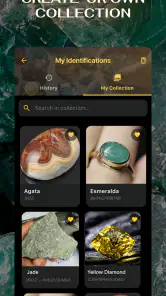
I would also value workflows that help users separate a quick guess from a confirmed identification. A collection journal, room for personal observations, and a way to record multiple candidate matches would be more useful to serious hobbyists than a single label that disappears after the moment. Those are expectations for future development, not features I am claiming are already present.
For now, my advice is straightforward: use the camera or photo option as an entry point, improve the image before resubmitting, record the context of the specimen, and verify anything important with a stronger source. That approach gets the educational benefit without overestimating what a picture can prove.
Overall, Rock & Crystal Identifier is a friendly and practical education app for the first stage of rock and mineral discovery. SL-Solutions has made a specialized subject approachable, and the 4.7 average shows that many users find the idea worthwhile. I like it most as a conversation starter and field companion: it helps me move from “I wonder what this is” to a specific research path.
My final view is positive but measured. If you are curious, the free starting point makes it worth testing, especially on a clear specimen photographed in good light. Just keep the boundary in mind: the app can suggest, organize, and encourage learning, while expert inspection and physical testing remain better for certainty. Used that way, it earns a useful place beside a reference book rather than trying to replace one.
Rock & Crystal Identifier App Frequently Asked Questions
Who develops Rock & Crystal Identifier, and what kind of app is it?
Rock & Crystal Identifier is an education app from SL-Solutions, intended for people who want to learn more about rocks, crystals, stones, minerals, and gemstones. Its central feature is photo-based identification, making it useful for exploring specimens you encounter at home, outdoors, or in a collection. The app is free to download, with in-app purchases available for users who want to explore paid options.
What is the Rock & Crystal Identifier app used for?
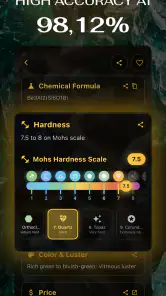
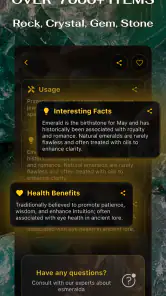
Rock & Crystal Identifier is designed to help users recognize rocks, minerals, crystals, and gemstones by analyzing a photo taken with a phone or selected from the gallery. It can provide an estimated identification along with general information such as common names, appearances, properties, and possible uses. The app is useful for beginners, collectors, students, hikers, and anyone curious about a specimen, although its results should be treated as an informative starting point rather than a professional geological assessment.
How accurate is the identification provided by the app?
The app can offer helpful suggestions, but identification accuracy depends heavily on image quality and the specimen itself. Clear, well-lit photos showing the color, texture, crystal structure, and distinctive markings usually produce better results. Similar-looking minerals, polished stones, unusual lighting, dirt, reflections, or partially visible samples may lead to incorrect suggestions. For valuable, rare, or potentially hazardous specimens, users should confirm the result with a geologist, mineral guide, laboratory, or experienced collector.
How should I take a photo for the best identification results?
Place the rock or crystal on a simple, contrasting background and use bright, even lighting without strong reflections or shadows. Take a sharp close-up that shows the entire specimen, then add additional angles if the app supports multiple images. Clean away loose dirt when appropriate, but avoid damaging fragile samples. It is also helpful to photograph natural features, crystal faces, veins, and patterns clearly, since these details may be more useful than color alone.
Does Rock & Crystal Identifier require an internet connection or access to my camera?
The app may request camera permission so you can photograph specimens directly, as well as access to your photo library if you want to upload existing images. Identification features may require an internet connection because images are often processed through online recognition services. Availability of offline tools can vary by version and device. Before using the app, review the permissions and privacy information in its store listing, especially if you are concerned about image uploads or personal data.
Pros
- Identifies many common rocks and crystals from a single photo.
- Simple interface makes it easy for beginners to use.
- Provides useful details about mineral properties and appearance.
- Helpful for organizing discoveries during hikes or field trips.
- Can support learning through quick
- accessible identification results.
Cons
- Photo quality and lighting strongly affect identification accuracy.
- Rare or similar-looking specimens may receive incorrect results.
- Some advanced information may require a subscription or payment.
- The app may not replace expert testing for valuable specimens.
- Results can be less useful when crystals are partially covered or dirty.
- Category
- Education
- Version
- 7.3.8











