

RoadWarrior Route Planner
- 3.61K
- 4.0
- Installs
- 1.00M
- Price
- Free

Screenshots
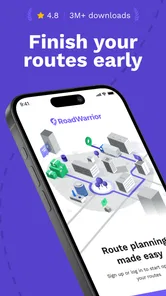
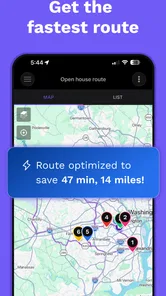
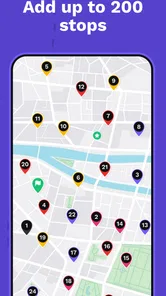
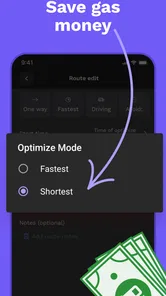

Analysis by Reviewed
I judge a route-planning app by more than whether its map looks polished: I want to know what it helps me organize, how much work it takes to trust a suggested plan, and whether it suits the way I actually travel. RoadWarrior Route Planner is built around getting through several stops, so it makes more sense for a delivery day or a run of appointments than for a single trip across town. That focus is useful, but it also means I’d choose it for a particular job rather than assume it should replace every navigation app on my phone.
Where a multi-stop plan earns its place
The strongest reason to consider a dedicated planner is not simply that it can show a route. It is that a list of addresses can become a sequence you can inspect before the day gets hectic. When a job involves repeated visits, choosing the next stop from scratch each time adds small decisions that accumulate. A planned order gives me a starting point, while still leaving room to change course when real life intervenes.
That distinction matters for people who have a shifting workload. A courier with a batch of parcels, a tradesperson visiting several customers, or a representative fitting meetings around town may benefit from seeing the whole run together. Someone who drives to one office and back may not. I would not add a planning step to a routine that is already simple; the tool is most worthwhile when the order and timing of multiple destinations are genuine problems.
Who benefits from a multi-stop planner
If I were visiting clients across town, delivering parcels, or fitting errands between appointments, I’d value having the stops gathered into one route instead of repeatedly entering the next address. The practical gain is not only the drive between locations: a planned sequence gives me a clearer view of how the day is laid out. For a commute with one destination, or a spontaneous weekend drive, a conventional map app may feel simpler and more direct.
There is a useful distinction between planning and navigating. I’d use RoadWarrior to think through a collection of stops, then keep my attention on the road and follow spoken directions rather than make changes while driving. Before setting off, I’d check the address order and any time constraints; a route can be efficient on paper yet still be wrong for a stop that has a narrow appointment window. That quick review is especially worthwhile when a customer’s entrance is not at the street address or parking takes time.
Trust is part of the route
MapQuest develops this free Maps & Navigation app, which is rated for Everyone and has an average rating of 4.1 from around 10 thousand ratings. Its 1 million-plus installs suggest it has found an audience among people who need more than point-to-point directions. I treat those figures as context, not proof that every route will match my needs: what matters is whether the planning workflow fits the work I do and whether I can check the details before relying on it.
For any navigation tool, location is sensitive because it can reveal where I work, where I make deliveries, and how my day is organized. I’d review the permission prompts on my device and grant location access only in a way that supports how I use the app. I also avoid entering private customer details into notes unless they are genuinely needed for the visit. Those are sensible habits for any route planner, not claims about how this app stores or shares information.
More From Our News Desk

 Weather - By Xiaomi
Weather by Xiaomi Review: Clear at a Glance, Less Clear Up Close
Xiaomi’s weather app makes everyday forecasts quick to scan, but its calm surface can leave useful details and recovery paths harder to find than they should be.

 X
XX Under Pressure: Can It Recover When Posting Goes Wrong?
A resilience-focused review of X, examining setup, mistaken posts, interruptions, weak connections, and the gaps that matter when recovery needs to be dependable.

 Clash of Clans
Clash of Clans Is Won Between the Battles
Its raids are quick; its community is a long-term project of coordination, teaching, rivalry, and shared responsibility—with all the friction that entails.

 Android Auto
Android Auto Makes the Case for Quieter Car Software
The car interface is no longer judged by how much it can do, but by how quietly it helps. Android Auto shows what drivers now expect—and what still gets in the way.

 MobiOffice: Word, Sheets, PDF
MobiOffice: Transforming Mobile Productivity with Seamless Integration
MobiOffice: Word, Sheets, PDF is redefining mobile productivity with a surprising blend of functionality and innovation.

 EA SPORTS FC Soccer Mobile 26
EA SPORTS FC™ Mobile Soccer: Redefining Mobile Sports Gaming
Dive into EA SPORTS FC™ Mobile Soccer, where immersive gameplay and strategic depth transform mobile sports gaming.
Latest News



Choices, limits, and the cost of convenience
The app is free to download, with in-app purchases listed from $4.99 to $99.99 per item. I’d check the purchase screen carefully before committing, particularly if I only need occasional route planning; a frequent courier may value paid capabilities differently from someone planning a few errands. The current version is 2025.06.230, and the minimum operating system is 7.0, so I’d check compatibility on an older device before building it into a work routine.
RoadWarrior is most convincing when I have several destinations and want to arrange the day with intention. It is less compelling if I mainly need live directions for one familiar journey, prefer to keep work and personal locations separate, or do not want to manage a detailed stop list. In those situations, the map app I already use may be enough. I’d also compare the route against real-world constraints such as opening times, parking, and a customer’s preferred arrival window rather than treating an optimized sequence as a guarantee.
Optimizing Your Route Like a Pro
First off, let's talk about what makes RoadWarrior Route Planner stand out. It's like having a personal GPS that not only figures out the shortest route but also takes into account real-time traffic conditions, road closures, and even your personal schedule. The app's algorithm is designed to help you hit all your stops efficiently, which is a lifesaver for delivery drivers, sales reps, or anyone who juggles multiple appointments.
I gave it a test run on a busy day filled with errands scattered all over town. Setting up my route was straightforward. You enter your destinations, and the app does the rest. I loved the fact that I could prioritize my stops, ensuring I hit the most critical ones first. The app even integrates with your calendar, so you don’t miss a beat.
User Interface and Experience
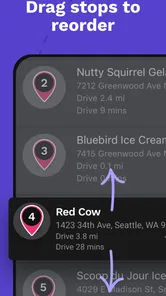
The user interface is sleek and intuitive. I’m not a tech wizard, so I appreciate apps that don’t require me to have a degree in rocket science to use. Everything is clearly labeled, and I didn’t have to hunt around to find what I needed. The drag-and-drop feature for adjusting stops is a nice touch, making it easy to tweak your route on the go.
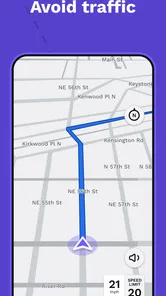
One of the standout features for me was the real-time traffic updates. I’ve used other navigation apps before, but the accuracy here was spot-on. It rerouted me around a nasty traffic jam, saving me both time and frustration. Plus, the voice navigation is clear and concise, so you’re not left straining to hear directions over your car's sound system.
Customization and Flexibility
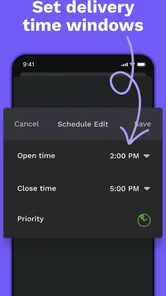
What really sets RoadWarrior apart is its customization options. Whether you’re planning a simple day trip or a complex multi-stop journey, the app adapts to your needs. Customizable features include setting time windows for each stop, adding notes, and even specifying the amount of time you plan to spend at each location. This level of detail ensures that your route is as efficient as possible.
And for those who thrive on data, the app offers analytics on your trips. You can review past routes, see your time savings, and make adjustments for future planning. It's like having your own personal road manager!
What a realistic workday looks like
Imagine a day with a morning delivery, two appointments in different neighborhoods, and a final pickup that must happen before closing. I would enter the destinations ahead of time, identify the fixed appointment, then see how the more flexible visits fit around it. If a customer changes availability, I’d make the adjustment while parked and review the whole sequence again. The value is less about blindly accepting the first route and more about having a workable plan to revise.
One practical trade-off is that detailed planning takes preparation. Adding accurate addresses and realistic stop durations is worthwhile, but it is still work before the first drive. If the list changes constantly, I’d keep the plan flexible and avoid spending time perfecting an order that will be obsolete in minutes. For a stable batch of stops, by contrast, that initial effort can spare repeated map searches and help me keep the day’s priorities visible.
Final Thoughts
After using RoadWarrior Route Planner, I can confidently say it delivers on its promise to simplify route planning. Whether you’re a road warrior by trade or just someone who hates getting stuck in traffic, this app is a must-try. It's packed with features that save time, reduce stress, and ultimately make your journeys more pleasant.
Give it a shot; you might find yourself wondering how you ever managed without it!
A steadier routine for busy days
A realistic day for this kind of planner might start with a handful of client visits spread across different neighborhoods. I’d enter the stops before leaving, mark the appointment that cannot move, and leave flexible errands for gaps in the schedule. If a customer calls to change the order, adjusting the route while parked is more sensible than trying to reorganize it in traffic. That small habit makes the app a planning aid rather than a distraction.
For recurring work, notes and stop durations can help me remember practical details that are easy to overlook when the day gets busy. I’d keep notes brief and useful, such as an arrival instruction, and avoid treating them as a substitute for checking the latest details with a customer. Time windows also deserve a reality check: drive time is only part of a visit, and loading, parking, queues, or a delayed appointment can undo a tightly packed plan.
How it compares with ordinary map apps
Most general navigation apps are strongest when I need directions from where I am to one destination, or want to explore nearby places. RoadWarrior’s appeal is the broader workflow: organizing several stops, setting priorities, and shaping a day around them. I would not assume that a multi-stop planner removes the need for a familiar map, though. If I need to judge a particular entrance, find a nearby service, or make a last-minute detour, my usual map app may be quicker for that one task.
A useful approach is to decide which app owns which part of the job. I can prepare the sequence in RoadWarrior, inspect it before departure, and use navigation for the drive. For a courier covering a changing list of addresses, that structure can reduce the mental load of repeatedly choosing the next stop. For a family outing with just a couple of destinations, the extra planning may be unnecessary. The best choice depends on whether stop order is a real problem to solve.
Small checks that prevent larger headaches
Before a full workday, I’d test the route with a short list and make sure the addresses, stop order, and timing behave as expected. When a stop has a strict arrival window, I’d treat the plan as a draft and leave room for delays rather than schedule every minute. I’d also review the route after any major change, since moving one priority stop can affect the logic of the rest of the day.
Account and privacy choices are worth handling deliberately. I’d use only the account details needed for my workflow, look over device permission settings, and check any purchase terms before buying an optional item. That is a practical way to keep control over a work tool without assuming anything about its internal data practices. For drivers using a shared phone, separating work information from personal notes is an extra sensible boundary.
Planning on a shared or older phone
For a driver who shares a device with family or coworkers, I’d agree on a simple rule before building a route: keep the stop list focused on the current shift and remove or update details when they are no longer useful. That reduces accidental mix-ups between personal errands and customer visits. It is also worth checking that the phone’s location permission matches the way the driver actually uses navigation, rather than leaving a setting untouched simply because it was convenient during setup.
The app supports devices running operating system version 7.0 or later, which gives it a broad compatibility floor, but an older phone can still make a demanding workday frustrating if its battery, screen, or connection is unreliable. I would test the actual device in the car before depending on it for a full route. A paper backup of essential addresses or a second navigation option can be sensible when a missed stop would have real consequences; that is a general driving precaution, not a special feature of this planner.
When I would choose something else
I would skip this app if my main need were offline navigation, a simple one-stop commute, or a map-first way to explore places; those needs are better served by tools designed around them. I’d also hesitate if I dislike preparing a route in advance, since the value here comes from organizing the stops rather than merely opening a map. Conversely, someone handling repeated visits or deliveries may find the planning effort pays back in fewer decisions on the road.
Overall, I see RoadWarrior as a focused tool for people whose day is defined by destinations, not just a destination. Its route planning, adjustable stops, and scheduling details give me a useful framework, while traffic, parking, and real appointment changes still require judgment. I’d try it with a representative day before relying on it for every work route, and keep the stop list accurate. For multi-stop driving, that is a sensible balance between letting an app organize the journey and staying responsible for the decisions that matter.
RoadWarrior Route Planner Frequently Asked Questions
Who is RoadWarrior Route Planner designed for?
RoadWarrior Route Planner is aimed at people who make several stops as part of their work, including professional drivers, couriers, and fleets. It can also suit anyone who regularly needs to organize a multi-stop trip. Its focus on route planning makes it more specialized than a simple point-to-point navigation app, so it is worth considering whether you need help arranging multiple destinations.
What is RoadWarrior Route Planner and how does it work?
RoadWarrior Route Planner is a powerful navigation app designed for delivery drivers, sales representatives, or anyone who needs to plan and optimize multiple stops on a route. It allows users to input multiple addresses and then calculates the most efficient route, taking into account real-time traffic conditions, time windows, and other constraints. This helps to save time, reduce fuel costs, and improve overall efficiency.
Is RoadWarrior Route Planner free to use?
RoadWarrior offers a free app, with in-app purchases available for users who want additional options. The app is listed as free to download, while purchases range from $4.99 to $99.99 per item. Check the available options in the app before committing, and consider whether its route-planning tools fit your needs before making a purchase.
Can RoadWarrior Route Planner be used offline?
Yes, RoadWarrior Route Planner can be used offline, which is particularly useful when traveling through areas with limited or no internet connectivity. Users can download maps and routes in advance, allowing them to continue navigating even without a data connection. However, for dynamic updates like real-time traffic information, an internet connection is required.
What platforms is RoadWarrior Route Planner available on?
RoadWarrior Route Planner is available on both Android and iOS platforms. Users can download the app from the Google Play Store for Android devices and the Apple App Store for iOS devices. This cross-platform availability ensures that users can access the app regardless of their preferred mobile device, making it versatile and widely accessible.
Pros
- Efficient route optimization
- User-friendly interface
- Supports multiple stops
- Customizable settings
- Real-time traffic updates
Cons
- Limited free features
- Occasional app crashes
- No offline mode
- Complex for new users
- Subscription required for full access













