MapQuest: Get Directions
- 20.22K
- 3.8
- Installs
- 10.00M
- Price
- Free

Screenshots

Analysis by Reviewed
I find MapQuest: Get Directions most useful when a trip needs clear, practical guidance rather than a complicated planning setup. I can check a route, listen for turns, keep an eye on traffic, and look for a nearby stop in one place. That makes it a handy option for everyday driving and unfamiliar roads, though it is not the right tool for every travel style or access need.
Choosing it for the trip you actually take
For a regular drive across town, the useful question is not simply which route is fastest. I also want to know whether traffic is building, whether I can avoid a toll, and whether the suggested road is one I feel comfortable driving. MapQuest gives me route choices and preferences that help with those decisions. I would still review the route before setting off instead of assuming the first suggestion is automatically best.
It is less compelling if most of my journeys depend on public transit details, or if I need highly specific accessibility information before choosing a route. In those cases, I would compare it with a mapping service designed around that particular need. Its strength is the combination of driving guidance, live traffic, and nearby amenities, not a promise that every route works equally well for every traveler.
A practical way to prepare before leaving
One small habit makes the app easier to use: enter the destination and adjust route preferences while parked. If I am trying to avoid highways, I can consider whether a slower local route is worth the trade-off; if time matters more, I can leave that restriction off. I also take a moment to scan the route for unfamiliar turns or roads that I would rather avoid. This is more useful than changing settings in the middle of a drive.
For a longer outing, I can use nearby gas stations, restaurants, or hotels as practical reference points if plans shift. I would not treat those results as a full trip-planning system, but they can help when I need a simple stop without switching between several tools. A passenger can do this route-checking and stop-searching while the driver stays focused on driving.
In the Maps & Navigation category, MapQuest sits alongside familiar map apps that may be stronger for transit, local discovery, or specialized route details. I would choose it when I want a straightforward driving companion and useful traffic context. If I already rely on another app for a particular city’s transit network or a route-specific access requirement, switching just for the sake of switching may add friction rather than value.
Readability and navigation
Have you ever found yourself stuck in traffic, desperately needing a shortcut to get to your destination faster? Well, let me introduce you to MapQuest: Get Directions. This handy app has been my go-to for navigating through the maze of city streets and unfamiliar highways. I can’t wait to share my experience with you!
You May Like

Clash of Clans Is Won Between the Battles

Android Auto Makes the Case for Quieter Car Software

MobiOffice: Transforming Mobile Productivity with Seamless Integration

EA SPORTS FC™ Mobile Soccer: Redefining Mobile Sports Gaming

How Microsoft OneDrive Became a Mobile Productivity Giant

How Google Translate Breaks Language Barriers Effortlessly
Reading the map and following a route
Readability matters most when I’m checking directions quickly, and MapQuest keeps its map and route information straightforward. Its turn-by-turn guidance gives me a clear next step rather than making me work through a complicated interface. I still set my destination before moving and check the route while parked; a readable screen is no substitute for keeping my attention on the road.
The voice guidance is useful when looking away from the map would be distracting. I find it especially helpful on an unfamiliar stretch where a turn might be easy to miss. If I’m a passenger, I can also use the map to follow the route visually and help the driver anticipate a turn. Those are practical differences in how the same directions can work for different people and situations.
Why MapQuest Stands Out
First off, let's talk about what makes MapQuest: Get Directions special. This app isn’t just about getting you from point A to point B. It's like having a savvy local guide right in your pocket, ready to offer turn-by-turn directions that are spot on. What I love about MapQuest is its user-friendly interface. It’s so intuitive that anyone can use it without a steep learning curve.
Features That Make a Difference
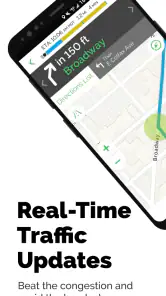
One of the standout features of MapQuest is its real-time traffic updates. The app monitors traffic conditions and suggests alternate routes if there are any snags ahead. This feature has saved me from countless traffic jams, especially during rush hours. Plus, it provides estimated arrival times that are pretty accurate, so you can plan your trips more efficiently.
Another cool feature is the voice-guided navigation. I find this extremely helpful when I’m driving alone and need to keep my eyes on the road. The voice prompts are clear and timely, ensuring I never miss a turn. And let’s not forget about the app’s ability to find nearby amenities like gas stations, restaurants, and hotels. This is a lifesaver when you’re traveling in unfamiliar areas and need a quick pit stop.
Using it across different situations
Consider a familiar everyday problem: I’m driving across town after work, traffic builds on my usual road, and I need to decide whether to stay on course or take another route. Live traffic and an alternate suggestion can help me make that choice before I reach the delay. For a longer trip, I can look for a nearby gas station or hotel when plans change. I’d still compare the suggested route with what I know about local streets, especially if a detour sends me onto roads I’m not comfortable using.
The walking and biking directions also make the app useful beyond driving. They can help me plan a short city trip without defaulting to a car route, though I would treat the displayed path as something to review rather than assume it suits every traveler or street condition. People who need a route tailored to a particular mobility requirement should check the route carefully before setting out. MapQuest’s navigation can be a helpful guide, but it does not replace local judgement about crossings, surfaces, or the ease of getting through a specific place.
User Experience and Interface
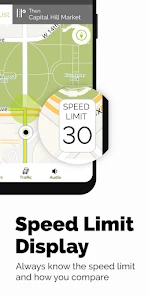
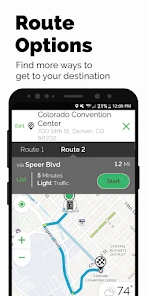
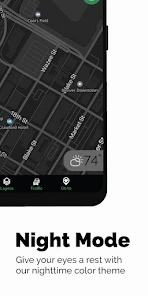
MapQuest’s interface is clean and straightforward. The map is easy to read, and the directions are displayed clearly. One thing that impressed me is the app’s speed. It loads quickly, and the maps refresh in real-time, which is crucial when you’re on the move. It’s also worth mentioning that the app offers multiple routing options, so you can choose the fastest, shortest, or most scenic route, depending on your preference.
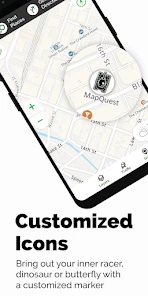
The app is also customizable. You can adjust settings to avoid toll roads, highways, or ferries, making it flexible for various travel needs. Personally, I appreciate the walking and biking directions. Living in a bustling city, these options are great for planning my daily commutes.
Small choices that make routes more useful
I get better results when I set route preferences before starting, rather than changing them while driving. Avoiding toll roads, for instance, can make sense when I have time and want to keep a trip simpler, but it may add distance; avoiding highways can be helpful for a slower local journey, while being a poor fit when I need to cover ground quickly. These settings are useful precisely because they make trade-offs visible: the route that looks shortest is not automatically the most comfortable or practical.
Compared with the familiar big-map alternatives, MapQuest’s appeal is its direct, no-fuss combination of navigation, traffic information, and nearby stops. I’d use it as a strong option for everyday driving and straightforward route planning. If I rely on a particular mapping service for a specialized transit workflow or need accessibility details to choose a route, I would compare options rather than assume every navigation app handles those needs equally well.
Who I’d recommend it to
MapQuest is a sensible choice for drivers who want voice directions, a quick look at traffic, and a way to find basic stops along an unfamiliar route. It can also suit people who occasionally walk or bike and want those routes in the same app. It is free to download, is rated for Everyone, and is developed by MapQuest. The app has a 3.8 average from around 67,000 ratings and over 10 million installs, which gives a useful sense of its established audience without telling me whether it will fit every individual’s needs.
I’d be less inclined to recommend it as someone’s only navigation tool if they need highly specialized accessibility planning, or if their regular travel depends on a different mode or local detail that they already trust elsewhere. Before a long drive, I’d enter the destination while stationary, review the route preferences, and check any important turn before setting off. That small routine makes the guidance easier to use without turning the phone into a distraction.
Motor and sensory considerations
Voice directions can make following a route easier when frequent screen interactions are inconvenient, and they may help someone who would rather listen than keep looking down at a map. I see that as a practical option, not a complete solution for every sensory preference: people who find spoken prompts distracting may prefer to let a passenger monitor the map, or to review the route before departure and rely less on the display while moving.
There is also a real driving trade-off here. A voice prompt can reduce the need to glance at the screen, but it cannot make phone use risk-free. I would mount and set up the phone before moving, keep the volume at a comfortable level, and avoid tapping through route choices in traffic. If a prompt comes at a confusing junction, I would prioritize safe driving and pull over somewhere appropriate before checking the map again.
Situational access on foot or by bike
Walking and biking directions give MapQuest a broader role than a car-only navigator, especially for a short trip where I want to compare route options before leaving. Still, I would check the proposed path against the conditions I expect to face. A route that looks direct on screen may not be the easiest one for a person who needs smoother surfaces, fewer crossings, or a particular kind of street environment. Those details matter more than a quick estimate of distance.
For a visitor meeting friends downtown, for example, I might compare a walking route with the driving approach and use a nearby landmark or amenity to orient myself. If I have a mobility constraint or am unfamiliar with the area, I would not assume the map has answered questions about curb access, pavement condition, or crossing comfort. I would use the route as a starting point and check local information or choose a route I already know when those details are essential.
Costs, compatibility, and practical expectations
The app is free, with optional in-app purchases ranging from $1.99 to $4.99 per item. I would start with the free experience and decide whether any paid item is relevant to how I actually travel rather than treating an in-app purchase as necessary for basic route planning. It is a navigation app from MapQuest, released on February 15, 2011; version 10.4.2 requires Android 7.0 or later. Those details make it easier to judge whether it fits an older Android device before installing.
Its 20,000 reviews alongside around 67,000 ratings suggest that many people have chosen to rate it, but those figures cannot tell me how well it will work in my neighborhood or for my specific route. I would test it on a familiar drive first. That gives me a chance to judge whether its prompts, traffic suggestions, and route choices suit my habits before I depend on it for an unfamiliar trip.
Remaining barriers and a fair comparison
The biggest limitation for my purposes is not that MapQuest lacks everyday navigation tools; it is that a general route can leave important personal questions unanswered. If I need detailed accessibility planning, a transit-first journey, or local route knowledge I already trust, another map or a specialist resource may be a better primary choice. Even when I use MapQuest, I treat a traffic-based detour as a suggestion to evaluate, not an instruction to follow blindly.
Compared with other popular map apps, I would choose based on the job rather than assume one service is best at everything. MapQuest is a reasonable fit when I want driving directions, live traffic, and nearby stops without a complicated workflow. A person who depends on transit connections or more detailed local information may prefer an alternative that places those needs at the center. For an occasional walking or cycling trip, I would compare the actual route before deciding which app gives me the clearest and most suitable plan.
Final Thoughts
In a world where getting lost can be a real hassle, MapQuest is a reliable companion. It’s more than just a navigation app; it’s a smart travel assistant that helps you navigate efficiently and stress-free. Whether you’re heading to work, exploring a new city, or embarking on a road trip, MapQuest has got your back. Give it a try and see how it transforms your travel experience!
My inclusive verdict is that MapQuest makes everyday navigation approachable, especially when voice prompts, route choices, and nearby stops are what I need. Its clear presentation can reduce the effort of following a trip, but no single map can make every route comfortable for every person. I’d use it with a little preparation, and choose another option when its route details do not answer the specific access needs of the journey.
Overall, I would recommend trying it if you mainly drive and want traffic-aware directions alongside useful stops, but I would not make it the sole authority for a complex journey or a route with particular access requirements. The strongest way to use it is as a clear, practical guide: prepare while parked, weigh its route suggestions against the conditions you know, and let your own safety and comfort decide when a different path is better.
MapQuest: Get Directions Frequently Asked Questions
Can I use MapQuest to plan a route before I leave?
Yes. MapQuest is built around maps and directions, so you can use it to prepare for a trip and review navigation options before setting off. Its driving directions, turn-by-turn guidance, live traffic information, and alternative routes can help you consider your journey. As with any navigation app, check your route and remain attentive to road signs while traveling.
Does MapQuest provide voice guidance and live traffic information?
Yes. MapQuest’s navigation features include voice guidance and live traffic information, helping you follow directions without needing to keep your eyes on the screen and giving you context about traffic as you travel. The app also offers alternative routes. Keep in mind that navigation features depend on having an internet connection, so plan accordingly if you expect limited connectivity.
Is MapQuest suitable for everyday trips and longer journeys?
MapQuest is a Maps & Navigation app designed to help with directions for everyday driving as well as longer journeys. Its turn-by-turn guidance, live traffic information, and alternative routes can help you plan a trip and respond to changing traffic. It also offers walking directions, so its navigation tools are not limited to drivers.
Who develops MapQuest, and what should I know about its age rating and version?
MapQuest is developed by MapQuest and is rated Everyone, so its listed content rating is suitable for a broad audience. The current version is 10.4.2, and the app requires Android 7.0 or later. It was released on February 15, 2011, and has grown into a widely installed navigation app. Check your device’s operating-system version before downloading to ensure compatibility.
What features does MapQuest offer for navigation?
MapQuest provides a comprehensive navigation experience with turn-by-turn directions, real-time traffic updates, and alternative routing options to help avoid congestion. Users can also access live traffic cameras and receive alerts for road closures or delays. The app supports walking and driving modes, making it versatile for different types of travelers.
Pros
- Accurate GPS navigation system
- Real-time traffic updates
- Multiple route options
- User-friendly interface
- Offline maps available
Cons
- Ads can be intrusive
- Limited customization options
- Occasional app crashes
- Requires internet for real-time updates
- Some features are premium only

- Category
- Maps & Navigation
- Version
- 10.4.2