

RoadReady
- 2.39K
- 3.3
- Installs
- 500.00K
- Price
- Free

Screenshots
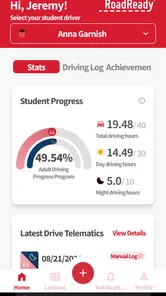
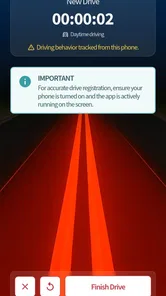
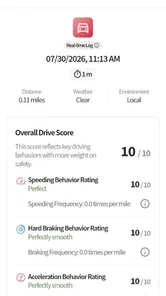
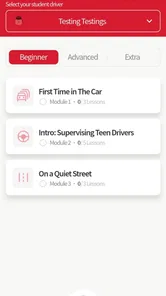
Analysis by Reviewed
When a teenager is learning to drive, practice often gets squeezed between school, work, errands, and the busy routines of the adults helping them. RoadReady is designed for that awkward stage before a full licence, when the learner needs more than occasional trips around the block and the supervising driver wants a clearer picture of how practice is progressing. I found it most useful as a shared record rather than as a complete driving teacher.
The app comes from Safe Roads Alliance, Inc. and belongs in the education category. Its main job is simple: it lets a teen log driving practice during the learner’s permit phase. That narrow purpose is also its strength. It does not try to replace the person sitting in the passenger seat, and it is not a navigation app, a driving game, or a general family organizer. It gives practice sessions somewhere to go after they happen.
It is free, rated for Everyone, and has passed half a million installs. The current version is 3.4.13, and it runs on Android 7.1 or later. Those details make it accessible to many older phones that a family may keep available for a new driver. Its average rating is 3.3 from roughly 3,600 ratings, with about 2,400 written reviews, so I would approach it as a useful practical tool with some room for improvement rather than a flawless experience.
Using RoadReady on a shared household device
The clearest everyday scenario is a parent and teenager sharing one phone or tablet at home. After a short evening drive, the learner can open the app while the details are still fresh and record the session. Later, the supervising adult can look back at the accumulated practice instead of trying to remember every route, condition, and skill covered.
This workflow sounds ordinary, but it solves a real problem. Driving practice is easy to underestimate because a learner may drive frequently without getting a balanced range of experience. A series of comfortable trips to school can create a reassuring total while leaving gaps in harder situations. A log encourages the household to notice whether practice is becoming varied, not merely longer.
I would use it immediately after parking, not while the vehicle is moving. The best habit is to make logging part of the end-of-drive routine: stop safely, discuss what went well, note what needs work, and then enter the session. That keeps the app from becoming another distraction and turns the record into a short debrief rather than a task that gets forgotten.
On a shared device, the practical boundary is that the family should agree who is entering each session. If several learners use the same phone, mixing records can make the history difficult to interpret. I would avoid treating one shared log as a household scoreboard. Each learner needs a record that reflects their own practice, and a supervising adult should confirm entries when accuracy matters.
More From Our News Desk

 Gmail
GmailGmail in a Busy Inbox: Who Benefits Most?
From first account to crowded workday, Gmail earns its place through dependable search and flexible sorting—but its best fit depends on how much inbox maintenance you can tolerate.

 Prime Video
Switching to Prime Video: What Changes in Your Viewing Routine
Prime Video can make a compelling second home for streaming, but switching means learning a different catalog, rental layer, and route from browsing to playback.

 Universal TV Remote Control
Universal TV Remote Control Works Best as a Reliable Backup
A phone remote earns its place through quick setup and reliable habits. Here is how to get more from Universal TV Remote Control—and where its limits show.

 Weather - By Xiaomi
Weather by Xiaomi Review: Clear at a Glance, Less Clear Up Close
Xiaomi’s weather app makes everyday forecasts quick to scan, but its calm surface can leave useful details and recovery paths harder to find than they should be.

 X
XX Under Pressure: Can It Recover When Posting Goes Wrong?
A resilience-focused review of X, examining setup, mistaken posts, interruptions, weak connections, and the gaps that matter when recovery needs to be dependable.

 Clash of Clans
Clash of Clans Is Won Between the Battles
Its raids are quick; its community is a long-term project of coordination, teaching, rivalry, and shared responsibility—with all the friction that entails.
Latest News



The useful mindset is to treat the log as a conversation starter, not as proof that a learner is ready. A recorded trip cannot show whether the driver checked mirrors consistently, handled pressure calmly, or made a safe decision at a confusing intersection. Those judgments still belong to the supervising adult and, where appropriate, a professional instructor.
What setup feels sensible before the first drive
RoadReady is easier to use when the family decides on a routine before opening it. Choose the device that will normally hold the record, decide whether the teen or adult will enter sessions, and agree that entries will be made after the car is parked. This removes small arguments later and makes the history more dependable.
I would also establish what the household considers a meaningful session. A five-minute repositioning of the car should not necessarily be treated the same way as a planned lesson covering traffic, turns, parking, or unfamiliar roads. The app can hold the record, but the family still needs its own standard for what counts as useful practice.
There is an important account boundary here. A shared device is not automatically a shared identity. If the app presents any sign-in or profile choice during setup, use the learner’s details consistently rather than switching casually between family members. I would not assume that a parent and teen can safely merge histories or that changing phones will preserve every record without checking the app’s current behavior first.
That caution is especially relevant when a household replaces an old phone. Before deleting the app or resetting a device, review the existing log and make sure the family knows how it will continue the record. A driving history is not valuable because it is digital; it is valuable because it remains available and understandable over time.
The minimum operating requirement is Android 7.1, which is helpful for families using an older spare handset. Still, an older phone can bring its own friction: a smaller screen, slower loading, or a battery that is unreliable after a drive. I would test the complete after-drive routine at home before relying on it during a busy week.
Coordinating practice without turning it into surveillance
One of the better uses for the app is planning the next lesson. After reviewing the recent record, the adult and learner can identify a specific gap: more night practice, smoother lane changes, better parking, or greater comfort on roads with heavier traffic. The next drive then has a purpose instead of becoming another unstructured trip.
This is where a simple log can outperform a parent’s memory. Adults often remember the dramatic moments—the sudden stop, the missed turn, or the tense conversation—and forget the gradual improvement. A written history can make progress easier to discuss calmly. It also helps prevent every drive from being judged by one mistake.
I would keep the review short. At the end of a session, choose one strength and one skill to revisit. If the family turns every entry into a detailed performance report, the teenager may start seeing the app as an inspection tool. That can lead to rushed entries, arguments, or a reluctance to practise in situations where mistakes are most likely.
RoadReady is not a replacement for a shared calendar or messaging app. It records driving practice, but it should not be expected to coordinate who is available, who owns the car, or whether weather and traffic make a lesson sensible. For those household decisions, ordinary communication remains better. The app works as the record behind the plan, not as the complete plan itself.
A useful division of responsibility is for the teenager to enter the session and for the adult to review patterns occasionally. That gives the learner ownership while keeping the supervising driver involved. I prefer this to having an adult fill in every detail, because the act of recording can help the learner think about what they actually practised.
There is also a trade-off with shared devices. A single phone is convenient, but it can make entries easy to forget when the device is not available. A dedicated household tablet may be easier to find at home, while a personal phone may be more convenient immediately after a drive. The better option depends on the family’s routine, not on the app alone.
Age, trust, and the limits of a driving record
Because the app is rated Everyone, it is a reasonable fit for a household supporting a young learner. That rating should not be confused with driving readiness or with a substitute for adult supervision. The learner’s age, permit rules, insurance requirements, and local practice expectations still determine how and where driving should happen.
I would explain to a teenager exactly how the household will use the record. Will the parent check every entry? Will the log be reviewed once a week? Is it only for tracking practice, or will it influence decisions about taking longer routes? Clear expectations matter more than installing an app. If the learner believes the record is being used secretly to judge them, trust can disappear quickly.
The app can support honest conversations, but it cannot create honesty by itself. A teen might record a session inaccurately, omit a difficult trip, or describe practice in a way that sounds more complete than it was. The adult should compare the log with the actual routine without turning every discrepancy into an accusation. The goal is safer practice, not a perfect-looking history.
This also affects shared household accounts and devices. I would keep the learner’s record separate from another sibling’s practice and avoid letting several people edit the same history casually. If a parent is helping more than one teen, a consistent naming and review routine becomes essential. Without that boundary, the record may remain tidy while becoming practically meaningless.
Another limitation is that a log cannot measure confidence accurately. A learner may complete a difficult route while feeling overwhelmed, or perform a familiar manoeuvre correctly without understanding why it worked. The supervising adult should ask questions after the trip: What felt hardest? What would you do differently? Which part should we repeat? Those answers add the context the app cannot provide.
For families already using a professional driving school’s structured system, RoadReady may be unnecessary. An instructor’s feedback, lesson plan, and local requirements can be more valuable than an additional record. Likewise, a learner who only wants driving theory, road-sign practice, or hazard-perception exercises should look for an app built for those tasks. This one is about documenting practice, not teaching every part of driving education.
Where it fits beside paper logs and ordinary notes
The most direct alternative is a paper log kept in the glove compartment. Paper is dependable, visible, and easy for several adults to sign or review. It also works when a phone battery is low or when a family prefers not to use a device during the learning process. For a very simple household routine, paper may be less distracting.
RoadReady becomes more appealing when the family wants a dedicated digital record that is easier to update after repeated sessions. Compared with scattered notes in a phone’s memo app, a purpose-built driving log gives the practice history a clearer home. Compared with a spreadsheet, it should feel less like administrative work for families that do not want to design their own columns and formulas.
The trade-off is flexibility. A handwritten notebook can include detailed observations in any format, while a dedicated app may guide the user toward the information it expects. If your instructor requires a particular form, signature, or breakdown of practice, check that RoadReady’s record suits that requirement before making it the only record.
I also would not compare it directly with navigation software. Navigation helps a driver get somewhere; RoadReady helps the household remember that a practice drive took place. Using both can make sense, but they solve different problems. The learner should set navigation before moving and should never use the logging process as a reason to handle the phone in traffic.
Its free price removes one common barrier for families testing a new routine. That does not remove the cost of attention, though. If the household never reviews the entries or if the learner records every drive mechanically, the app adds little. The value comes from using the history to choose better practice, not from building the largest possible total.
Small habits that make the record more useful
My first tip is to log soon after stopping. Waiting until the end of the week makes details blur together, especially when several short trips look similar. A quick entry while the route and conditions are still familiar produces a more useful record than a batch of guesses later.
My second tip is to pair each session with a learning intention. Before leaving, agree on one focus such as controlled braking or checking blind spots. After returning, record whether that focus was actually practised. This creates a link between the drive and the next decision, which is more valuable than simply accumulating entries.
My third tip is to use the record to spot comfort-zone driving. If the same easy route appears repeatedly, plan a gradual change rather than jumping straight to the hardest environment. Move from a quiet road to a busier time, from familiar parking to a different layout, or from daylight to another condition when the supervising adult thinks the learner is ready. The log makes repetition visible, but the family must choose the progression safely.
A fourth useful habit is to separate a mistake from a lesson. Instead of writing only “bad drive,” describe the skill to practise next time. That wording helps the teenager see the record as a training tool. It also gives the adult something concrete to coach, rather than reopening an emotional moment.
Finally, review the record at a predictable interval rather than after every single entry. A weekly conversation can reveal patterns without making the learner feel watched every time the phone is opened. If a serious safety concern appears, address it immediately; otherwise, let the log support calm planning.
Who should use it, and who should skip it
I recommend RoadReady most strongly to families that are actively supervising a learner and want one dedicated place to track practice. It is particularly suitable when several adults share responsibility for lessons, because a common record can reduce duplicated questions and forgotten sessions. It also suits households with an older Android device that needs a focused, free educational use.
I would be more cautious for a family that expects the app to teach driving independently. It cannot replace a qualified instructor, an attentive supervising driver, or the learner’s local permit requirements. It is also not the best match for someone looking for interactive lessons, tests, route guidance, or advanced performance analysis.
People who dislike recording details may find a paper notebook faster. Families with multiple learners should pay close attention to identity and record separation. And if the household has no agreement about privacy, review, or who is responsible for entries, installing the app may create tension instead of improving coordination.
The rating of 3.3 suggests a mixed user experience, and I think that is a fair warning to keep expectations practical. The concept is useful, but any logging app depends on consistent input and a routine that survives busy days. If setup feels awkward or entries do not fit the family’s required paperwork, the simplest alternative may be the better one.
My household verdict
After looking at RoadReady as a family tool rather than just a download, I see a focused app with a sensible role. It gives a learner and supervising adult a shared reference point during the permit stage, and it can turn vague impressions about practice into a clearer plan for the next drive. That is enough to make it worthwhile for the right household.
I would install it when the family agrees on who owns the record, when entries happen, and how often the history will be discussed. I would keep a backup habit for any formal documentation and would never treat the app’s record as a final test of readiness. The safest use is quiet and practical: park, reflect, log, and plan.
For a teen who needs encouragement and a parent who keeps losing track of what has been practised, RoadReady can be genuinely helpful. For a learner who needs instruction rather than documentation, another education app or a professional lesson is a better investment of attention. My final view is positive but measured: RoadReady is most valuable when it supports trust, honest coaching, and deliberate practice—not when it becomes a digital scorecard.
RoadReady Frequently Asked Questions
Can RoadReady help me build a regular driving-practice habit?
RoadReady is designed to log teen driving practice during the Learner’s Permit phase, making it useful for keeping practice activity organized over time. A learner and supervising adult can use it as a shared prompt to stay consistent and review progress. The app supports recordkeeping, but safe practice still depends on responsible supervision and following local licensing rules.
Who makes RoadReady, and which devices can run it?
RoadReady is an education app developed by Safe Roads Alliance, Inc. It is available for Android and iOS, and its current version is 3.4.13. The minimum operating system is Android 7.1, so check your device’s compatibility before downloading. The app is rated for Everyone, which makes its stated age classification suitable for a broad audience.
What is RoadReady, and what is it used for?
RoadReady is a driving-focused mobile app designed to help users organize and monitor important information related to driving practice and road readiness. It is intended to log teen driving practice during the Learner’s Permit phase, helping learners keep a record of their practice. It is best used as a tracking and preparation tool, not as a replacement for official driving-school instruction or local licensing requirements.
Is RoadReady suitable for learner drivers and parents?
Yes, RoadReady can be useful for learner drivers, parents, and supervisors who want a clearer way to track practice sessions and driving experience. A learner can use the app to build a consistent record, while a parent or instructor can help confirm that practice is taking place in different conditions. Users should still check whether the app’s tracking categories match the requirements of their local licensing authority.
Does RoadReady replace a driving instructor or official logbook?
No. RoadReady should not be considered a substitute for professional instruction, a certified driving school, or an official paper or digital logbook required by your local authorities. The app may make recordkeeping more convenient, but users remain responsible for entering accurate information and keeping any legally required documentation. Always verify requirements with your local department of motor vehicles or licensing agency.
Pros
- Tracks driving practice hours and conditions in one place.
- Clear progress summaries help learners prepare for licensing requirements.
- Useful reminders encourage consistent practice sessions.
- Simple interface makes logging trips quick and convenient.
- Can help parents and instructors monitor a learner’s experience.
Cons
- Some features may depend on regional licensing requirements.
- Manual trip entry can become repetitive over time.
- Limited value after obtaining a full driving licence.
- Users may need to verify logs with local authorities.
- Older devices may experience occasional performance issues.












