

Road Trip Ryan Trip Guide
- 129.00
- 4.8
- Installs
- 10.00K
- Price
- Free

Screenshots
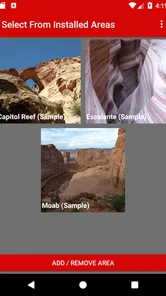
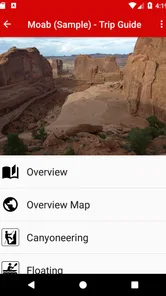
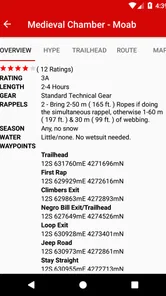
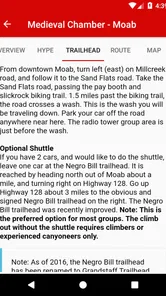
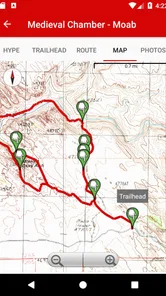
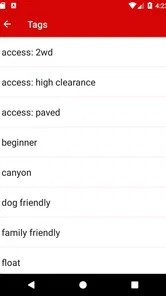
Analysis by Reviewed
Planning a trip through Southern Utah can begin with a simple idea—choose a trail, find a scenic road, and work out where the day ends—but the practical details quickly become the difficult part. Distances, access points, hiking conditions, nearby stops, and the order of the day all affect whether the plan feels relaxed or rushed. I found Road Trip Ryan Trip Guide most useful at that early planning stage, when I wanted destination-specific guidance rather than a general map with a few popular pins.
This is a free Travel & Local app from Road Trip Ryan, LLC, aimed at road-trippers exploring Southern Utah and nearby areas. It is rated for Everyone, and its strong average of 4.8 from around 250 ratings suggests that it has found a clear audience among travelers who want focused regional information. The app has passed ten thousand installs, which also gives it the feel of a specialist guide rather than a mass-market navigation platform.
My overall impression is that it works best as a companion to ordinary navigation, not as a replacement for it. I would use it to decide what deserves a place in the itinerary, understand the character of a stop, and prepare for the handoff from driving to exploring. I would still rely on a dedicated map or navigation app for live routing, traffic, and the final turn-by-turn journey.
From a vague road-trip idea to a workable day
The starting condition for using this guide is usually an incomplete plan. Perhaps I know that I want to visit Southern Utah, but I do not yet know which stops fit together or whether a famous location is actually suitable for the time and energy available. That is where a regional guide has an advantage over a broad travel app: it begins with the area itself instead of asking me to assemble everything from scattered search results.
I would open the app before leaving accommodation, ideally with a rough route already in mind. The first useful question is not “What is the most popular place?” but “What kind of stop can fit into this day?” A scenic viewpoint, a short walk, a longer hike, and a remote detour create very different schedules. Reading the guide with that distinction in mind helps prevent the common mistake of building an itinerary from attractive names alone.
One of the less obvious benefits is that destination research becomes more deliberate. In a general map app, I tend to compare pins, photos, and review snippets. That is fast, but it can flatten every place into the same kind of listing. A focused guide encourages me to think about the experience behind the marker: how the stop fits the road, what preparation it may require, and whether it belongs in the morning, afternoon, or only as an optional backup.
The strongest use of this app is turning a list of tempting places into a sequence I can realistically complete. That requires judgment from me, but the app gives the trip a more useful starting point than an unfiltered web search.
More From Our News Desk

 Weather - By Xiaomi
Weather by Xiaomi Review: Clear at a Glance, Less Clear Up Close
Xiaomi’s weather app makes everyday forecasts quick to scan, but its calm surface can leave useful details and recovery paths harder to find than they should be.

 X
XX Under Pressure: Can It Recover When Posting Goes Wrong?
A resilience-focused review of X, examining setup, mistaken posts, interruptions, weak connections, and the gaps that matter when recovery needs to be dependable.

 Clash of Clans
Clash of Clans Is Won Between the Battles
Its raids are quick; its community is a long-term project of coordination, teaching, rivalry, and shared responsibility—with all the friction that entails.

 Android Auto
Android Auto Makes the Case for Quieter Car Software
The car interface is no longer judged by how much it can do, but by how quietly it helps. Android Auto shows what drivers now expect—and what still gets in the way.

 MobiOffice: Word, Sheets, PDF
MobiOffice: Transforming Mobile Productivity with Seamless Integration
MobiOffice: Word, Sheets, PDF is redefining mobile productivity with a surprising blend of functionality and innovation.

 EA SPORTS FC Soccer Mobile 26
EA SPORTS FC™ Mobile Soccer: Redefining Mobile Sports Gaming
Dive into EA SPORTS FC™ Mobile Soccer, where immersive gameplay and strategic depth transform mobile sports gaming.
Latest News



How I would build the route in stages
I would begin by choosing the broad area or destination that matches the road trip I am considering. From there, I would read several entries rather than committing to the first appealing result. This matters because Southern Utah trips often involve more than the headline attraction. A nearby stop may be a better fit for a late arrival, a weather change, or a day when the group does not want a demanding outing.
Next, I would divide the day into fixed commitments and flexible stops. A booked activity, accommodation check-in, or long drive is a fixed point. The guide then becomes more valuable for the flexible spaces around it. I might choose one main destination, add a nearby secondary stop, and keep another option available if the schedule changes. This is a more reliable workflow than trying to visit every interesting place shown on a map.
I would also make a short note outside the app with the decisions that matter on the road: the order of stops, the approximate point where I need to turn back, and which destination can be dropped without damaging the day. That small handoff is important. A guide can help me understand a place, but the person driving needs a simple plan that can be followed without repeatedly browsing.
For a family, this approach helps with energy and attention. For photographers, it helps separate essential locations from sunrise or sunset possibilities. For hikers, it encourages a more honest look at how much of the day will be spent reaching the trailhead rather than walking. The app is not merely a collection of destinations; its value appears when I use the information to make trade-offs before the trip begins.
The handoff from research to navigation
This is where I would keep expectations realistic. Road Trip Ryan Trip Guide is a specialist information source, while a conventional navigation app is designed to get me from my current location to a chosen address. Those roles overlap, but they are not identical. After deciding which places belong in the itinerary, I would transfer the practical destination details into my usual navigation tool and confirm the driving order there.
That two-app workflow may sound less convenient than using one all-purpose travel platform, but it can produce a better result. General navigation is excellent at roads and directions, yet it is not always the best place to decide which destinations deserve time. The regional guide handles the discovery and interpretation stage; the map handles movement between points. Separating those jobs reduces the temptation to treat every visible marker as a mandatory stop.
The handoff also exposes one of the app’s limitations. If I want live traffic, route recalculation, fuel planning, or a continuously updated driving view, I need another tool. I would not depend on this guide alone for last-minute navigation. Before setting off, I would check the destination in my map app, confirm that the selected road matches the day’s plan, and save the places I expect to visit.
For a passenger, the guide can remain open during this process as a reference for choosing the next stop. For the driver, the final route should be prepared before moving. That division is safer and more comfortable than asking one app to serve as both a research library and an active dashboard.
A realistic day using the guide
Imagine I am staying in Southern Utah with one full day available and a preference for scenery without an exhausting schedule. In the morning, I would use the app to compare several possible destinations and identify one main experience that justifies the drive. I would then look for a second stop that can be shortened or skipped if the first location takes longer than expected.
Before leaving, I would pass the selected destinations to my navigation app, place them in a sensible order, and write down the point at which I need to begin returning. During the drive, the guide would serve as a reference for the next decision rather than something I constantly read while moving. At the first stop, I would use the information I reviewed earlier to decide whether to continue, linger, or protect time for the next part of the route.
If the group becomes tired, the plan can change without feeling like a failure. The main destination remains the success condition, while the secondary stop is optional. If the weather changes or access becomes inconvenient, I can revisit the guide and choose another nearby possibility instead of starting the entire planning process again. This is a practical strength: it supports a flexible itinerary rather than encouraging a rigid checklist.
At the end of the day, the result I want is not simply a larger number of visited locations. It is a route that feels coherent, with enough time to enjoy the surroundings and enough margin to handle delays. The app contributes by helping me understand the choices before I am standing at a roadside junction trying to decide what comes next.
Where it is more useful than broad travel apps
General travel apps usually win when I need broad accommodation searches, restaurant discovery, booking, user-generated updates, or live map information. They are convenient because they cover many needs in one place. Their weakness is that regional outdoor destinations can become a stream of disconnected listings, each competing for attention without helping me understand how they fit into a road trip.
This guide has a narrower purpose, and that narrowness is its advantage. It is centered on road-trip information for Southern Utah and beyond, so I can approach the area as a connected journey rather than a collection of businesses and map pins. That makes it especially useful before departure, when I am shaping the route and deciding what kind of day I actually want.
I would choose it over a general travel app when the trip is destination-led, scenic, and dependent on good sequencing. I would choose a general travel platform when my main concern is booking, dining, current local commerce, or a broad city itinerary. Neither tool fully replaces the other. The right choice depends on whether the problem is “What should I do and how should I arrange it?” or “How do I get there right now, and what is available nearby?”
Small planning habits that improve the experience
My first practical tip is to read the guide before the day begins, not only when I am already on the road. Regional travel often rewards preparation because the cost of a wrong turn or poorly timed detour can be much higher than it appears on a screen. Reviewing options in advance gives me time to compare the main destination with realistic alternatives and to identify which part of the route is least flexible.
My second tip is to create a primary, secondary, and escape plan. The primary plan is the reason for the day. The secondary plan is a nearby addition that works if time and energy allow. The escape plan is what I do when the schedule slips. This structure makes the guide more useful than a simple wish list because it converts information into decisions.
My third tip is to treat the app as a handoff document for the whole group. I would show travel companions the destinations I am considering, agree on the main goal, and then transfer only the final choices to navigation. This avoids a common road-trip problem in which everyone sees different search results and the driver receives last-second instructions that were never part of the original plan.
A fourth useful habit is to separate destination confidence from route confidence. I may be confident that a place is worth visiting while still needing another app to confirm the best way to reach it. Keeping those questions separate prevents disappointment and makes it easier to adapt when the driving portion changes.
What may slow you down
The app’s regional focus is also its main boundary. If my trip covers several unrelated states or depends on city attractions, it is unlikely to be the only travel tool I need. Its value is strongest when Southern Utah is central to the journey. Someone looking for an all-purpose planner, reservation manager, or real-time navigation system should start elsewhere.
The free download lowers the barrier to trying it, but some content is supported by in-app purchases priced from $6.99 to $9.99 per item. I would therefore explore the free experience first and decide whether the additional material matches my route before spending anything. The purchase model may feel less straightforward than an app that includes every feature in one upfront price, particularly for occasional visitors.
Another point of friction is the need to combine it with other tools. I do not see that as a serious flaw for a prepared traveler, but it does add a step. I must move from research to navigation, and I must keep my final route organized outside the guide. People who prefer one application to handle discovery, directions, bookings, and live changes may find this workflow too fragmented.
I would also avoid treating any digital guide as a substitute for situational awareness. A destination can look perfect during planning and still require a change of plan once the day develops. The sensible approach is to use the app to prepare, then remain willing to shorten the route, skip a stop, or choose a safer alternative when circumstances demand it.
Who should install it, and who should pass
I recommend it to travelers who are building a Southern Utah road trip and want more structure than a generic map provides. It is particularly suitable for independent planners, couples comparing several scenic stops, families trying to avoid overloading a day, and visitors who prefer to understand a destination before committing driving time to it.
It is also a good fit for repeat visitors. Someone who has already seen the headline attractions may get more value from using the guide to reshape the route, find a different balance of driving and exploring, or create backup options for a return trip. The focused scope means the app can remain relevant even when the traveler no longer needs a basic introduction to the region.
I would skip it if my trip is mainly urban, booking-heavy, or spread far beyond the area it covers. I would also skip it as a primary tool if I expect live navigation to be the central feature. In those cases, a conventional map, booking service, or broader travel planner will be a better first installation, with this guide serving only as an optional specialist reference.
Version, cost, and the overall result
The current version is 7.4.4 and requires Android 8.0 or later. It is free to install, carries an Everyone age rating, and has been available since February 9, 2015. Those details make it accessible to a wide range of Android travelers, while the optional purchases mean I would still check exactly which material I need for my route before buying anything.
After using it as part of a complete planning workflow, I see Road Trip Ryan Trip Guide as a focused regional companion rather than a universal travel solution. It helps at the point where a road trip changes from an attractive idea into a sequence of choices: which destination comes first, what can be added, what should remain optional, and when the route needs to hand over to a navigation app.
My recommendation is straightforward: install it if Southern Utah is the heart of your trip and you enjoy planning your own days. Use it early, build a flexible itinerary, transfer the final stops to your normal map, and keep a backup plan. If you want one app to manage every travel task, choose a broader alternative. If you want a focused guide to help shape the journey before the driving begins, Road Trip Ryan Trip Guide earns its place in the travel folder.
Road Trip Ryan Trip Guide Frequently Asked Questions
What regions does Road Trip Ryan Trip Guide cover?
Road Trip Ryan Trip Guide focuses on road-trip information for Southern Utah and beyond, making it relevant to travelers exploring that part of the United States. Before planning a specific itinerary, check whether the destinations you have in mind are covered in the app. The guide is best approached as a source of ideas and local trip information, rather than a guarantee that every place along a route is included.
Is Road Trip Ryan Trip Guide available for my device?
Road Trip Ryan Trip Guide is a travel app from Road Trip Ryan, LLC. Its current version is 7.4.4, and the minimum supported operating system is 8.0. Check your device’s system settings before downloading to make sure it meets that requirement. The app is free to download, and its age rating is Everyone, so it is suitable for a broad audience.
What is Road Trip Ryan Trip Guide?
Road Trip Ryan Trip Guide is a travel-planning app designed to help users explore road-trip destinations, attractions, scenic routes, and practical stops. It focuses on providing organized trip information so travelers can decide where to go, what to see, and how to structure their journey. Before downloading, users should check the current app description and coverage area to confirm that their preferred destination is supported.
What kind of information does Road Trip Ryan Trip Guide provide?
The guide typically helps travelers discover points of interest and plan visits around a road-trip route, including attractions, viewpoints, outdoor locations, and other useful stops. Its value depends on the destination and the depth of information available for that region. Users should treat the app as a planning aid and verify opening hours, road conditions, admission requirements, and local restrictions before traveling.
Does Road Trip Ryan Trip Guide work offline?
Offline availability is an important consideration for anyone traveling through rural areas or places with unreliable mobile coverage. Road Trip Ryan Trip Guide may offer some content that can be accessed without a constant connection, but users should confirm the exact offline features in the current app listing or settings. Downloading relevant guides and maps in advance is recommended whenever offline access is supported.
Pros
- Detailed road-trip itineraries make planning routes and stops much easier.
- Useful local tips can help travelers find lesser-known attractions and scenic detours.
- Works well for travelers seeking practical
- experience-based destination advice.
- Covers more than major landmarks
- encouraging exploration beyond typical tourist spots.
- The focused travel content is easier to browse than broad
- general-purpose guide apps.
Cons
- Content may be less useful outside the destinations covered by Ryan’s guides.
- Some recommendations may feel subjective rather than tailored to your travel style.
- The app may not replace maps
- navigation
- or live traffic information.
- Travel details can become outdated as businesses
- roads
- and attractions change.
- Users wanting extensive hotel or restaurant booking tools may find it limited.











