Rippling - HR, IT & Finance
- 561.00
- 4.4
- Installs
- 100.00K
- Price
- Free

Screenshots

Analysis by Reviewed
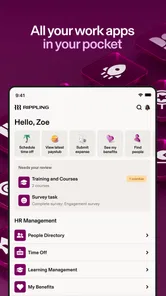
I came to Rippling - HR, IT & Finance expecting a practical work companion rather than an app I would open for entertainment, and that is exactly how it feels. It belongs to the business category and is developed by People Center Inc., with a focus on keeping everyday employee tasks in one place: benefits, expenses, time off, and related workplace information. My first impression was that its value depends less on constant use and more on how quickly it removes small administrative interruptions when I actually need it.
That makes it a different kind of app from a general finance tracker, a standalone calendar, or an ordinary employee directory. Rippling is built around the relationship between a worker and their organization. If your employer uses the service properly, the app can become a convenient doorway into work-related details that would otherwise be scattered across emails, spreadsheets, paper forms, and separate portals. If your employer does not use those parts of the platform, however, the experience can feel much narrower than the broad name suggests.
How Rippling feels in everyday work
The current version is 3.0.46, and the app has been available since June 15, 2017. That history matters because this is not a brand-new workplace experiment trying to prove that a phone can replace every HR process. It feels more like a mature companion for tasks employees tend to postpone until they become urgent: checking available time off, reviewing a benefit detail, submitting an expense, or finding information connected with work.
I would describe the app as a central access point rather than a complete replacement for every conversation with HR or payroll. A well-organized mobile screen is useful when I am away from my desk, traveling, or trying to answer a simple question without searching through old messages. The benefit is especially clear for employees who work in a hybrid environment and do not have a physical HR desk nearby.
One realistic example is a Monday morning expense. I might buy something for work while traveling, keep the receipt on my phone, and want to deal with it before the paper disappears in my bag. Rippling gives that kind of task a more natural home than sending a photo to myself or saving it for a monthly cleanup session. The important advantage is not that expense administration becomes exciting; it is that the task can be handled in the same work context as other employee information.
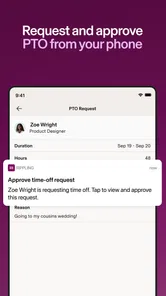
The same applies to paid time off. Instead of asking a manager or opening a spreadsheet, I can use the relevant workplace area to check what I need before making a request. That does not remove the need to follow company rules, but it can reduce avoidable back-and-forth. For someone who only needs occasional access, this is a strong reason to keep the app installed even if it is not opened every day.
The practical value of one workplace doorway
The strongest idea here is consolidation. Benefits and expenses are usually separate subjects in an employee’s mind, yet they are both part of the same administrative relationship with an employer. Rippling places them alongside time-off information and other work tools, which can make the phone feel less like a collection of unrelated company portals.
More From Our News Desk

Weather by Xiaomi Review: Clear at a Glance, Less Clear Up Close

X Under Pressure: Can It Recover When Posting Goes Wrong?

Clash of Clans Is Won Between the Battles

Android Auto Makes the Case for Quieter Car Software

MobiOffice: Transforming Mobile Productivity with Seamless Integration

EA SPORTS FC™ Mobile Soccer: Redefining Mobile Sports Gaming
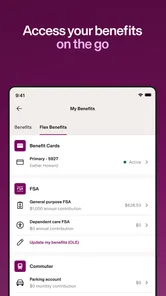
I also appreciate the difference between information that is merely displayed and information connected to an action. A benefits page is useful when I need to understand what is available, but the real convenience comes when I can move from checking a detail to completing the next employee task without starting over somewhere else. The exact workflow will depend on how an organization has configured its Rippling environment, so I would not assume every employee sees identical options.
That configuration point is important. Two people can install the same app and have noticeably different experiences because their employers may enable different areas or use different procedures. This is not a weakness unique to Rippling, but it changes how I judge the product. I evaluate it as a bridge to an employer’s setup, not as a fully independent app with the same content for everyone.
For this reason, the app works best when a company has made a deliberate effort to keep its employee information current. A polished interface cannot compensate for an outdated policy, an unclear approval route, or an HR process that still happens entirely by email. Rippling can shorten the path to information, but the organization still controls much of what that path contains.
What the current release means for users
The current release gives existing users a useful point of reference: version 3.0.46 is the version I would expect to encounter now, while the app supports devices running Android 8.0 or later. That minimum requirement is friendly to people who do not replace their phone frequently, although anyone using an older device should check compatibility before planning around the app.
The app is free to install, which removes an obvious barrier for employees who simply need access to workplace services. I would still separate the app’s installation cost from the services offered through it. A free employee app does not mean that benefits, payroll arrangements, or company policies are free or identical; those are matters handled through the employer and the relevant workplace programs.
Its public response is encouraging without being a reason to ignore personal fit. Rippling holds a 4.4 average from around 4.4 thousand ratings, with roughly 560 written reviews, and has passed 100 thousand installs. Those figures suggest that many people find the app useful, but they do not guarantee that every company’s setup will be equally smooth. In an HR product, the quality of the surrounding organization matters almost as much as the software.
The Everyone age rating also matches the app’s purpose. It is designed for ordinary workplace administration rather than mature entertainment or sensitive recreational content. That said, the information inside an employee account can still be personally important, so I would treat the phone and account with the same care I use for any work-related service.
Where it saves time, and where it does not
Rippling is at its best when the question is simple and the answer is already available in the company’s system. “How much time off do I have?” “Where do I submit this expense?” or “Which benefit detail should I review?” are the kinds of questions that benefit from a central mobile entry point. The app can turn a search through messages into a short visit to a familiar workplace tool.
A less obvious advantage is timing. Administrative tasks are easier to complete while the relevant event is still fresh. An expense can be dealt with near the purchase, and a time-off request can be considered before schedules become complicated. I find that this reduces the mental load of maintaining a separate personal reminder system for every small HR obligation.
There is also a useful distinction between occasional access and regular management. Employees who rarely need HR information may value Rippling precisely because they do not need to learn several different systems. Employees with frequent approvals, detailed payroll questions, or complex company-specific processes may spend more time moving between sections or contacting support. The app is a strong front door, but it may not be the entire building.
Compared with a general expense app, Rippling has the advantage of workplace context. A standalone expense tracker may be better for personal budgeting, categorizing household purchases, or monitoring a private spending plan. Rippling makes more sense when the expense belongs to an employer and needs to fit an organizational approval process.
Compared with a basic calendar or a shared spreadsheet for time off, Rippling can provide a more direct employee workflow. A calendar may show when someone is away, but it is not necessarily the right place to manage a formal request or review related information. On the other hand, a small team with a simple, reliable manual process may find a dedicated HR platform unnecessary if its needs are limited.
Three details that change the decision
First, I would install the app only after clarifying how my employer expects it to be used. The broad “HR, IT & Finance” identity can create an expectation that every employee will see a complete set of tools. In practice, the useful sections are tied to the organization’s configuration. Asking which tasks are supported prevents disappointment and also helps identify whether the app is meant to replace an older portal or simply supplement it.
Second, I would use Rippling as the place to begin a task, not automatically as the final authority on a complicated issue. For a straightforward time-off request or expense submission, that distinction may not matter. For an unusual reimbursement, a benefits exception, or a question involving company policy, I would read the available guidance and then confirm with the appropriate workplace contact. Convenience is not the same as policy interpretation.
Third, I would build a small habit around receipts and approvals. The app is more useful when information is captured close to the event rather than reconstructed later. Taking care of an expense while the receipt and purpose are clear can reduce errors, but I would still keep the original documentation until the organization’s process is complete. That is a practical safeguard, not a criticism of the app.
A fourth consideration is device age. Because the minimum operating system is Android 8.0, many users will be able to run it, but people holding on to older phones should check before depending on mobile access during travel or a busy work period. If the app is central to a company workflow, compatibility should be treated as part of planning rather than discovered at the last minute.
The friction I noticed
The biggest limitation is dependence on the employer. Rippling cannot decide how clearly a company explains its benefits, how quickly an expense is approved, or whether a time-off balance is maintained correctly. When something looks wrong, the app may show the problem clearly without being able to solve it directly. That can make the convenience feel incomplete at exactly the moment a user needs reassurance.
I also would not choose it as a personal finance replacement. Its workplace focus is an advantage for company expenses and employee information, but it is not the same as a household budgeting tool. Someone looking for investment tracking, private bill management, or a broad view of personal spending should choose an app designed for those jobs instead.
There is a similar limitation for very small teams. If a business has only a few employees and handles leave, expenses, and benefits through a simple process that everyone understands, introducing a centralized HR app may add another account and another routine. Rippling becomes more compelling as the cost of scattered information grows, not merely because mobile access sounds modern.
Users who prefer to resolve every issue through a person may also find the app less satisfying when the answer depends on an HR representative. The mobile interface can make a request easier to submit, but it does not eliminate human decisions, approvals, or exceptions. I see that as a healthy boundary, although it means the app should not be judged as a fully automated workplace assistant.
What I would watch as an existing user
For the next stage of the product, I would pay attention to how consistently the experience connects information with action. A benefits detail is more valuable when it is easy to understand, an expense flow is more valuable when its status is clear, and a time-off tool is more valuable when employees can tell what happens after submitting a request. These are the areas that determine whether the app becomes a trusted daily utility or remains an occasional portal.
I would also watch how updates affect older devices and established routines. The current version supports Android 8.0 and later, so users with older hardware should remain aware of compatibility as the app evolves. Existing employees generally want improvements without losing the familiar path to a task, especially when that task involves a deadline or an approval.
Another worthwhile measure is clarity rather than the number of visible sections. A workplace app can become harder to use if it tries to display every possible service at once. I would prefer changes that make the most common jobs—checking time off, reviewing benefits, and handling expenses—easier to recognize and complete. That would help both new employees and people who open the app only a few times each month.
Finally, I would look for a continued balance between broad coverage and dependable basics. The name suggests a connection across HR, IT, and finance, but the app earns trust through small moments: a balance that is easy to find, a receipt that reaches the right workflow, or a workplace detail that does not require an old email thread. Those improvements would matter more to me than adding complexity for its own sake.
Who should use it
I recommend Rippling to employees whose organizations actively use it for benefits, expenses, paid time off, or related workplace administration. It is especially suitable for people who work away from a central office, travel for work, or want one dependable place to begin routine HR tasks. The free installation and broad device support make it easy to try, while the app’s real value comes from the employer setup behind the account.
I would be more cautious if you are searching for an independent personal finance app, a standalone scheduling tool, or a complete replacement for direct HR support. Those needs call for different products, and Rippling may feel unnecessarily tied to your workplace. It is also not the right choice for someone whose employer does not use the relevant parts of the platform.
After using it as a workplace companion, my view is positive but practical. Rippling is most useful when it turns scattered employee chores into a short, repeatable mobile routine. It does not make HR administration disappear, and it cannot repair unclear company policies, but it can make ordinary tasks less awkward and easier to handle at the right moment. For an employer-supported setup, I would keep it installed; for personal finance or a very simple small-team process, I would look elsewhere.
Rippling - HR, IT & Finance Frequently Asked Questions
Can I use Rippling if my employer has not set up an account for me?
Rippling is designed to connect employees with the workplace that manages their account, so downloading it by itself does not create access to company records or services. Your employer needs to set up or activate your account and provide the appropriate sign-in details or invitation. If you are considering the app for personal use, it is not a standalone tool for managing your own payroll or benefits.
What is Rippling - HR, IT & Finance used for?
Rippling is a business management platform that brings human resources, payroll, benefits, IT administration, and finance-related workflows together in one system. Companies can use it to onboard employees, manage payroll and time off, organize benefits, assign devices and software, and automate administrative tasks. The exact tools available depend on the employer’s subscription, location, and enabled modules.
Can employees use Rippling from a mobile device?
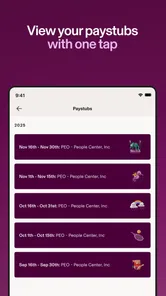
Yes, Rippling provides mobile access for many common employee and administrator tasks. Depending on your organization’s setup, you may be able to view pay information, request time off, complete onboarding steps, access company documents, review benefits, and manage certain work applications. Mobile features can vary by account permissions, operating system, company policies, and the specific Rippling products your employer uses. The app is listed as compatible with operating systems starting at version 8.0, so check your device before installing.
Does Rippling work on both Android and iOS?
Rippling is a mobile app intended for employees and administrators who need access to workplace tools on a phone. The minimum operating-system requirement is version 8.0. Before downloading, make sure your device meets the requirement and that your employer supports mobile access for your account. The tasks available after signing in depend on your organization’s setup and the permissions assigned to you.
Is Rippling free for employees to download and use?
Employees generally do not purchase Rippling independently when their company provides access. The employer usually pays for the organization’s Rippling subscription, while employees sign in using credentials or an invitation supplied by their workplace. Availability of features is controlled by the employer, so downloading the app alone will not provide access unless your company has created or activated a Rippling account for you.
Pros
- Combines HR
- payroll
- IT
- and finance tools in one platform.
- Automates onboarding
- offboarding
- and employee lifecycle workflows.
- Supports integrations with many business and productivity applications.
- Provides centralized employee data and customizable administrative controls.
- Offers mobile access for completing tasks and viewing workplace information.
Cons
- Pricing can be difficult to estimate without a tailored sales quote.
- The broad feature set may feel overwhelming for small teams.
- Some advanced tools require additional modules or paid add-ons.
- Payroll and benefits availability varies by country and region.
- Employees may have limited access if their employer restricts app features.











