

Ringtones & Wallpapers - Mob24
- 747.00
- 4.5
- Installs
- 1.00M
- Price
- Free

Screenshots
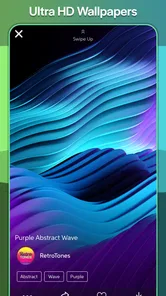
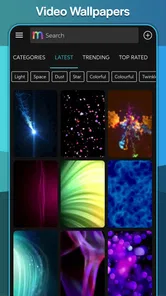

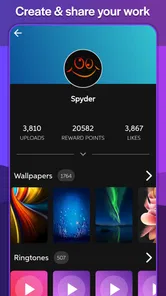
Analysis by Reviewed
I like changing the small things that make a phone feel personal, but I don’t want to spend an afternoon comparing separate tools just to pick a new sound and background. That is the appeal I see in Ringtones & Wallpapers - Mob24: it puts two everyday customization jobs together, with a ringtone maker for moments when the available sounds are close but not quite right. It is a practical idea, and the app is most useful when I treat it as a place to explore and try options rather than as a deep design studio.
The combination matters more than it might seem. A ringtone is something I hear, often when I’m not looking at my phone, while a wallpaper is something I see repeatedly as I unlock it. They serve different purposes, but both affect how familiar and recognizable the device feels. Having both kinds of material in one app makes it easier to refresh the phone in one sitting, then leave the settings alone until I want another change.
Customization Galore
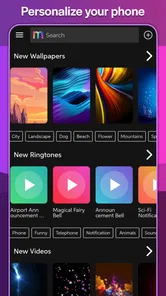
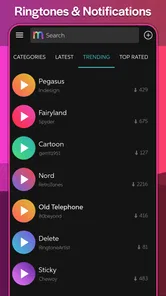
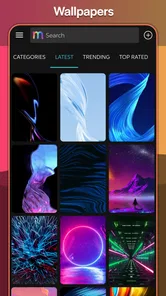
First things first, Ringtones & Wallpapers - Mob24 is a one-stop shop for all things personal on your phone. This app is packed with an impressive variety of ringtones and wallpapers to suit every mood and style. Whether you’re into funky beats or calming soundscapes, Mob24 has got your back. And the wallpapers? Oh, they’re a visual treat! From stunning landscapes to quirky art, there’s something for everyone.
For me, the practical benefit is not simply having more choices; it is being able to make a small change without turning phone setup into a project. A new background can make the home screen feel less stale, while a distinct ringtone can make an incoming call easier to recognize in a busy room. I’d treat those as separate decisions, though: a wallpaper that looks striking in a preview may feel too busy behind app icons, and a sound that seems fun at first can become tiring when it repeats throughout the day.
That distinction is a useful way to browse. I look at a wallpaper as part of the screen I use, not as an isolated picture: a detailed image might be attractive full-size but compete with icons, while a simpler composition can make the home screen easier to scan. For sounds, I think about the places where I’ll hear them. A tone that stands out in a quiet room may be too sharp for a shared workspace, and a gentle one can disappear into street noise. Choosing for the setting, rather than only for a quick first impression, makes the collection more useful.
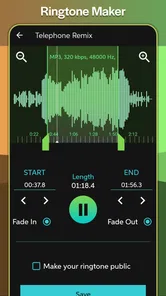
The ringtone maker is the feature that gives the app a more personal angle than a collection alone. A ready-made sound can be appealing but still not quite match what I want; having a way to create a tone offers another route instead of forcing me to settle immediately. I would approach that feature with a specific goal in mind: for example, aiming for a sound that is recognizable without being startling. The value is less about producing an elaborate audio project and more about having a chance to make the phone’s alert feel less generic.
Easy Peasy Interface
One thing I really appreciate about this app is its user-friendly interface. You know how some apps just make you feel like you need a manual to navigate? Not this one. Everything is laid out in a way that makes sense, and you can browse through categories without breaking a sweat. Plus, the search feature is pretty nifty if you have something specific in mind.
More From Our News Desk

 Gmail
GmailGmail in a Busy Inbox: Who Benefits Most?
From first account to crowded workday, Gmail earns its place through dependable search and flexible sorting—but its best fit depends on how much inbox maintenance you can tolerate.

 Prime Video
Switching to Prime Video: What Changes in Your Viewing Routine
Prime Video can make a compelling second home for streaming, but switching means learning a different catalog, rental layer, and route from browsing to playback.

 Universal TV Remote Control
Universal TV Remote Control Works Best as a Reliable Backup
A phone remote earns its place through quick setup and reliable habits. Here is how to get more from Universal TV Remote Control—and where its limits show.

 Weather - By Xiaomi
Weather by Xiaomi Review: Clear at a Glance, Less Clear Up Close
Xiaomi’s weather app makes everyday forecasts quick to scan, but its calm surface can leave useful details and recovery paths harder to find than they should be.

 X
XX Under Pressure: Can It Recover When Posting Goes Wrong?
A resilience-focused review of X, examining setup, mistaken posts, interruptions, weak connections, and the gaps that matter when recovery needs to be dependable.

 Clash of Clans
Clash of Clans Is Won Between the Battles
Its raids are quick; its community is a long-term project of coordination, teaching, rivalry, and shared responsibility—with all the friction that entails.
Latest News



Changing your ringtone or wallpaper is just a tap away. Find something you like? Tap, set, and you’re done. It’s that simple. And for someone like me who changes their mind often, the ease of switching things up is a huge plus.
A useful way to make browsing less random is to decide what you want to change before opening the app. If I need a quieter call sound for a shared office, I can focus on ringtone choices rather than getting sidetracked by backgrounds. If the goal is a calmer screen, I can judge wallpapers against the icons and widgets I actually use. With a ringtone maker in the mix, I’d also listen to a candidate more than once before setting it; a sound that works as a quick preview may be distracting after hearing it repeatedly.
I’d also separate browsing from committing to a change. When I’m only exploring, I can notice a few promising options without immediately replacing the sound or image I already use. Then I can make the final choice when I have a moment to check how the wallpaper sits behind my usual icons, or to hear the ringtone at a sensible volume. This small pause matters because previews are brief, while the chosen sound may repeat and the chosen image may stay on screen every day.
If you’re wondering whether you need to use both parts of the app, I don’t think so. Someone who only wants a new call sound can focus on that, while someone who mainly wants a fresh background can browse for one without turning the visit into a full phone makeover. The advantage is having the options in one place when you do want both; it doesn’t make changing everything at once necessary. I’d start with whichever part is bothering me most and leave the other alone unless I find a good reason to change it.
Regular Updates
Another cool thing about Mob24 is that it keeps things fresh with regular updates. New ringtones and wallpapers are added frequently, so you’re never stuck with the same old choices. I love checking back to see what’s new and finding little gems that brighten up my phone.
In an everyday situation, I might refresh the wallpaper at the start of a new season, then choose a ringtone that stands out from the general noise of a commute. That is where a combined library feels more convenient than searching separate wallpaper and sound apps. The trade-off is that someone who already has a favorite wallpaper source or prefers a dedicated audio editor may find this all-in-one approach less focused. Mob24 is most appealing when convenience and variety matter more than deep control over either kind of customization.
A realistic routine could be quite modest: I might notice on a morning commute that I keep mistaking my phone’s alert for someone else’s, then use a distinctive tone for calls rather than changing every notification setting. Later, at home, I could pick a less cluttered background because the current one makes the screen feel busy. These are small adjustments, but solving one annoyance at a time is more likely to leave me with a phone I enjoy using than choosing a sound and image just because both are available.
For a shared home or workplace, the sound choice deserves particular care. A ringtone that is funny or dramatic may amuse me once but become awkward when it rings in a quiet room; a short, recognizable tone can be more practical. I’d also avoid choosing solely by what sounds loudest in a preview. The goal is to recognize a call, not to make every incoming call disruptive. The app’s collection and maker are useful starting points, but the best result still depends on matching the tone to the way I use the phone.
There is a similar screen-side trade-off. A wallpaper can make the phone feel new, yet a highly detailed image may make frequently used icons harder to pick out at a glance. I’d consider the top and bottom areas where shortcuts or widgets sit, rather than judging only the center of the image. If I rely on the home screen to find apps quickly, a background that leaves visual breathing room may serve me better than one that is impressive but crowded.
Choosing It for Your Phone
Mob24 is free, and its Teen content rating makes it relevant to a broad range of users, though I’d still encourage younger users to browse with the same care they would use in any media library. Mobiles24 is the developer, and the app has a 4.5 average from around 8.3 thousand ratings, with over 500 thousand installs. It was released on December 25, 2012, and version 3.0.10 supports Android 5.0 and later.
That Android requirement is worth checking before downloading, especially if you keep an older device in service. I’d also compare the app with the phone’s built-in wallpaper and ringtone settings: those are enough if you only want to select a picture already saved on your phone or use a sound you already own. Mob24 makes more sense when you want to browse a dedicated collection and explore the maker, rather than just change a setting once.
One limitation of any broad collection is that a large choice can make it harder to find a personal favorite quickly. Search and categories help, but I’d go in with a style or mood in mind instead of expecting every suggestion to fit. If you want precise sound editing or a tightly curated set of backgrounds, a specialist tool may suit you better; if you mainly want easy access to both kinds of customization, this app is a more convenient starting point.
The comparison with the usual alternatives comes down to how much control I need. A phone’s built-in settings are simpler when I already have the image or audio file and only need to apply it. A dedicated wallpaper app may be a better fit if my entire priority is selecting and arranging visual backgrounds, while a focused audio editor makes more sense if I want detailed control over a sound. Mob24 sits between those options: it is for people who value browsing both types of customization in one place and are comfortable keeping the process straightforward.
I would not choose it expecting every item to match my taste or a perfectly tailored recommendation every time. Broad libraries are useful precisely because they offer variety, but that also means I may need to search, compare, and dismiss plenty of options before finding one I want to keep. A search term or a clear idea of the mood I’m after helps. If I open the app with no plan and scroll without a purpose, the number of possibilities can turn a quick refresh into an indecisive session.
Another practical question is whether a selected sound will suit every moment. I’d think about where the phone usually sits and how often I expect to hear calls before choosing something unusual. A tone that is distinctive at home might be uncomfortable in a meeting or public place. The maker can help me aim for a more personal result, but it does not remove the need to test that result in ordinary use. I’d prefer a sound I can live with over a novelty that gets old after a day.
For wallpapers, I’d make the choice with the screen’s everyday job in mind. If I use widgets or keep many shortcuts on the home screen, a calmer image may be more functional than a striking one. If I mostly see the lock screen, a detailed picture may matter more to me there. Thinking about where I’ll actually view the image is a simple way to avoid choosing something that looks good in isolation but feels wrong once it becomes part of the phone.
The app’s long history and current version are useful context, but I’d still make the decision based on what I need today: an accessible place for sounds and backgrounds, with a maker as an extra option. Its free price lowers the barrier to trying that approach, while the Teen rating is a reminder that it is a media library intended for a broad audience rather than a child-focused experience. I’d keep browsing sensible, especially if a younger family member is using the device.
Who Gets the Most from It
I think the best match is someone who likes changing the feel of their Android phone now and then, but does not want separate apps for every small adjustment. It is also a reasonable starting point for someone who has never made a ringtone before and wants to see whether a more personal call sound is worth the effort. The paired browsing experience is the key convenience: I can handle the visual and audio sides of personalization in one visit, without needing a complicated workflow.
It is less suited to someone who already has a carefully organized collection of personal sounds and images, or who expects extensive editing controls. If my only task is applying a saved file, the built-in settings may be enough. If I care deeply about exact audio adjustments or want a narrowly curated visual library, a specialist alternative is likely to serve me better. Those aren’t flaws so much as a reminder that Mob24 is strongest as an approachable, combined option, not as a replacement for every dedicated tool.
My practical advice is to begin with one small change, then live with it for a while. Pick a wallpaper that keeps the screen legible or a ringtone that is easy to identify without being jarring. If that works, the app has done its job; there is no need to keep changing things for the sake of exploring. If it doesn’t, the ease of browsing and switching gives me a low-effort way to try another direction.
Final Thoughts
At the end of the day, Ringtones & Wallpapers - Mob24 is a fantastic app for anyone looking to jazz up their phone. It’s easy to use, constantly updated, and offers a vast collection of ringtones and wallpapers that cater to all tastes. If you’re like me and love keeping your phone’s look and sound fresh, give this app a go. You won’t be disappointed!
My recommendation is strongest for people who want an uncomplicated way to browse sounds and backgrounds together, and who enjoy making occasional personal changes rather than fine-tuning every detail. I’d keep a specialist editor or the phone’s built-in tools in mind if my needs were narrower. For a quick refresh, though, the combination of a broad selection and a ringtone maker gives Mob24 a clear, practical purpose: it helps make a familiar phone feel a little more like my own.
Ringtones & Wallpapers - Mob24 Frequently Asked Questions
Does Ringtones & Wallpapers - Mob24 work on both Android and iOS?
Ringtones & Wallpapers - Mob24 is an Android app, and its listed minimum requirement is Android 5.0. Its features are intended for personalizing an Android device, including using sounds as ringtones and choosing wallpapers. If you use an iPhone, this Android app is not the right download for your device.
What features does Ringtones & Wallpapers - Mob24 offer?
Ringtones & Wallpapers - Mob24 provides a vast selection of high-quality ringtones and wallpapers for users to personalize their devices. The app includes categories like pop, rock, classical, and nature sounds for ringtones, while offering HD and 4K wallpapers in various themes such as nature, abstract, and urban landscapes. Additionally, it allows users to easily set and change their ringtones and wallpapers directly from the app.
Is Ringtones & Wallpapers - Mob24 free to use?
Yes, Ringtones & Wallpapers - Mob24 is free to download and use. However, it may offer in-app purchases or ads to access premium content or features. Users can enjoy a wide range of free wallpapers and ringtones, but opting for premium options might enhance their experience with exclusive content and an ad-free interface.
How user-friendly is the Ringtones & Wallpapers - Mob24 app?
The Ringtones & Wallpapers - Mob24 app is designed with user-friendliness in mind. It features an intuitive interface that allows users to easily navigate through categories and preview ringtones and wallpapers before setting them. The app also includes a search function to quickly find specific content, making it accessible for users of all ages and technical abilities.
Does Ringtones & Wallpapers - Mob24 consume a lot of data or battery?
Ringtones & Wallpapers - Mob24 is optimized to minimize data and battery usage. The app primarily requires data when downloading new ringtones and wallpapers, but it allows users to save their favorite items offline. Its efficient design ensures that the app does not significantly drain battery life, making it suitable for daily use without impacting device performance.
Pros
- Wide variety of ringtones available.
- High-quality wallpapers and images.
- Easy to navigate user interface.
- Frequent updates with new content.
- Allows customization of favorites.
Cons
- Contains ads that can be intrusive.
- Limited free content options.
- Some ringtones are repetitive.
- Requires internet for downloads.
- Premium features are expensive.











