RingCentral
- 2.53K
- 4.8
- Installs
- 1.00M
- Price
- Free

Screenshots


Analysis by Reviewed
When I judge a work-communications app, I look beyond the number of buttons it offers: the useful question is whether it helps a team keep conversations and calls from splintering across unrelated tools. RingCentral aims to bring those work interactions together on mobile. I’d consider it most seriously if your colleagues already use RingCentral as part of their work setup; without that shared context, an all-in-one app can feel like one more place to check.
What the free download means
The app is free to download, which makes trying it a low-commitment first step. That fact alone does not tell you what a business will pay for the broader service, so I wouldn’t treat the download price as proof that every calling or collaboration need is free. Before a team moves its routine communications over, it should check that the service arrangement it plans to use fits its budget and requirements.
Where the value comes from
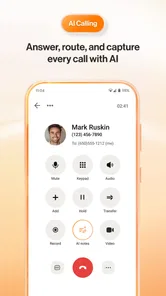
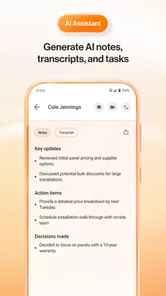
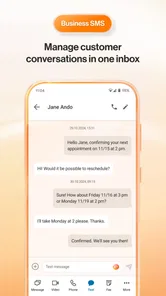
For me, the practical value is in having messaging, video calls, and phone calls available in one work-oriented place, rather than switching between a chat app, a meeting app, and a separate calling tool. That can make handoffs easier: a quick message can clarify an issue before someone decides a call is needed. RingCentral is developed by RingCentral, and its AI-focused positioning suggests a modern communications service, but I’d assess it by whether its tools suit the team’s actual workflow rather than by a broad claim.
A realistic workday
Picture a small team coordinating a customer handoff while people are away from their desks. Someone can use team messaging to keep the relevant colleagues in the conversation, then move to a call or video meeting when a written exchange is no longer enough. Keeping that activity in one work hub may reduce app-hopping, though it only works smoothly when the people involved know where to find the conversation and actually use the same system.
Trade-offs and fit
This is not automatically a better choice than a familiar standalone chat or video app. If your work is mostly casual one-to-one messaging, a simpler messenger may be easier to adopt; if your organization already relies on a different communications platform, adding another one could create duplicate notifications and scattered conversations. I’d also plan a little time for onboarding and agree on channel habits before expecting the team to benefit. With a 4.7 average from around 31,000 ratings and over a million installs, it has attracted a substantial audience, but popularity cannot tell you whether it matches your workplace.
Anyone deciding whether to install it should ask a few practical questions: Do coworkers already use RingCentral? Will the team genuinely use messaging, calls, and video in the same workflow? And has whoever manages the workplace account checked the service costs and setup? If the answers point to a shared, supported work environment, the app is easier to justify. If you only need an occasional personal call, it may be more than you need.
Hey there! If you've been on the lookout for a comprehensive communication solution, then you're going to want to hear about RingCentral. Trust me, I was in the same boat, searching for an app that could streamline my work communications without giving me a headache. So, let's dive right into what makes this app a potential game-changer.
More From Our News Desk

Weather by Xiaomi Review: Clear at a Glance, Less Clear Up Close

X Under Pressure: Can It Recover When Posting Goes Wrong?

Clash of Clans Is Won Between the Battles

Android Auto Makes the Case for Quieter Car Software

MobiOffice: Transforming Mobile Productivity with Seamless Integration

EA SPORTS FC™ Mobile Soccer: Redefining Mobile Sports Gaming
Why RingCentral Caught My Attention
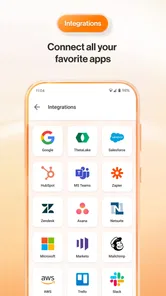
First off, let me just say that RingCentral isn't just your typical communication app. It's more like an all-in-one hub for messaging, video calls, and phone calls. Imagine having the power to text, call, and video conference all from one platform. That's a big plus for someone like me who juggles between different communication tools daily. Plus, the app's integration capabilities are top-notch. It syncs seamlessly with other apps like Google Workspace and Microsoft 365, which is a huge time-saver.
The User Experience
Now, let's talk about the user experience. Setting up RingCentral was a breeze. The interface is clean and intuitive, so you won't find yourself lost in a sea of complicated menus. I appreciated how everything was laid out clearly, making it easy to find what I needed without any fuss. And if you're big on customization, you'll love the options available to tailor the app to your preferences.
Performance and Reliability
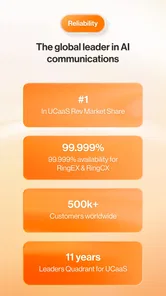
Performance-wise, this app is a powerhouse. Whether I'm on a video call or sending a quick message, the connection stays strong and reliable. I haven't faced any major glitches or crashes, which is honestly a breath of fresh air. In a world where dropped calls and frozen screens are all too common, this level of reliability is definitely worth noting.
Features That Stand Out
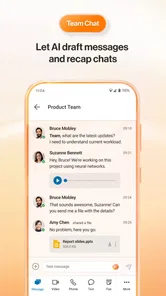
There are a few features in RingCentral that absolutely stand out to me. For starters, the team messaging feature is fantastic for keeping everyone in the loop. It's like having a virtual office space where you can share files, set tasks, and even create separate channels for different projects. The video conferencing feature is also stellar, offering HD quality and the ability to host large meetings without a hitch.
And let's not forget about the mobile app. Having access to all these features on the go is a game-changer, especially for those of us who are constantly on the move. It's like carrying a mini office in your pocket!
What I’d Check Before Relying on It
For a person who mainly needs a private chat or a basic phone app, RingCentral may be overbuilt. Its strongest case is a workplace where colleagues need to move between messages and live conversations without losing the thread. If only one person adopts it, the shared-workspace benefits are naturally limited; a team should settle on where project updates belong and when a message warrants a call.
A useful habit is to keep channels focused on projects or subjects instead of treating every channel as a general inbox. That makes it easier to find the context behind a decision later. On mobile, I’d also distinguish urgent updates from conversations that can wait, so the convenience of being reachable does not turn into checking every thread constantly. These are small choices, but they determine whether a unified communications app reduces clutter or simply moves it onto a phone.
RingCentral is listed for Everyone, and its current version is 25.4.20.800978, with Android 8.0 as the minimum operating-system requirement. The app has been available since March 5, 2014, and its 2.5K reviews offer more user feedback to consider alongside its rating. I would check that an older phone meets the OS requirement before planning a rollout, and I’d have the team test its everyday calling and messaging routines before depending on it for important work.
Who is likely to get the most from it?
I see the clearest fit for people who coordinate work across locations, handle changing schedules, or need a mobile way to stay connected to a team’s shared conversations. A manager moving between meetings, for example, can catch up on a project thread and respond without having to return to a desk. For a business already organized around RingCentral, the app can be a practical companion; for a solo user or a group committed to another platform, switching is harder to justify unless it solves a specific communication problem.
My verdict on value
There is a lot to like in the idea of keeping team messaging, calls, and video together, and the mobile access is especially useful when work does not happen at one desk. The main trade-off is that an integrated service pays off only when the team adopts it consistently, while the free download should not be confused with a promise that every business need carries no cost. I’d try it when a workplace is ready to use it as a shared hub, but skip it if a simpler, already-established tool does the job.
Before your team moves everyday work over
I’d treat the first few days as a workflow test, not a full migration. Pick one recurring task, such as confirming who is handling a customer request, and decide where its updates should live. If the team can find the discussion, add the right colleague, and switch to a call when the issue needs a faster exchange, that is a useful sign the app is fitting into real work rather than becoming another inbox. Keep the existing method available until everyone knows the new routine.
One practical distinction is between using a mobile communications app as a companion and treating it as the whole office. A person who is mostly away from a computer may value quick access to team conversations, while someone doing detailed administrative work may still prefer a larger screen for reviewing information and composing longer messages. I’d use the phone for timely coordination and reserve more involved decisions for a setting where the relevant context is easy to review.
How it compares with separate tools
Compared with a standalone chat app, a meeting service, and a separate business phone tool, the appeal here is consolidation: fewer transitions when a conversation changes format. That does not automatically make it better. Separate apps can be simpler when each has a clear purpose, and people may already know how to use them. The trade-off is that conversations can become harder to trace across services. I’d favor RingCentral when the team needs those communication modes to work as one routine; I’d keep a narrower tool when one function is all the group needs.
It is also worth separating “one app” from “one communication habit.” If colleagues keep posting decisions in personal messages, another group chat, or email, a shared hub cannot magically gather the context afterward. Before rollout, agree on what belongs in team messaging, what deserves a call, and where final decisions should be recorded. That simple agreement can matter more than spending time exploring every available option.
Small choices that make mobile use easier
For a team with several active projects, channel discipline is particularly useful. Keep each space tied to a recognizable subject, and bring only the people who need that conversation into it. When a topic changes, starting or moving to the appropriate discussion can save colleagues from searching a long stream later. I would also make clear which messages require a prompt response and which are simply updates, so staff do not feel they must monitor the app every minute.
For calls and video, I’d think about the setting before joining from a phone. A quick check-in may suit a mobile connection, while a conversation involving several people or a sensitive handoff deserves a quieter place and enough time to listen properly. This is not a limitation unique to RingCentral; it is a practical consequence of putting work communications in your pocket. The convenience is real, but it works best when teams respect boundaries and choose the right format for the discussion.
Who should probably choose something simpler?
If you are looking for a personal messenger, occasional calls, or a video tool for informal chats, the business-oriented setup may offer more structure than you need. Likewise, a very small group that already communicates comfortably through one familiar service may gain little by asking everyone to learn another environment. I would not switch just because an app combines several functions; I’d switch only when the current arrangement is causing a concrete problem, such as missed handoffs or conversations scattered across tools.
It may also be the wrong fit for a workplace that cannot agree on a shared communications home. In that situation, installing the app on individual phones will not resolve confusion about where updates belong. A team lead should first confirm that the organization is ready to support the service and that people understand the intended workflow. If that groundwork is not in place, a simpler existing option is likely to be less disruptive.
A sensible way to decide
My recommendation is to start with the people who handle recurring coordination, rather than asking everyone to change tools at once. Have them try a representative week of messages and calls, note where they still need another app, and ask whether the shared context is easier to follow. That gives a manager a more useful basis for a decision than a feature checklist. It also helps reveal whether the benefit comes from the app itself or from the team finally agreeing on a clearer communication routine.
For an individual employee, the key question is whether a workplace account and team are already in place. The download is free, but that does not settle what access the organization needs or what its service arrangement costs. I’d check with the person responsible for communications before relying on it for work calls, and I’d confirm the phone meets the stated Android requirement. Those checks prevent an avoidable surprise and keep the decision focused on the actual work setup.
My closing recommendation
I’d recommend RingCentral to a team that wants mobile access to work messaging, phone calls, and video in a shared communications environment, especially when colleagues are ready to use it consistently. Its value is not simply having several tools under one roof; it is the chance to carry a conversation from a written update into a live discussion without losing the team context. That advantage is strongest when people settle on sensible channel and response habits.
If you are deciding for yourself, ask whether your coworkers already use it, whether the combined workflow solves a real frustration, and whether the organization has checked the service costs beyond the free download. If the answers are yes, it is worth considering as a work companion. If your needs are personal or your team already communicates well elsewhere, I’d skip the extra setup and stay with the simpler arrangement.
RingCentral Frequently Asked Questions
Does RingCentral work on both Android and iOS?
RingCentral is available for Android and iOS, so employees can use the business communication app on supported mobile devices. This can be useful for teams that need to stay connected while away from a desk or that use different mobile platforms. Before downloading, check that your device meets the operating system requirement and that your organization is prepared to use RingCentral for its communications.
Who is RingCentral designed for?
RingCentral is a business app developed by RingCentral and is intended for organizations that want to bring workplace communications together. It may suit teams working in an office, remotely, or across different locations, depending on the services and setup their organization uses. The app is not primarily an entertainment product; its usefulness depends on whether your workplace relies on RingCentral.
What operating system does my device need to run RingCentral?
RingCentral requires Android 8.0 or later, so check your device’s software version before starting the download. The app is also available for iOS users on supported devices. Meeting the minimum requirement is only one part of getting started: your organization’s RingCentral setup and the services it uses will determine which communication features are available to you.
Is RingCentral free to download, and what should businesses know about its cost?
RingCentral is free to download, but downloading the app does not necessarily mean that every business communication service is free to use. The app is intended for business use, so teams should consider the services and plan their organization needs before relying on it. Reviewing the available options through RingCentral can help a business decide whether the app fits its communication needs and budget.
What is RingCentral and what services does it offer?
RingCentral is a comprehensive communication platform designed for businesses of all sizes. It offers a wide range of services, including voice, video conferencing, team messaging, and fax capabilities. With its cloud-based system, RingCentral enables seamless communication and collaboration across different devices and locations, making it an ideal solution for remote and on-site teams alike.
Pros
- User-friendly interface for easy navigation.
- High-quality video and audio calls.
- Seamless integration with other tools.
- Reliable customer support available 24/7.
- Offers a comprehensive free trial.
Cons
- Occasional connection issues reported.
- Limited features on mobile version.
- Can be expensive for small businesses.
- Setup process can be complex.
- Requires strong internet connection.











